Short-Form Video for Business: How to Make Videos That Sell
How to make Reels, TikToks and YouTube Shorts that bring in customers: hooks, scripts, phone filming, editing, captions, ads, metrics and a 30 day sprint you can start this week.
Short-form video for business means vertical videos, usually 15 to 90 seconds long, posted as Instagram and Facebook Reels, TikToks and YouTube Shorts, built to earn attention from people who do not follow you yet and move them one step closer to buying. It works because these feeds recommend videos by interest rather than follower count, so a plumber with 400 followers can reach 20,000 local homeowners with one useful clip.
The way to make it sell is simple to describe and hard to do consistently: pick one offer, open every video with a hook that names a real problem in the first 3 seconds, show proof instead of claims, end with one clear next step, and publish on a schedule you can sustain for 30 days before judging the results. This guide walks you through every part of that, from hook formulas and scripts you can copy to phone settings, editing, captions, ads and a 30 day content sprint.
Everything below is the process we use with clients every week, simplified so you can run it yourself with a phone and about four hours a week.
What short-form video for business is, and why it works now
Short-form video is a format, not a platform: one 30 second vertical clip can run as a Reel, a TikTok and a Short. Three things make it worth your time now.
First, the audience is enormous and it is not just young people. According to the Pew Research Center social media fact sheet, 84% of US adults use YouTube, 71% use Facebook, 50% use Instagram and 32% use TikTok, based on a survey fielded in 2025. Among adults 18 to 29, 63% use TikTok. Your customers are already scrolling these feeds every day.
Second, distribution no longer depends on followers. Instagram says in its creator guidance on finding success with reels that ranking historically favored creators with larger followings, but that creators of all sizes now have an equal chance of breaking through. TikTok's For You feed and the YouTube Shorts feed work on the same principle. A small account with a good video can outperform a big account with a lazy one.
Third, video sells directly. Meta reports on its Reels ads page that 79% of people it surveyed say they have bought a product or service after watching Reels. Treat that as a platform's own number, but it matches what we see: the clients who post useful video consistently get more inquiries that mention a specific video by name.
Why it works especially well for local and service businesses
Service businesses sell trust. A prospect hiring a roofer, a dentist or a bookkeeper is asking one question: can I trust these people with my money and my problem? A 30 second video of the owner explaining why a quote looks the way it does answers that question better than any headline on a website.
Product businesses sell outcomes. A video of the product in use, in someone's hand, shows scale, texture and speed in a way a photo cannot. Either way, someone who has watched six of your videos arrives already halfway sold.
What short-form video will not do
It will not fix a weak offer, a slow website or a phone that nobody answers. If your landing page takes eight seconds to load or your contact form goes to an inbox nobody checks, more views will just mean more wasted attention. If that sounds familiar, fix the funnel first with our guide to landing page best practices, then come back to video.
It also will not work in two weeks. The first 30 days are for learning, not leads.
Reels vs TikTok vs YouTube Shorts: the platform differences that matter
The three platforms look identical from a distance: vertical video, full screen, swipe to the next one. The differences are in who is watching, how long videos can be and what each platform rewards.
Instagram and Facebook Reels
Reels live on both Instagram and Facebook and are managed through Meta's tools, so one video can reach both audiences. Instagram says creators in the United States can publish reels up to 3 minutes long in the Reels editor, and that reels up to 3 minutes can now be recommended to non-followers in the Reels tab and Explore, according to its creator update on reels. The same page calls posting original content consistently one of the most effective ways to grow.
The feature most businesses miss is trial reels. Per Instagram's trial reels announcement, a trial reel is shown to non-followers first, your followers do not see it in Feed or the Reels tab unless you later share it, and you get views, likes, comments and shares in the reels viewer about 24 hours after posting. You can also set it to share with everyone automatically if it performs well in the first 72 hours. Instagram's Reels hub for creators notes that you need a professional account to use trial reels. That is a free A/B testing tool for hooks, and you should use it.
Best for: local service businesses, restaurants, retail, beauty, fitness and home services. Facebook Reels reach an older audience many businesses underestimate.
TikTok
TikTok is the most interest-driven of the three: it will show a brand-new account's video to thousands of people if the first audience watches it through, and it punishes anything that looks like an ad.
TikTok's own creative best practices for performance ads are a useful guide for organic content too: prioritize your hook in the first 6 seconds, introduce your content proposition in the first 3 seconds, shoot vertically at 9:16, shoot at least 720p, use captions or text overlays, use sound or music, and aim for a DIY or not overly polished style so the video fits in with user-generated content. That last point matters. A shaky but honest phone video often beats a polished studio piece on TikTok.
Best for: product brands, ecommerce, younger audiences and trades with visually satisfying work (cleaning, restoration, detailing, landscaping).
YouTube Shorts
Shorts sit inside the world's largest video platform, which gives them two advantages: search and long-term discovery. A Short can keep getting views months later because people search YouTube for answers. Per YouTube's help page on creating Shorts, Shorts can be up to 3 minutes long with the multi-segment camera, you can upload Shorts at a maximum resolution of 1080p, titles can be up to 100 characters, and Shorts appear in the Shorts tab, search results, the homepage and your channel.
The same page notes that since March 31, 2025, a Shorts view counts each time a Short starts to play or replay, with no minimum watch time, and that the previous metric is now called "engaged views" in Analytics. That means raw Shorts view counts are inflated compared with what they used to be. Watch engaged views instead (more on that in the measurement step).
Best for: businesses that answer questions (accountants, lawyers, clinics, contractors) and how-to content with long search demand.
Which platform should you start on?
You will eventually post the same video on all three. But pick one primary platform to read results from and optimize for. Use these rules:
- If your buyers are mostly over 35 and local, start with Instagram and Facebook Reels.
- If you sell a physical product online and your buyer is under 35, start with TikTok.
- If your customers search for answers before they buy (how much does X cost, is Y worth it), start with YouTube Shorts.
- If you already run Meta ads, start with Reels, because your organic winners can become ads in a few clicks.
- If you are unsure, start with Reels and cross-post everywhere. It is the safest default for most North American small businesses.
If you have not built an overall social plan yet, our social media marketing plan guide covers platform choice, content pillars and weekly systems in detail. This post goes deep on the video itself.
How to make short-form video for business: 11 steps
Here is the full process. Do the steps in order the first time. After that, steps 3 to 9 become a weekly loop.
Step 1: Pick one goal and one offer for the next 30 days
Most business video fails because it tries to do everything. Before you film anything, decide:
- The goal. Pick one: booked calls, quote requests, store visits, online sales or email signups. "Brand awareness" is not a goal for a small business; it is a side effect.
- The offer. The one thing you want people to do after watching. "Book a free roof inspection." "Shop the fall collection." "Grab the free pricing guide." One offer, repeated, for 30 days.
- The audience. Write one sentence describing the person you are talking to. For example: "Homeowners in west Edmonton with a 20 year old furnace who are worried about winter."
- The destination. Where viewers go next: your booking page, a product page, your DMs or a lead form. Make sure it works on a phone and loads fast.
Decision rule: if you cannot finish the sentence "After watching, I want this person to..." with a single action, you are not ready to script.
Step 2: Choose content formats that work for your business type
You do not need to invent formats. These are proven, repeatable formats that we use for clients over and over. Pick three to rotate.
Formats that work for service businesses:
- The myth bust. "You do not need a new roof because of one leak." Then explain why.
- The price explainer. "Why do kitchen reno quotes range from 30,000 to 90,000 dollars?"
- The walkthrough. A job from arrival to finish in 20 to 40 seconds. Before and after is the most reliable format in home services.
- The mistake list. "Three things homeowners do that void their warranty."
- The customer question. Read a real question from an email and answer it on camera.
- The day in the life. What your team actually does. Helps with hiring too.
Formats that work for product businesses:
- The demo. Show the product solving the problem in the first 3 seconds. No intro.
- The comparison. Your product next to the common alternative, tested side by side.
- The packing order. Satisfying, and it shows care.
- The use case. "Three ways to wear this jacket."
- The founder story. Why the product exists, as a problem and a fix.
- The customer clip. User-generated video from real buyers, with their permission (see the disclosure rules in Step 10).
Decision rules for picking formats:
- If your work is visual (cleaning, landscaping, detailing, renovations, beauty), lead with walkthroughs and before and afters.
- If your work is invisible (accounting, law, insurance, consulting), lead with myth busts, price explainers and customer questions.
- If you sell a product with a clear "aha" moment, lead with demos and comparisons.
- If you sell something people buy on emotion (fashion, gifts, food), lead with use cases and customer clips.
Step 3: Write hooks that stop the scroll
The hook is the first 1 to 3 seconds: what viewers see, hear and read before deciding to swipe. TikTok's guidance says to introduce your proposition in the first 3 seconds and land your hook within the first 6. In practice, your opening line, your first frame and your on-screen text all need to say the same thing at the same time.
A strong hook does three jobs: it names a specific viewer, it creates a gap they want closed, and it promises the video will close it quickly.
Twelve hook formulas you can copy. Swap in your own details:
- The direct callout: "If you own a house built before 1990, watch this before winter."
- The mistake: "Stop doing this to your hardwood floors."
- The price reveal: "Here is exactly what a 1,200 square foot paint job costs in Edmonton."
- The myth: "You do not need a new furnace. You probably need this 40 dollar part."
- The result first: "This driveway went from this to this in four hours."
- The insider: "I have quoted 800 decks. Here is what nobody tells you."
- The question they Google: "Is a heat pump worth it in Alberta?"
- The comparison: "Cheap vs expensive running shoes: I tested both for a month."
- The warning: "If your dentist says this, get a second opinion."
- The countdown: "Three signs your website is costing you customers."
- The story: "A customer called us at 11 pm with water pouring through the ceiling."
- The contrarian: "Most fitness coaches will tell you to do cardio. I disagree."
How to make any hook stronger:
- Add a number. "Three signs" beats "some signs."
- Add a place or a person. "In Edmonton" or "for dog owners" filters in the right viewers.
- Cut the greeting. Never open with "Hey guys" or your logo. The first word should be part of the hook.
- Match the visual. If you say "this driveway," the driveway should be on screen in frame one.
- Start in motion. Open mid-action, mid-sentence or mid-pour. A static first frame invites the swipe.
Common hook mistake: clickbait the video never pays off. If the hook promises a price, say the price.
Step 4: Script every video with a template
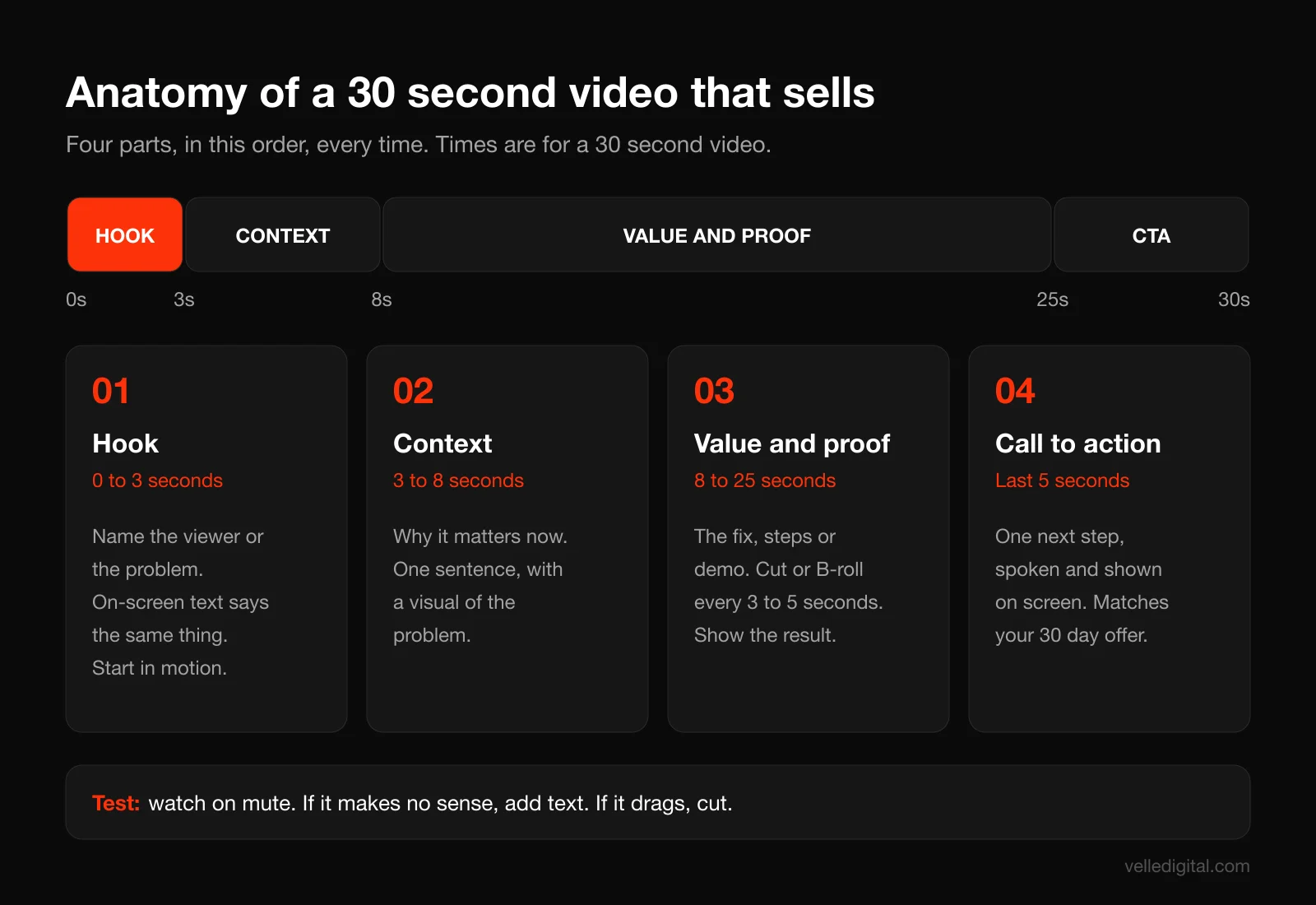
You need a structure that keeps you from rambling, not screenwriting skills. These four templates cover most business videos, each in 20 to 45 seconds.
Template 1, the problem and fix (best for service businesses):
- Hook (0 to 3 seconds): name the problem. "If your basement smells musty after rain..."
- Context (3 to 8 seconds): why it matters. "...that is moisture getting in, and it gets worse every season."
- Fix (8 to 25 seconds): the two or three things that solve it, shown on screen.
- Proof (25 to 32 seconds): a quick before and after, a stat from your own work or a customer line.
- Call to action (last 5 seconds): one next step. "Book a free moisture check, link in bio."
Template 2, the list (best for authority):
- Hook: "Three mistakes that make your quote double."
- Items one and two, each with a visual.
- Item three, saved for the most surprising.
- Call to action: "Follow for part two" or "Send us your photos for a free estimate."
Template 3, the demo (best for products):
- Hook: the product doing the thing, immediately, with text on screen naming the benefit.
- Problem: the old way, in one shot.
- Demo: three quick angles of the product working.
- Call to action: "Shop it at the link" or "Comment SIZE and we will send the fit guide."
Template 4, the story (best for trust):
- Hook: drop into the moment. "A customer called us at 11 pm..."
- Tension: what was at stake.
- Turn: what you did.
- Outcome: what happened.
- Lesson and call to action: "If this ever happens to you, here is what to do first."
A complete example script you can adapt, for a hypothetical furnace company:
Hook: "Your furnace is not broken. It is probably this 15 dollar filter." Context: "Half the no-heat calls we get in November are a clogged filter." Fix: "Pull it out. If you cannot see light through it, replace it. Here is how." Proof: show a dirty filter next to a new one. CTA: "Still no heat? Book a same-week visit, link in bio."
That script is about 60 words. Most people speak around 150 words per minute on camera, so it runs about 25 seconds. Use that ratio to check length before you film: 75 words is roughly 30 seconds, 150 words is roughly a minute.
Scripting rules we follow:
- Read the script out loud. If you stumble, rewrite it.
- One idea per video. If you have two points, make two videos.
- Put the call to action in words and on screen. Some viewers have the sound off, others do not read.
- Never script a full minute of talking head. Plan a cutaway shot (B-roll) at least every 3 to 5 seconds.
If writing is the bottleneck, the clarity principles in our website copywriting guide apply directly to scripts.
Step 5: Film with your phone: light, audio and framing
Your phone is good enough. The gap between amateur and professional video is light, sound and framing, not the camera.
Phone settings to check before every shoot:
- Resolution: 1080p or 4K at 30 frames per second. 4K gives you room to crop and punch in during editing. YouTube Shorts uploads max out at 1080p, so 4K is for editing flexibility, not final export.
- Orientation: vertical, 9:16. Lock rotation so the phone does not flip mid-shot.
- Lens: use the main (1x) lens. Ultra-wide distorts faces and selfie cameras are usually lower quality.
- Exposure and focus lock: on iPhone and most Android phones, press and hold on your face to lock focus and exposure so it does not pulse as you move.
- Clean the lens. A smudge causes most hazy footage.
Light, in order of priority:
- Face a window. Daylight from a window in front of you, slightly to one side, is the best free light there is.
- Never put the window behind you. You will be a silhouette.
- Turn off overhead lights when using window light. Mixed color temperatures make skin look strange.
- If you shoot at night or in a shop, buy one LED panel or ring light and place it at 45 degrees to your face, slightly above eye level.
- On job sites, keep the sun behind the camera or to the side, and shoot in shade when possible.
Audio is more important than video. Viewers forgive grainy footage. They swipe away from echoey, windy or muffled sound.
- Use a wireless lapel mic. A clip-on wireless mic that plugs into your phone is the single best equipment purchase for business video. It removes room echo and lets you film in noisy places.
- Kill background noise. Turn off fans, music and dishwashers. Close windows.
- Outdoors, use the foam or fur windscreen that comes with your mic.
Framing rules:
- Eyes on the top third. Place your eyes about one third down from the top of the frame.
- Leave room for the interface. The bottom of vertical video gets covered by captions, usernames and buttons, and the right edge by like and share icons. Keep your face and key visuals in the center.
- Phone at eye level. Use a tripod or stack books. Looking down at the camera is unflattering; looking up is worse.
- Film B-roll every time. For every talking shot, grab 5 to 10 cutaway clips: hands working, tools, the product, the result, the customer smiling. These make editing easy and keep the video moving.
A simple kit, roughly 150 to 300 dollars total: a phone tripod, a wireless lapel mic and a small LED panel.
Step 6: Edit fast with a repeatable workflow
Treat editing like an assembly line, not a craft project. A 30 second video should take 20 to 40 minutes once you have a template.
CapCut, Instagram's Edits app and the built-in editors in each app all work. Pick one and learn it well.
The editing workflow we use:
- Rough cut. Drop in your talking clips and cut every pause, "um" and false start. Do this first, before anything else.
- Tighten the opening. Cut the first second of almost every clip. Most people start talking a beat after they hit record. The video should begin on the first word of the hook.
- Lay B-roll over the talking. Cover a cut or illustrate a point every 3 to 5 seconds.
- Add punch-ins. Zoom in 10 to 20% on key lines. This creates movement without new footage.
- Add captions. Auto-generate, then fix every error (see Step 7).
- Add on-screen hook text. A short headline in the first frame that repeats your hook, placed in the upper middle of the screen.
- Add sound. Keep music low under voice. For organic posts use platform-licensed audio; for ads use the platforms' commercial libraries or royalty-free music.
- Add the end card. Your call to action as text for the last 3 to 5 seconds.
- Export. 1080 by 1920, 30 frames per second, high bitrate. Save the version without platform watermarks as your master file.
- Watch it once on mute and once with sound. If it does not make sense on mute, add text. If it drags anywhere, cut.
When you want branded intros, animated text, product animations or explainer graphics that go beyond what templates can do, that is where professional motion graphics for short-form video earn their keep. For most weekly posts, though, clean cuts and good captions beat fancy effects.
Step 7: Add captions and make every video accessible
Captions are not optional. A large share of people watch with the sound off at work, in waiting rooms and on transit, and people who are Deaf or hard of hearing need them to follow your content at all. Captions also help viewers who take in written information more easily than audio.
The W3C's guidance on captions and subtitles explains the two types: closed captions, which viewers can turn on and off, and open captions, which are always displayed. For short-form video, use open (burned-in) captions as the default, because many viewers never turn closed captions on and the text doubles as on-screen emphasis. Where a platform offers its own auto-caption feature, turn that on as well.
The W3C also warns that automatic captions do not meet accessibility needs unless they are fully accurate, and that one missed word, such as "not," can make captions contradict the audio. Auto-captions are a draft, not a finished product.
Caption checklist:
- Fix every error. Especially names, prices, places and technical terms. Auto-captions mangle these most often.
- Keep lines short. 2 to 5 words on screen at a time works well on a vertical screen.
- High contrast. White text with a black outline or a dark background box. Avoid thin fonts.
- Place captions in the middle third, above the bottom area where the platform's own text and buttons sit.
- Describe meaningful sounds when they matter to the story, such as [alarm beeping] or [drill noise].
- Avoid rapid flashing effects. Fast strobing transitions can be a problem for viewers with photosensitive conditions. Use them rarely, if at all.
- Write post captions for search, using words people search for, such as "furnace repair Edmonton."
Step 8: Set a posting cadence you can keep
Consistency beats volume. Three good videos a week for three months beats daily posting for two weeks followed by silence.
Cadence options, by how much time you have:
- Minimum (about 2 hours a week): 2 videos a week, cross-posted to all three platforms. This is enough to learn and grow slowly.
- Recommended (about 4 hours a week): 3 to 4 videos a week. This is where most small businesses should land.
- Aggressive (8 or more hours a week): daily posting. Only worth it if you have a team member who owns video or you are testing hooks heavily with trial reels.
The batching system that makes this possible:
- Monday, 30 minutes: pick topics for the week from your idea list and write the scripts.
- Tuesday, 60 to 90 minutes: film all of them in one session. Change your shirt or location between videos if you want variety.
- Wednesday, 60 to 90 minutes: edit all of them.
- Schedule them across the week using Meta Business Suite, TikTok's scheduler, YouTube Studio or a social scheduling tool.
- Daily, 10 to 15 minutes: reply to comments and DMs. This is part of the job, not optional.
On timing: once you have some history, each platform's analytics show when your audience is online. Until then, do not overthink it. The hook matters far more than the hour.
Keep a running idea list of every customer question and every "people always get this wrong" moment. For a broader system of turning these ideas into blog posts, emails and social content, see our guide to building a content marketing strategy.
Step 9: Repurpose every video across platforms
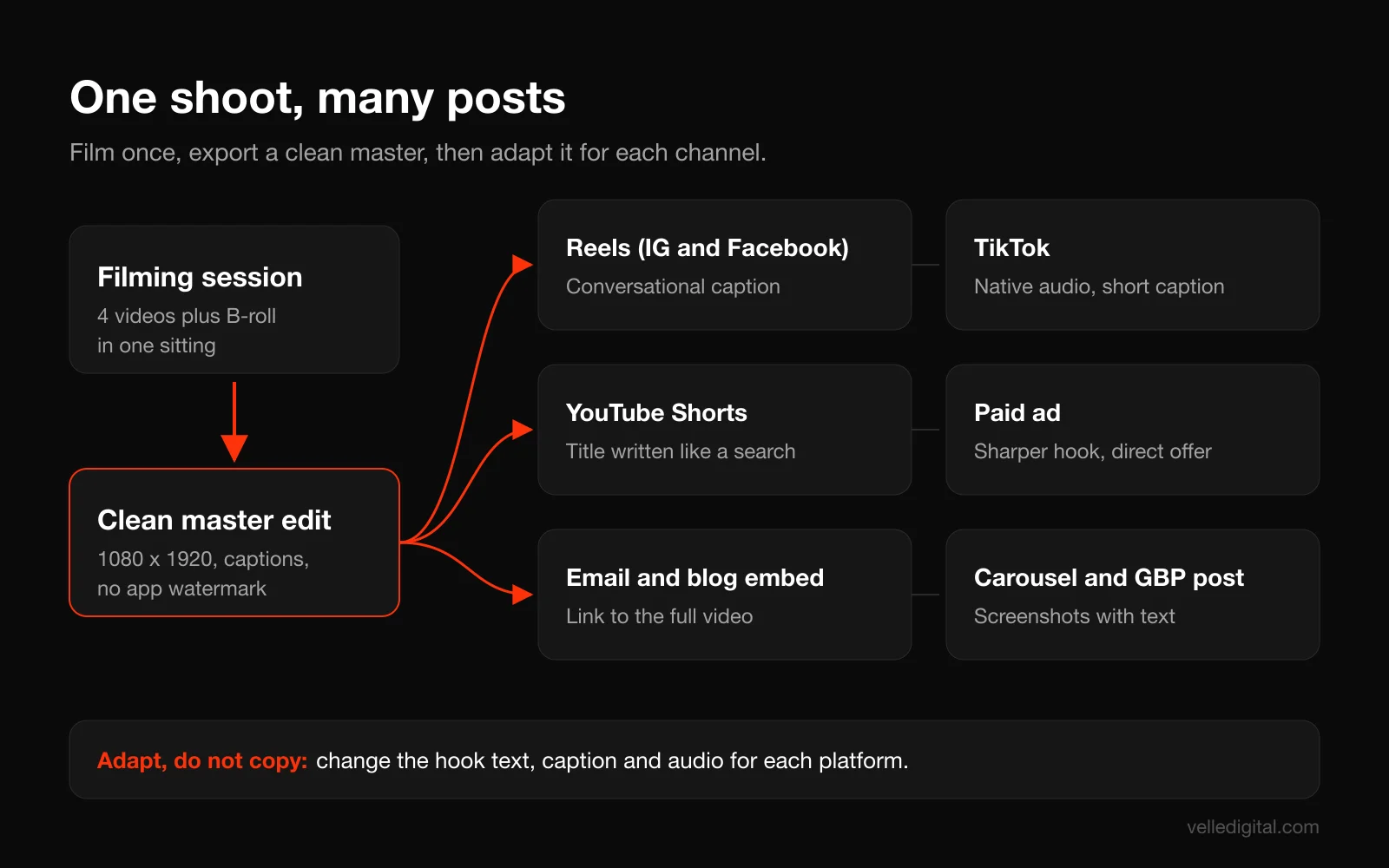
One shoot should feed every channel: film once, publish five to ten times.
How to repurpose a single video properly:
- Export a clean master. Always save your edit without any platform watermark. Do not download a TikTok and upload it to Reels with the TikTok logo on it. Each platform wants original content, and a visible watermark from another app signals the opposite.
- Adjust the first line and on-screen text per platform. A hook that works on TikTok ("POV: you just got your first reno quote") may need to be plainer on Facebook ("Just got a reno quote? Read this first").
- Use native audio when posting organically. Add trending or library audio inside each app, at low volume under your voice.
- Rewrite the caption. Instagram captions can be conversational. YouTube Shorts titles should read like a search query. TikTok captions should be short with a couple of relevant keywords.
What else one shoot can become:
- A carousel post using screenshots of key moments with text.
- A paragraph or section in a blog post with the video embedded.
- A Google Business Profile post or video, which helps local search visibility.
- A paid ad (see Step 10).
Step 10: Use short-form video in paid ads
Organic video tells you what works; paid video scales it. Our best client ads are usually proven organic videos with a sharper call to action.
Meta says on its Reels ads page that campaigns using 9:16 video with audio and key messages in the safe zone had a 34.5% lower cost per result than image ads, based on 15 split tests. That is Meta's own research, so test it on your account, but it matches what we see.
How to turn a short-form video into an ad:
- Pick the winner. Choose by above-average watch time, not views.
- Tighten the hook. Ad viewers are colder, so be even more specific.
- Add a direct call to action. Organic videos can end with "follow for more." Ads should end with the offer: "Book your free inspection this week."
- Respect the safe zone. Keep text, faces and logos out of the top and bottom edges, where the platform's interface covers them. Meta, TikTok and YouTube all publish safe zone guidance in their ad specs, and editing apps like Canva include safe zone overlays.
- Keep it short for cold audiences. TikTok's video advertising guide for small businesses says in-feed ads can run up to 60 seconds, but recommends 21 to 34 seconds for most ads, and advises skipping long intros or logo animations.
- Make three to five variations. Same body, different hooks. Hooks are the variable that moves results most.
- Send traffic to a matching page. If the ad talks about furnace repair, the landing page should be about furnace repair, not your homepage.
Platform notes for ads:
- Meta (Facebook and Instagram): use Advantage+ placements or select both Facebook and Instagram Reels placements. Meta notes Reels play with sound on by default unless the viewer has turned it off, so design for sound and still caption everything. Our guide to Meta ads for local service businesses covers targeting, budgets and lead forms in detail.
- TikTok: the ad should look like a TikTok. TikTok's own guidance favors a DIY, not overly polished style. Spark Ads let you boost an existing organic post so it keeps its comments and engagement.
- YouTube Shorts: Shorts inventory is available in Google Ads video and Demand Gen campaigns. Google's ABCDs of effective video creative are worth following: grab attention from the start, bring in your brand early and often (YouTube is mostly a sound-on experience, so say your name, do not just show it), connect emotionally, and give clear direction on what to do next. Google reports the ABCDs deliver an average 30% lift in short-term sales likelihood, per a 2021 Google and Kantar study. For campaign setup, see our guide to Google Ads for small business.
Disclosure rules for creator and customer videos: if you pay a creator, give free product or have any relationship with someone promoting you, the post needs a clear disclosure. The FTC's Disclosures 101 for social media influencers says the disclosure should be in the video itself, not only in the description, that disclosures in both audio and on-screen text are more likely to be noticed, and that vague terms like "spon" or "collab" are not enough. Use plain words: "ad," "sponsored" or "thanks to [brand] for the free product."
For a first test, pick a budget you can leave alone for 7 days and judge on cost per lead or purchase, not cost per view. If you would rather have a team run it, our Meta ads management service builds creative and campaigns together.
Step 11: Measure what matters, and ignore what does not
Views feel good and tell you very little. Especially on YouTube Shorts, where a view now counts every time a Short starts to play or replay, raw view counts are a weak signal.
The metrics that actually predict business results, in order:
- Hook rate (stayed to watch). The share of people who did not swipe away in the first seconds. YouTube Studio shows this for Shorts as viewed versus swiped away. On Instagram and TikTok, look at the retention graph and the drop in the first 3 seconds. If this is low, your hook is the problem.
- Average watch time and completion rate. How much of the video people watch. If people stay through the hook but leave in the middle, your pacing or structure is the problem.
- Shares and saves. A share means someone found it valuable enough to send to a friend. Saves mean they want to come back to it. Both are stronger signals than likes.
- Profile visits and link clicks. People who went looking for more.
- Leads and sales. Inquiries, bookings and orders you can trace back to video. Ask every new customer "How did you hear about us?" and record the answer in your CRM.
Track results with a tracked link in bio, a "How did you find us?" field on your contact form, and a phone script that asks the same question. Review weekly, decide monthly, and look for patterns across 10 or more videos.
A worked example (hypothetical numbers to show the logic): you post 12 videos in a month. Ten get between 800 and 2,000 views. Two get over 15,000. You look at both outliers and notice they are price explainers with a dollar amount in the hook. The rest are tips. Next month, you make half your videos price explainers. If the next batch of price explainers also outperforms, you have found a winning format. If not, it was luck and you keep testing.
Decision rules from your numbers:
- If hook rate is low and watch time is decent, rewrite hooks and opening frames.
- If hook rate is high but completion is low, cut length and move the payoff earlier.
- If views and watch time are good but nobody clicks or calls, strengthen the call to action and check that your landing page matches the video.
- If one format consistently wins, make more of it and turn the best version into an ad.
- If nothing is working after 30 videos, change your topics, not just your editing. You are probably answering questions nobody is asking.
The 30 day short-form video sprint
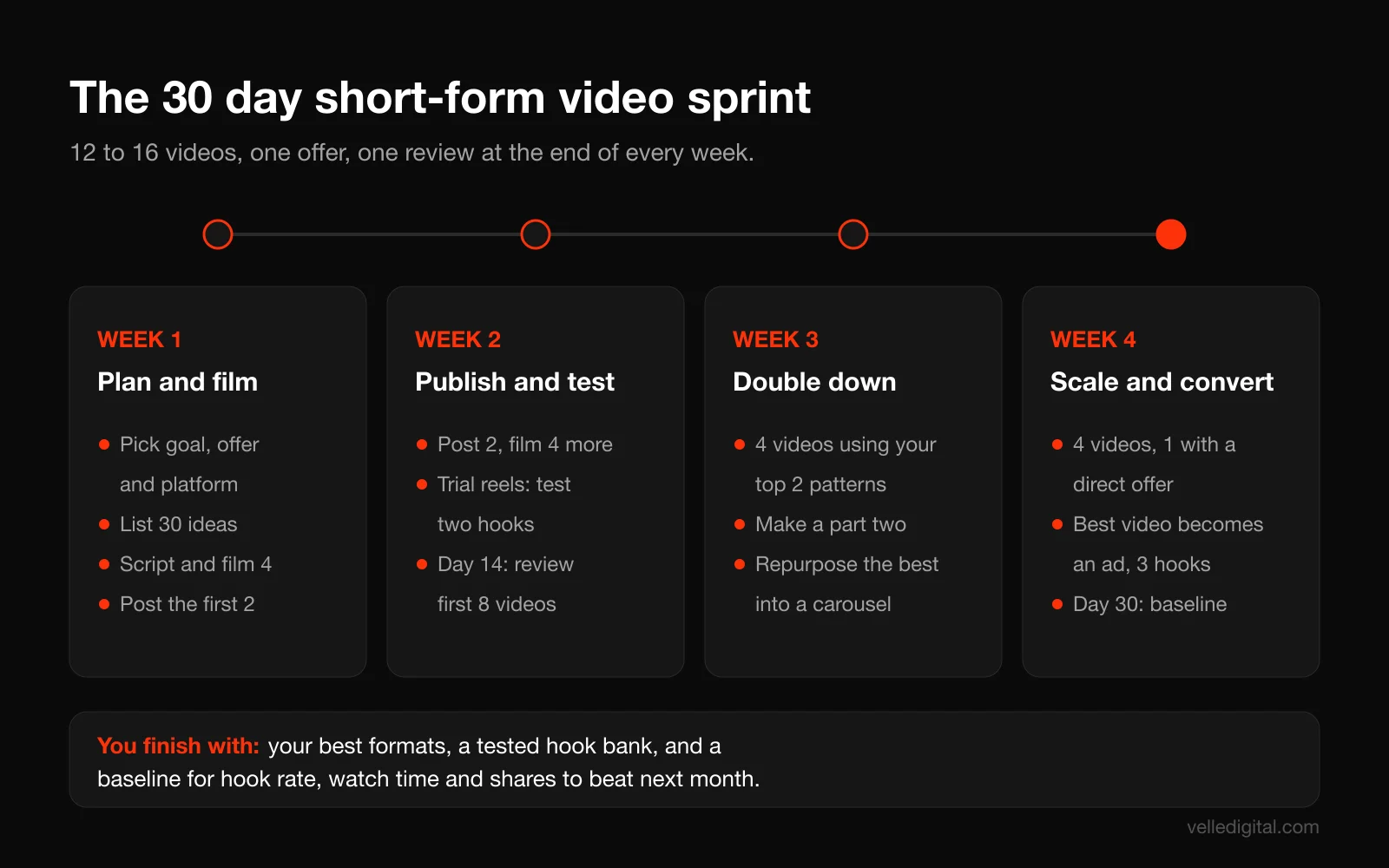
This is the plan we give clients starting from zero. It produces 12 to 16 videos, a library of tested hooks and real data about what your audience wants. Commit to the full 30 days before judging the results.
Week 1: Set up and build your first batch
- Day 1: choose your goal, offer and primary platform (Step 1). Switch your Instagram and TikTok accounts to professional or business accounts.
- Day 2: list 30 video ideas, drawn from customer questions, mistakes you see, price questions and jobs you are proud of.
- Day 3: pick your three formats (Step 2) and write four scripts using the templates (Step 4).
- Day 4: set up your filming spot with window light, a tripod and a mic. Film all four videos plus B-roll.
- Day 5: edit all four with captions and an end card.
- Days 6 and 7: post the first two videos. Reply to every comment within a few hours.
Week 2: Publish and test hooks
- Post the remaining two videos from week 1 and film four more.
- Use trial reels on Instagram to test two different hooks for the same video body.
- On day 14, review your first eight videos. Write down the hook rate, watch time and shares for each in a simple spreadsheet.
- Write down what the top two have in common: topic, hook type, length, format.
Week 3: Double down on what worked
- Make four new videos using the patterns from your top two.
- Make one "part two" of your best performer. Viewers who liked part one will look for it.
- Repurpose your top video into a carousel, a Story and an email.
- Start a hook bank: every hook you have used and how it performed.
Week 4: Scale and convert
- Make four more videos, including at least one with a strong direct offer.
- Turn your best performing video into an ad with three hook variations (Step 10). Run it for at least 7 days.
- On day 30, review all 16 videos. Calculate your averages for hook rate, watch time and shares. These become your baseline.
- Write down the leads or sales you can trace to video, plus any customer who mentioned a video.
- Plan the next 30 days: keep the two best formats, drop the worst, test one new one.
After the sprint you will know your best formats, your best hooks and roughly how many videos it takes to generate a lead.
Common short-form video mistakes businesses make
We see these constantly, and every one of them is fixable:
- Starting with a logo or greeting. You lose half the audience before saying anything useful. Start with the hook.
- Making ads instead of content. "We are a family-owned business with 20 years of experience" is not a reason to keep watching. Teach, show or entertain first.
- Posting with another platform's watermark. Always upload a clean master.
- Chasing trends that do not fit. TikTok's own small business guide says to skip trends that do not support your message.
- Judging after five videos. You need at least 20 to 30 videos to see meaningful patterns.
- No call to action. Viewers who loved your video do not know what to do next. Tell them.
- Ignoring comments. Comments are leads asking questions in public. Answer them fast, and turn good questions into new videos.
Short-form video for business checklist
Use this before you publish every video:
- The first frame and first words state the hook, with no greeting or logo.
- The hook names a specific viewer or problem and gets paid off before the end.
- The video makes one point and stays under 60 seconds unless there is a strong reason.
- There is a visual change (cut, zoom or B-roll) at least every 5 seconds.
- Audio is clear with no echo, wind or background music overpowering the voice.
- Captions are burned in, high contrast, error-free and placed above the bottom interface area.
- Faces, text and logos sit inside the platform's safe zone.
- The call to action is spoken and shown on screen, and matches your 30 day offer.
- The master file is exported clean at 1080 by 1920 without any platform watermark.
- The post caption includes words people actually search for.
- Any paid or gifted relationship is disclosed in the video itself.
- The link in bio or ad destination loads fast on a phone and matches the video's topic.
- You have logged the video in your tracking sheet to review hook rate, watch time and shares.
Frequently asked questions
How long should a short-form video for business be?
For most business content, aim for 20 to 45 seconds. That is long enough to deliver a hook, one useful point and a call to action, and short enough that people finish it. TikTok recommends 21 to 34 seconds for most ads, and while Reels and Shorts can run up to 3 minutes, longer videos need a stronger reason to keep people watching.
Which is better for business: Instagram Reels, TikTok or YouTube Shorts?
It depends on your audience, but you should usually post on all three and optimize for one. Reels are the best default for local service businesses with buyers over 35, TikTok is strongest for products and younger buyers, and YouTube Shorts work best for businesses that answer searchable questions. Pick a primary platform based on where your customers already spend time.
How often should a business post short-form video?
Two to four videos a week is the sweet spot for most small businesses. That is enough volume to learn what works without burning out. Consistency matters more than frequency, so choose a cadence you can sustain for at least three months.
Do I need professional equipment to make business videos?
No. A recent smartphone, window light and a wireless lapel mic will cover almost everything, and a basic kit costs roughly 150 to 300 dollars. The biggest quality improvements come from good audio, good light and tight editing, not a more expensive camera.
Should I show my face in business videos?
If you can, yes. Videos with a real person talking tend to build trust faster, especially for service businesses where buyers are choosing who to let into their home or trust with their money. If you are camera-shy, start with voiceover over B-roll of your work, and move to on-camera clips once you are comfortable.
Can I post the same video on TikTok, Reels and Shorts?
Yes, as long as you upload a clean master file without another platform's watermark. Adjust the opening text, caption and audio for each platform, since each one rewards content that feels native. Posting the same core video everywhere is the most efficient way to run short-form video for business.
How do I know if short-form video is actually working?
Track hook rate, watch time, shares and saves for each video, and track leads and sales by asking every new customer how they found you. Give it at least 30 days and 12 or more videos before deciding. If people watch but do not act, the issue is usually the call to action or the landing page, not the video.
Ready to make short-form video a real channel?
Short-form video rewards businesses that show up consistently with useful, honest content, and you can run everything in this guide with a phone and a few hours a week. If you would rather have a team handle the strategy, filming plans, editing and posting while you focus on the work, our social media management service does exactly that, and our motion graphics team can add the branded polish when a video deserves it. Book a call and we will look at your current content and tell you where we would start.