Speed to Lead: How to Automate Follow-Up So No Inquiry Goes Cold
The first business to reply usually wins the job. Here is how to automate instant replies, routing, missed-call text-back and a 14-day follow-up cadence, with copy-ready scripts and compliance basics.
Speed to lead is the time between a prospect raising their hand (a form, a call, an ad lead, a text) and your business making real contact. For most local service businesses, it decides who gets the job more than price or reviews do, because the first company to respond is usually the first one to give a quote, and plenty of buyers book the first credible option. The fix is not working harder. It is a system: every lead source flows into one CRM, an instant SMS and email reply goes out in seconds, the right person gets alerted, and a 14-day follow-up cadence runs until the lead books or says no.
This guide walks through that system step by step. You will set up lead capture, instant auto-replies, routing and alerts, missed-call text-back, a day 1 to 14 cadence with message scripts you can copy, booking links, SMS consent and compliance (CASL in Canada, TCPA basics and 10DLC carrier registration in the US), and the numbers to track. If you follow it, you can have a working speed to lead setup in a week or two without hiring anyone. If you would rather have it built for you, that is exactly what our booked services automation work does.
Why speed to lead decides who wins the job
Think about how people actually hire a plumber, a landscaper, a dentist or a roofer. They search, open three or four tabs, fill out two or three forms, and call the one that looks best. Then they wait. Whoever replies first gets the conversation, gets to ask questions, gets to set the appointment, and becomes the benchmark everyone else is compared against.
That is not a theory we made up. In a 2011 Harvard Business Review article titled The Short Life of Online Sales Leads, researchers James Oldroyd, Kristina McElheran and David Elkington looked at how companies handle web inquiries and concluded that "most companies are not responding nearly fast enough." Fifteen years later, our experience auditing small business lead handling says the same thing is still true.
The most quoted numbers on this topic come from the Lead Response Management study, run with Professor Oldroyd using call data from InsideSales.com. It analyzed three years of data from six companies, covering more than fifteen thousand leads and more than a hundred thousand call attempts. The headline findings:
- The odds of qualifying a lead fell 21-fold when the first response moved from 5 minutes to 30 minutes.
- Qualification odds dropped fourfold between 5 and 10 minutes.
- Contact success dropped more than tenfold within the first hour.
- After 20 hours, additional call attempts actually hurt the chances of making contact.
Treat those figures as directional, not as a law of physics. The data is old, it came from a vendor that sells sales software, and it was about B2B style inside sales calls rather than a homeowner who needs a furnace fixed. But the direction matches everything we see in practice: the value of a lead decays fast, and the steepest drop happens in the first few minutes.
What slow response actually costs you
Here is a worked example with hypothetical numbers so you can run your own.
Say you spend 3,000 dollars a month on Google and Meta ads and get 60 leads, so each lead costs you 50 dollars. Your average job is worth 1,200 dollars. If you currently reach and book 20 percent of leads, that is 12 jobs, or 14,400 dollars in revenue.
Now suppose a faster response and a real follow-up cadence lift your booking rate to 30 percent. Same ad spend, same leads, and you now book 18 jobs for 21,600 dollars. That is 7,200 dollars a month from fixing what happens after the click, without spending another dollar on traffic. Run your own numbers with your own lead volume and job value. For most businesses we work with, response time is the cheapest growth lever they have.
Why humans alone cannot hit five minutes
Most owners know they should respond fast. The problem is that leads arrive when nobody is free: during a job, at 9 p.m., on a Saturday, during lunch. The office manager is on another call. The owner is on a roof. The form notification email lands in an inbox with 200 unread messages.
Automation does not replace the human conversation. It buys you time and holds the lead's attention. An instant text says "we got your request, here is what happens next, and here is a link to book," which stops the lead from filling out the next form on their list. Then the system makes sure a real person follows up, and keeps following up until there is an outcome.
What a speed to lead system looks like
Before the steps, here is the whole machine in one picture. Every source on the left feeds a single CRM. The CRM fires four things on the right: an instant reply, a routed alert, a booking link, and a follow-up cadence.
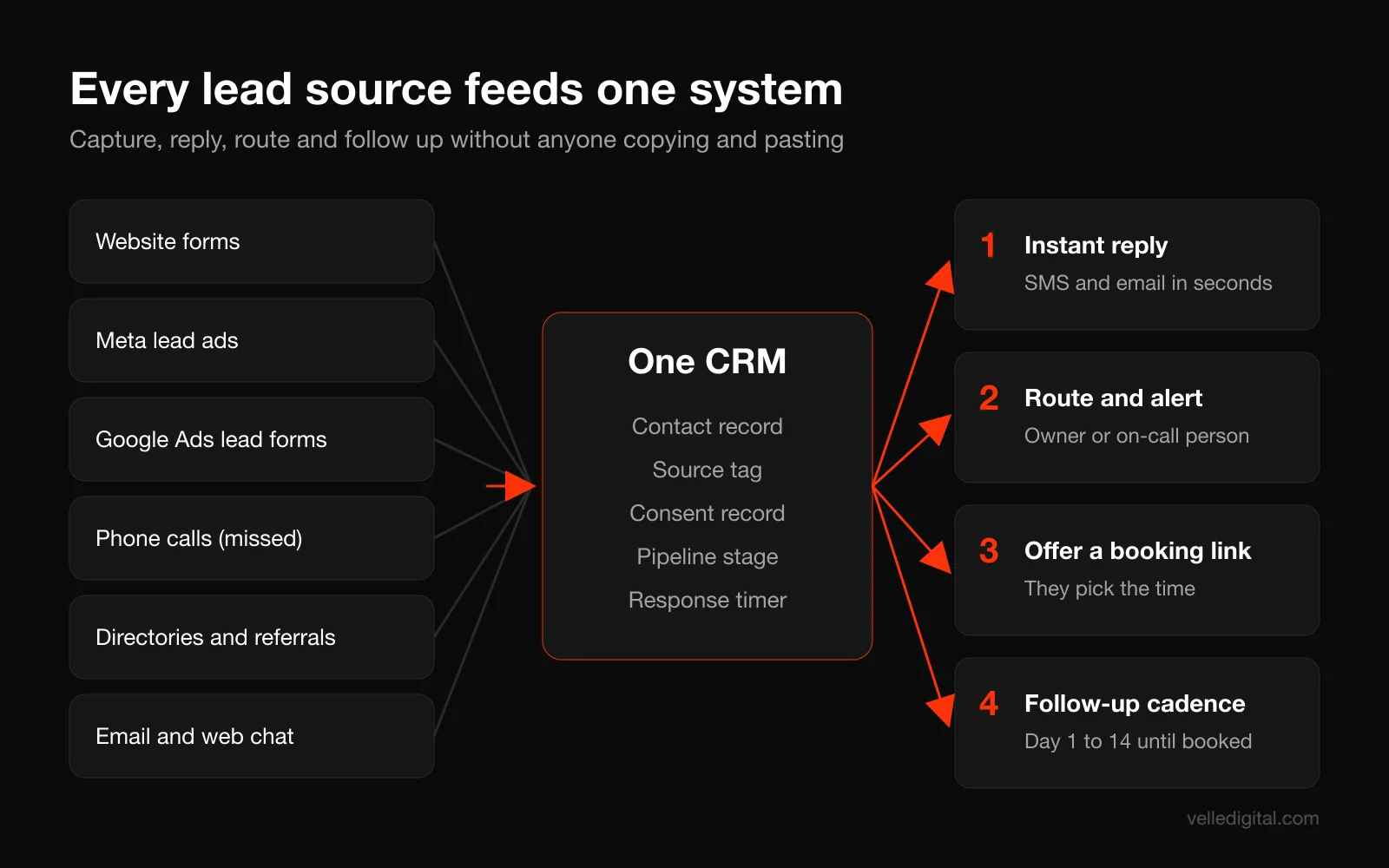
You need four building blocks:
- A CRM that can receive leads from every channel, store contact records, and run automations. Most small business platforms (HubSpot, Hubsyra, Zoho, Pipedrive and similar) can do this. If you are still choosing, our CRM setup service page explains what to look for.
- A business texting number that sends and receives SMS through the CRM, registered with carriers where required.
- A booking calendar that the lead can use directly, synced with the calendars of the people doing the appointments.
- A phone system that can tell the CRM when a call was missed.
You do not need custom software for any of this. The steps below assume an off-the-shelf CRM with a workflow or automation builder. If your process is unusual (multiple locations, complex dispatch rules, a legacy database), a custom CRM may be worth it, but start simple.
How to set up speed to lead automation, step by step
Step 1: Measure your current response time
Do not skip this. You need a baseline, and the result usually surprises people.
Pick your last 30 to 50 leads. For each one, write down when the lead came in and when someone first made two-way contact (a real conversation by phone or a reply by text or email from a person, not an auto-reply). Calculate the gap.
Then do a secret shopper test. Over one week, submit your own website form three times at different times of day (a weekday morning, a weekday evening, a weekend), call your main number once after hours, and fill out your own Meta or Google lead form if you run them. Record exactly what happens and how long it takes.
What to record for each test:
- Time submitted and time of first automated response, if any
- Time of first human contact and by which channel
- Whether the response used your name and referenced your request
- Whether you were offered a way to book
- How many follow-up attempts happened over the next week
Tip: use a phone number and email the team will not recognize, and do not tell anyone the test is running. You want to see the real process, not the best behavior version.
If the median time to first human contact is over an hour, or if any test lead never got a reply at all, you have found your biggest marketing problem. It is more common than you would think.
Step 2: Map every lead source
List every place a lead can come from. Most businesses undercount this. A typical local service business has some combination of:
- Website contact and quote forms (often more than one)
- Phone calls to the main number, plus tracking numbers on ads or listings
- Meta lead ads (forms inside Facebook and Instagram)
- Google Ads lead form assets
- Google Local Services Ads leads, if you run them
- Online booking widgets
- Directory and marketplace leads (HomeStars, Houzz, Yelp, Angi and so on)
- Website chat
- Direct emails and social media messages
- Referrals from partners
For each source, write down where the lead currently lands (an inbox, a spreadsheet, an app notification, a platform dashboard), who sees it, and how fast. Anything that requires someone to log into a separate dashboard to check is a leak. Leads sitting in a Meta Business Suite inbox that nobody opens are the most common one we find.
Step 3: Pipe every source into one CRM
The rule is simple: if a lead does not land in the CRM automatically, it does not exist. No copying and pasting, no forwarding emails, no "I will add it later."
Here is how to connect the usual sources:
- Website forms: use your CRM's native form, or send your existing form to the CRM by webhook or a native integration. Capture the page URL and any UTM parameters so you know which campaign produced the lead.
- Meta lead ads: Meta supports partner integrations with many CRMs and a webhook option for custom setups. Meta's developer documentation on connecting your CRM to lead ads explains both routes. Use a direct integration rather than downloading CSV files.
- Google Ads lead forms: Google offers a lead form webhook that sends each submission to a URL you provide, so it lands in your CRM in real time. Set this up instead of downloading leads from the Google Ads interface. Google's help page on lead form assets covers the form itself.
- Phone calls: route your business number through a phone system that integrates with the CRM, so every call (answered or missed) creates or updates a contact.
- Directories and marketplaces: many send leads by email only. Use an email parser or a forwarding rule into the CRM so each lead email becomes a contact.
- Chat: connect your chat widget to the CRM, or replace it with the CRM's own chat.
When you are done, every lead should create a contact with at minimum: name, phone, email, source, the service they asked about, the time they came in, and their consent status for SMS and email.
Decision rule: if a source sends fewer than two leads a month and cannot integrate, set a daily reminder to check it by hand and move on. If it sends more than that, fix the integration before anything else.
Tip: create one "test" contact per source and push it through after you connect each integration. If you run ads, our guide to Meta ads for local service businesses covers how to set up the forms themselves so they produce better leads.
Step 4: Write and turn on the instant auto-reply
The moment a lead lands, two messages should go out within seconds: a text and an email. The text gets read. The email holds the details.
A good instant reply does four things: confirms you received the request, uses their name and what they asked for, sets an expectation for what happens next, and offers a booking link so they can skip the wait.
Copy and adapt this SMS:
Hi {first name}, it's {your name} at {Company}. Thanks for reaching out about {service}. I'll call you in the next few minutes from this number. If it's easier, grab a time that works for you here: {booking link}. Reply STOP to opt out.
And this email:
- Subject: Got your request, {first name}
- Line 1: Thanks for contacting {Company} about {service}. A real person on our team is reviewing it now.
- Line 2: What happens next: we will call you from {number} within {time window}. If you miss us, we will text.
- Line 3: Want to skip the phone tag? Pick a time here: {booking link}
- Line 4: A few things that help us quote accurately: {two or three questions, such as photos, address, timeline}
- Sign-off: Your name, title, direct phone number, business address.
Rules for the auto-reply:
- Write it from a person, not "the team." A named sender gets more replies in our experience.
- Keep the SMS under 300 characters. Long texts split into multiple segments and read like marketing.
- Do not promise what you cannot deliver. If you say "in the next few minutes," the routing in Step 5 has to make it true during business hours. After hours, say "first thing tomorrow morning" instead.
- Branch by business hours. Build two versions of the message, one for open hours and one for after hours and weekends.
- Send the reply only when consent is in place. More on this in Step 9.
Decision rule: if the lead came from a form with no phone number, send email only and put a "text me instead" option in the email. If the lead came from a call, skip the email unless you already have their address.
Step 5: Route each lead to the right person and alert them
An auto-reply without a human behind it is a polite way to lose a lead slowly. The next automation decides who owns the lead and makes sure they know about it immediately.
Choose a routing method:
- Single owner: every lead goes to one person (the owner or office manager). Right for teams of one to three.
- Round robin: leads rotate between salespeople or estimators. Right when several people do the same job.
- Territory or service routing: leads go to whoever covers that postal code or service line. Right for multi-location businesses or companies with specialized crews.
- Availability routing: leads go to whoever is on shift or marked available. Right for teams with shifts or on-call schedules.
Then set up alerts. Email alone is not an alert. Use at least two of these:
- A push notification from the CRM mobile app
- An internal SMS to the assigned person with the lead's name, service, source and a tap-to-call link
- A message in your team chat channel
- A task in the CRM due in 5 minutes
Copy this internal alert:
NEW LEAD: {first name} {last name}, {service}, from {source}. {phone}. Call now, task due {time}. Notes: {form message}
Finally, add escalation. If the lead has not been called or messaged by a human within your target time (say, 5 minutes during business hours), alert a backup person. If nobody touches it in 15 minutes, alert the owner. This one rule fixes more lost leads than anything else on this list, because it turns "someone will get to it" into a named person with a deadline.
Decision rule: if your team cannot reliably call within 5 minutes during business hours, do not pretend. Set your auto-reply to promise a realistic window (within the hour) and push the booking link harder so the lead can book themselves.
Step 6: Turn on missed-call text-back
A large share of local service leads still come in by phone, and a missed call is a lead with a timer running. Most people will not leave a voicemail. They will call the next business in the search results.
Missed-call text-back is an automation that sends a text to the caller within seconds of an unanswered call. Setup in most CRMs takes a few minutes once your phone number is connected.
Copy this message:
Hi, it's {Company}. Sorry we missed your call, we're with a customer right now. How can we help? You can reply here, or book a time directly: {booking link}
Settings to get right:
- Trigger on missed or unanswered calls only, not on every call. Exclude calls that went to voicemail and were later returned if your system tracks that.
- Delay it 30 to 60 seconds so it does not fire on someone who hangs up and immediately calls back.
- Do not text landlines. Most phone platforms can detect line type. If yours cannot, the message simply fails, which is fine.
- Do not send to known spam numbers or existing customers with an open job, unless you want it to.
- Create a task for someone to call back, and route the reply text to the person who owns the lead.
A note on consent: a person who calls you has started the conversation. Replying with a single text about their call is the kind of back-and-forth exchange carriers generally treat as conversational. Even so, keep the text-back strictly about their call, do not add promotions, and do not put the number into marketing campaigns without proper consent. Step 9 covers this in more detail.
Step 7: Add a booking link to every touch
The fastest way to beat response time is to let the lead skip the response altogether. A booking link lets them choose a time for a call, an estimate or an appointment without waiting for you.
Use a booking tool that syncs with the real calendars of the people doing the work. If you use Google Workspace, Google Calendar's appointment schedules generate a booking page based on your availability and hide times you are busy. Most CRMs include their own calendar booking as well, which is better because the booking lands straight on the contact record.
How to set it up well:
- Offer one clear appointment type per service. "15-minute phone consult" or "free on-site estimate," not a menu of eight options.
- Ask only what you need to prepare. Name, phone, address, a short description. Every extra field costs bookings.
- Set buffers and minimum notice. For on-site work, add travel time between appointments and require at least a few hours of notice.
- Limit how far out people can book. Two to three weeks is usually enough. Further out, no-shows climb.
- Send confirmations and reminders automatically: a confirmation right away, a reminder 24 hours before, and a text 1 to 2 hours before.
- Stop all follow-up the moment someone books. Nothing makes you look more disorganized than asking a booked customer "are you still interested?"
Put the booking link in the instant reply, the missed-call text-back, every follow-up message, your email signature, and the thank-you page after a form submission.
Step 8: Build the day 1 to 14 follow-up cadence
Most leads do not book on the first touch. They are busy, comparing options, or waiting for a spouse to weigh in. The business that keeps showing up politely, with something useful, usually wins. The business that calls once and gives up does not.
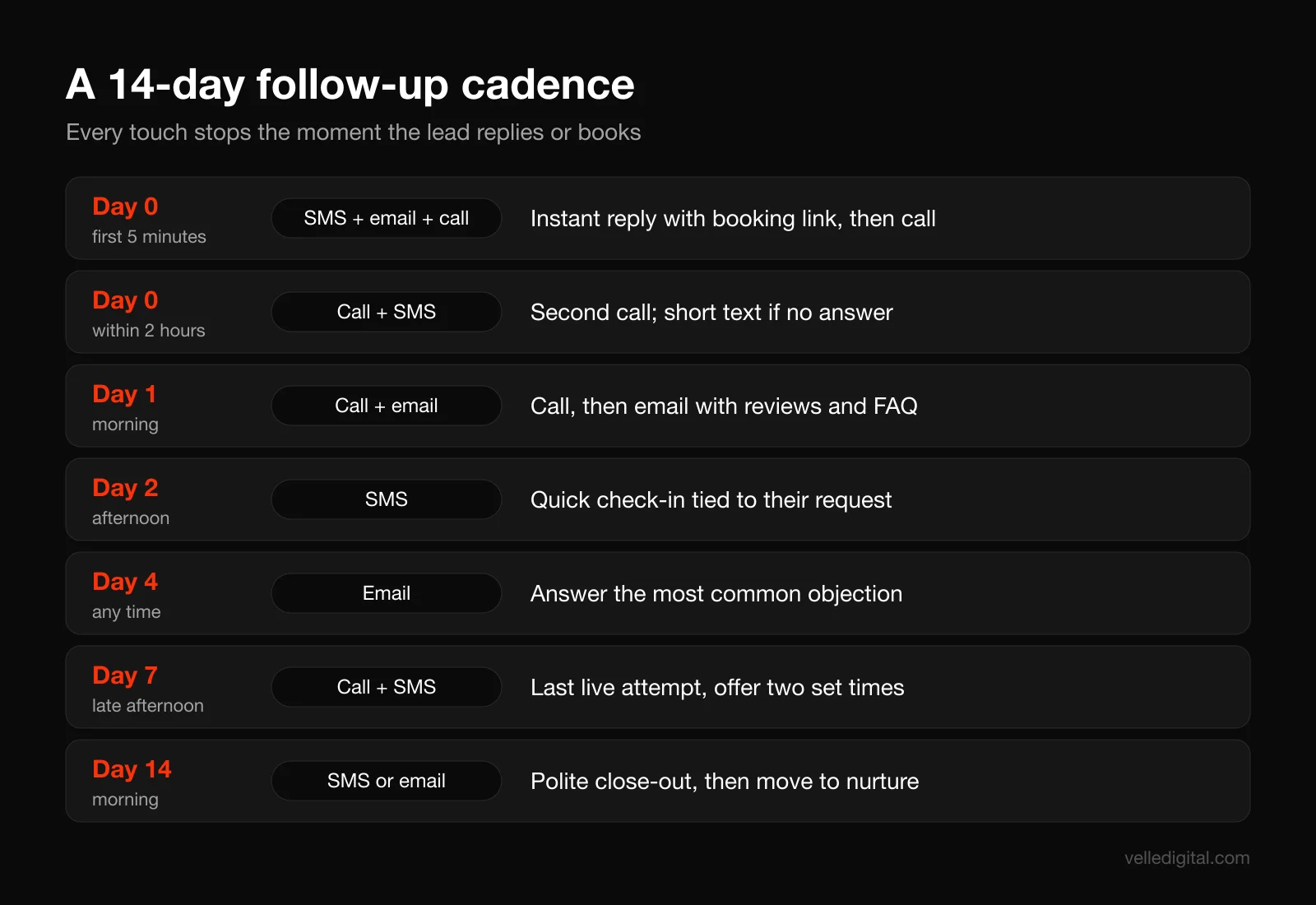
Here is the cadence we recommend as a starting point for local service businesses. Every touch stops the instant the lead replies, books or is marked won or lost.
- Day 0, within 5 minutes: instant SMS and email (Step 4), then a phone call from the assigned person.
- Day 0, within 2 hours: second call attempt. If no answer, a short text.
- Day 1, morning: call attempt, then an email with something useful (reviews, photos of similar jobs, answers to common questions).
- Day 2, afternoon: short SMS check-in that references their specific request.
- Day 4: email that answers the most common objection for your service (price, timing, trust).
- Day 7, late afternoon: final live call attempt, followed by a text offering two specific appointment times.
- Day 14: polite close-out message by SMS or email. Then move the lead into a long-term nurture list if they gave email marketing consent.
That is about 12 touches across three channels in two weeks. It sounds like a lot until you remember that each one is short, relevant and easy to stop by replying.
Example follow-up scripts you can copy
Day 0, second attempt text (after a missed call):
Hi {first name}, {your name} from {Company} again. Just tried calling about your {service} request. Is now still a good time, or would you rather pick a time here? {booking link}
Day 1 email:
- Subject: A few {service} jobs like yours
- Body: Hi {first name}, I wanted to share a couple of recent {service} projects near {city} so you can see our work: {link to project page or photos}. Most customers ask us about {common question}, and the short answer is {answer}. If you would like a quote, you can book a quick call or estimate here: {booking link}. Or just reply to this email with any questions. {Your name}, {direct phone}
Day 2 text:
Hi {first name}, quick check-in from {Company}. Still looking for help with {service}? Happy to answer questions by text if that's easier.
Day 4 email (objection handling, written for price as the example):
- Subject: What a {service} job usually costs
- Body: Hi {first name}, the most common question we get is about price, so here is an honest answer. Most {service} jobs we do fall between {range}, depending on {two or three factors}. We give a fixed written quote after a {free / 15-minute} assessment, so there are no surprises. If that sounds useful, grab a time here: {booking link}. {Your name}
Day 7 text:
Hi {first name}, {your name} at {Company}. I have openings on {day} at {time} or {day} at {time} for your {service} estimate. Want me to hold one of those for you?
Day 14 close-out text:
Hi {first name}, I haven't heard back so I'll stop reaching out about {service}. If you still need help down the road, just reply to this text and we'll pick it up from there. Thanks, {your name} at {Company}
The close-out message gets a surprising number of replies in our experience. Some people were simply busy and the "last message" framing prompts them to answer.
Rules that make the cadence work
- Stop on reply, booking or a status change. Every CRM workflow builder has a "goal" or "exit condition." Use it. Test it.
- Respect sending hours. Send texts only between 8 a.m. and 9 p.m. in the lead's time zone, and earlier is better than later. For non-urgent touches, aim for weekday business hours.
- Vary the channel. Some people never answer unknown numbers, some never read email. Mixing call, SMS and email reaches more of them.
- Personalize with the details you already have. The service, the city, what they wrote in the form. Templates are fine as long as they do not read like templates.
- Keep texts short and from a person. No links to long brochures, no all caps, no emoji walls.
- Make every message easy to answer. End with a simple question or a link, never with nothing.
Decision rule: if your average job is high value with a long decision process (renovations, solar, legal, financial services), stretch the cadence to 21 or 30 days and add more useful content between calls. If your service is urgent (emergency plumbing, towing, locksmiths), compress it: most of the effort happens in the first hour, and if they have not replied by day 3 they have almost certainly hired someone else.
After day 14, leads that gave email consent can move into a monthly newsletter or seasonal reminder sequence. That is where a lot of "not right now" leads turn into customers six months later. Our email marketing service covers that longer nurture side.
Step 9: Get SMS consent and compliance right
Texting is the most effective channel in this system, and also the one with the most rules. None of this is legal advice, and if you text at volume or in a regulated industry, have a lawyer review your setup. But here are the basics every business owner should understand before turning on automated texts.
CASL basics for Canadian businesses
Canada's Anti-Spam Legislation (CASL) applies to commercial electronic messages, which includes both emails and texts. The government's CASL information page is a good plain-language starting point. Key points for a speed to lead system:
- You need consent, either express or implied. Express consent is when someone actively agrees (for example, checking an unticked box). Implied consent exists in specific situations defined in the law.
- An inquiry creates implied consent for a limited time. Under the Act, an inquiry or application made by the person to your business within the previous six months creates an existing business relationship. A purchase creates one for two years.
- Requested quotes are exempt from the consent requirement. A message that solely provides a quote or estimate the person asked for does not need consent, though it still needs your identification and an unsubscribe mechanism.
- Every message needs identification and an unsubscribe option. Name the business, give contact information, and include a working way to opt out.
- Honor unsubscribes fast. The Act requires that an unsubscribe request be given effect without delay, and no later than 10 business days after it is sent. Automate it so it happens instantly.
What this means in practice: a lead who fills out your form asking for a quote can receive your instant reply, your follow-up cadence and your quote under implied consent, as long as each message identifies you and offers an opt-out. If you want to keep marketing to them after six months (newsletters, seasonal promotions), get express consent with a clear checkbox on the form.
TCPA basics for US businesses
In the US, texts are treated like calls under the Telephone Consumer Protection Act. The FCC's implementing rules are in 47 CFR 64.1200. The parts that matter most here:
- Marketing texts sent with automated systems require prior express written consent. That means a clear written agreement (an online form checkbox with clear disclosure counts when done properly) that names your business and covers the number.
- Consent can be revoked by any reasonable means. The rules list replies like "stop," "quit," "end," "revoke," "opt out," "cancel" and "unsubscribe" as revocation, and require revocation requests to be honored within a reasonable time, not exceeding ten business days.
- Quiet hours apply to telephone solicitations. The rules prohibit telephone solicitations to residential subscribers before 8 a.m. or after 9 p.m., local time at the called party's location. Some states have stricter rules, so check yours.
- Do-not-call registries matter for marketing. Consent and an existing relationship change what you can send, but cold outreach to numbers on the National Do Not Call Registry is off limits.
A responding text to someone who just asked you for a quote is very different from a promotional blast, but you want consent captured in writing either way. It costs you nothing and protects you if a lead later claims they never asked to hear from you.
Consent wording for your forms
Put a short disclosure directly next to the phone field and submit button, and store the consent on the contact record. Example wording to adapt (have your lawyer review it):
By submitting this form, you agree that {Company} may contact you about your request by phone, text message and email at the number and email provided, including messages sent using automated technology. Message frequency varies. Message and data rates may apply. Reply STOP to opt out, HELP for help. Consent is not a condition of purchase. Optional checkbox: Yes, also send me occasional tips and offers by email and text.
Then record proof. The wireless industry's CTIA Messaging Principles and Best Practices recommends keeping consent records including the timestamp and how consent was collected, and says a confirmation message should include the program name, how to get help, how to opt out, message frequency and a note that message and data rates may apply. In your CRM, store at least:
- Consent status for SMS and for email (yes, no, unknown)
- Date and time consent was given
- Source of consent (which form, which page URL, which ad)
- The exact consent wording that was shown
10DLC registration for US texting
If you send texts to US phone numbers from a regular 10-digit business number through software, US carriers require you to register under A2P 10DLC (application-to-person, 10-digit long code). Twilio's A2P 10DLC documentation puts it plainly: anyone sending SMS or MMS from an application to the US over a 10DLC number must register.
Registration has two parts, handled through your texting provider and The Campaign Registry:
- Brand registration: who you are (legal business name, tax ID such as an EIN, address, website).
- Campaign registration: what you send and how people opt in (use case, sample messages, opt-in description, opt-out and help handling).
Twilio's documentation notes that unregistered traffic incurs additional carrier fees, and that registration results in lower message filtering and higher throughput. Practically, your messages are far less likely to be filtered after you register.
Tips for getting approved the first time:
- Make sure your website is live, shows your business name, and has a privacy policy that mentions text messaging and says you do not sell or share mobile numbers for marketing.
- Use sample messages that match what you will actually send, including your business name and opt-out language.
- Describe your opt-in clearly: "Customers provide their number on our website quote form, which includes SMS consent wording" with the form URL.
- Choose the use case that fits (for example, customer care or mixed) rather than guessing.
If you text only Canadian numbers from a Canadian number, 10DLC as defined here is a US system, but carriers still filter unwanted traffic and your provider may have its own registration or verification steps. Ask your provider what applies to your numbers before you launch.
Email deliverability basics
Your instant reply email is useless if it lands in spam. At minimum, set up SPF, DKIM and DMARC on the domain you send from. Google's email sender guidelines require authentication for everyone sending to Gmail accounts, ask senders to keep reported spam rates below 0.3 percent, and require one-click unsubscribe for marketing messages from senders over 5,000 messages a day. Send your automated emails from your real domain, not a free email address.
Step 10: Measure response time and fix leaks every week
What gets measured gets fixed. Once the automation is live, track these numbers weekly:
- Median time to first human contact. Use the median, not the average, because one lead that sat for three days skews the average badly.
- Percent of leads contacted within 5 minutes during business hours. This is your speed to lead score.
- Percent of leads that never got a human response. The target is zero.
- Contact rate: leads you actually spoke or texted with, divided by total leads.
- Booking rate: appointments booked divided by total leads.
- Show rate: appointments attended divided by appointments booked.
- Close rate and revenue by source: which channels produce paying customers, not just leads.
How to capture response time in a CRM: create two date fields on the contact or opportunity, "lead created" and "first human contact." A workflow stamps the first when the lead arrives and the second when a team member logs a call, sends a manual message or moves the stage. A simple formula field (or a report) calculates the gap. Some CRMs have this built in as a "time to first response" metric. Exclude automated messages from the calculation, otherwise your numbers look perfect and mean nothing.
Hold a 15-minute weekly review. Look at every lead that missed the 5-minute target or never got a human reply and ask why: was it after hours, did routing fail, was the person on a job, did an integration break? Fix the cause, not the symptom.
Decision rule: if your 5-minute rate is under 50 percent during business hours, the problem is staffing or routing, not automation. Add a backup person to the escalation path, or have the booking link do more of the work. If your contact rate is good but your booking rate is low, the problem is your offer, pricing or call script. That is a different fix, and often a marketing audit is the faster way to find it.
Common speed to lead mistakes
These are the issues we see most often when we audit a business's lead handling:
- Automation with no human follow-through. The auto-reply says "we'll call you shortly" and nobody does. This is worse than no auto-reply because you made a promise and broke it.
- Leads stuck in platform inboxes. Meta lead ad submissions and directory leads sitting in apps nobody checks. Integrate or assign a daily check.
- Notifications that go to a shared inbox. When everyone gets the alert, nobody owns it. Assign a person.
- Follow-up that does not stop. Texting "still interested?" to someone who booked yesterday. Test your exit conditions with a real booking.
- Sending texts at 11 p.m. After-hours leads get an after-hours auto-reply, and the human follow-up waits for morning.
- Robotic templates. "Dear Valued Customer, your inquiry has been received." Write like a person texting a neighbor.
- No consent capture. Nothing on the form about texting, and no record of when consent was given. Fix this before you send a single automated text.
- Unregistered texting numbers in the US. Messages get filtered and you do not know why. Register first.
- Measuring only lead volume. More leads with a 10 percent booking rate is worse than fewer leads with a 40 percent booking rate. Track the whole funnel.
- Never testing. Integrations break when someone edits a form or a password expires. Run your secret shopper test monthly.
Advanced moves once the basics work
When your core system is running and your response times are consistently fast, a few upgrades are worth considering:
- AI-assisted replies. An AI assistant can answer common questions by text, qualify the lead (service, location, timeline) and offer booking times when your team is busy or after hours. Keep a human in the loop and make it easy to reach a person. Our guide to AI automation for small businesses covers where this works and where it does not.
- Call recording and scoring. Review a handful of first calls each week for coaching. The first two minutes of a call matter as much as response speed.
- Lead scoring. Prioritize leads by service type, job size or location so your best opportunities get called first when several arrive at once.
- Closed-loop ad tracking. Send booked and closed outcomes back to Google and Meta so their algorithms optimize for paying customers, not just form fills.
- Reactivation campaigns. Every quarter, send a short, useful message to old leads who did not book (with consent). A lot of "not now" turns into "now."
Speed to lead setup checklist
Use this before you switch anything on, and again every quarter.
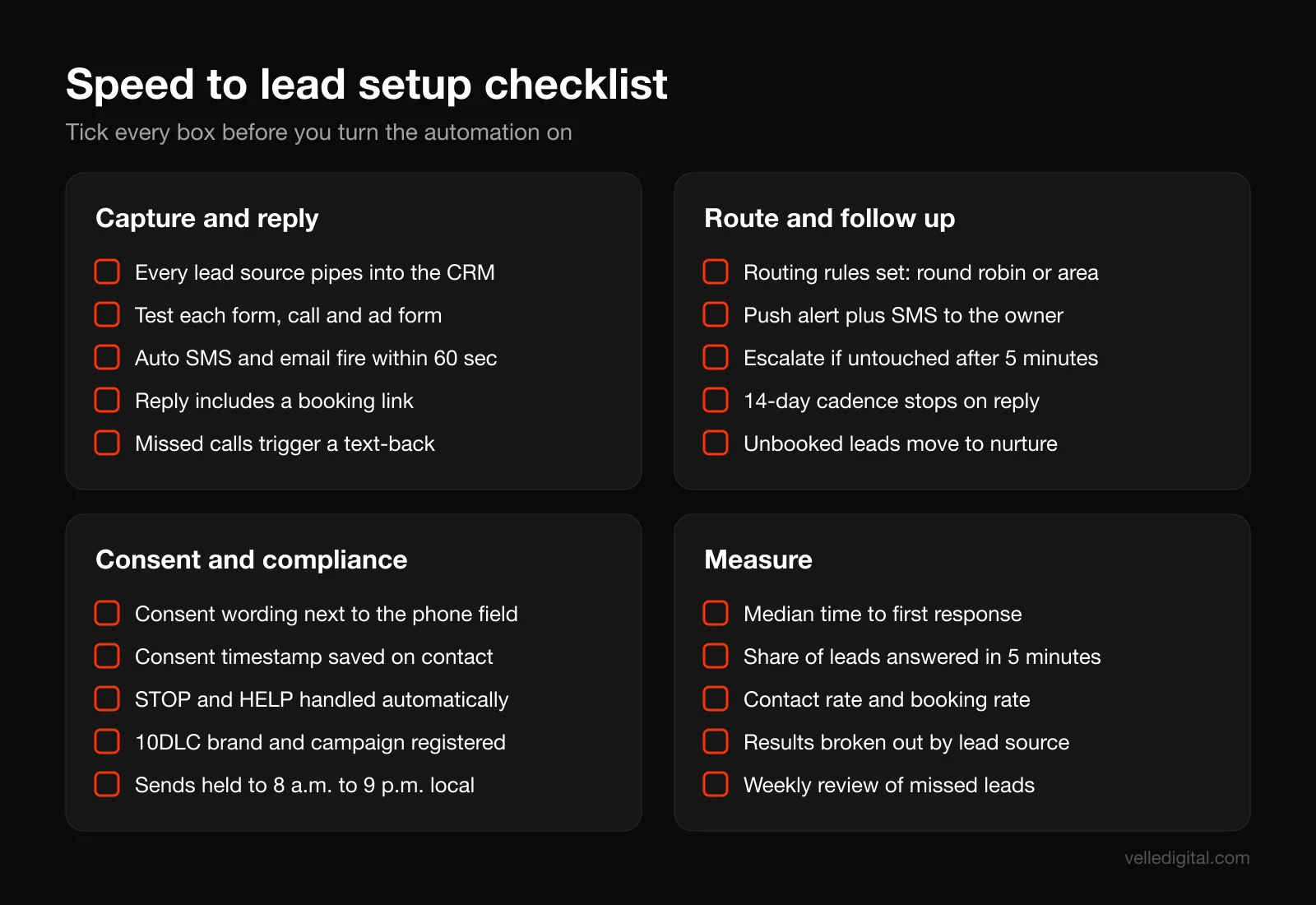
Capture and reply:
- Every lead source is listed and connected to the CRM automatically
- Each source has been tested with a real submission
- Contacts include source, service, timestamp and consent status
- Instant SMS and email fire within 60 seconds, with separate after-hours versions
- Every reply includes a working booking link
- Missed-call text-back is on, with a short delay and a callback task
Route and follow up:
- Routing rules are set (single owner, round robin, territory or availability)
- Alerts go out by push notification and internal SMS, not email alone
- Escalation fires if a lead is untouched after your target time
- The 14-day cadence is built, with exit conditions for reply, booking and status change
- Unbooked leads with consent move into a nurture sequence
Consent and compliance:
- Consent wording sits next to the phone field on every form
- Consent status, timestamp, source and wording are stored on the contact
- STOP, HELP and other opt-out replies are processed automatically
- US texting numbers are registered for A2P 10DLC (brand and campaign)
- Texts send only between 8 a.m. and 9 p.m. in the lead's time zone
- SPF, DKIM and DMARC are set up on your sending domain
Measure:
- "Lead created" and "first human contact" timestamps are captured
- Median response time and 5-minute rate are reported weekly
- Contact, booking, show and close rates are tracked by source
- Every missed lead is reviewed weekly with a fix assigned
- A secret shopper test runs monthly
Frequently asked questions
What is a good speed to lead time?
Aim to make human contact within 5 minutes during business hours, and send an automated SMS and email within 60 seconds at any hour. The Lead Response Management study found qualification odds dropped sharply between 5 and 30 minutes. If 5 minutes is not realistic for your team, get as close as you can and let a booking link carry the rest.
Is it legal to text leads automatically?
Generally yes, if you have the right consent and follow the rules. In Canada, CASL allows messages under implied consent for six months after an inquiry, and requested quotes are exempt from the consent requirement, but every message needs identification and an unsubscribe option. In the US, use clear written consent on your forms, honor opt-outs, respect quiet hours and register your number for 10DLC. Talk to a lawyer if you are unsure.
Do I need 10DLC registration as a small business?
If you send texts to US phone numbers from a standard 10-digit business number through software, yes. Carriers require brand and campaign registration, and unregistered traffic faces extra fees and heavier filtering. Your texting provider or CRM handles the submission, and approval is much smoother when your website and privacy policy are in order.
How many times should I follow up with a lead?
For most local service businesses, about 10 to 12 touches over 14 days across phone, text and email works well, stopping the moment the lead replies or books. Urgent services can compress this into the first two or three days. High-value, slow decisions can stretch to 30 days with more educational content.
What is missed-call text-back?
It is an automation that texts a caller within seconds when you miss their call, so they get a reply instead of a voicemail greeting. The text acknowledges the call, asks how you can help and usually includes a booking link. It is one of the simplest speed to lead wins for any business that relies on phone calls.
Which CRM is best for speed to lead automation?
The best one is the one that can receive leads from all your sources, send SMS and email, route and alert your team, and run multi-step workflows with exit conditions. Many small business CRMs do all of this. Choose based on your lead sources, team size and budget, and make sure SMS is built in rather than bolted on.
Will automated messages make my business feel impersonal?
Only if they read like robots wrote them. Write from a named person, reference the specific service they asked about, keep texts short and always have a real human follow up quickly. Most people are relieved to get an instant, clear reply instead of silence.
How do I measure response time accurately?
Capture two timestamps on every lead: when it was created and when a team member first made human contact. Report the median gap and the percentage of leads contacted within 5 minutes, and exclude automated messages from the calculation. Review every lead that missed the target each week.
Ready to stop losing leads to slow replies?
Speed to lead is one of the few marketing problems where a few days of setup can change your results within a month, because you are converting leads you already paid for. If you would rather have the CRM, auto-replies, routing, missed-call text-back, follow-up cadence and compliance set up properly for you, take a look at our booked services automation and CRM services, or book a call and we will walk through how your leads are handled today.