Google Business Profile Optimization: A Complete Setup Guide
A field by field guide to setting up and optimizing your Google Business Profile, staying clear of suspensions, tracking what it produces, and keeping it current in 30 minutes a week.
Google Business Profile optimization means filling in every field of your free Google listing accurately, choosing the right categories and location settings, keeping photos, posts and hours current, and staying inside Google's guidelines so the profile never gets suspended. Done properly, it makes your business show up for more relevant searches on Google Search and Maps, and it turns more of those views into calls, direction requests, bookings and website visits.
This guide walks through the whole job field by field: the setup decisions that are hard to undo, the details most businesses skip, the violations that get profiles taken down, how to track what the profile actually produces, and a weekly routine that takes about 30 minutes. If you want the bigger picture of how the map pack ranks businesses, including reviews, citations and location pages, read our local SEO guide to ranking in the map pack alongside this one.
What Google Business Profile optimization actually changes
Your Business Profile is the panel that appears when someone searches your business name, and the listing that appears in the map results when someone searches for what you do. It is free, Google owns it, and in our experience it often gets more views than the website does.
Google is unusually direct about how local results work. Its page on improving your local ranking says local results are mainly based on relevance, distance and prominence, and that "businesses with complete and accurate info are more likely to show up in local search results." It also says plainly that there is no way to request or pay for a better local ranking.
That gives you three levers, and the profile touches all of them:
- Relevance is how well your profile matches the search. Categories, services, the description and attributes do most of the work here.
- Distance is how far you are from the searcher. You control this only by setting your address and service area honestly.
- Prominence is how well known you are. Reviews, photos, links and general web presence feed it.
Optimization does not mean gaming any of these. It means removing every reason Google might have to show a competitor instead of you. In our experience, most profiles we audit are missing half their fields, have the wrong primary category, or break a guideline that puts the whole listing at risk.
Before you start: gather these assets
Spend 20 minutes collecting these before you log in.
- A company Google Account to own the profile, not one employee's personal Gmail.
- Your legal and real-world business name, exactly as it appears on your signage, invoices and website.
- Your full street address with suite number, or a list of the cities and postal codes you serve if customers never come to you.
- Your main phone number, plus up to two additional numbers if you have them.
- Regular hours, holiday hours for the next 12 months, and any separate service hours.
- A list of every service you offer with a one or two sentence description of each, and prices if you publish them.
- At least 15 real photos: exterior, interior, team, work in progress and finished work.
- Your logo as a square image and one strong cover photo.
- Your website, booking page and social profile URLs.
If you are an agency or a contractor doing this for a client, the business owner should own the profile and add you as a manager. Google's business eligibility and ownership guidelines say authorized representatives must never claim a profile without the owner's express consent and must transfer ownership to the owner immediately on request.
Step 1: Claim the right profile and clean up duplicates
Search your business name and city on Google and on Google Maps. Profiles often exist before the owner touches them, created from public data, user suggestions or a long-gone agency.
- If no profile exists, create one.
- If a profile exists and nobody has verified it, claim it. That keeps its existing reviews and photos.
- If someone else has verified it, use Google's request ownership process from the profile.
- If there are duplicates, pick the one with the most reviews and the correct address to keep, then get the others removed or merged. Google's guidelines say there should be only one profile per business, and duplicates split your reviews and confuse ranking.
Decision rule: never create a fresh profile to escape an old one with bad reviews or an ownership dispute. Google treats that as a duplicate, and it is a common trigger for suspension of both.
Once you have access, add a second owner or manager from inside your company, so one departure cannot lock you out.
Step 2: Decide storefront, service area or hybrid
This is the most consequential setting on the profile and the one most often set wrong. It controls whether your address shows, where you can appear, and what you must prove at verification.
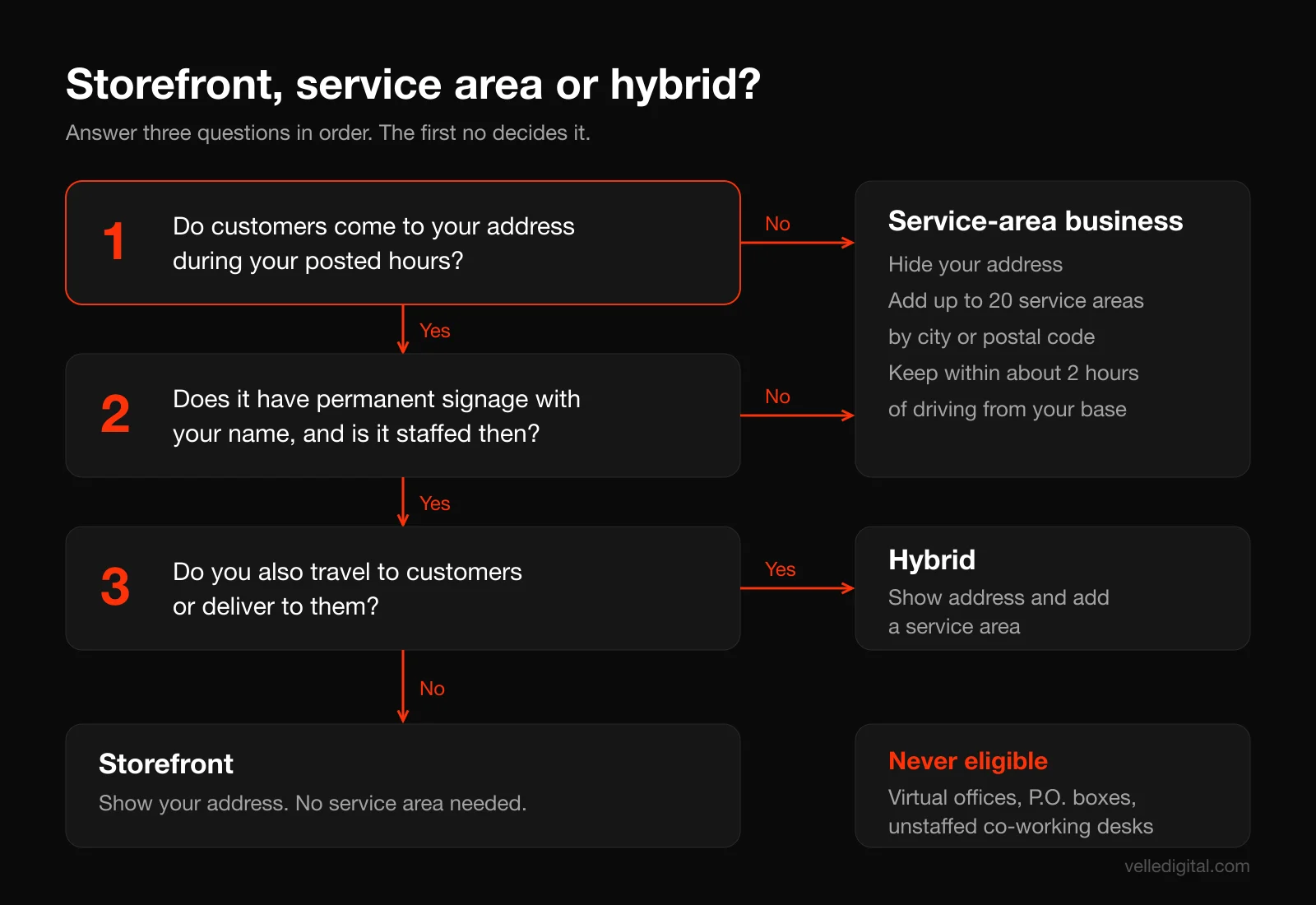
Google's service area help page defines them this way:
- Storefront: customers come to you, at an address with permanent signage, during your stated hours. A dental clinic, a retail shop, a gym.
- Service-area business: you go to customers or deliver to them and do not serve customers at your address. A plumber, a mobile dog groomer, a cleaning company. You must hide your address.
- Hybrid: you serve customers at your location and also travel to them. An auto shop with roadside service, a restaurant that delivers. You show your address and add a service area.
Use these decision rules:
- Do customers physically come to your address during your posted hours? If no, you are a service-area business. Remove the address.
- If yes, does the location have permanent signage with your business name and is it staffed during those hours? If no, you are still a service-area business.
- If yes to both, do you also travel to customers or deliver? If yes, you are hybrid. If no, you are a storefront.
Setting your service area correctly
If you are a service-area or hybrid business, you can add up to 20 service areas defined by city, postal code or region. You can no longer draw a radius around your base. Google also says the boundaries of your overall area should not extend farther than about two hours of driving time from where your business is based.
Listing 20 cities does not make you rank in all of them. In practice, service-area businesses tend to rank best close to the hidden address Google has on file, and the service area mostly tells customers whether you cover them. List the areas you genuinely serve.
Running the business from home is fine, but if customers do not visit your home during business hours, hide the address. Google still uses it for verification.
Step 3: Get verified
Nothing you publish shows publicly until the profile is verified. Google's verification help page notes that the methods are chosen automatically based on your business type, public information, region and hours, and you cannot change them.
The methods you may see:
- Phone or text: a code is sent to your business number. Automated phone menus (IVR systems) will not get the code, so make sure a human or a mobile number can receive it.
- Video recording: you record a continuous clip on your phone that proves location, existence and management.
- Live video call: a support representative watches you show the business in real time, during your business hours.
- Postcard: a code mailed to your address. Most arrive within 14 days and codes expire after 30 days.
How to pass video verification on the first try
Google now recommends video when it is offered. The video verification requirements are specific: the recording must be live, unedited, at least 30 seconds, and uploaded from a mobile device through the profile. Review takes up to five business days.
For a storefront, plan a single continuous take that shows:
- A street sign or building number, then neighboring businesses, so Google can match the location to the map.
- Your permanent exterior sign with the business name exactly as it appears on the profile.
- Something only staff can access: unlocking the door, opening the till, the back room, the point-of-sale screen.
For a service-area business, show:
- Street signs or landmarks near the address you entered.
- The tools of your trade: branded vehicle, equipment, uniforms, business cards.
- Proof you run it: unlocking the branded van, or a business license or utility bill with the matching business name.
Do not film other people's faces or sensitive numbers. If the video is rejected, Google tells you why and you can record a new one.
The most common verification mistake we see: editing the business name, address or category while a postcard or review is pending. Google explicitly warns that doing so invalidates the code. Change nothing until you are verified.
Step 4: Name, address, phone and website
These four fields are your identity. They must match the real world and everywhere else your business appears online.
Business name
Use your real-world name as it appears on your storefront, website and stationery. Google's guidelines for representing your business list what your name must not include: marketing taglines, store codes, trademark symbols, all-caps words (unless that is the real brand), hours, phone numbers or URLs, service or product descriptions, and location information. Legal terms like Inc. or Ltd. are only allowed if they consistently appear in your real-world branding.
Here is what that looks like for a hypothetical Edmonton plumber:
- Wrong: Northside Plumbing | 24/7 Emergency Plumber Edmonton
- Wrong: NORTHSIDE PLUMBING LTD.
- Right: Northside Plumbing
In our experience, keyword-stuffed names are among the most commonly reported violations on Google Maps. Google's guidelines say unnecessary information in a name could result in suspension. A keyword that is genuinely on your sign is fine.
Address
Enter the precise address, with the suite or unit in address line 2. P.O. boxes and remote mailboxes are not allowed. If you are a service-area business, the address is used for verification and hidden from the public.
If the map pin lands in the wrong spot, drag it to your actual entrance.
Phone numbers
Your primary number must connect directly to this location and be under your control. You can add up to two more numbers. Google asks for a local number over a central call center where possible, and premium-rate numbers are not allowed.
If you use call tracking, a common approach is to put a local tracking number that forwards to your main line in the primary field and your main number in an additional field, so your real number is still attached to the profile and matches your citations.
Website
Link to the page that best represents this location: usually the home page for a single location, or each location's own page for a multi-location business. Add a UTM tag (covered in the tracking section below). The page should load fast on a phone and make calling or booking obvious. Our landing page best practices guide covers what that page needs.
Step 5: Choose your categories
Categories are the strongest relevance signal you control on the profile. You get one primary category and, according to Google's edit your Business Profile page, up to nine more.
Google's guidelines give a useful test: pick categories that complete the sentence "This business IS a," not "This business HAS a." Use as few as possible to describe your core business, choose the most specific option that fits, and do not use categories as keywords.
How to pick the primary category
- Search your main service plus your city, for example "roofer Sherwood Park," and open the top three map results.
- Note their primary categories.
- Choose the most specific category that describes what most of your revenue comes from. "Roofing contractor" beats "Contractor." "Pediatric dentist" beats "Dentist" if that is genuinely your practice.
Google notes that when you pick a specific category, it implicitly includes the more general ones. Selecting "Golf resort" already covers "Resort hotel" and "Golf course." So you rarely need to add the broad version as a secondary.
How to pick secondary categories
Add secondary categories only for genuine, substantial lines of business. A plumbing company that also installs water heaters and does drain cleaning might add "Water heater installation service" and "Drainage service." It should not add "Bathroom remodeler" because it once did a bathroom.
Irrelevant categories make the profile less precise and are not permitted. In our experience three to five well-chosen categories outperform ten loose ones for most small businesses.
Decision rule: if a category would make a customer arrive expecting something you do not really offer, leave it off.
Revisit categories twice a year, since Google adds and renames them.
Step 6: Set hours, special hours and more hours
Hours seem trivial until a customer drives over and finds you closed, then leaves a review about it.
Regular hours
Enter your customer-facing hours, meaning the hours a person can walk in or reach you, not the hours your staff are in the building. Seasonal businesses can use the current season's hours as regular hours and mark the business temporarily closed during the off-season.
Some business types should not list hours at all: those that run by appointment only, or whose schedules vary by activity, such as schools and event venues. If you are appointment only, say so in the description and make sure the booking link is set up.
Special hours
Set holiday hours well in advance for every statutory holiday in your province or state, plus Christmas Eve, Boxing Day and New Year's Eve if your hours change. Put a reminder in your calendar on the first of each month to check the next month's holidays.
If you do not confirm holiday hours, Google may display a warning that hours might differ, which costs you visits on the days you are actually open.
More hours
More hours lets you list separate schedules for specific services, such as pickup, delivery, senior hours, phone support or a drive-through. Google says these should generally be a subset of your main hours.
Step 7: Add services, products and menus
Services are where most profiles leave the most relevance on the table, because they describe what you do in more detail than categories can.
Services
Depending on your category, Google may suggest predefined services. Accept the ones you actually offer, then add custom services for anything missing. For each service:
- Use the name a customer would search for, such as "Furnace repair," not internal jargon like "HVAC Service Package B."
- Write a plain description covering what is included, who it is for and any service area limits.
- Add a price or price range if you are comfortable publishing it. "From 149 dollars" is better than nothing if your pricing varies.
Here is an example service entry you can adapt:
Service: Furnace repair. Description: Same-week diagnosis and repair for gas furnaces of all major brands. Our licensed technicians carry common parts on the truck, so most repairs are finished in one visit. Serving Edmonton, St. Albert and Sherwood Park. Price: diagnostic visit from 129 dollars, credited toward the repair.
List every service that has its own page on your website, using consistent language.
Products
Retail businesses in eligible countries (Google lists the US, Canada, the UK and Ireland) can showcase in-store products, either manually through the product editor or automatically by connecting a point-of-sale system through Google's local inventory tools. Product listings follow Google's Shopping ads policies, and regulated products such as alcohol, tobacco and pharmaceuticals are not allowed.
Where your category allows it, service businesses can use products to feature real, bookable packages, such as a landscaper's "Spring cleanup package" with a photo and starting price.
Menus
Food and drink businesses get a menu editor, and service businesses like spas can link a service menu. Google's guidelines say menus must reflect what is actually available, not a "popular items" excerpt, and a menu URL cannot point straight to a third-party delivery service.
Step 8: Write the business description
You get 750 characters. Google's guidance says to describe what you offer, what makes you different, how long you have been in business, and anything else helpful. It also lists what not to do: no URLs or HTML, and no focus on promotions, prices or sales. Content like "Everything 50 percent off" is specifically called out as not allowed.
In our experience the description has limited ranking influence, but it is often the only copy a searcher reads before calling.
A template you can copy
[Business name] is a [specific category] serving [area] since [year]. We [core service 1], [core service 2] and [core service 3] for [type of customer]. [One concrete differentiator: a guarantee, a certification, a response time, a specialty]. [One sentence about the team or how you work]. [What the customer should do next, such as book online, call for a same-day quote or visit the showroom].
Here is a filled example for a hypothetical clinic:
Riverbend Physiotherapy is a physical therapy clinic serving south Edmonton since 2014. We treat sports injuries, back and neck pain, and post-surgery recovery for active adults and seniors. Every first visit is a full 60-minute assessment with a registered physiotherapist, not an assistant, and most patients get a home exercise plan the same day. Our team of six works out of a ground-floor clinic with free parking and wheelchair access. Book online or call to check direct billing with your insurer.
That example is about 520 characters, uses the category and service terms naturally, and gives a reason to choose this clinic over the one next door. Do not stuff it with city names.
Step 9: Fill in attributes
Attributes are the yes or no facts that appear as icons and short labels on your profile: wheelchair accessible entrance, free Wi-Fi, accepts credit cards, online appointments, women-owned, and so on. Google's attributes help page notes that adding certain attributes can make your business show up in searches for places with those attributes.
There are two kinds:
- Factual attributes you set yourself: accessibility features, payment types, amenities, service options and identity attributes.
- Subjective attributes that come from customer input, like "popular with locals." You cannot set these directly.
Answer every attribute available for your category accurately. A few notes from Google's definitions:
- The wheelchair accessible entrance attribute assumes an entrance about one meter wide with no steps, or a permanent or movable ramp. Do not tick it if a customer in a wheelchair would hit a step.
- The small business attribute is for businesses under 10 million dollars a year in revenue, and franchises cannot use it.
Google says attribute edits usually take about 10 minutes to review, but can take up to 30 days.
Step 10: Upload photos and video
Photos are what searchers actually look at, and the field most likely to go stale.
The technical specs
From Google's photo and video help page:
- Photos: JPG or PNG, between 10 KB and 5 MB, recommended 720 by 720 pixels, minimum 250 by 250.
- Video: up to 30 seconds, up to 75 MB, 720p or higher.
- Quality: in focus, well lit, and without significant alterations or heavy filters.
New uploads can take 24 to 48 hours to appear.
What to shoot
Google's tips for business-specific photos recommend at least three photos in each relevant group. Here is the shot list we give clients:
- Logo: square, clean, readable at small sizes.
- Cover photo: the single image that best represents you. Google may still pick a different photo if it judges yours low quality.
- Exterior, at least three: from each direction a customer approaches, ideally at different times of day, with the sign visible.
- Interior, at least three: what a customer sees when they walk in.
- At work, at least three: your team doing the actual job. For service-area businesses this is the most important set.
- Team, at least three: owners and staff, a little less formal than a corporate headshot.
- Products or finished work, at least three: the things people buy or the results they get.
For video, shoot short clips under 30 seconds: a walk from the parking lot to the front desk, a before and after, a technician explaining one common problem. A phone is enough.
Mistakes that hurt more than they help
- Stock photos. Customers can tell, and they undercut trust at the moment of decision.
- Images with text, phone numbers or promotional overlays. Save offers for posts.
- Uploading 40 photos once and never again. A steady trickle looks alive.
Customers can upload photos too. Check them weekly and report any that violate policy.
Step 11: Set up booking links, chat and other actions
Every action button is a shortcut from search to revenue.
Booking and other business links
Depending on your category, you can add links for appointments, reservations, online orders, pickup or delivery. You can either connect a supported booking provider through the Bookings section of the profile, which can add a book button directly on the profile, or add your own booking URL.
Google's business links policy sets the rules, and it is stricter than most people realize:
- The link must go to a dedicated page where the customer can actually complete the action. A "book" link has to let someone book.
- Multi-location businesses must link to the page for that specific location.
- Links cannot be social media pages, messaging links, app store links or link shorteners.
- Google checks links with automated crawlers, which do not follow robots.txt for this purpose. If your booking page blocks bots with a CAPTCHA or firewall rule, the link may be removed.
- You can have up to 20 links per action type, and only one link per domain.
If you take appointments, a direct booking link is one of the most valuable fields here, because it removes the phone call entirely. If you want new bookings to land straight in your CRM with automatic confirmations and reminders, that is the kind of setup we build in our automation for booked services work.
Chat and messaging status in 2026
Messaging has changed several times. The old built-in Google chat feature was retired in 2024. As of October 2026, Google's chat help page says verified businesses can add a WhatsApp or text message option to their contact information, in select regions. If you add both, only the text option is shown.
To turn it on: edit profile, then Contact, then Chat, choose WhatsApp or Text message, and enter your WhatsApp click-to-chat URL or a number that can receive texts.
Decision rule: only turn chat on if someone will answer within minutes during business hours. A message that sits for a day is worse than no chat button. Our guide to speed to lead automation explains how to set up instant replies so no inquiry waits.
Social links
In supported regions you can add one link each for Facebook, Instagram, LinkedIn, Pinterest, TikTok, X and YouTube. Add only the ones you keep active.
Step 12: Publish Google Posts
Posts are short updates that appear on your profile under updates or "From the owner." Google's posts help page lists three types:
- Updates: news, tips, project photos, with an optional button.
- Offers: require a title and dates, and automatically get a "View offer" button. You can add a coupon code and terms.
- Events: require a title and start and end dates.
Posts older than six months are archived unless they have a date range, and you can schedule posts or set them to repeat weekly or monthly.
What to post
Posts work best as proof and a nudge to act. A simple monthly rotation:
- Week 1, recent work: a photo of a finished job with two sentences on the problem and the result.
- Week 2, a tip: one useful piece of advice your customers ask about, with a "Learn more" button to the relevant service page.
- Week 3, an offer or seasonal reminder: a real promotion with clear terms, or a reminder like "Book furnace tune-ups before the first cold snap."
- Week 4, people: a team member, a community event, a new piece of equipment.
A sample update post you can adapt:
Finished a full basement waterproofing in Terwillegar this week. The homeowner had water coming through the floor joint every spring. We installed an interior drainage system and a new sump pump with a battery backup, so it keeps running during power cuts. Spring bookings are open now. [Button: Book]
Post rules worth knowing
Google may reject posts that include phone numbers it cannot verify as belonging to the business, and its content policy suggests using the Call now button instead.
Tag every post button with UTM parameters, as described below.
Step 13: Handle Q and A in 2026
The Questions and answers section, where anyone (including competitors) could ask or answer, has largely gone away. Google discontinued the Q&A API on November 3, 2025, according to its Business Profile API deprecation schedule, and the public Q&A section has disappeared from most of the profiles we manage. Google's edit page now describes Q&A as available only for select business categories and regions.
What this means for you:
- If your profile still shows a Q&A section, answer every question there, accurately and briefly, and check it weekly.
- If it does not, do not go looking for workarounds. Put the answers where Google can read them: in your services descriptions, your business description, your posts and an FAQ section on your website.
- Make sure your website answers the questions customers actually ask: pricing ranges, service areas, how quickly you can come, warranties, parking, payment options. Google increasingly draws on that information to answer questions about businesses directly in Maps and Search.
Track results with UTM links and Business Profile insights
Google Business Profile optimization is only worth the effort if you can see what it produces. Out of the box, profile traffic lands in Google Analytics as plain organic search. Two 15 minute fixes make the numbers usable.
Tag every profile link with UTM parameters
UTM parameters are tags added to the end of a URL that tell your analytics where a visit came from. Use Google's own Campaign URL Builder to create them. Here is the scheme we use, which you can copy:
- Website button: utm_source=google, utm_medium=organic, utm_campaign=gbp, utm_content=website
- Booking link: same, with utm_content=booking
- Post buttons: same, with utm_content=post-[month]-[topic], for example post-oct-furnace
So the website field for a hypothetical business would become:
https://www.example.com/?utm_source=google&utm_medium=organic&utm_campaign=gbp&utm_content=website
Keeping source and medium as google and organic keeps the visits classified as organic search, while the campaign value separates them. Use lowercase everywhere, since UTM values are case sensitive.
Then filter traffic acquisition in Google Analytics to the gbp campaign to see sessions, pages and conversions from the profile.
Link the profile to Google Analytics
Google now lets you link a Business Profile directly to a GA4 property. According to its Analytics connection help page, you need an Administrator or Editor role in GA4 and Owner or Manager access on the profile. Go to GA4 Admin, then Product links, then Google Business Profile links, then Link, and select your profiles.
Once linked, profile performance data such as interactions, website clicks, calls, directions, messages, bookings and menu clicks is shared with the Analytics property, so you can see local discovery and website conversions in one place.
Read the performance report
Inside the profile, the Performance view shows how people found you and what they did: how many people viewed the profile on Search and Maps, which search terms surfaced it, and interactions such as calls, direction requests, website clicks, bookings and messages.
How to read them:
- Search terms tell you whether Google understands what you do. If nearly all views come from your own name, you need more category and service relevance. Generic terms like "emergency plumber" mean your relevance work is paying off.
- Calls and direction requests are the closest thing to revenue on the report. Track them monthly, not daily.
- Website clicks should roughly match the gbp campaign sessions in Analytics. If Analytics shows far fewer, check that the UTM tag survived and that your site loads quickly enough for visitors to stay.
A simple worked example, using hypothetical numbers: say a renovation company's profile shows 2,000 views, 40 calls and 60 website clicks in a month. Analytics shows 55 gbp sessions and 6 quote requests from them. The CRM shows that 30 percent of calls and quote requests become booked jobs worth an average of 4,000 dollars. That is roughly (40 + 6) x 0.3 = about 14 jobs, or about 55,000 dollars in booked work traceable to the profile. Even a fraction of that justifies 30 minutes a week. To run this math you need calls and form fills captured in a CRM with the source recorded, which is what our CRM setup work is built around.
Keep your NAP consistent everywhere
NAP stands for name, address and phone number. Google cross-checks your profile against your website, directories and other sources, and inconsistencies erode its confidence. The local SEO guide covers citations in depth; here is the profile-focused version.
- Pick one canonical format and write it down, including how you abbreviate. For example: Northside Plumbing, 10220 104 Ave NW Suite 200, Edmonton, AB T5J 0H6, (780) 555 0123. Use that exact format everywhere.
- Match your website first. Put the canonical NAP in the footer of every page and on the contact page, and add LocalBusiness structured data with the same details.
- Fix the big platforms next: Apple Business Connect, Bing Places, Facebook, Yelp, your Chamber of Commerce and the main industry directory for your trade.
- Change everything at once when something changes. If you move or change numbers, update the profile and every major citation in the same week. A move also requires re-verification on Google.
Google also maintains "Collected info" on your profile, which records details it has gathered or confirmed, sometimes through automated calls, texts or WhatsApp messages to your verified number. Review it under Edit profile so you can delete anything wrong.
Guideline violations that get profiles suspended
A suspended profile disappears from Search and Maps, sometimes for weeks, and the phone can stop ringing overnight. Almost every suspension we have helped clients through traced back to one of the issues below, all covered in Google's guidelines for representing your business.
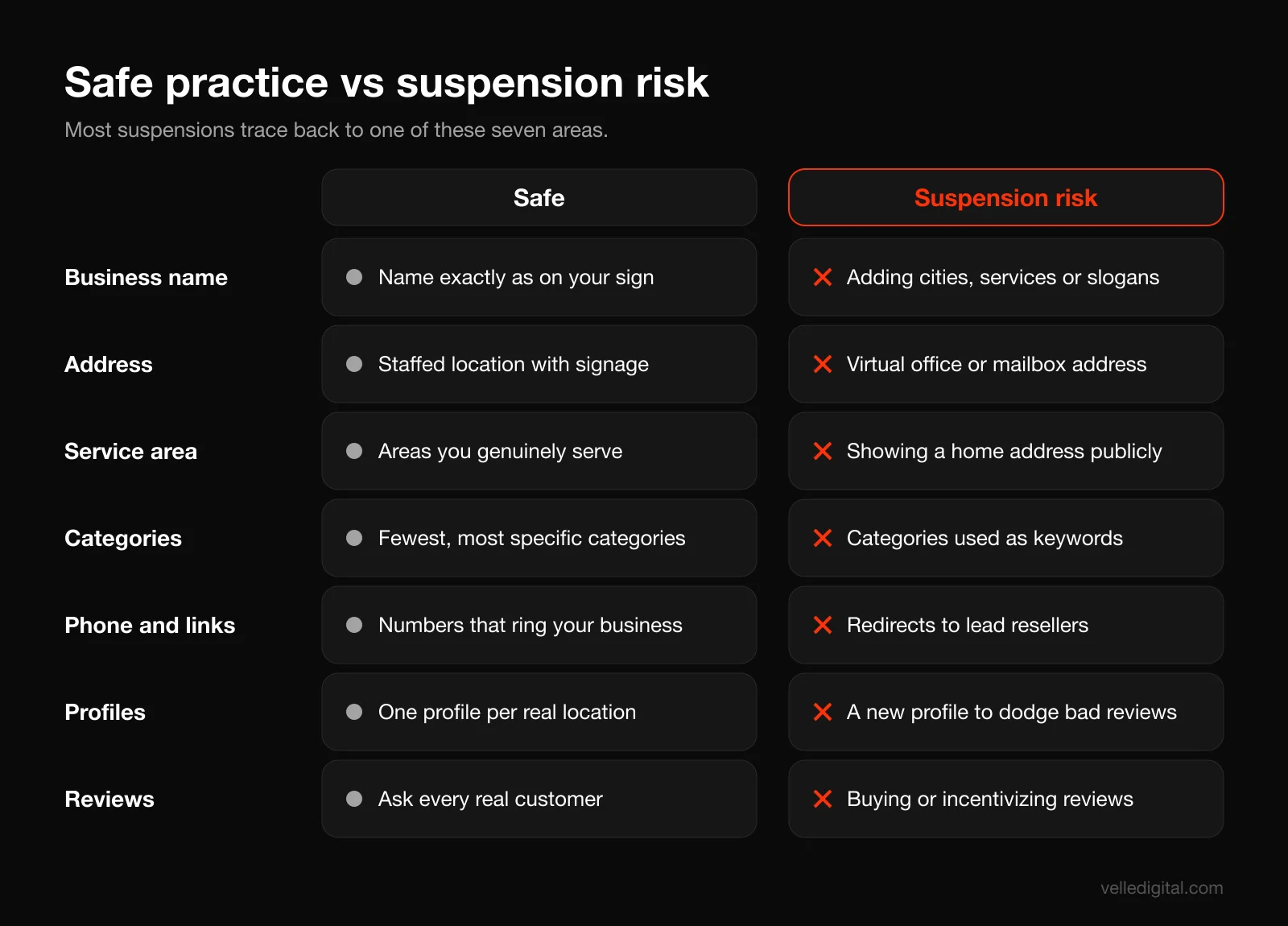
The high-risk violations
- Keyword stuffing the business name. Adding services, cities or slogans to the name. In our experience this is the violation competitors report most.
- Virtual offices and mailboxes. Google says that if your business rents a physical mailing address but doesn't operate out of it, that location isn't eligible for a profile. P.O. boxes and remote mailboxes are not acceptable addresses.
- Co-working desks without real presence. An office in a co-working space only qualifies if it has clear signage, receives customers during business hours, and is staffed by your own team during those hours.
- Fake locations for ranking. Creating profiles at a friend's address, an empty unit or a storage locker to appear in another part of the city.
- Multiple profiles for one business. Separate profiles for each service, or a second profile to escape bad reviews.
- Phone numbers or links that redirect to a different business, a lead generation service or a call center that resells leads.
- Ineligible business types. Online-only businesses, lead generation companies, and rental or for-sale properties are not eligible, according to the eligibility guidelines.
- Review manipulation. Buying reviews, reviewing yourself, or offering discounts in exchange for reviews. Our guide on how to get more Google reviews covers the compliant way to build volume.
Risky edits that can trigger re-verification
Changing the name, moving the address, switching business type, or making many large edits in one day can prompt Google to re-check the profile. Make significant changes one at a time, with proof ready.
If you get suspended
Google's suspended profiles help page lays out the process:
- Fix the cause first, and do not create a new profile for the same business.
- Gather evidence where the business name and address match the profile exactly: business registration, business license, tax certificates, and utility bills such as electricity, phone, water or internet.
- Submit through the Business Profile appeals tool, which shows the decision date, reason and the policy involved.
- Be thorough, because Google says appeals can only be submitted once. If it is denied, you may be able to request an additional review with new evidence.
The weekly maintenance routine
Profiles drift: the public suggests edits, customers upload photos, holidays approach. Here is the 30 minute weekly routine we recommend.
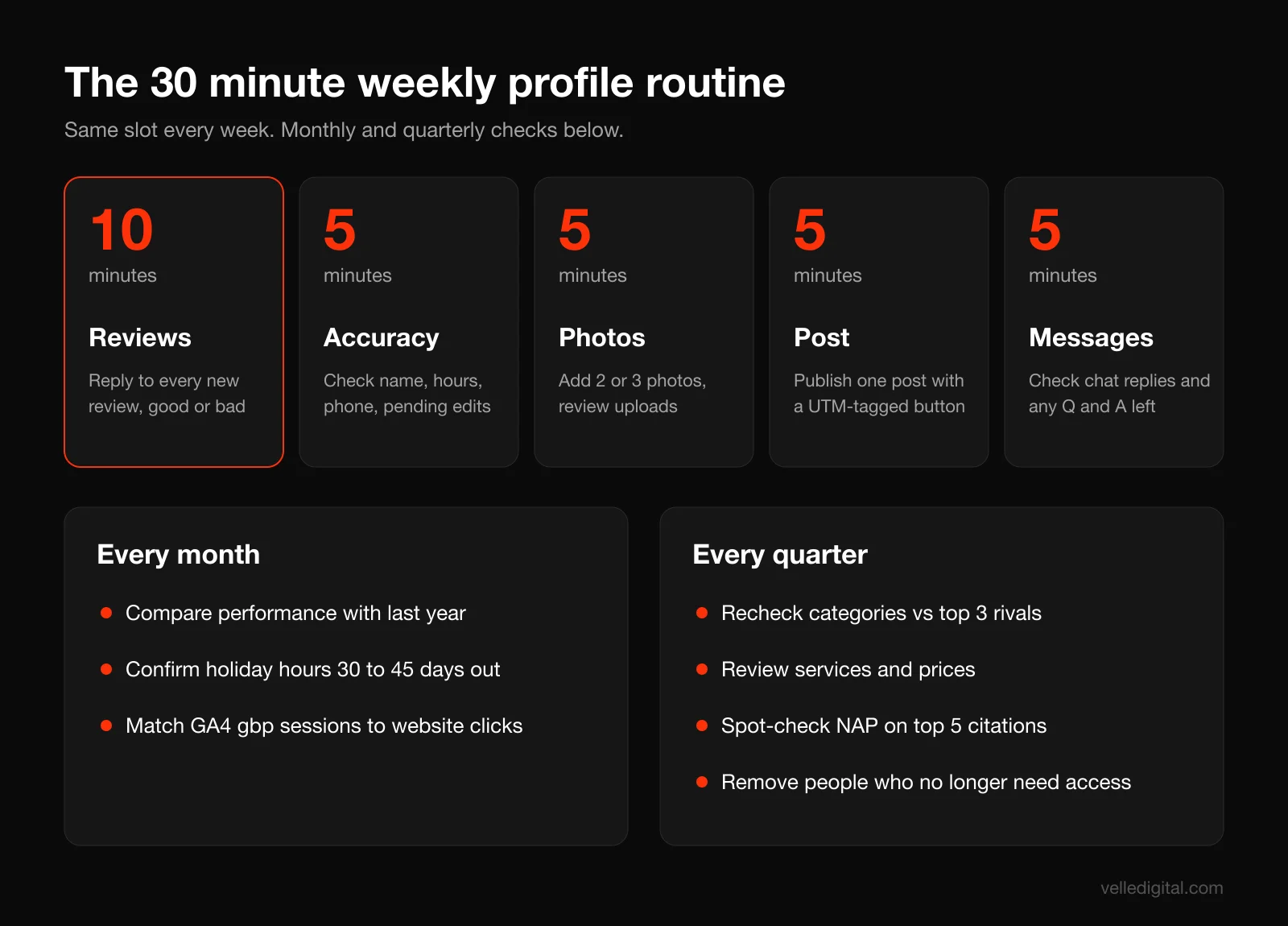
Every week (about 30 minutes)
- Reviews (10 minutes). Reply to every new review, positive and negative. Mention the specific job, and handle complaints calmly with an offer to continue offline.
- Accuracy check (5 minutes). Open the profile while logged out, or in a private window, and check the name, hours, phone, website and categories. Approve or reject any pending Google updates.
- Photos (5 minutes). Upload two or three new photos from that week's work. Review any customer photos and flag anything that violates policy.
- Post (5 minutes). Publish one post from the monthly rotation in Step 12, with a UTM-tagged button.
- Messages and Q and A (5 minutes). If chat is on, check that response times are holding. If your profile still has Q and A, answer anything new.
Every month
- Check performance trends against the same month last year.
- Confirm special hours for any holidays in the next 30 to 45 days.
- Compare the gbp campaign numbers in Google Analytics with the profile's website clicks.
Every quarter
- Re-check categories against the top three competitors and Google's current category list.
- Review the services list and descriptions against your website and your current pricing.
- Spot-check NAP on your five most important citations.
- Confirm who has owner and manager access, and remove anyone who has left the company or an agency you no longer work with.
Common Google Business Profile mistakes
These are the issues we fix most often when we audit a profile:
- Primary category set to something broad, like "Contractor," when a specific category exists.
- Services section empty, or filled with Google's suggestions that the business does not actually offer.
- Website link pointing to a slow page or a generic page that does not mention the service or location.
- Holiday hours never set, so customers find the shop closed on a day Google said it was open.
- A booking link that goes to a page with a CAPTCHA or a social media page, which Google will eventually remove.
If your website itself is part of the problem, our website audit checklist covers what happens after someone clicks through.
Google Business Profile optimization checklist
Use this once for setup, then the weekly routine to keep it current.
- One verified profile per location, owned by a company account, with at least two people holding access.
- Business type set correctly: storefront, service area or hybrid. Service-area businesses have the address hidden.
- Business name exactly as on your signage, with no added keywords or locations.
- Precise address with suite in line 2 and the map pin on your entrance.
- Local primary phone number that rings the business.
- Website link to the right page, with UTM tags.
- Most specific primary category, plus only relevant secondary categories.
- Regular hours, special hours for the next holidays, and more hours where useful.
- Every service listed with a plain-language description and a price or range where possible.
- Description written to the 750 character limit, with no links, prices or promotions.
- All relevant attributes answered accurately.
- Logo, cover photo and at least three photos each of exterior, interior, team, at work and finished work.
- Booking or appointment link that lets the customer complete the action, tagged with UTMs.
- Chat enabled only if someone will reply within minutes.
- At least one post per week, with tagged buttons.
- Profile linked to Google Analytics, and a gbp campaign view saved in GA4.
- NAP matching your website footer, contact page, structured data and top citations.
- A recurring 30 minute weekly maintenance slot in someone's calendar.
Frequently asked questions
How long does Google Business Profile optimization take to show results?
Most edits show up within days. In our experience, visibility changes tend to show within a few weeks of a full optimization, while review volume and prominence build over months. Track calls and direction requests monthly rather than expecting a jump the next morning.
Is Google Business Profile free?
Yes. Creating, verifying and managing a Business Profile costs nothing, and Google states there is no way to pay for a better local ranking. Related tools like booking software or call tracking may cost money.
Can I have a Google Business Profile without a physical address?
Yes, if you serve customers in person at their location. Set the profile up as a service-area business, hide your address and list the areas you serve. Online-only businesses that never meet customers face to face are not eligible for a profile.
How many categories should I choose?
Choose one specific primary category that describes the core of your business, then add secondary categories only for genuine, substantial services. Google allows up to nine additional categories, but its guidelines say to use as few as possible. For most small businesses, three to five well-chosen categories is plenty.
Why was my Google Business Profile suspended?
The most common causes are keyword stuffing in the business name, an ineligible address such as a virtual office or mailbox, a service-area business showing its address, duplicate profiles, and large edits that trigger a review. Fix the cause, gather documents with a matching name and address, and submit one thorough appeal through the appeals tool. Do not create a new profile.
Do Google Posts help with ranking?
Google does not list posts as a ranking factor, and we would not post purely for ranking. Posts do help conversion by showing recent work, offers and activity to people already looking at your profile, and the buttons create trackable visits. One good post a week is enough for most businesses.
Does my business still have a Q and A section?
Probably not. Google discontinued the Q&A API in November 2025 and the public section has disappeared from most profiles we see, though its help page says Q&A remains available for select categories and regions. Put common answers in your services, description, posts and website FAQ instead.
Need a hand with your profile?
A well-optimized Google Business Profile is one of the cheapest sources of local customers you will ever have, and keeping it that way takes discipline more than expertise. If you would rather have someone audit your profile, fix the setup and run the weekly routine alongside your website and local rankings, that is part of our SEO services. Start with a short call, and we will tell you honestly what is worth fixing first.