Landing Page Best Practices: How to Build Pages That Convert
A section-by-section guide to building lead generation landing pages that convert, from ad message match and headlines to forms, speed, A/B testing and a pre-launch checklist.
The landing page best practices that actually move numbers are simple to list and hard to execute: match the page to the ad that sent the visitor, say what you offer and who it is for in one headline, prove it with real evidence, make one clear offer with one clear call to action, keep the form as short as your sales process allows, answer the objections that stop people, and make the whole thing fast on a phone. Then test one change at a time with enough traffic to trust the result.
This guide walks through a lead generation landing page section by section, in the order a visitor reads it. Each step tells you what to put in that section, gives you a template you can copy, and flags the mistakes we see most often when we audit pages for clients. At the end you will find an A/B testing method that does not lie to you and a pre-launch QA checklist you can run in an afternoon.
What a landing page is (and why it is not your homepage)
A landing page is a single page built for one audience, one offer and one action. Someone clicks an ad, an email or a social post, lands on the page, and either takes the action or leaves. There is no menu to wander through and no "learn more about us" detour.
Your homepage has a different job. It serves everyone: past customers looking for a phone number, job seekers, suppliers, people comparing you to a competitor. That is why sending paid traffic to a homepage usually wastes money. The visitor arrived with a specific intent and the page answers twenty questions they did not ask.
The ad makes a promise, and the landing page keeps it. Anything that does not help the visitor believe that promise and act on it gets cut. If you are building a full system around that page (ads, follow-up email, CRM), our guide to full-funnel marketing strategy shows where the landing page sits in the bigger picture.
The one decision to make before you write anything
Pick the single conversion. For most local service businesses it is one of these:
- Request a quote or estimate
- Book a call or consultation
- Claim an offer (free inspection, first class free, a discount)
- Download a guide or checklist in exchange for an email
Not two of these. One. A page that pushes a quote, a newsletter and a competing "call us" button splits attention and muddies your data. You can include a phone number as a secondary option (many service buyers prefer to call), but the page should be designed around the primary action.
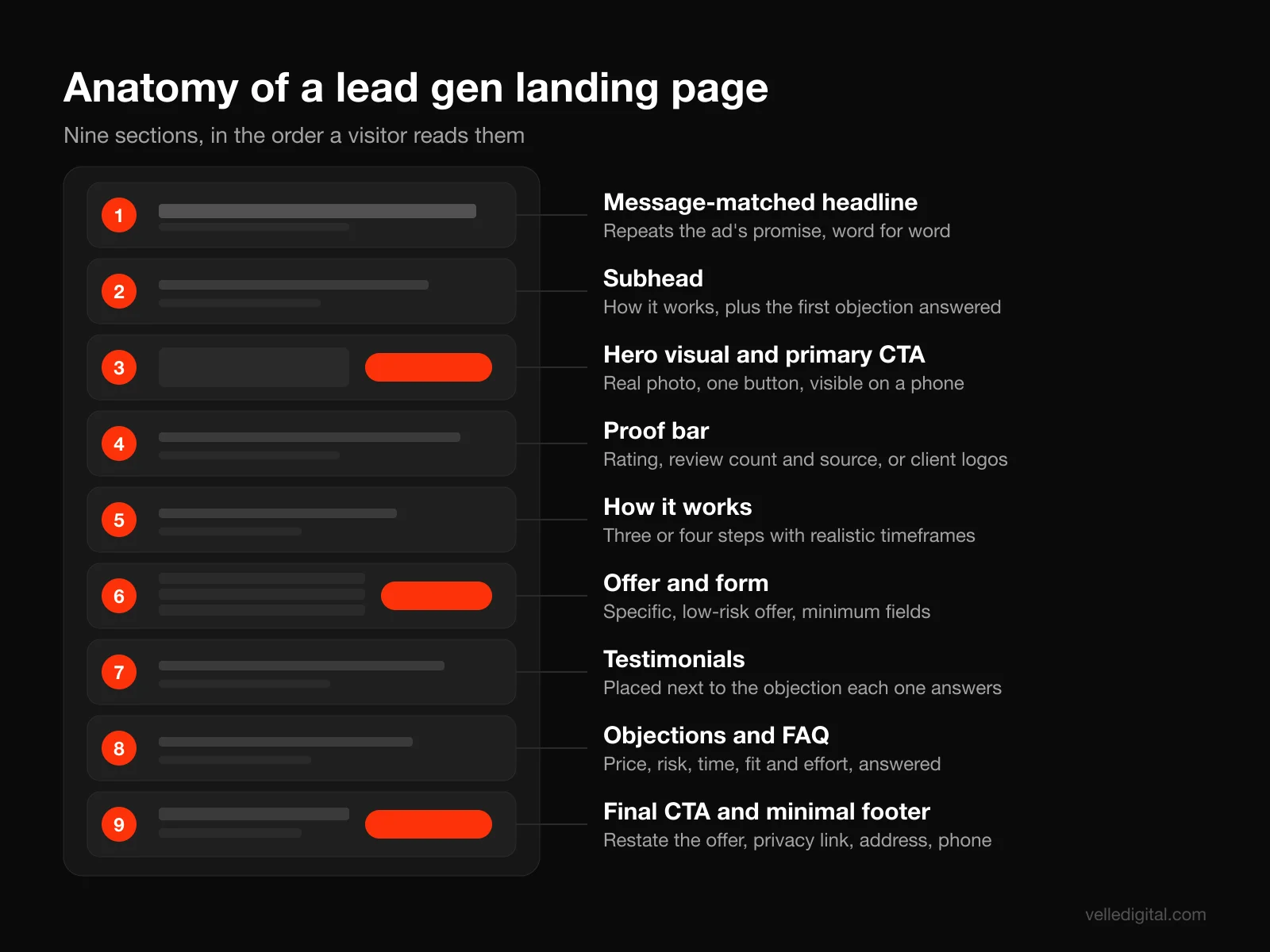
Landing page best practices, section by section
The steps below follow the order of the page from top to bottom. You do not need every section on every page. A simple "book a free estimate" page for a roofer might be five sections long. A higher-consideration offer (a 15,000 dollar renovation, a B2B service retainer) usually needs all of them because the visitor has more questions before they will hand over their details.
Step 1: Match the message to the ad
Message match means the page repeats the language, offer and visual cues of the thing the visitor clicked. If the ad says "Free furnace inspection in Edmonton, this month only," the headline on the page should say something very close to "Free furnace inspection in Edmonton, this month only." Not "Welcome to Smith Heating and Cooling."
Visitors decide in seconds whether they landed in the right place. If the first words they see are the words they just clicked, they keep reading. If not, they hit back. It also matters for ad costs. Google Ads describes landing page experience as one of the three components of Quality Score, defined as how relevant and useful your landing page is to people who click your ad.
Here is how to build message match in practice:
- Write down the exact headline, offer and call to action from each ad or ad group that will point at the page.
- Put the core phrase from the ad into your page headline, word for word if it reads naturally.
- Carry the same offer details (price, deadline, location, guarantee) onto the page, above the fold.
- Reuse the same hero image or a visually related one if the ad was image-led, as most Meta ads are.
- If you run several ad angles (price, speed, quality), build a page variant for each angle rather than one generic page.
Decision rule: if you run more than one distinct offer or audience, you need more than one landing page: one page per offer, and ideally one headline variant per major ad group.
Common mistakes:
- Sending every campaign to the same page because building variants feels like extra work
- An ad that promises a price ("from 99 dollars") and a page that never mentions it
- Ads aimed at a city or neighborhood and a page that never names the place
- A Meta ad with a bright lifestyle image and a page that opens with a stock photo of a handshake
If you run paid social, our guide to Meta ads for local service businesses covers how to plan ad angles so each one has a page to land on.
Step 2: Write the headline and subhead
Your headline has one job: tell the visitor what they get, in their language, fast. Your subhead has a second job: tell them why it is credible or how it works, and remove the first doubt.
Nielsen Norman Group's eyetracking work explains why this matters so much. In their study on scrolling and attention, users spent about 57% of their page-viewing time above the fold, and 74% of viewing time went to the first two screenfuls. The headline is the most-read line on the page. Treat it that way.
The headline formula we use most:
[Specific outcome] for [specific audience or place], [without the main pain or with the key differentiator]
Examples:
- "Furnace repair in Edmonton, same-day service with no call-out fee"
- "A website that books jobs for your trades business, live in four weeks"
- "Bookkeeping for Alberta contractors, done monthly for one flat fee"
The subhead formula:
[How it works or proof in one sentence]. [The first objection, answered].
Examples:
- "Licensed technicians on the road seven days a week. Upfront pricing before we touch anything."
- "Built by a team that has launched sites for local service businesses across Canada. You approve every page before it goes live."
Headline rules worth following:
- Lead with the outcome, not your company name.
- Use the words your customers use. If they say "AC," do not say "climate control solutions."
- Be specific. Numbers, places and timeframes beat adjectives every time. "Fast" means nothing; "same-day" means something.
- Keep it under about 12 words if you can. If you need more, move the extra into the subhead.
- Never write a clever headline that requires a second read. Clarity beats wit on a page that costs you money per visitor.
A quick test: cover everything on the page except the headline and subhead, and show it to someone who does not know your business. Ask them what you sell, who it is for and what they should do next. If they cannot answer all three in about five seconds, rewrite. If writing is not your strong suit, this is one place where professional conversion copywriting earns its fee quickly.
Step 3: Build the hero section and everything above the fold
The hero is the first screenful: headline, subhead, a visual, the primary call to action and usually a small piece of proof. On a phone the fold is roughly 600 to 800 pixels tall, which is not much room, so every element has to earn its spot.
A strong above-the-fold layout for a lead gen page contains:
- Headline and subhead from Step 2
- Primary CTA button (or the first step of the form, see Step 6)
- A relevant visual: a photo of your actual team, your work, the finished result or the product in use. Real beats stock.
- One proof element: star rating and review count, a recognizable client logo, a years-in-business line or a licensing badge
- Optional phone number in the header for buyers who prefer to call, tap-to-call on mobile
What to remove from the hero:
- Full navigation menu. Strip the header down to your logo (not linked, or linked to the same page) and maybe a phone number. Every menu link is an exit.
- Rotating carousels. Visitors rarely wait for slide two, and the movement pulls focus from the headline.
- Generic stock imagery. A smiling headset model tells visitors nothing and can quietly signal that the business is not real.
Layout tip from eyetracking research: NN/g found in the same scrolling study that more than 65% of above-the-fold viewing time was concentrated in the top half of the viewport. Put the headline and the CTA near the top of that first screen, not centered at the bottom under a giant image.
Decision rule for hero visuals: if your service produces a visible result (landscaping, renovations, cosmetic dentistry, detailing), show a real before and after. If it does not (accounting, legal, consulting), show the people the customer will actually deal with. Faces of the real team do more for trust than any illustration.
Step 4: Add proof that is specific and verifiable
Proof answers the question every visitor is silently asking: "Has this worked for people like me?" Nielsen Norman Group's article on social proof in UX puts the principle plainly: people are guided by other people's behavior, so showing the actions and opinions of others can influence what users do.
In rough order of persuasive power for a local service business:
- Specific case results with names and context: for example, "Replaced a 1970s boiler for a family in Sherwood Park, finished in two days." Use real customers, real details, with permission.
- Reviews with names, photos and the platform they came from: pull your strongest Google reviews and show the reviewer's first name, last initial and the date.
- Aggregate rating and count: for example, "4.9 stars from 312 Google reviews" beside the CTA. Only display numbers that are true today, and link to the source.
- Client or partner logos: useful for B2B and for any business that serves recognizable organizations.
- Credentials: licenses, certifications, insurance, industry association memberships, warranties.
- Volume indicators: a line like "Over 2,000 furnaces serviced since 2011," but only if your own records back it up.
How to write a testimonial block that persuades:
- Lead with the specific outcome in the customer's words, bolded as a pull quote
- Follow with two or three sentences of context (what the problem was, what you did)
- Add the customer's name, location or company and a photo if they agree
- Keep each testimonial short enough to read in 10 seconds
Where to put proof: one small proof element in the hero, a proof bar (logos or rating) directly below it, and two or three full testimonials placed next to the objections they answer. A testimonial about speed belongs beside your "how fast can you start" section. A testimonial about price fairness belongs beside your pricing or offer.
Common mistakes:
- Testimonials with only initials ("J.S., Calgary"), which read as invented
- Proof that is not relevant to this offer (a commercial client quote on a residential page)
- Showing a rating without a count, or a count without a source
- Editing customer quotes into marketing copy. Keep their voice; it is what makes it believable.
A note on honesty: never invent reviews, combine reviews from different people into one, or pay for reviews without disclosure. Beyond being wrong, fabricated reviews create legal exposure in both Canada and the US, and visitors are better at spotting fake praise than most owners assume.
Step 5: Design the offer and the call to action
The offer is what the visitor gets for taking action. The call to action is the button or link that starts it. Most landing pages underinvest in the first and overthink the color of the second.
Make the offer worth the effort. "Contact us" is not an offer. Compare:
- Weak: "Contact us for more information"
- Better: "Get a free quote"
- Strong: "Get a written quote within 24 hours, no site visit needed for most jobs"
A strong offer is specific (what exactly do I get), low risk (what does it cost me, can I back out) and time bound where that is honest (this month, limited spots, while stock lasts). If the only thing you can offer is a quote, make the quote process sound faster, clearer and less salesy than your competitors'.
Offer ideas that work for service businesses:
- Free inspection, assessment or audit with a written report
- Fixed-price starter package or "first visit" rate
- Guaranteed response time ("We call you back within 15 minutes during business hours")
- A useful resource (cost guide, planning checklist, buyer's guide) for earlier-stage visitors
- A risk reversal: satisfaction guarantee, no-obligation estimate, cancel anytime
CTA button copy formula:
[Verb] + [what they get] + [optional risk reducer]
Examples you can adapt:
- "Get my free quote"
- "Book my free inspection"
- "Check availability"
- "Send me the cost guide"
- "See if we serve your area"
First person ("my") often reads more naturally on a button because the visitor is the one clicking. Whichever you pick, describe the result, not the mechanics. "Submit" and "Send" describe what the browser does, not what the visitor gets.
CTA design rules:
- One primary button style, used for one action, repeated down the page (after the hero, after proof, after the FAQ).
- High contrast with the background. It should be the most obvious thing on the screen, not because it is orange but because nothing else competes with it.
- Big enough to tap comfortably on a phone, full width on mobile is fine.
- A short line of microcopy directly under the button that removes the last hesitation: "No credit card. No obligation. We reply within one business day."
Decision rule on secondary CTAs: offer a phone number or click-to-call as a secondary option if your buyers commonly call (trades, emergency services, healthcare). Do not offer a second, different conversion (newsletter signup, "follow us") on the same page.
Step 6: Build the form
The form is where interest becomes a lead, and it is where most of the friction lives. Every field you add is a small cost the visitor pays. Some fields are worth the cost because they help you qualify and route the lead. Many are not.
Baymard Institute's checkout research is the best large-scale evidence on form length. Their analysis of checkout form fields found the average checkout contains 11.3 form fields, and that the number of form fields users must consider affects usability far more than the number of steps. A lead form is not a checkout, but the lesson carries over: count fields, not pages, and cut ruthlessly.
Step 6a: Decide which fields you actually need
Go through every field and ask: "What do we do differently with this answer before the first conversation?" If the answer is "nothing," cut it and ask on the call instead.
A sensible baseline for a service quote form:
- First name
- Phone or email (or both, if you genuinely follow up on both)
- What they need (a short dropdown or a set of buttons)
- Postal code or city (only if you need to check service area)
That is three or four fields. Add more only when they change routing or pricing, for example property type for a roofing company or budget range for a renovation firm that does not take small jobs.
Step 6b: Choose single step or multi-step
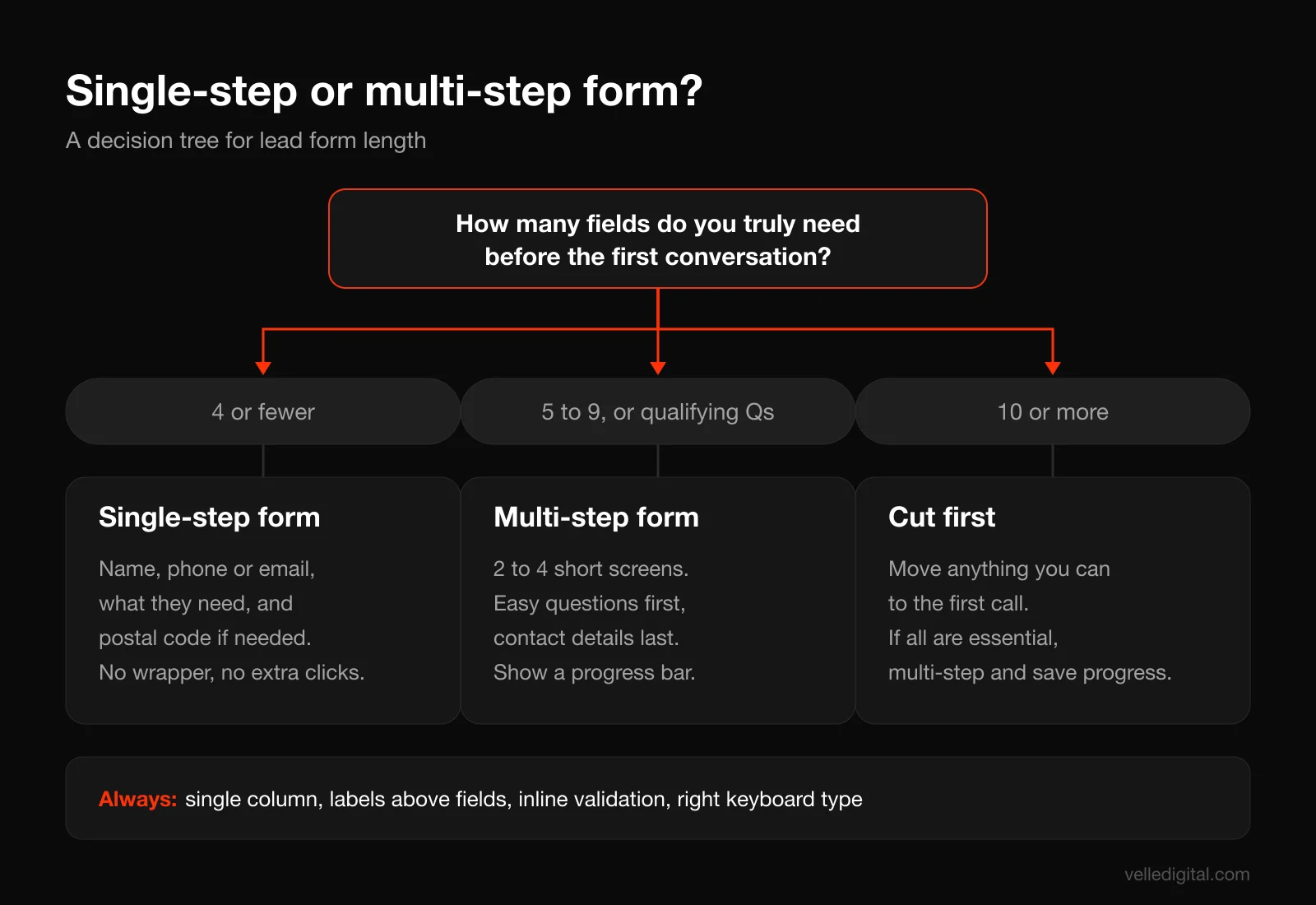
A multi-step form shows a few questions at a time, usually starting with easy, non-personal ones ("What type of project?") and ending with contact details. This works because the first click costs almost nothing, and once someone has answered two questions they are more likely to finish. It is the same idea as progressive disclosure: show only what is needed at each step.
Use this decision rule:
- Four fields or fewer: single step. A multi-step wrapper adds clicks for no benefit.
- Five to nine fields, or any qualifying questions: multi-step, two to four screens, contact details last.
- Ten or more fields: question whether all of them belong before the first call. If they truly do (insurance quotes, financing applications), use multi-step with a visible progress indicator and save progress if you can.
Step 6c: Get the form details right
Small, well researched rules that add up:
- Single column layout. NN/g's guide to website form design recommends presenting fields in a single column because multiple columns interrupt the vertical momentum of moving down the form.
- Labels above the fields, not inside them. On mobile, Baymard's testing found labels work best above the field rather than to the left.
- No placeholder text as labels. NN/g explains that placeholder text in form fields makes it hard for people to remember what belongs in a field and to check for and fix errors.
- Mark optional fields, and keep them rare. The same NN/g forms article suggests limiting a form to one or two optional fields and clearly labeling them.
- Validate inline, kindly. Baymard's research on inline form validation found 31% of sites have no inline validation at all. Tell people a phone number looks incomplete when they leave the field, not after they press submit and lose their place.
- Use the right input types. Phone fields should open the number pad on mobile, email fields the email keyboard. This is one HTML attribute and it makes a real difference.
- Use buttons for short choices. "Residential / Commercial" as two tappable buttons beats a dropdown with two options.
- Write a useful error message. "Please enter a 10 digit phone number" beats "Invalid input."
Step 6d: Plan what happens after submit
The form is not finished when it submits. Decide:
- Thank-you page: a real page (not just a "thanks" message) that confirms what happens next, when, and from whom. "Sarah will call you within 15 minutes between 8 am and 6 pm. If you would rather book a time now, pick a slot below."
- Confirmation email or text: sent instantly, with the same promise and a way to reach you.
- Lead routing: the lead should land in your CRM and alert the person responsible right away. A lead that sits in an inbox for a day is worth a fraction of one called back in five minutes. We cover the setup in our post on speed-to-lead automation.
- Conversion tracking: fire your ad platform conversion event on the thank-you page or on a confirmed submission, not on a button click, so your ad optimization learns from real leads.
Step 7: Handle objections and write the FAQ
By the time visitors reach the middle of the page, they want to act but something is holding them back. Find out what it is and answer it on the page, before they leave to ask a competitor.
How to find the real objections:
- Ask whoever answers your phone: "What are the five questions people ask before they book?"
- Read your last 20 lost quotes or unanswered follow-ups and note why they went cold.
- Read your competitors' one-star and three-star reviews. They list exactly what customers in your market fear.
- Look at your Google Business Profile questions and your own reviews for repeated themes.
Most service objections fall into five buckets: price ("Is it going to be expensive, are there hidden fees?"), risk ("What if it goes wrong?"), time ("How soon can you start, how long will it take?"), fit ("Do you do my type of job, do you serve my area?") and effort ("Will this be a hassle?").
How to answer them on the page:
- Price: show a price, a range or "starting from" if you possibly can. If you cannot, explain how pricing works and what affects it. Silence about price reads as "expensive."
- Risk: guarantees, warranties, insurance, licensing, and a testimonial from someone who had a problem you fixed.
- Time: a simple "How it works" section with three or four numbered steps and realistic timeframes.
- Fit: a service area list or map, and a short "Who this is for / who it is not for" block.
- Effort: spell out what the customer has to do (usually very little) and what you handle.
The FAQ section catches the rest. Keep it to five to eight questions, written the way customers ask them, with short direct answers. Use an accordion on mobile to save space, but make sure the questions themselves are visible without clicking. This is also where you answer the "boring" questions (payment methods, parking, cancellation) that otherwise generate phone calls.
Objection template you can copy:
Question in the customer's words? Direct answer in the first sentence. One sentence of supporting detail or proof. Optional link or CTA if it helps them act.
Example: "Do you charge for quotes? No. Quotes are free and you will get yours in writing within 24 hours. Most jobs can be quoted from photos, so you do not need to book a site visit."
Step 8: Make it fast and built for mobile first
For most local service businesses, most paid traffic comes from phones. Design and review the mobile version first, then desktop.
Speed targets to hit. Google's Core Web Vitals give you concrete thresholds: Largest Contentful Paint within 2.5 seconds, Interaction to Next Paint of 200 milliseconds or less, and Cumulative Layout Shift of 0.1 or less, measured at the 75th percentile of page loads. These numbers are a good stand-in for "does this feel fast and stable to a real person on a real phone."
How to check your page:
- Run it through Google's PageSpeed Insights and look at both the mobile field data (real users, if you have enough traffic) and the lab diagnostics.
- Open the page on an older mid-range phone on cellular data, not on your office wifi and latest phone.
- Watch for anything that jumps as the page loads: banners that push content down, images without set dimensions, late-loading fonts.
The most common speed fixes on landing pages:
- Compress and resize the hero image. A 4 MB photo scaled down in the browser is the single most common cause of slow LCP we see. Serve modern formats like WebP or AVIF at the size it displays.
- Do not lazy-load the hero image. Lazy-load images further down, but the main above-the-fold image should load immediately.
- Cut third-party scripts. Chat widgets, heatmaps, multiple tracking pixels and review widgets all add weight. Keep what you use, remove what you do not, and load non-essential scripts after the page is interactive.
- Avoid heavy page builder bloat. Many drag-and-drop builders ship far more code than a simple landing page needs. If your page builder cannot get you under the thresholds, that is a strong signal to change tools.
- Reserve space for embeds. Forms, maps and videos should have a fixed container size so the page does not shift when they load.
Mobile layout rules:
- Body text at least 16 px, line length short enough to read without zooming
- Tap targets large and spaced apart, especially the CTA and form buttons
- Sticky call or CTA bar at the bottom of the screen for long pages (test it, some audiences find it pushy)
- No pop-ups that cover the content on load
- Forms that do not trigger zoom when a field is tapped (usually fixed by using a 16 px font size in inputs)
Step 9: Earn trust and respect privacy
Trust is the sum of many small signals. NN/g's research on trustworthy design groups them into four themes that have stayed stable over the years: design quality, upfront disclosure, content that is comprehensive, correct and current, and being connected to the rest of the web. Each maps to concrete things you can add to a landing page:
- Design quality: consistent fonts and colors, no typos, real photos, nothing broken. Sloppy design reads as a sloppy business.
- Upfront disclosure: show pricing or how pricing works, your service area, your hours and what happens after the form. Hiding these until the sales call degrades trust.
- Comprehensive, correct, current: an up-to-date review count, current offer dates, a copyright year that is not three years old.
- Connected to the web: links or badges for your Google reviews, industry associations, a real address and a phone number that a human answers.
Privacy and consent essentials:
- Say what you will do with the details. One line under the form: "We will only use your details to respond to your request. No spam, ever."
- Link to a privacy policy in the footer and near the form. In Canada, private-sector businesses are subject to privacy law covering how they collect and use personal information; the Office of the Privacy Commissioner's PIPEDA overview is a good starting point.
- Separate marketing consent from the request. Asking for a quote is not permission to add someone to your newsletter. Canada's anti-spam legislation (CASL) governs commercial electronic messages, so if you want to send marketing emails or texts, use an unchecked opt-in box with clear wording and keep a record of the consent.
- Use HTTPS everywhere. Browsers flag non-secure pages, and a "Not secure" warning next to a form kills conversions.
- Be careful with tracking. Know what your pixels collect, disclose it in your policy, and set up a cookie banner if your audience or jurisdiction requires one.
None of this is legal advice, and rules differ by province, state and industry. If you collect sensitive information (health, finances), get a proper review.
Step 10: Close the page with a final CTA
Visitors who scroll to the bottom are interested but not yet convinced, or convinced but looking for the button. Give them a short closing section: restate the offer in one line, repeat the main proof point, and show the CTA or form one more time. Then a minimal footer with your business name, address, phone, privacy policy link and nothing else.
How to A/B test landing pages properly
Testing is how a live page gets better. It is also where most small businesses fool themselves, by calling a winner after 40 visits or changing five things at once.
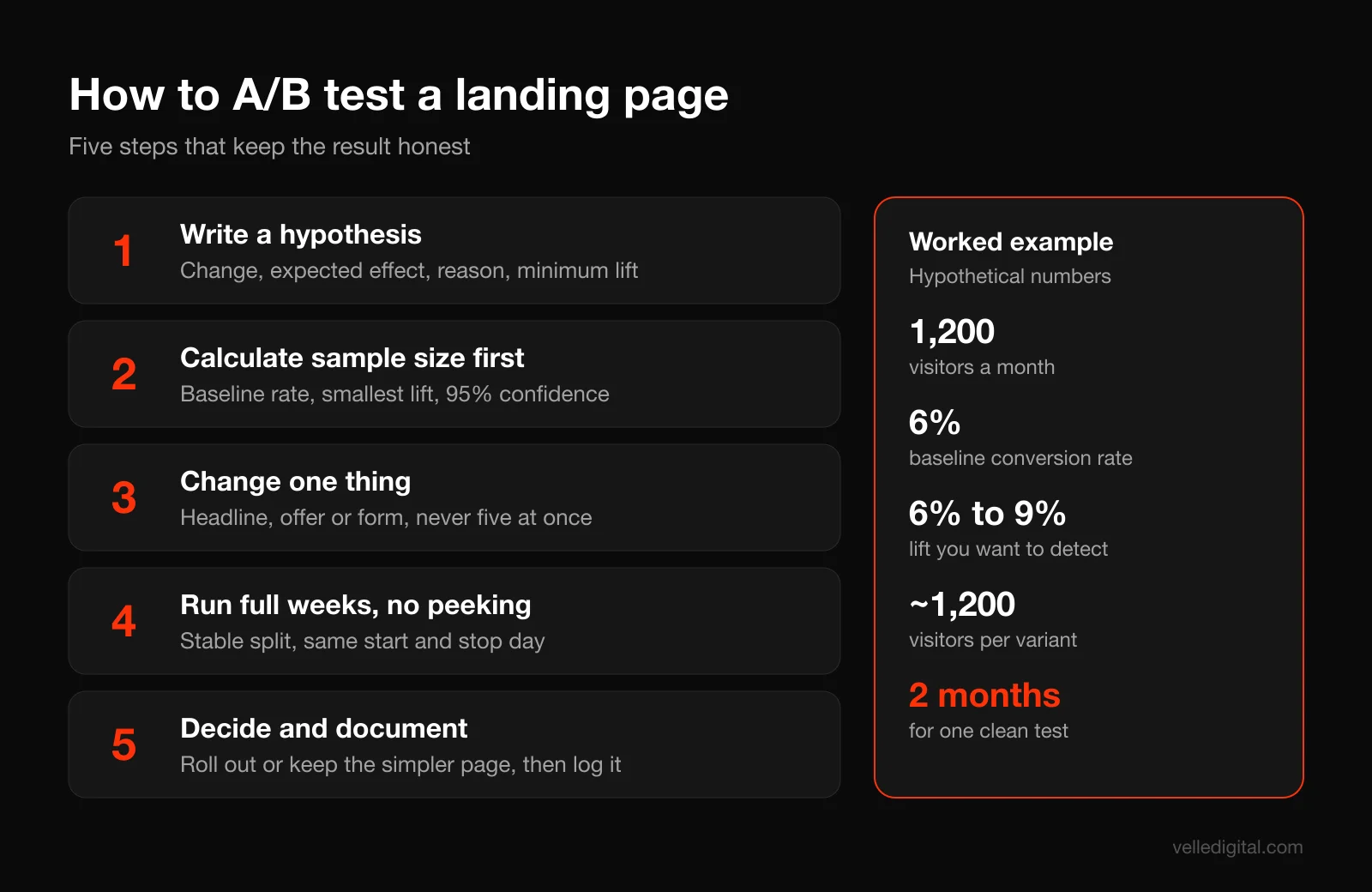
Nielsen Norman Group's guide to A/B testing lays out the core requirements: a clear hypothesis, defined metrics, and a sample size calculated before the test starts. They also recommend running a test for at least one to two weeks even with sufficient traffic, to account for fluctuations in user behavior.
Step 1: Write a hypothesis worth testing
A good hypothesis names the change, the expected effect and the reason.
Because [observation or research], we believe [change] will [increase or decrease metric] for [audience]. We will know when [metric] moves by at least [minimum detectable effect].
Example: "Because callers keep asking whether quotes are free, we believe adding 'Free written quote, no site visit needed' under the headline will increase form submissions from paid search visitors. We will know when the conversion rate improves by at least 20% relative."
Test big things first: the headline and offer, the form length or format, the hero layout, the presence of pricing. Button colors and tiny wording changes rarely produce detectable effects for small business traffic levels.
Step 2: Calculate the sample size before you start
You need three numbers to calculate sample size: your baseline conversion rate, the smallest improvement you care about detecting, and the confidence level you want (95% is standard). Plug them into any reputable sample size calculator.
NN/g's worked example shows why this matters: with a 3% baseline click rate, wanting to detect a 20% relative change at 95% significance, their calculation called for about 13,000 users. Most local landing pages do not get that kind of traffic in a month.
Worked example (hypothetical numbers): your page gets 1,200 visitors a month and converts at 6%, so about 72 leads. If you want to detect a lift from 6% to 9% (a 50% relative improvement) at 95% confidence and 80% power, a standard calculator puts the requirement at roughly 1,200 visitors per variant, about 2,400 in total. That is two months of traffic for one test.
Decision rules for low-traffic pages:
- If a test would take more than about eight weeks, test a bigger change (a completely different headline and offer, not a reworded button).
- If you get fewer than a few hundred visitors a month, skip formal A/B testing. Instead, run usability checks (watch five people use the page), review session recordings, and make research-backed improvements one at a time while watching weekly trends.
- Optimize for the metric that pays the bills. A form submission rate is fine, but if you can measure qualified leads or booked jobs in your CRM, judge tests on those.
Step 3: Change one thing at a time
If variant B has a new headline, a shorter form and a new hero image, and it wins, you do not know why, and one of those changes might have been hurting you. Change one element per test. (Multivariate testing exists, but it needs far more traffic than almost any small business has.)
Step 4: Run it cleanly
- Split traffic randomly and evenly, and keep the split stable for each visitor so they always see the same version.
- Run full weeks. Behavior on a Monday morning differs from a Saturday night. Start and stop on the same day of the week.
- Do not peek and stop early. Checking daily and stopping the moment one version looks ahead is the most common way to crown a false winner. Decide the duration up front and stick to it.
- Keep everything else steady. Do not change ad budgets, targeting or offers mid-test.
- Protect your SEO. If the test uses separate URLs, Google's guidance on website testing says not to cloak, to use rel="canonical" pointing to the original URL, to use 302 (temporary) redirects rather than 301s, and to end the experiment once you have your answer.
- Testing the ad side? Google Ads has built-in custom experiments that split campaign traffic between your original and a variant, which is useful when you want to test sending traffic to two different landing pages.
Step 5: Decide and document
When the test reaches its planned sample size and duration, look at the result. If the variant wins at your chosen confidence level, roll it out. If there is no clear difference, keep whichever is simpler and move on; a "no difference" result is still useful information. Write every test down in one shared document: hypothesis, dates, traffic, result, decision. After a year, that log is one of the most valuable marketing assets you own.
Common landing page mistakes (and the fix for each)
These are the problems we find most often when reviewing pages for clients:
- Sending ads to the homepage. Fix: build a dedicated page per offer, with message match.
- A headline about you, not them. Fix: rewrite with the outcome and audience formula from Step 2.
- No proof above the fold. Fix: add a rating, count and source next to the CTA.
- Too many choices. Fix: one primary action, remove the navigation, cut secondary offers.
- A long form asked up front. Fix: cut to essentials or switch to multi-step with contact details last.
- Hidden pricing. Fix: show a range, a starting price or a clear explanation of how pricing works.
- Slow on mobile. Fix: compress the hero image, remove unused scripts, check Core Web Vitals.
- No follow-up plan. Fix: instant confirmation, CRM routing and a fast human callback.
- Tracking the wrong conversion. Fix: fire conversion events on confirmed submissions, verify in each ad platform.
- Declaring test winners too early. Fix: calculate sample size first and commit to the run time.
Pre-launch landing page QA checklist
Run this before you spend a dollar on ads. It takes an afternoon and catches the problems that otherwise waste a week of budget.
Message and copy
- Headline repeats the core promise of every ad pointing at the page
- Offer details (price, deadline, location) match the ads exactly
- No typos, placeholder text or "lorem ipsum" anywhere, including alt text and the page title
- Every claim is true today: review counts, years in business, guarantees
- Page title and meta description are written (even for paid traffic, they show up in shares and browser tabs)
Layout and design
- Headline, subhead and CTA visible on the first screen of a phone
- Navigation removed or minimized
- One primary CTA style, repeated at logical points
- Real photos, properly cropped, no stretched or pixelated images
- Readable text size and contrast on mobile
Form and conversion
- Every field is necessary, labels sit above fields, optional fields are marked
- Correct keyboard opens for phone and email fields
- Inline validation and helpful error messages work
- Submit a test lead from a phone and a desktop; both arrive in the CRM with all fields mapped
- Confirmation email or text arrives within a minute
- Thank-you page loads and explains next steps
- Alert reaches the person who will call the lead
- Spam protection is in place (honeypot field or invisible captcha, not a puzzle)
Tracking
- Analytics loads on the page and the thank-you page
- Ad platform conversion events fire once per real submission, not on page refresh
- UTM parameters from the ads are captured with the lead
- Test conversions show up in Google Ads, Meta Events Manager or whatever platforms you use
Speed and technical
- PageSpeed Insights mobile check run; LCP, INP and CLS in the good range or close to it
- Hero image compressed and not lazy-loaded
- HTTPS working with no mixed content warnings
- Page works in Chrome, Safari and at least one other browser
- Links in the footer (privacy policy, terms) work
- If the page should not appear in search, it is set to noindex; if it should, it is not
Trust and compliance
- Privacy policy linked near the form
- Marketing consent checkbox is separate and unchecked by default
- Real business name, address and phone number visible
- Testimonials used with permission
Which landing page best practices to fix first
If your page exists and is underperforming, work in this order. In our experience each step tends to matter more than the one after it:
- Message match. Rewrite the headline to mirror your best-performing ad. This is often a 10 minute change with the largest effect.
- Offer and CTA. Replace "Contact us" with a specific, low-risk offer and a button that names it.
- Form length. Delete every field you do not need before the first call.
- Proof near the CTA. Add your rating, review count and source beside the button.
- Mobile speed. Compress the hero image and remove scripts you do not use.
- Objections. Add a short "How it works" section and five honest FAQs.
Only then does it make sense to A/B test smaller details. Testing a button color on a page with a vague headline and a twelve field form is rearranging furniture in a house with no front door.
How landing pages fit with your ads and CRM
The ad decides who arrives, the page decides who converts, and your follow-up decides who becomes a customer. Weakness in any one caps the other two.
If you run search campaigns, structure your Google Ads account so that each ad group's keywords point to a page variant that speaks to that exact search. "Emergency plumber" and "bathroom renovation quote" are different people with different urgency and they deserve different pages.
On the follow-up side, connect your forms to a CRM so every lead is captured, assigned and tracked to a result. That also closes the loop on testing: when you can see which variant produced booked jobs, not just form fills, you optimize for revenue rather than clicks.
On the design side, if you want a page designed around how your customers actually behave rather than around a template, that is the core of our UI and UX design work.
Frequently asked questions
What are the most important landing page best practices?
The most important are message match with your ad, a clear outcome-focused headline, specific proof near the call to action, a single offer with one primary CTA, a short form, and fast mobile performance. If you fix only those six, most pages improve noticeably. Everything else (FAQ, trust badges, testing) builds on that foundation.
How long should a landing page be?
As long as it needs to be to answer the visitor's questions, and no longer. Low-cost, low-risk offers like a free quote can work with a short page of a few sections. Higher-cost or higher-risk decisions usually need more proof, a "how it works" section and an FAQ, so the page gets longer.
How many form fields should a lead generation form have?
Ask only for what you need before the first conversation, which for most service businesses is three or four fields: name, phone or email, what they need and possibly location. Baymard's research shows the number of fields users must consider matters more than the number of steps. If you need qualifying questions, use a multi-step form with contact details last.
Should a landing page have navigation?
Generally no. Each navigation link is a way to leave the page without converting, so most high-performing lead gen pages show only a logo and possibly a phone number in the header. Keep footer links to essentials like the privacy policy.
What is a good landing page conversion rate?
It depends heavily on the industry, the offer, the traffic source and how you define a conversion, so broad averages are not very useful. A free quote page fed by high-intent search traffic should convert far better than a guide download fed by cold social traffic. Compare against your own baseline and aim to improve it month over month.
How long should I run an A/B test on a landing page?
Calculate the required sample size first, then run the test until you reach it, in full weeks. Nielsen Norman Group recommends at least one to two weeks even with plenty of traffic. If the math says the test would take months, test a bigger change or use qualitative research instead.
Do landing pages help SEO?
Most paid landing pages are not built to rank, and some are deliberately set to noindex to avoid thin duplicate pages. Pages designed for organic search need more depth and a different structure. That said, the same speed, clarity and mobile usability improvements help both paid conversion rates and search performance.
Build a landing page that earns its traffic
Every ad dollar passes through your landing page before it becomes a lead, so improving the page is often the cheapest way to lower your cost per lead. Start with the priority list above, run the QA checklist before launch, and test one meaningful change at a time. If you would rather have a team handle it, from ad message to page design to CRM follow-up, take a look at how we build landing pages and funnels for service businesses and get in touch when you are ready.