How to Build a Social Media Marketing Plan for a Local Business
A step-by-step social media marketing plan for local businesses: goals tied to revenue, platforms chosen by data, a 3 hour weekly content system, DMs as a lead channel, and a 90 day calendar.
A social media marketing plan for a local business is a one-page operating document that answers five questions: what revenue you want social to produce, which two or three platforms your customers actually use, what you will post every week, who answers comments and messages (and how fast), and which numbers you will check every month to decide what to keep. If your current plan is "post when we remember," you don't have a plan, you have a habit that feels productive and rarely books jobs.
This guide walks you through building that plan step by step, the same way we build them for local service businesses: goals tied to booked work, platforms chosen by data instead of trends, content pillars with real examples, a weekly batching system you can run in about three hours, phone-shot video that looks professional, DMs treated as a lead channel, Google Business Profile posts, a clear rule for when to boost versus run proper ads, and a 90 day rollout with a sample content calendar. You can follow it without hiring anyone.
What a social media marketing plan is (and what it is not)
Most "social media strategies" we see from small businesses are either a content calendar with no goal attached, or a goal ("grow our brand") with no system to reach it. A working plan has both, and it fits on one or two pages.
Here is what belongs in it:
- A revenue goal expressed in leads or booked jobs, not followers.
- Two or three primary platforms with a reason for each.
- Three to five content pillars that map to the questions your customers ask before they buy.
- A weekly production rhythm (who films, who writes, who schedules, when).
- A response standard for comments, reviews and direct messages.
- A paid layer: how much you will spend on boosting or ads, and the rule for when.
- A measurement routine: five or six numbers, checked monthly.
What it is not: a 40-slide brand deck, a list of national holidays to post about, or a promise to be on every platform. Local businesses win on social by being consistent, useful and fast to respond in a small number of places, not by being everywhere.
Rule of thumb: if a line in your plan doesn't change what someone does on Monday morning, cut it.
Before you start: gather these five things
You'll move faster if you have these open before Step 1. None of them take long.
- Your last 12 months of revenue by service. Even rough numbers. You need to know which services make you money so social can push those.
- Your average job value and close rate. If you don't track close rate, estimate it: of the last 20 people who asked for a quote, how many hired you?
- Admin access to every account. Facebook Page, Instagram, Google Business Profile, and any others. Make sure the business owns them, not a former employee or a past agency.
- A list of the 20 questions customers ask most. Ask whoever answers your phone. This list becomes your content.
- Your camera roll from the last six months. You probably have more usable footage of real jobs than you think.
Step 1: Set social media goals tied to revenue
Start from money and work backward. "More engagement" is not a goal because you can't pay rent with it. The goal for a local business is almost always one of three things: more booked jobs, more high-value jobs, or more jobs in a specific season or area.
Work backward from the revenue you want
Use this simple funnel math. The numbers below are an example for a hypothetical residential cleaning company, not a benchmark.
- Revenue target from social: 6,000 dollars per month in new business.
- Average first job value: 300 dollars. So you need 20 new customers a month.
- Close rate on inquiries: 40 percent. So you need 50 inquiries a month (20 divided by 0.4).
- Inquiries come from: DMs, calls from your profile, website form fills from social links, and Google Business Profile actions.
Now you have a real target: 50 qualified inquiries a month that you can trace to social. That number decides how much you post, how fast you reply, and whether organic alone can get there or you need a paid layer.
Pick one primary goal and two supporting metrics
Write your goal in this format and put it at the top of your plan:
Goal: Generate 50 qualified inquiries per month from Facebook, Instagram and Google Business Profile by the end of month three, measured by tagged DMs, calls and form fills.
Then pick two supporting metrics that predict the goal:
- Reach among local accounts (are the right people seeing you?).
- Profile actions (taps on call, directions, website and message buttons).
Everything else (likes, follower count, impressions) is a diagnostic, not a goal. Look at it when something breaks.
Decision rule: organic, paid, or both
- If your monthly inquiry target is under about 15 and you already have reviews and some following, then start organic only and revisit at day 60.
- If your target is higher, you have a capacity problem to fill, or you have a seasonal window, then plan a paid layer from day one (Step 9).
- If you have zero reviews and a brand-new page, then fix your Google Business Profile and get ten honest reviews before spending a dollar on ads.
Step 2: Choose platforms by where your customers actually are
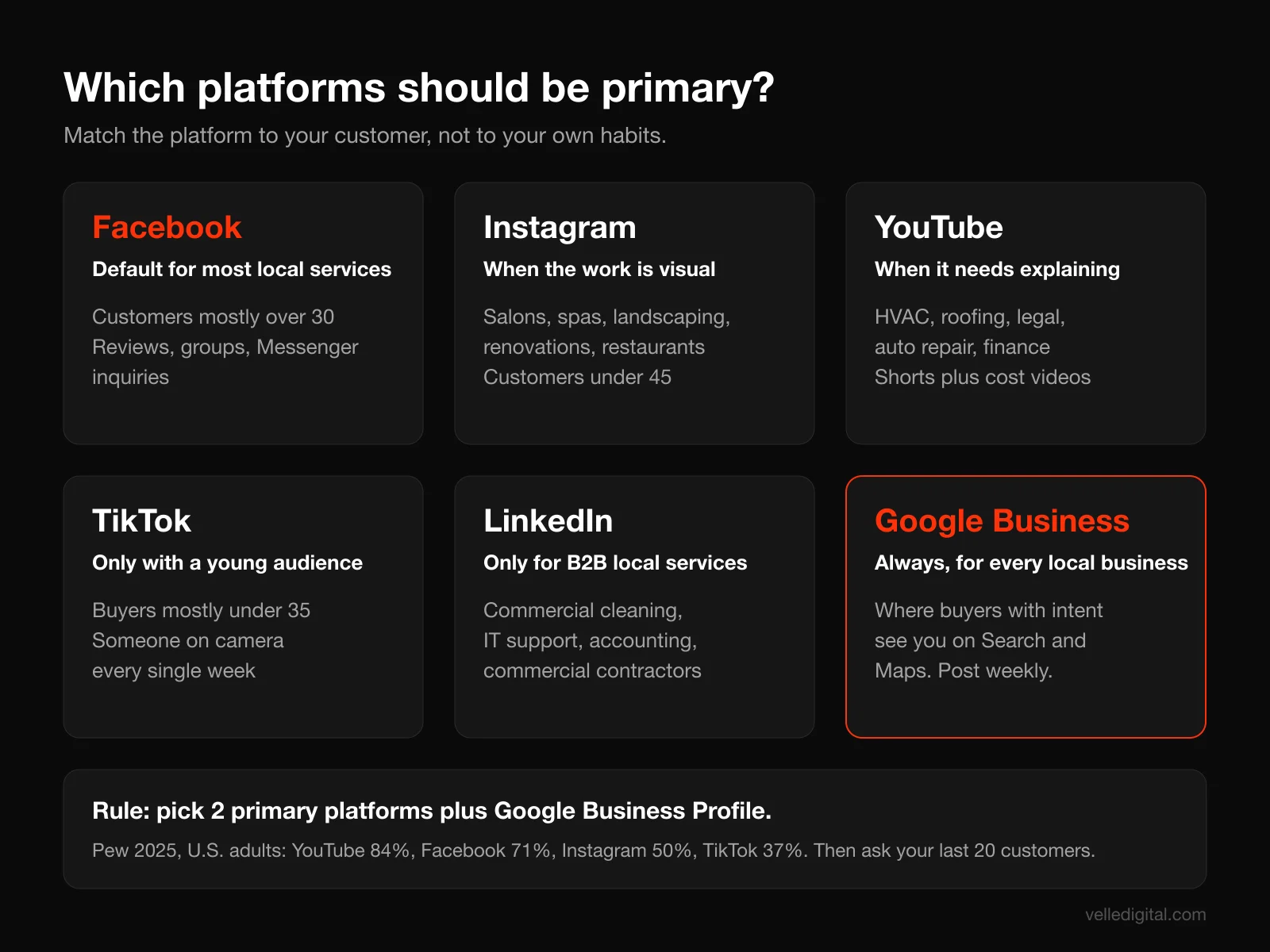
The most expensive mistake in a social media marketing plan is spreading a small team across six platforms. Pick two primary platforms plus your Google Business Profile, do them well, and add a third only when the first two run without you thinking about them.
What the usage data says
Pew Research Center's 2025 survey of U.S. social media use found that YouTube (84 percent of U.S. adults) and Facebook (71 percent) are still the most widely used platforms, with Instagram at 50 percent and TikTok at 37 percent. The age split matters more than the totals for local businesses: 80 percent of adults ages 18 to 29 use Instagram, compared with 19 percent of those 65 and older, while Facebook is used by 80 percent of adults ages 30 to 49.
Daily use is where Facebook stands out for local service businesses. In the same report, 58 percent of adults ages 30 to 49 and 54 percent of ages 50 to 64 said they use Facebook daily. Those are the people buying roofs, booking dental cleanings and hiring landscapers. Pew's social media fact sheet breaks usage down by age, income, education and community type if you want to match it to your customer profile.
For Canadian readers, the behavior is similar: Statistics Canada reported that weekly online communication with friends rose from 73 percent to 77 percent between 2020 and 2022. Your customers are online and talking. The question is only which apps.
A simple platform decision guide
Use your customer's age and how they buy, not your own habits. Here is how we usually decide for local businesses:
- Facebook: Default primary platform for most local service businesses with customers over 30. Strong for community groups, reviews, local reach and Messenger inquiries.
- Instagram: Primary when your work is visual (salons, med spas, restaurants, landscaping, renovations, fitness) or your customers skew under 45. Reels and DMs do the heavy lifting.
- YouTube: Primary when your service needs explaining or trust before purchase (HVAC, financial planning, legal, roofing, auto repair). Shorts for reach, longer videos for "how much does X cost" questions.
- TikTok: Primary only if your buyers skew under 35 and you or someone on your team is comfortable on camera every week.
- LinkedIn: Primary only for B2B local services (commercial cleaning, IT support, accounting, commercial contractors).
- Google Business Profile: Not optional. It is where local buyers with intent see you, and it gets its own step below.
Validate with your own customers
Data is a starting point. Before you commit, ask your last 20 customers one question: "Which apps do you open most days?" Add it to your intake form or ask at the end of the job. If 15 of 20 say Facebook and nobody mentions TikTok, that settles it, regardless of what's trending.
Common platform mistakes
- Choosing TikTok because a competitor went viral once, then abandoning it after three weeks.
- Running Instagram and Facebook as if they were separate businesses. Cross-post most content through Meta Business Suite and only tailor captions and formats.
- Ignoring Google Business Profile because it doesn't feel like "social." For many local businesses it drives more calls than any social app.
Step 3: Define who you are talking to and what you sell
Content without a clear customer becomes generic quickly. Spend 30 minutes writing a short customer profile and an offer list. This keeps every post pointed at someone who can pay you.
Write a one-paragraph customer profile
Answer these in plain sentences:
- Who hires you most often (age range, homeowner or renter, family situation, business type)?
- Where do they live? List the neighborhoods or towns you actually want work in.
- What triggers the purchase (a breakdown, a season, a life event, a referral)?
- What do they worry about before hiring (price, mess, trust, timing)?
- What do they say after a great job? Pull phrases from your reviews.
Example for a hypothetical lawn care company: "Homeowners aged 35 to 60 in the north and west suburbs, usually dual income with kids, who want a green lawn without spending weekends on it. They start looking in April when neighbors' lawns green up. They worry about getting locked into contracts and about crews who don't show up. Our best reviews mention reliability and the before and after."
List the services you want social to sell
Not everything you offer deserves equal airtime. Rank your services by margin and capacity. Your content should push the top two or three, especially the ones with open capacity in the coming quarter. If spring is always full but fall aeration has open slots, your September content should lean hard on aeration.
Step 4: Build three to five content pillars with real examples
Content pillars are the recurring themes you post about. They stop you from staring at a blank screen and they make sure your feed covers the full buying journey: discovering you, trusting you, and choosing you.
The five pillars that work for most local service businesses
- Proof: before and afters, finished jobs, reviews, customer stories. This is your strongest pillar for conversions.
- Education: answers to the questions customers ask before they buy. "How often should you service a furnace?" "What does a deep clean include?"
- Behind the scenes: your team, your trucks, your process, how you protect a customer's home. This builds trust with people who've never met you.
- Local: your community, local events, neighborhood jobs, partnerships with other local businesses. Signals that you're actually nearby.
- Offer: seasonal promotions, booking windows, new services, limited slots. Direct calls to action.
A healthy mix for most local businesses is roughly 30 percent proof, 25 percent education, 20 percent behind the scenes, 15 percent local and 10 percent offer. Adjust after 60 days based on what drives inquiries, not likes.
Pillar examples for three local businesses
Here is how the same five pillars look across very different businesses:
- HVAC company: Proof: 15-second clip of a cracked heat exchanger found during a tune-up. Education: "Three sounds your furnace makes before it fails." Behind the scenes: tech laying drop cloths and wearing boot covers. Local: sponsoring a community rink. Offer: fall tune-up booking window with limited slots.
- Med spa: Proof: client results (with written consent) and review screenshots. Education: "What to expect at your first appointment." Behind the scenes: how treatment rooms are cleaned between clients. Local: partnership with a nearby gym. Offer: new client consultation week.
- Landscaper: Proof: drone or phone time-lapse of a full backyard install. Education: "When to aerate in our climate." Behind the scenes: crew morning loadout at 6 a.m. Local: before and after of a community garden volunteer day. Offer: spring cleanup booking list opens.
Turn your customer questions into 60 posts
Take the list of 20 questions from the prep step. Each question can become at least three posts: a short video answering it, a carousel or graphic breaking it down, and a Google Business Profile update linking to the answer on your website. That's 60 posts from one list, and every one answers something a real buyer asked.
If your website already has service pages and blog posts answering these questions, social becomes the distribution channel for that work. That connection between social and your site is the core of a good content marketing program, and it compounds over time because the same answers also help you rank in local search.
Common pillar mistakes
- Making every post an offer. People unfollow businesses that only sell.
- Posting generic quotes and holiday graphics that could belong to any business anywhere.
- Never showing faces. Local buyers hire people, and a feed with no humans feels like a call center.
Step 5: Set up a weekly content system and batching workflow
Consistency beats volume. Three good posts a week, every week, for six months will outperform a burst of daily posting that dies in week four. The way to stay consistent is to batch: plan once, shoot once, edit once, schedule once, then spend the rest of the week on engagement.
How much to post
For a local business with one person running social part time, we recommend this as a starting cadence:
- Facebook and Instagram (cross-posted): 3 feed posts per week, at least 2 of them short videos.
- Stories: 3 to 5 per week, low effort, filmed in the moment on jobs.
- Google Business Profile: 1 post per week.
- YouTube Shorts or TikTok (if chosen): repurpose the same 2 videos per week.
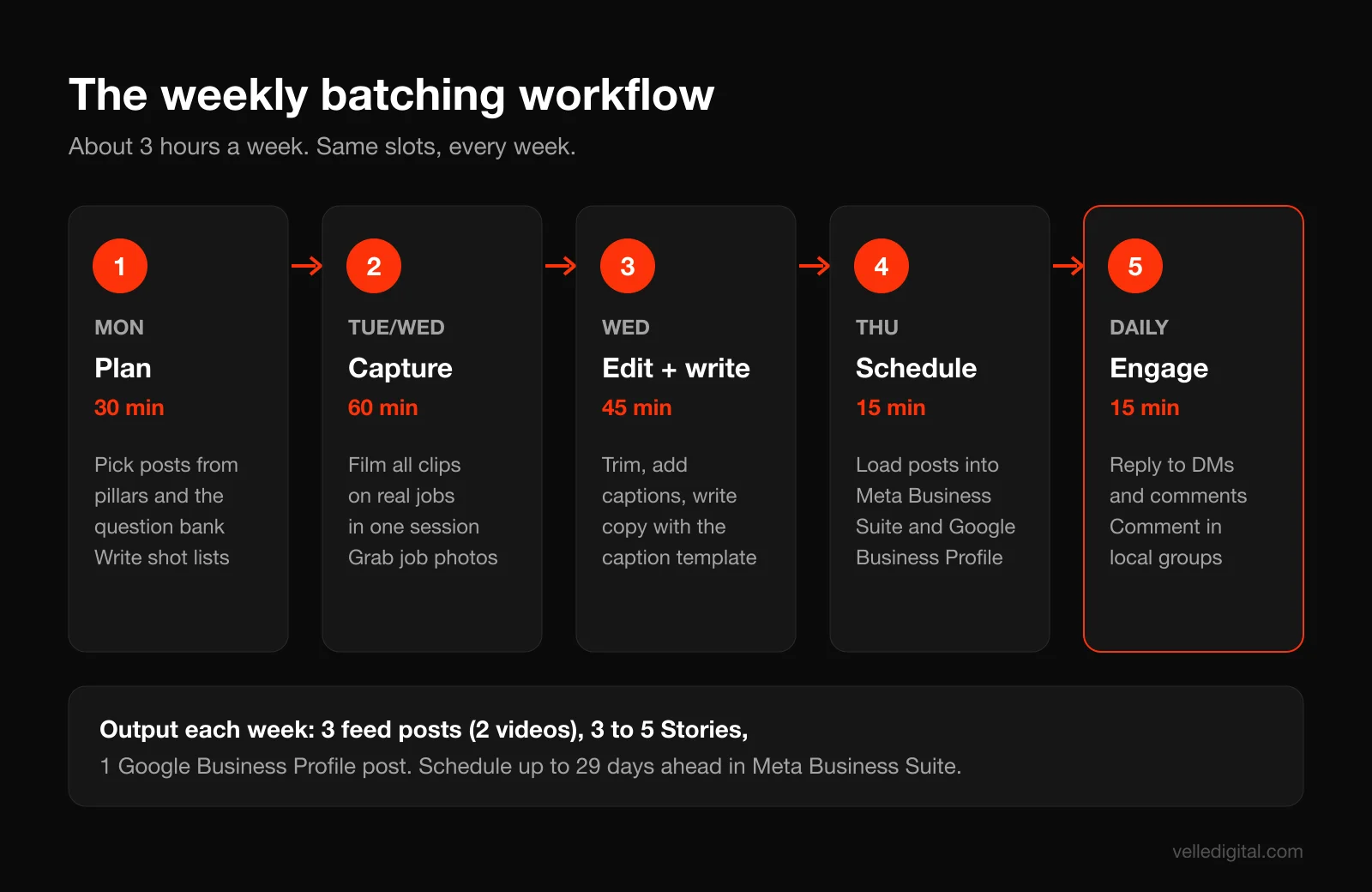
That's roughly three hours a week of focused work if you batch properly. Increase volume only once you've held this rhythm for 8 weeks.
The weekly batching workflow
Block the same time slots every week and treat them like client appointments.
- Monday, 30 minutes: Plan. Open your content calendar, pick next week's posts from your pillar list and question bank, and write a shot list for each video (three to five shots each).
- Tuesday or Wednesday, 60 minutes: Capture. Film on real jobs or at the shop. Record all the week's clips in one session where possible. Grab photos of finished work.
- Wednesday, 45 minutes: Edit and write. Trim clips, add captions, write post copy using the caption template below.
- Thursday, 15 minutes: Schedule. Load everything into Meta Business Suite and your Google Business Profile.
- Daily, 15 minutes: Engage. Reply to comments and messages, comment on local pages and groups, share customer tags to Stories.
Meta Business Suite lets you schedule Facebook posts between 20 minutes and 29 days in advance and manage them in the Planner calendar view, so a single scheduling session per week, or even one per month, is enough.
A caption template you can copy
Most local business captions are either too long or say nothing. Use this structure and fill it in:
Line 1: the hook (the problem or the result). Line 2 to 3: what you did or what the viewer should know. Line 4: who this is for and where (neighborhood or city). Line 5: one call to action (message us "QUOTE", tap call, or book at the link).
Example: "This furnace was 'working fine' until we pulled the panel. Cracked heat exchanger, which can leak carbon monoxide. Caught during a routine fall tune-up in the west end. If yours hasn't been checked in two years, message us TUNEUP and we'll send open times this week."
Who does what
- Owner or manager: approves the monthly plan, appears on camera at least twice a month.
- Field team: captures raw clips on jobs (we'll show you exactly how in Step 6).
- Social lead (in-house or outsourced): edits, writes, schedules, and handles daily engagement.
If nobody on your team has the time for the social lead role, this is the piece most worth handing to a social media management partner, because the field team's footage is the hard-to-replace part and they're already capturing it.
Step 6: Shoot short-form video with your phone
Short vertical video is the format that reaches new local people on Instagram, Facebook, YouTube and TikTok. You don't need a camera crew. You need a recent phone, a cheap clip-on microphone, decent light, and a repeatable structure.
Know the format limits
The platforms have converged on vertical video. Instagram lets you record and edit Reels up to 20 minutes, but notes that reels over 3 minutes won't be recommended to new audiences. YouTube says Shorts can be up to 3 minutes long. For local businesses, aim for 15 to 45 seconds. Short enough to finish, long enough to show a result.
Phone settings and gear
- Orientation: vertical, 9:16. Always.
- Resolution: 1080p at 30 frames per second is plenty and keeps file sizes manageable. Use 4K only if you plan to crop.
- Lens: use the main (1x) camera. Ultra-wide distorts faces and looks cheap indoors.
- Lock focus and exposure: tap and hold on your subject so the phone stops hunting.
- Clean the lens. Phones that live in work trucks are almost always smudged. This one habit fixes half of all "blurry" footage.
- Audio: a wireless clip-on mic costs less than one service call and makes talking videos watchable. Bad audio loses viewers faster than bad video.
- Light: face a window or shoot outside with the sun behind the camera. Avoid overhead fluorescent light directly above someone's head.
A four-part structure for every video
- Hook (first 2 seconds): show the result or say the problem. "This is what 12 years of dryer lint looks like."
- Context (3 to 10 seconds): what you're looking at and why it matters.
- Process or proof (10 to 35 seconds): the work, the fix, the before and after.
- Call to action (last 3 to 5 seconds): one clear next step, said out loud and written on screen.
Shot list for a job site video
Hand this to your field team. It takes under five minutes on a job:
- Wide shot of the problem before work starts (5 seconds, hold still).
- Close-up of the specific issue (3 to 5 seconds).
- Two or three short clips of the work in progress (hands, tools, process).
- Same wide angle as the first shot, after the work is done.
- Optional: tech facing camera, one sentence about what they found.
Teach the "same angle" rule: the before and after must be filmed from the same spot. That single detail is what makes a before and after satisfying to watch.
Editing in 15 minutes
Use the editor built into Instagram, or a free mobile editor. For each video:
- Trim dead time from the start. The first frame should already be interesting.
- Add auto captions and fix any errors. Many people watch with sound off.
- Add a short text hook at the top for the first 2 seconds.
- Keep music low under any voice. Use only audio the platform licenses for business use.
- Export once and post the same file to Reels, Facebook, Shorts and TikTok.
Consent and privacy on job sites
Always ask before filming inside a customer's home or showing their face, house number or vehicle plate. A simple line in your service agreement ("We may photograph completed work for our portfolio; we never show your address or faces without permission") prevents awkward conversations. For med spas, dental and other health businesses, get written consent for any client results.
Common video mistakes
- Starting with a logo animation or "Hey guys." You've lost the viewer before the content starts.
- Shooting horizontally and cropping later, which cuts off the action.
- Talking for 60 seconds before showing anything. Show first, explain second.
Step 7: Treat community management and DMs as a lead channel
For local businesses, the inbox is where social media becomes revenue. Someone sees a video, taps message, asks "how much for a 3 bedroom?" and whoever answers first usually wins the job. Treat every DM like a phone call from a new customer, because that's what it is.
Set a response standard
Write this into your plan and assign an owner for every day of the week, including weekends:
- Direct messages: human reply within 15 minutes during business hours, and within 2 hours outside of them.
- Comments with a question: reply within 2 hours during business hours.
- Reviews: reply to every review, positive or negative, within 48 hours.
Speed matters because buyers message several businesses at once. We cover the economics of fast response in depth in our guide to speed to lead automation.
Turn on inbox automations
Meta Business Suite offers Inbox automations across Messenger, Instagram and WhatsApp, including instant replies to first messages, away messages, frequently asked questions, and custom keyword replies (custom keywords are desktop only). Set up at least these:
- Instant reply: "Thanks for reaching out to [Business]! A real person will reply in a few minutes. To speed things up, what's your neighborhood and what do you need help with?"
- Away message: "We're off the tools for the night. We reply first thing at 7:30 a.m. If it's an emergency, call [number]."
- FAQ replies: hours, service area, and "Do you offer free estimates?"
- Keyword reply: for your call to action word (for example, QUOTE or TUNEUP) so people who message the keyword from a post get an instant, relevant answer.
A DM script that books jobs
Automations buy you time. The human reply is what books. Use this four-message flow:
- Acknowledge and qualify: "Hi Sarah, thanks for messaging! Happy to help with your gutters. Are you in [service area]? And is it a one-storey or two-storey home?"
- Give a useful answer: "Most two-storey homes in that area run 180 to 260 dollars for a full clean, depending on length and debris."
- Make the next step easy: "We have openings Thursday morning or Saturday. Want me to hold one for you?"
- Capture details: "Perfect. What's the best phone number and address? I'll send a confirmation text."
Then log the lead in your CRM with the source tagged as the platform and post (for example "IG DM, gutter reel Oct 3"). If you don't have a CRM, a shared spreadsheet works for the first 90 days. When volume grows, a proper CRM setup keeps social leads from getting lost between the inbox and the schedule.
Community management beyond your own page
- Local groups: join neighborhood Facebook groups as your business page where allowed. Answer questions helpfully; don't spam links. When someone asks for a recommendation, a past customer tagging you is worth more than any post.
- Comment on other local businesses: genuine comments on posts from neighboring businesses, local news and community pages put your name in front of local people.
- Share customer tags: when a customer posts about you, thank them and share it to Stories.
Stay on the right side of endorsement rules
If you give customers anything in exchange for posts or reviews, rules apply. The FTC's Endorsement Guides Q&A says employees who promote their employer on social media should disclose the relationship, and you can't condition an incentive like a discount on a review being positive. The FTC's Consumer Reviews and Testimonials Rule Q&A also covers fake reviews and review incentives. Ask every customer for an honest review, not just the happy ones, and never buy reviews.
Step 8: Use Google Business Profile posts as part of your plan
Your Google Business Profile is where people with buying intent find you on Search and Maps. It isn't a social network in the usual sense, but it belongs in your social media marketing plan because the content you're already making can feed it with almost no extra work.
What you can post
Google's help center lists three post types for a Business Profile: updates, offers and events. Updates can include a photo or video and an action button; offers need a title and dates; events need a title plus start and end dates. Google also notes that posts older than six months are archived unless you set a date range, and that posts containing a phone number that can't be verified as the business's may be rejected.
A weekly Google Business Profile routine
- Pick the best photo or video from that week's social content.
- Write 2 to 4 sentences: what the job was, where (neighborhood), and the result.
- Add a button linking to the matching service page on your website, not your homepage.
- Upload two or three extra job photos to the profile's photo section.
- Reply to any new reviews.
Google lists keeping your information complete, responding to reviews, and adding photos and videos among its tips to improve local ranking. Posting regularly also signals to people browsing your profile that the business is active. For the full picture of how your profile, reviews and website work together, see our local SEO guide.
Step 9: Know when to boost a post and when to run real ads
At some point organic reach won't hit your inquiry target on its own, especially for a newer page. That's when paid comes in. The question is whether to tap the Boost button or build a campaign in Ads Manager.
What boosting actually is
Meta defines boosted posts as ads you create from existing posts on your Facebook Page, and says boosting can help you get more messages, video views, leads or calls and reach people who don't currently follow you. It suggests boosting posts that already resonated with your audience. So a boost is a real ad, just with fewer controls than a campaign built in Ads Manager.
Decision rule: boost vs Ads Manager
- Boost when: a post is already performing well organically, your goal is messages or local awareness, your budget is small (for example 5 to 15 dollars a day for 7 days), and you just want more of the right local people to see it.
- Use Ads Manager when: you want leads or bookings tracked to your website, you need to test several creatives against each other, you want to exclude existing customers or retarget video viewers, or you're spending more than a few hundred dollars a month.
- Don't spend at all when: your profile has no reviews, your DMs go unanswered for hours, or the landing page doesn't load quickly on mobile. Ads amplify whatever is broken.
A simple starter paid layer
Here is an example structure for a local business putting a modest budget behind social. Treat these numbers as a starting point to test, not a guarantee.
- Weeks 1 to 4: boost your two best-performing organic videos each week to people in your service radius, with "Send message" as the goal.
- Weeks 5 to 8: move to Ads Manager. Run one lead or message campaign with three or four creatives (your best proof videos), targeting your service area.
- Weeks 9 onward: add a retargeting audience of people who watched at least half of your videos or engaged with your page, and show them your offer.
If you want the full playbook for paid campaigns, including targeting, creative and budgets, read our guide to Meta ads for local service businesses, or talk to our Meta ads team about running it for you.
Step 10: Measure what matters and review monthly
If you can't trace inquiries to social, you'll end up judging the plan on likes, which is how good plans get cancelled and bad ones survive. Set up tracking in the first week and review the same numbers every month.
Tag every link with UTM parameters
Every link in your bio, posts and Google Business Profile should carry UTM parameters so your analytics can tell you which platform and post sent the visitor. Google Analytics explains how UTM parameters on destination URLs feed the Traffic acquisition report, and Google's Campaign URL Builder creates them for you. Use consistent naming:
- utm_source: facebook, instagram, google_business_profile, youtube
- utm_medium: social (organic), paid_social (ads), or gbp
- utm_campaign: the month and theme, for example 2026_10_fall_tuneup
- utm_content: the specific post, for example reel_heat_exchanger
Track DMs and calls by hand at first
Analytics won't see DMs or phone calls that start from your profile. Fix this with a habit: every inquiry gets a "how did you hear about us?" question, and every DM lead is logged with its source. A simple tally sheet works for the first 90 days.
The monthly scorecard
Review these six numbers on the first Monday of every month:
- Qualified inquiries from social and Google Business Profile (your goal metric).
- Booked jobs and revenue from those inquiries.
- Median DM response time.
- Reach among local accounts (platform insights, filtered to your city where possible).
- Profile actions: calls, website taps, direction requests, messages.
- Top three posts by inquiries generated, not by likes.
Decision rules for the monthly review
- If a pillar drives inquiries, then make more of it next month (shift 10 percent of posts toward it).
- If reach is fine but inquiries are low, then your calls to action or offers are weak. Rewrite them before posting more.
- If reach is falling, then you need more video, more consistent posting, or a small paid push behind your best organic posts.
- If inquiries are high but bookings are low, then the problem is follow-up or pricing, not social. Check response times and the DM script.
Your 90 day social media marketing plan
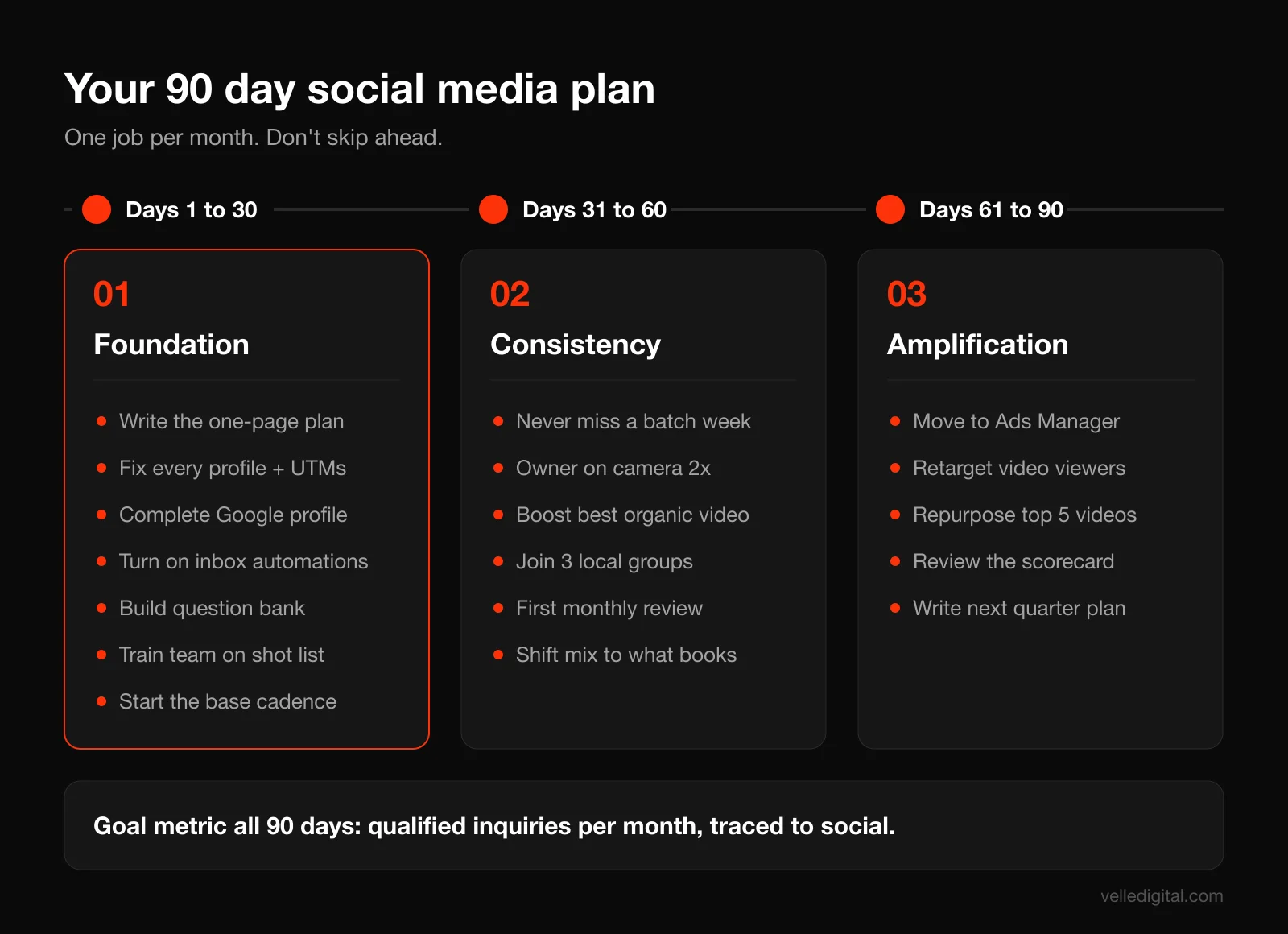
Here is how we roll out a social media marketing plan for a local service business over three months. Each month has one job. Don't skip ahead: a polished content calendar on top of broken profiles and slow DMs won't produce leads.
Days 1 to 30: Foundation
- Write the one-page plan: goal, platforms, pillars, response standard, budget.
- Audit and fix every profile: consistent name, logo, phone, hours, service area, booking link with UTMs.
- Complete your Google Business Profile: categories, services, photos, description.
- Turn on inbox automations and write your DM script.
- Build your question bank (20 questions) and content bank (30 ideas).
- Train the field team on the job site shot list.
- Start posting at the base cadence: 3 feed posts, 3 to 5 Stories, 1 Google Business Profile post per week.
- Ask your last 30 happy and not-so-happy customers for honest reviews.
Days 31 to 60: Consistency
- Run the weekly batching workflow without missing a week.
- Have the owner appear on camera at least twice this month.
- Start boosting the best organic video each week to your service area.
- Join and participate in three local community groups.
- First monthly review: compare inquiries by pillar and adjust the mix.
Days 61 to 90: Amplification
- Move paid spend from boosts into a structured Ads Manager campaign if your inquiry target isn't being met.
- Add a retargeting audience of video viewers and page engagers.
- Repurpose your top five videos into YouTube Shorts or TikTok if you chose a third platform.
- Write the next quarter's plan based on what actually drove inquiries.
Sample content calendar for one month
Here is an example of four weeks for a hypothetical HVAC company in fall, using the pillars from Step 4. Copy the pattern, swap in your own topics.
Week 1:
- Monday: Reel (Proof): cracked heat exchanger found during a tune-up, with the TUNEUP keyword call to action.
- Wednesday: Carousel (Education): "5 things we check during a furnace tune-up."
- Friday: Reel (Behind the scenes): how our techs protect your floors and clean up.
- Google Business Profile: Offer post for fall tune-up window with end date.
Week 2:
- Monday: Reel (Education): "Three sounds your furnace makes before it fails."
- Wednesday: Photo (Proof): review screenshot with a photo of the tech who did the job.
- Friday: Reel (Local): sponsoring the community rink opening day.
- Google Business Profile: Update with before and after of a furnace replacement in a named neighborhood.
Week 3:
- Monday: Reel (Proof): before and after of a dirty versus clean blower motor.
- Wednesday: Carousel (Education): "Repair or replace? How we help you decide."
- Friday: Reel (Behind the scenes): meet a technician, 20 seconds on why they got into the trade.
- Google Business Profile: Update answering "How often should I change my furnace filter?" with link to the service page.
Week 4:
- Monday: Reel (Offer): "Last 12 tune-up slots before November."
- Wednesday: Reel (Education): owner on camera answering the most common price question.
- Friday: Photo (Proof): customer story, with permission, about a no-heat emergency call.
- Google Business Profile: Event or offer post for the final week of the booking window.
Daily throughout: Stories from job sites, replies to every comment and DM within the response standard, and one helpful comment in a local group.
Common social media marketing mistakes local businesses make
These are the patterns we see most often when we audit a local business's social presence. Each one quietly kills results.
- Measuring followers instead of inquiries. A page with 800 local followers that books 15 jobs a month beats one with 20,000 followers that books none.
- Being on too many platforms. Five neglected profiles look worse than two active ones. A dormant page signals a dormant business.
- Slow or no replies to DMs. The single biggest leak we see. A great video that leads to a message nobody answers for a day is wasted.
- Stock photos and generic graphics. Local buyers want to see your actual team and your actual work.
- No call to action. Every post should tell the viewer what to do next, even if it's just "save this for later."
- Boosting random posts. Boost what already works organically, with a clear goal, to a tight local radius.
- Posting in bursts. Two weeks of daily posts followed by a month of silence. Pick a cadence you can keep for a year.
- Owner never appears. For most local businesses, the owner on camera twice a month outperforms any polished brand video.
- Not connecting social to the rest of marketing. Social works best as part of a system with your website, reviews, email and ads. Our full funnel marketing strategy guide shows how the pieces fit.
Social media marketing plan checklist
Use this to check your plan before you launch, and again at every quarterly review.
- Revenue goal written as qualified inquiries per month, with the math behind it.
- Two primary platforms chosen, with a reason backed by customer data.
- Google Business Profile complete, verified and posting weekly.
- Customer profile written in one paragraph.
- Top two or three services to promote this quarter identified.
- Three to five content pillars defined, with a target mix.
- Question bank of 20 customer questions and content bank of 30 ideas.
- Weekly batching slots blocked in the calendar with owners assigned.
- Field team trained on the job site shot list and consent rules.
- Phone, clip-on mic and basic editing workflow ready.
- Caption template saved and used.
- Inbox automations turned on (instant reply, away message, FAQ, keyword).
- DM script written and response standard assigned for every day.
- Lead log or CRM capturing source for every social inquiry.
- UTM parameters on every link in bios, posts and Google Business Profile.
- Paid rule decided: when to boost, when to use Ads Manager, monthly cap.
- Monthly scorecard date set, with the six numbers listed.
- 90 day plan and first month's content calendar drafted.
Frequently asked questions
How do I create a social media marketing plan for a small business?
Start with a revenue goal written as monthly inquiries, then choose two platforms where your customers spend time, define three to five content pillars, set a weekly batching schedule, and decide who answers messages and how fast. Add a simple paid rule and a monthly scorecard. The whole plan should fit on one or two pages.
How often should a local business post on social media?
A good starting point is three feed posts per week on Facebook and Instagram (at least two of them short videos), three to five Stories, and one Google Business Profile post. Consistency matters more than volume, so pick a cadence you can keep for at least six months before increasing it.
Which social media platform is best for a local business?
For most local service businesses with customers over 30, Facebook is the strongest primary platform, with Instagram second when the work is visual or the audience skews younger. Pew Research's 2025 data shows YouTube and Facebook are the most widely used platforms among U.S. adults. Always confirm by asking your own customers which apps they use daily.
How much should a small business spend on social media marketing?
Your real cost is time first: about three hours a week to run the system in this guide. For paid, many local businesses start by boosting their best organic posts with a small daily budget and move to structured Ads Manager campaigns once they know which content drives inquiries. Base the budget on your inquiry target and job value, not on a percentage you read somewhere.
Is boosting a Facebook post worth it?
It can be, when you boost a post that is already performing well organically, with a clear goal like messages, to a tight local audience. Meta describes boosted posts as ads created from existing Page posts. If you need lead tracking, creative testing or retargeting, build the campaign in Ads Manager instead.
How long does it take for social media marketing to work for a local business?
Expect the first 30 days to be setup and the first measurable inquiry trends to show between days 60 and 90 if you post consistently and reply fast. Paid support can speed that up. Most of the compounding benefit (recognition in your area, a library of proof content, steady referrals from social) builds over six to twelve months.
Do Google Business Profile posts help with local SEO?
Google's guidance on local ranking emphasizes complete information, reviews, and photos and videos, and posts keep your profile current and give searchers a reason to choose you. Treat them as part of a broader local SEO effort that includes reviews and strong service pages on your website.
What should a local business post on social media?
Post proof (before and afters, reviews), education (answers to the questions customers ask), behind the scenes (your team and process), local community content, and occasional offers. Turning your 20 most common customer questions into short videos and carousels is the fastest way to build a month of useful content.
Build a plan that books jobs
A social media marketing plan doesn't need to be complicated to work. Pick your platforms with data, post consistently from a small set of pillars, treat every DM like a phone call, and measure inquiries instead of likes. Do that for 90 days and you'll know exactly what social is worth to your business. If you'd rather have a team build and run the system with you, from filming workflows to inbox setup and paid amplification, take a look at our social media marketing services or book a strategy call and we'll map out your first 90 days together.