Website Copywriting: How to Write Copy That Wins Customers
A step-by-step guide to website copywriting for small businesses: research your customers, sharpen your value proposition, and write homepage, service, about and contact pages that turn visitors into leads.
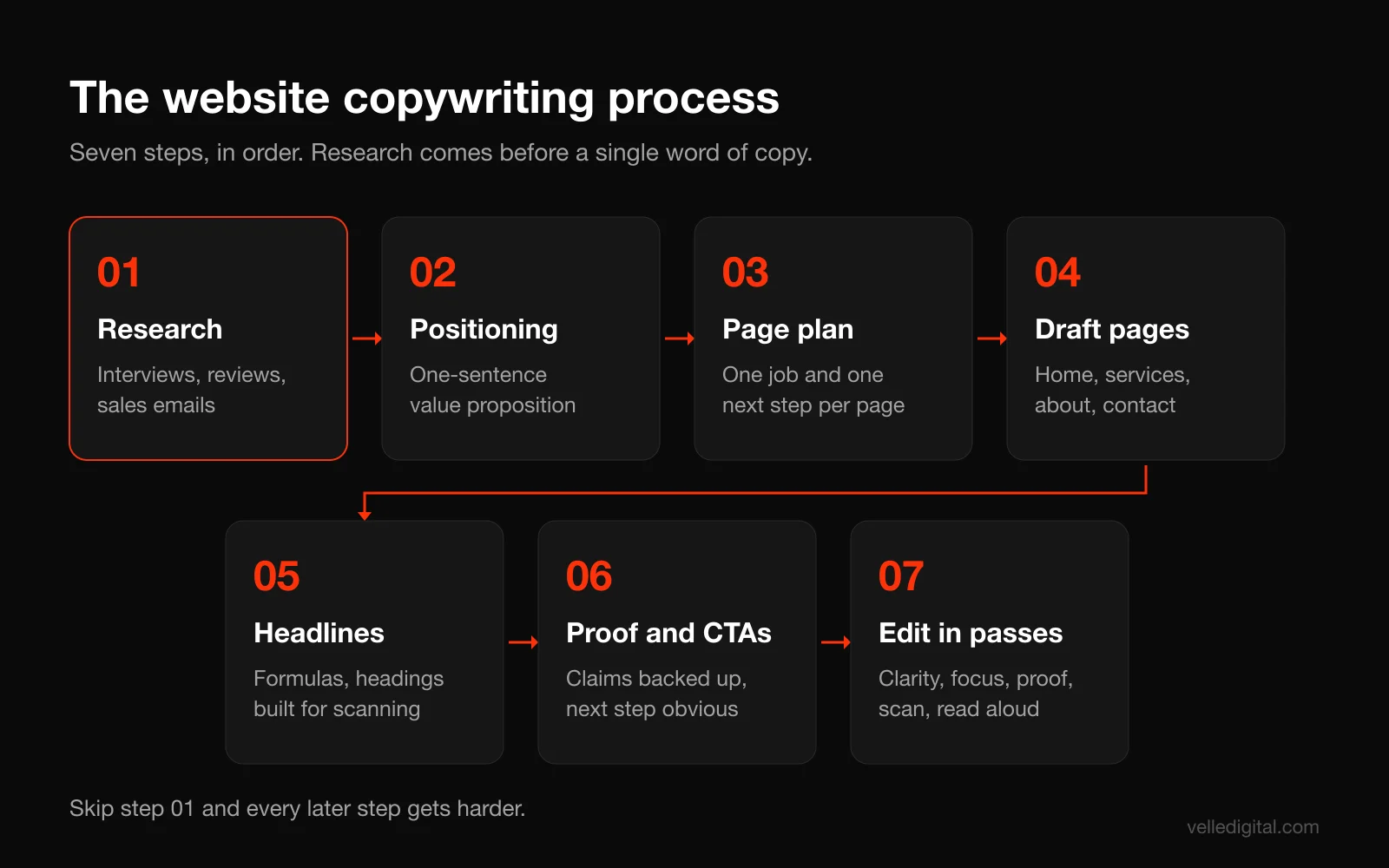
Website copywriting is the work of writing the words on your website so the right visitor understands what you do, believes you can do it for them, and takes the next step. Good website copy is built from customer research, not brainstorming. It leads with one clear value proposition, gives every page a single job, uses headlines and structure that survive scanning, backs every claim with proof, and ends each section with an obvious action.
The short version of the process: interview customers and mine reviews for their exact language, write a one-sentence value proposition, plan what each page must accomplish, draft the homepage, service, about and contact pages in that order, then edit in several focused passes. The rest of this guide walks through each step with templates, before and after rewrites, and the mistakes we see most often when we rewrite small business sites.
What website copywriting is (and what it is not)
Website copywriting is not decoration that goes into the boxes a designer left empty. It is the argument your website makes. Design controls how that argument looks, development controls how fast and reliably it loads, and copy controls whether it is persuasive at all.
It is also not the same as blogging. A blog post like this one teaches. Your homepage and service pages sell. They have to answer a skeptical visitor's questions in the order that visitor asks them: what is this, is it for me, why should I trust you, what does it cost, and what do I do next.
Finally, website copywriting is not about clever lines. In our experience the copy that converts best is usually plain to the point of being boring to the person who wrote it. Clear beats clever almost every time, because the visitor is busy and has three other tabs open with your competitors.
Why most small business website copy underperforms
When we audit a small business website, the copy problems tend to be the same handful, regardless of industry.
- It talks about the business, not the customer. "Founded in 2009, we are a family-owned company committed to excellence" tells the visitor nothing about their problem.
- It is vague. "Quality solutions for all your needs" could describe a plumber, a law firm or a software company. If a competitor could paste your headline onto their site without changing a word, it is not doing its job.
- It buries the offer. The visitor scrolls through a mission statement, a stock photo and a paragraph of history before learning what you actually sell.
- It has no proof. Every business says it is trusted, experienced and reliable. Without reviews, numbers, photos of real work or named clients, those words are noise.
- It asks for nothing, or for too much. Either there is no clear call to action, or the only option is a big commitment like "Request a quote" with a twelve field form.
All five are fixable without a redesign. That is good news, because rewriting copy is one of the cheapest changes you can make to a website, and it is often the one with the biggest effect on leads.
Step 1: Research your customers before you write a word
The single biggest difference between amateur and professional website copywriting is that professionals do not start by writing. They start by listening. The best phrases on your website are probably already sitting in your customers' mouths, your reviews and your sales emails.
Run five to eight customer interviews
Pick recent customers, ideally a mix of your best clients and people who almost did not buy. Fifteen to twenty minutes on the phone is enough. Record the call (with permission) so you can capture exact wording instead of your paraphrase of it.
Ask open questions about the moment they decided to look for help, not about how much they like you. Here is a script you can copy:
- What was going on that made you start looking for someone to help with this?
- What had you already tried before you found us?
- What almost stopped you from going ahead?
- What other options did you consider, and why did you pick us over them?
- What were you most worried about before we started?
- What is different now that the work is done?
- If you were recommending us to a friend, what would you say?
Do not lead the witness. "Was our fast response time important to you?" will get you a polite yes. "What made you pick us?" gets you the real answer, which is sometimes surprising. We have seen businesses discover that customers chose them for a reason that appeared nowhere on their website.
Mine your reviews and your competitors' reviews
Open your Google Business Profile reviews, and then do the same for your three biggest competitors. Copy every phrase that describes a problem, a fear, a result or a reason for choosing someone into a spreadsheet. Pay special attention to three and four star reviews: they tell you what people care about but did not fully get.
Competitor reviews are a gift. A one-star review that says "they never showed up when they said they would" tells you exactly which promise your homepage should make and prove.
Pull language from sales calls and emails
Your inbox and your sales team hold the questions people ask before they buy. List the ten questions you answer most often. Every one of those is either a section on a service page, an FAQ, or an objection your copy needs to handle before the visitor ever picks up the phone.
Build a voice of customer bank
Put everything into one document or spreadsheet with four columns: the exact quote, the source, the theme (problem, fear, desired result, reason for choosing, objection), and how often it came up. After eight interviews and a hundred reviews you will have obvious clusters. Those clusters become your headlines, your benefit bullets and your FAQ.
Decision rule: if a phrase shows up three or more times across interviews and reviews, it belongs on your homepage or main service page, in the customer's words, not yours.
Step 2: Nail your positioning and one-sentence value proposition
Positioning is the decision about who you are for, what you do for them, and why you instead of the alternatives. You cannot write clear website copy without it, because every page inherits it. If positioning feels fuzzy, that is a brand problem before it is a copy problem, and our piece on why brand identity matters covers that foundation.
Answer four positioning questions
Write one or two sentences for each, using your voice of customer bank:
- Who is the customer? Be specific enough to exclude people. "Homeowners in Edmonton with homes built before 1990" is a position. "Everyone who needs renovations" is not.
- What problem do they have, in their words? Use the phrases from your research.
- What is the alternative? Doing nothing, doing it themselves, hiring a big national chain, or hiring the cheapest person on Facebook Marketplace.
- Why you? The specific, provable difference. Not "quality." Something like "fixed quotes in writing before we start, and we finish on the date we give you or the last week is free."
Write the one-sentence value proposition
Now compress it. This template works for most service businesses:
We help [specific customer] get [specific result] without [main pain or risk], by [how you do it differently].
Some worked examples, all hypothetical:
- Weak: "Quality landscaping solutions for residential and commercial clients."
- Strong: "We help Edmonton homeowners get a finished backyard in one season, without chasing contractors, by handling design, permits and build under one fixed quote."
- Weak: "Your trusted accounting partner."
- Strong: "We help Alberta trades businesses stop dreading tax season, with monthly bookkeeping and a named accountant who answers the phone."
The long sentence is not your headline. It is the brief that every headline, subheadline and page has to agree with. Pin it above your desk.
Test: read your value proposition to someone outside your industry. If they cannot tell you, in their own words, who you help and what you do, rewrite it.
Step 3: Plan the pages and give each one a single job
Before drafting, list every page and write one sentence describing what it must accomplish and what the visitor should do next. This keeps you from writing the same generic paragraph five times.
A typical small business site needs:
- Homepage: confirm the visitor is in the right place, state the value proposition, route them to the right service, and offer a primary action.
- Service pages (one per service): answer every question a buyer of that specific service has, handle objections, and get the inquiry.
- About page: build trust in the people, show why you are credible, and still point to a next step.
- Contact page: make it effortless to reach you and set expectations about what happens next.
- Proof page (work, case studies or reviews): show the results in enough detail to be believable.
Map the message hierarchy for each page
For each page, list the questions the visitor has, in the order they have them. For a service page that is usually: what exactly is this, is it for someone like me, what results can I expect, how does it work, what does it cost or how is it priced, why should I trust you, what if something goes wrong, and how do I start. That list becomes your section order. You are not inventing structure, you are answering questions in sequence.
Decision rule: if you have more than one service that a customer would search for separately, give each its own page. One "Services" page with six paragraphs cannot rank for six searches or answer six sets of questions.
Step 4: Write your homepage copy
The homepage gets more first visits than any other page, and most of those visitors decide within seconds whether to keep going. Its job is not to say everything. Its job is to make the right visitor want to see more.
The above-the-fold block
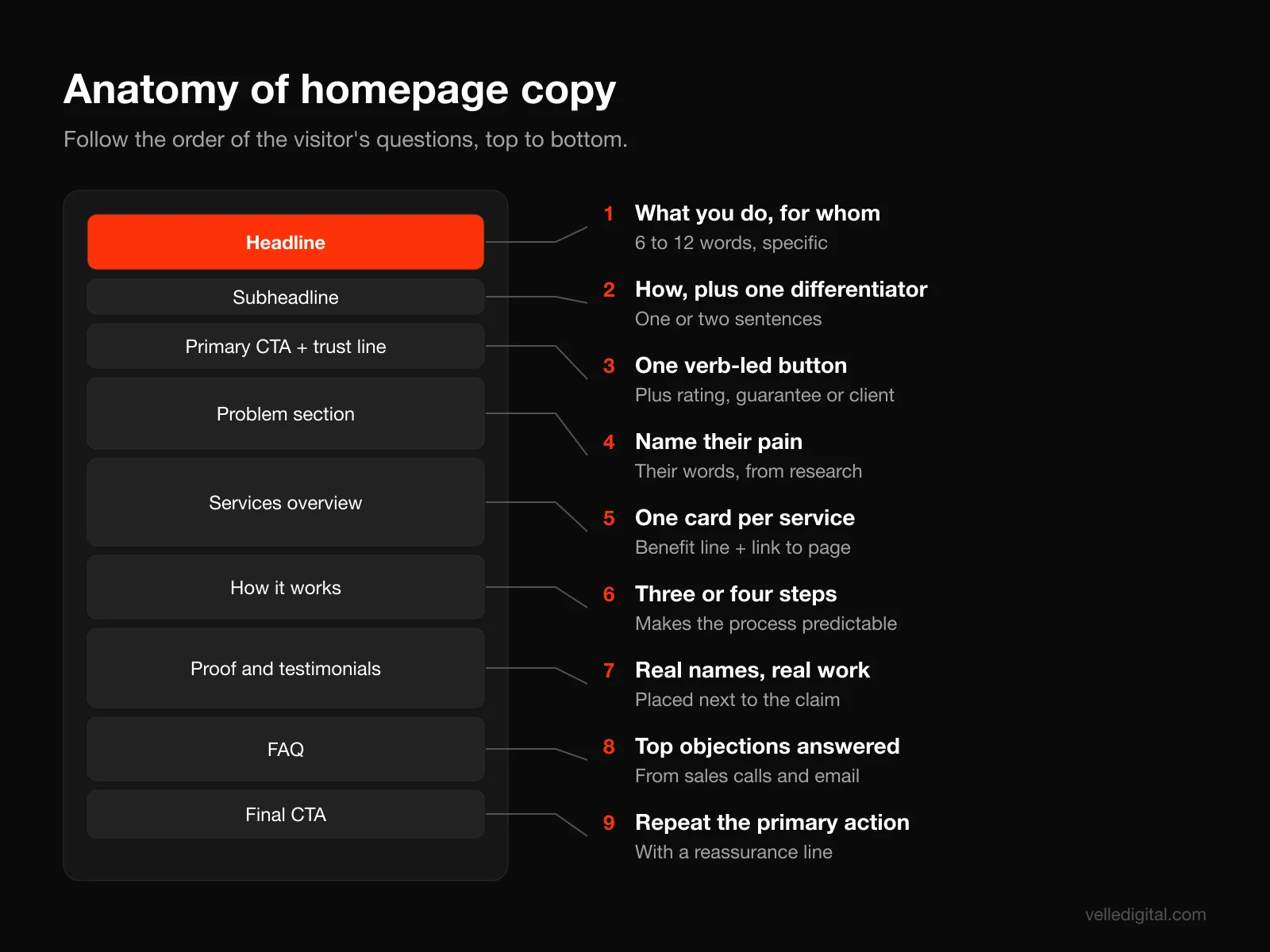
This is the part visible before scrolling. It needs four elements:
- Headline: the outcome you deliver, for whom. Usually 6 to 12 words.
- Subheadline: how you deliver it, plus the one differentiator that matters most. One or two sentences.
- Primary call to action: one button, with a specific label.
- A trust signal: a star rating with review count, a recognizable client, years in business, or a guarantee.
Here is a hypothetical example for a roofing company:
- Headline: "Roof replacements in Edmonton, finished in two days"
- Subheadline: "Fixed written quotes, a 15-year workmanship warranty, and a crew lead who texts you every morning. No surprise invoices."
- Button: "Get my free roof quote"
- Trust line: "4.9 stars from 312 Google reviews"
Notice that every element is specific. A visitor knows what the company does, where, how fast, and why they might be different, before they move the mouse.
The rest of the homepage
Below the fold, follow the order of the visitor's questions. A structure that works for most service businesses:
- Problem section: two to four short lines naming the pains from your research. Customers should feel recognized.
- Services overview: a card for each service with a one-line benefit and a link to its page.
- How it works: three or four steps. This lowers anxiety by making the process feel predictable.
- Proof: testimonials with full names, photos of real projects, logos, or short results.
- Differentiators: the two or three reasons people choose you, taken from interviews.
- FAQ: the objections you hear most often.
- Final call to action: repeat the primary action with a short reassurance line underneath.
Homepage mistakes to avoid
- A rotating slider with three different headlines. Visitors see one at most, and you never decided which message matters.
- A welcome paragraph. "Welcome to our website" wastes the most valuable line you have.
- Leading with your history. Founding year and family values belong on the about page, or in a single trust line.
- Five buttons with equal weight. Decide on one primary action and make everything else secondary.
Step 5: Write service pages that answer every buying question
Service pages are where most of your leads should come from, and where most small business sites are thinnest. A visitor who lands on a service page from search is already interested. They want detail, not a slogan.
A service page template you can copy
Use this as a skeleton, adjusting sections to fit:
- Headline naming the service and the result, ideally containing the phrase people search for.
- Subheadline with who it is for and the main differentiator.
- Primary call to action and one trust signal.
- "Is this right for you?" section listing the situations where this service fits, and briefly where it does not.
- What is included, as a scannable list.
- The process, step by step, with realistic timing.
- Pricing or how pricing works. If you cannot list prices, explain the factors and give a typical range.
- Proof specific to this service: a relevant testimonial, a short project story, before and after photos.
- FAQ with the five to eight objections you hear about this service.
- Final call to action with what happens after they click.
Talk about price
Many owners resist putting any pricing information on their site. We understand the worry, but visitors who see no price often assume the worst and leave for a competitor who gave them a number. You do not have to publish a rate card. A sentence like "Most bathroom renovations we do land between 18,000 and 35,000 dollars, depending on size and finishes" filters out poor fits and builds trust with good ones. Our website cost guide uses exactly this approach.
Features, benefits and the "so what" test
For each feature you list, ask "so what?" until you reach something the customer cares about.
- Feature: "We use a moisture meter on every inspection."
- So what? "We find hidden leaks before they turn into mold."
- So what? "You avoid a 10,000 dollar remediation bill two years from now."
You do not need to write all three layers every time, but the benefit usually belongs in the bold lead and the feature in the supporting sentence.
Step 6: Write an about page that still sells
The about page is often the second most visited page on a small business site, because people want to know who they are hiring. It is still a sales page. The story is about how you help customers, told through the people who do it.
A structure that works:
- Open with the customer, not the founding date. "We started this company because homeowners kept telling us the same thing: nobody shows up when they say they will."
- Show the people. Real photos, names and a line about each person's role and experience. Stock photos of smiling strangers in a boardroom actively hurt trust.
- State your credentials plainly. Licenses, certifications, insurance, memberships, years of experience and the number of projects, if you know it.
- Share what you believe, specifically. "We never start work without a signed, fixed quote" is a value. "Integrity" is a word.
- End with a next step. A button to the main service or the contact page. Every page should lead somewhere.
Step 7: Write a contact page that removes friction
The contact page is short, but its copy decides whether interested people actually reach out. Most of the work is setting expectations and lowering the perceived risk of contacting you.
- Headline that frames the action: "Tell us about your project" or "Book a free 20-minute call" beats "Contact Us."
- Say what happens next: "We reply within one business day with a few questions and a time for a site visit. No obligation."
- Offer more than one channel: phone, form, email and, if you have one, online booking. Different people prefer different routes.
- Keep the form short: name, contact details, and one open question like "What do you need help with?" Every extra field needs to justify itself.
- Add one trust element: a short testimonial about responsiveness or a guarantee near the form.
Microcopy matters here. A submit button labeled "Send my request" feels better than "Submit." A line under the email field saying "We will never share your email or add you to a mailing list without asking" removes a small but real hesitation.
Step 8: Write headlines that earn the next line
The headline's only job is to get the subheadline read. The subheadline's job is to get the first section read. Every headline on your site, including section headings, should carry information on its own, because many visitors will read nothing else.
Six headline formulas that work for service businesses
- Outcome plus audience: "Clean books every month for Alberta trades businesses"
- Outcome plus timeframe: "A new furnace installed within 48 hours"
- Outcome without the pain: "A finished basement without six months of chaos"
- The specific promise: "Fixed quotes in writing. Finished on the date we give you."
- The question they are asking: "Need a roof inspection before you sell?"
- Name the service plus the differentiator: "Commercial cleaning with the same crew every visit"
Before and after rewrites
These are hypothetical, but each "before" is typical of what we see on real sites.
- Before: "Excellence in Every Project." After: "Kitchen renovations in Sherwood Park, on time and on budget, or we pay the difference."
- Before: "Your Partner in Growth." After: "Bookkeeping and payroll for restaurants with 5 to 50 staff."
- Before: "Welcome to Smith Dental." After: "Family dentistry in St. Albert, with evening and Saturday appointments."
- Before: "Innovative HVAC Solutions." After: "Furnace stopped working? Same-day repairs across Edmonton."
- Before: "Our Services." After: "What we can fix this week."
- Before: "Why Choose Us?" After: "Three reasons 400 families have switched to us." (Only if the number is true.)
The pattern in every rewrite is the same: replace abstract words with concrete ones, name the customer or place, and make a promise you can keep.
Headline test: cover everything on the page except the headline. Could a stranger tell what you sell and who it is for? If not, rewrite it.
Section headings carry information too
Section headings are where scanners decide whether to stop. "Our Process" is a label. "Four steps from first call to finished deck" is information. Rewrite every generic label on your site into something that would make sense in a list of bullet points with no other context.
Step 9: Write for scanning, because people do not read websites
This is the most important research finding for anyone doing website copywriting. In Nielsen Norman Group's original research on how users read on the web, 79 percent of test users always scanned any new page they came across, and only 16 percent read word by word. A later analysis of browsing data concluded that users have time to read at most 28 percent of the words on an average visit, and that about 20 percent is more likely.
The same research group's eyetracking studies identified the F-shaped scanning pattern: people read across the top, then a shorter line further down, then scan down the left edge. Their advice is direct: include the most important points in the first two paragraphs, use headings and subheadings, make the first sentence of each paragraph the most important, and start sentences with information-carrying words.
Writing style changes results too. In an NN/g study comparing versions of the same site, the concise version scored 58 percent higher in measured usability than a promotional control, the scannable version 47 percent higher, and the objective version 27 percent higher. A version that was concise, scannable and objective at the same time scored 124 percent higher. In other words, cutting the marketing fluff is not just a style preference.
How to apply the scanning research
- Use the inverted pyramid. Put the conclusion first, then the supporting detail. NN/g's article on the inverted pyramid explains why this suits the web: readers get the main point regardless of how far they read.
- Front-load headings, links and bullets. NN/g found that users typically see about the first two words of list items. "Same-day repairs" scans. "We are proud to offer same-day repairs" does not.
- Keep paragraphs to one to four sentences. One idea per paragraph.
- Use bulleted lists for anything parallel: features, steps, inclusions, service areas.
- Bold the key phrase, not whole sentences. If everything is bold, nothing is.
- Write in plain language. Short words, active voice, "you" and "we." The US government's plain language guidance is a free and very good reference for this.
- Cut promotional adjectives. "World-class," "cutting-edge" and "best-in-class" reduce credibility. Replace them with a fact.
Scan test: read only the headings, bold text and button labels on a page. If that skeleton tells the full story, the page is ready. If it reads like a list of labels, rewrite the headings.
Step 10: SEO copywriting without keyword stuffing
Good website copywriting and good SEO want the same thing: a page that clearly and completely answers what the searcher needs. Google says its ranking systems are designed to prioritize helpful, reliable, people-first content rather than content made to manipulate rankings. The same page asks whether you are writing to a particular word count because you heard Google prefers one, and answers plainly: it does not.
Google's spam policies define keyword stuffing as filling a page with keywords or numbers to manipulate rankings, with examples like blocks of text listing cities and regions a page is trying to rank for. That "we serve Edmonton, St. Albert, Sherwood Park, Spruce Grove, Leduc..." paragraph at the bottom of many local sites is exactly what they mean.
A practical SEO copywriting process
- Pick one primary search phrase per page. The service page for furnace repair targets "furnace repair Edmonton." The homepage targets your main category plus location.
- Put the phrase where it naturally belongs: the page title, the main headline or close to it, the first paragraph, and one or two subheadings. Then stop thinking about it.
- Cover the related questions. Look at the "People also ask" box and related searches for your phrase. Each relevant question is a section or an FAQ answer.
- Write a distinct page title for every page. Google's title link guidance asks for descriptive, concise titles, warns against vague ones like "Home," and calls out repeated keywords as something that looks spammy to users and to Google.
- Write a unique meta description. Google mostly generates snippets from page content, but its snippet documentation notes it may use your meta description when that describes the page better. Treat it as ad copy: the result plus a reason to click.
- Link between your pages with descriptive anchor text. "See our furnace repair pricing" beats "click here."
For local businesses, location pages deserve real content: projects you have done in that area, local details, and a team member who serves it. Our local SEO guide goes deeper on this, and if you want help with the technical side, that is what our SEO service covers.
Decision rule: if a sentence exists only to fit a keyword in and you would cut it if search engines did not exist, cut it.
Step 11: Write calls to action that tell people what happens next
A call to action is not just a button. It is the moment the visitor decides whether the risk of acting is worth it. Your copy should make the next step feel small, specific and safe.
CTA button rules
- Use a verb plus the outcome: "Get my free quote," "Book a 20-minute call," "See pricing." Avoid "Submit," "Learn more" and "Click here."
- Write in the first person when it fits. "Get my quote" often reads more naturally than "Get your quote" on a button the visitor is pressing.
- Match the commitment to the page. A first-time visitor on a blog post is not ready for "Sign a contract." Offer a lower step, like a checklist or a pricing guide.
- Have one primary CTA per page. Secondary actions can exist, but style them as secondary.
- Repeat it. On a long page, offer the same primary CTA after the hero, after proof, and at the bottom.
Add a reassurance line under the button
The short line under a CTA does a lot of work. Some you can copy and adapt:
- "Free, no-obligation quote. We reply within one business day."
- "Takes two minutes. No credit card required."
- "Talk to a real person, not a sales script."
- "Prefer the phone? Call us at [number], Monday to Friday, 8 to 5."
If your CTA leads to a landing page from ads, the same principles apply with even less room for distraction. Our guide to landing page best practices covers that page type in detail.
Step 12: Back every claim with proof
Every business claims to be reliable and experienced. Proof is what makes your claims believable. Copy without proof asks the visitor to take your word for it, and they will not.
There is good evidence that reviews in particular move people. Northwestern University's Spiegel Research Center found that the purchase likelihood for a product with five reviews was 270 percent greater than for a product with no reviews, and that purchase likelihood typically peaked at ratings between 4.0 and 4.7 rather than a perfect 5.0. That research was about products, not services, but the lesson carries over: show real reviews, and do not worry that yours are not all perfect.
Types of proof, from strongest to weakest
- Specific results with context: for example, "Cut a client's heating bill by about a third after replacing a 25-year-old furnace," backed by the actual numbers if you have permission.
- Detailed testimonials with full name, photo and context: a customer describing a specific problem and outcome.
- Before and after photos of real work.
- Review ratings and counts from Google or industry platforms, linked to the source.
- Credentials: licenses, certifications, insurance, awards, memberships.
- Client logos or "as seen in" mentions, if they are real and recognizable.
- Guarantees, which are a form of proof because they show you are willing to carry the risk.
How to get better testimonials
Most testimonials are weak because the request is vague. "Could you leave us a review?" gets you "Great service, would recommend!" Instead, send a few prompts:
- What was the situation before you hired us?
- What made you choose us?
- What was the result?
- What would you tell someone who is on the fence?
Place testimonials next to the claim they support. A quote about punctuality belongs beside your "we show up when we say we will" promise, not in a carousel at the bottom of the page. Never write testimonials yourself or edit them in ways that change their meaning. Fake or misleading reviews damage trust, and consumer protection rules in both Canada and the US treat them seriously.
Step 13: Edit your website copy in focused passes
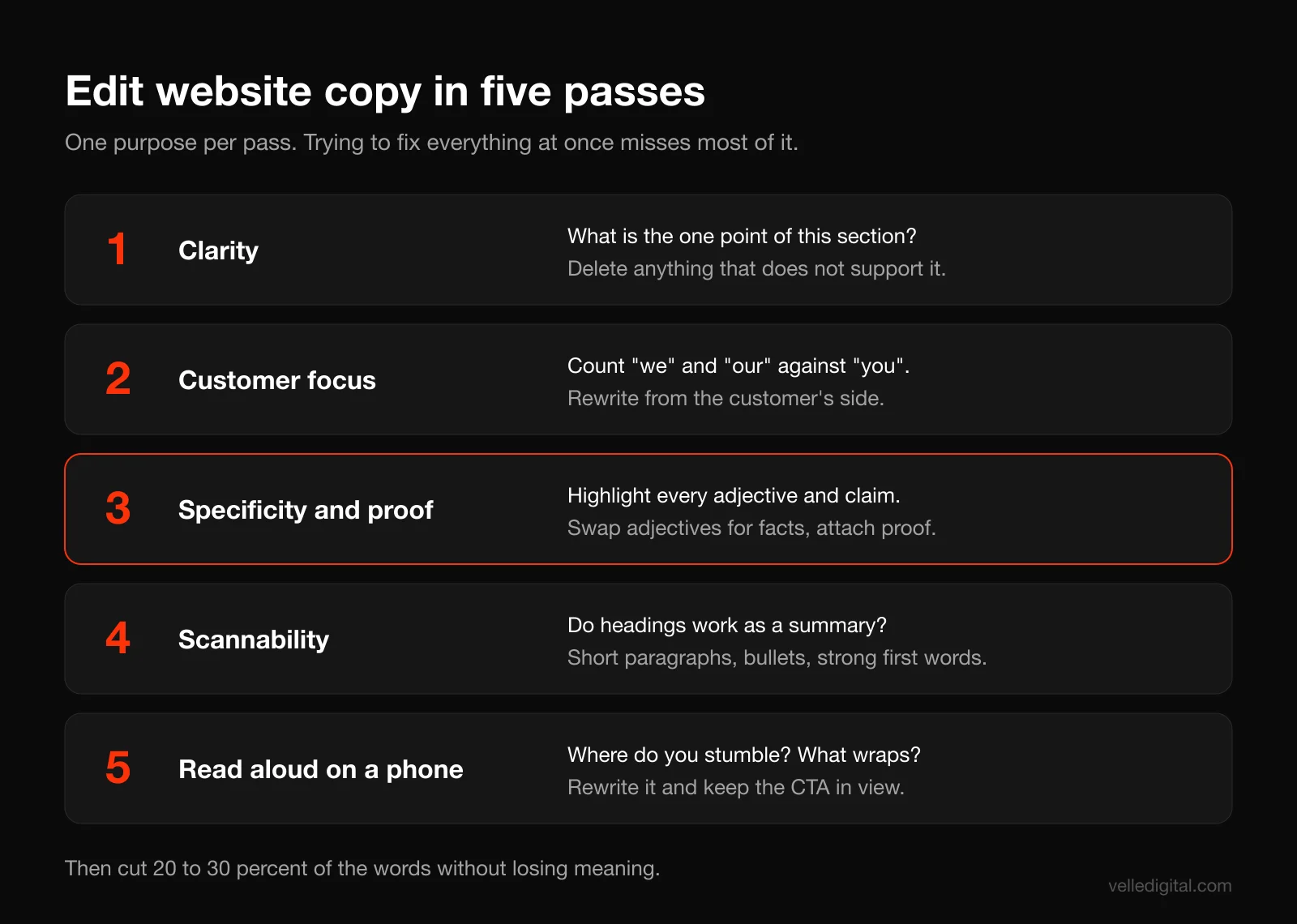
First drafts are always too long, too vague and too focused on the business. Trying to fix everything in one read does not work. Edit in separate passes, each with one purpose.
Pass 1: Clarity
Read each section and ask: what is the one point here? If you cannot say it in a sentence, the section is trying to do too much. Delete anything that does not support that point.
Pass 2: Customer focus
Count "we," "our" and "us" versus "you" and "your." Not every sentence should start with "you," but if "we" dominates, rewrite from the customer's side. "We offer flexible scheduling" becomes "Book a time that fits your week, including evenings."
Pass 3: Specificity and proof
Highlight every adjective and every claim. Replace adjectives with facts ("fast" becomes "within 48 hours") and attach proof to claims (a testimonial, a number, a photo). If you cannot back a claim up, soften it or remove it.
Pass 4: Scannability
Break long paragraphs, turn lists hiding in paragraphs into bullets, rewrite generic headings into informative ones, and check that the first two words of every heading and bullet carry meaning.
Pass 5: Read aloud and check on a phone
Read the page out loud. Anything you stumble over, rewrite. Then look at it on a phone, because that is where much of your traffic is likely to see it. Headlines that look fine on desktop can wrap into four lines on mobile and push the CTA out of view.
Cut ruthlessly
A useful target for a first edit: cut 20 to 30 percent of the words without losing any meaning. Phrases to delete on sight include "in order to" (use "to"), "we are proud to," "we strive to," "a wide range of," "solutions," and "for all your needs."
Using AI tools for website copywriting responsibly
AI writing tools are genuinely useful for website copywriting, and also genuinely good at producing the generic, interchangeable copy this guide warns against. The difference is how you use them.
Google's position is clear. Its guidance says that using automation, including AI, to generate content primarily to manipulate search rankings violates its spam policies, while helpful content can be rewarded however it was produced. Its documentation on using generative AI content warns that generating many pages without adding value can count as scaled content abuse, and says it is critical to fact-check and review AI-generated content before publishing, including titles, meta descriptions and image alt text.
Where AI helps
- Summarizing research. Paste interview transcripts and ask for recurring themes and exact quotes grouped by theme. Then check the quotes against the transcripts.
- Generating options. Ask for 20 headline variations from your value proposition. Most will be weak, a few will spark something better.
- Spotting gaps. Ask it to list the questions a skeptical buyer would still have after reading your page.
- Tightening drafts. Ask it to cut a paragraph by 30 percent without losing facts.
Where AI hurts
- Starting from a blank prompt. "Write a homepage for a plumbing company" produces copy any plumber in North America could use. That is the opposite of positioning.
- Inventing facts. AI tools will happily write "trusted by over 1,000 clients" or a testimonial that sounds real. Never publish a number, claim or quote you cannot verify.
- Flattening your voice. AI defaults to a recognizable style, heavy on "seamless," "elevate" and "tailored solutions." Readers increasingly notice.
Rule of thumb: give the tool your research, value proposition and page plan, and use it as an assistant inside the process. Never let it replace Step 1 and Step 2.
Common website copywriting mistakes
Beyond the problems covered above, these are the mistakes we fix most often:
- Writing for yourself or your peers. Industry jargon impresses competitors, not customers. Use the words from your interviews.
- Trying to appeal to everyone. Copy that excludes no one persuades no one. Naming who you are for makes those people trust you more.
- Writing copy after design is finished. When copy gets squeezed into a layout built around lorem ipsum, the message is shaped by the boxes. Write first, or at least together. This is how we run website development projects.
- One giant services page. Covered in Step 3, but it is common enough to repeat.
- No next step at the end of pages. Every page should end with somewhere to go.
- Never updating it. Your offer, prices, team and proof change. Review copy at least twice a year, and immediately after you change pricing or services.
- Copying a competitor's site. You inherit their positioning, which by definition cannot make you stand out from them.
- Testing nothing. Change one headline or one CTA at a time and compare leads over a few weeks. With low traffic, focus on big changes rather than tiny word swaps, since small differences will not be measurable.
Website copywriting checklist
Run every key page through this list before you publish:
- I interviewed customers and mined reviews, and the page uses their words.
- I can state the page's single job in one sentence.
- The headline says what we do and who it is for, and it would not fit a competitor's site unchanged.
- The subheadline adds the "how" and our main differentiator.
- There is one primary CTA with a specific verb-led label, visible without scrolling.
- A reassurance line under the CTA says what happens next.
- At least one trust signal appears above the fold.
- Every claim has proof nearby: a testimonial, number, photo or credential.
- Headings carry information on their own, not just labels.
- Paragraphs are one to four sentences, and lists are bulleted.
- The first two words of each heading and bullet carry meaning.
- Promotional adjectives have been replaced with facts.
- Service pages cover what is included, process, timing, pricing guidance and FAQ.
- The primary search phrase appears in the title, headline area, first paragraph and a subheading, without stuffing.
- The page title and meta description are unique and written for humans.
- Internal links use descriptive anchor text.
- Any AI-assisted content was fact-checked line by line.
- I read the page aloud and checked it on a phone.
If you want a second set of eyes, a website audit will flag copy, structure and conversion issues together.
Frequently asked questions
What is website copywriting?
Website copywriting is writing the text on a website, including headlines, page copy, calls to action and microcopy, so that visitors understand the offer and take action. It combines persuasion, clarity and structure for scanning. It also supports SEO by clearly answering what searchers are looking for.
How long should website copy be?
As long as it takes to answer the visitor's questions, and no longer. Homepages are usually shorter because they route people elsewhere, while service pages often need 800 to 1,500 words to cover inclusions, process, pricing, proof and FAQs. Google has said it has no preferred word count, so write to the questions, not to a number.
How do I write a good website headline?
Say what you deliver and for whom, in plain words, and make it specific enough that a competitor could not use it unchanged. Formulas like outcome plus audience, or outcome without the main pain, work well for service businesses. Test it by asking someone unfamiliar with your business to explain what you do after reading only the headline.
Should I write my own website copy or hire a copywriter?
You can write strong copy yourself if you follow a research-first process and give it real time, usually several days for a small site. Hire a copywriter if you cannot do customer interviews objectively, if your positioning is unclear, or if the website is a major source of revenue. Either way, you will need to supply access to customers, reviews and your expertise.
How do I make website copy SEO friendly without keyword stuffing?
Choose one primary search phrase per page, use it naturally in the title, main headline area, first paragraph and a subheading, and then focus on answering related questions thoroughly. Write unique page titles and meta descriptions, and link between your pages with descriptive anchor text. Google's spam policies specifically name keyword stuffing, such as long lists of cities, as a violation.
Can I use AI to write my website copy?
Yes, as an assistant, not a replacement. Use AI to summarize your customer research, brainstorm headline options and tighten drafts, but base everything on your own research and positioning. Google warns that unreviewed, mass-produced AI content can violate its spam policies, and AI tools can invent facts, so check every claim before publishing.
How often should I update my website copy?
Review your key pages at least twice a year, and immediately whenever your services, prices, team or proof change. Add new testimonials and project examples as you get them. If leads drop or traffic rises without more inquiries, the copy is one of the first things to revisit.
Get website copy that does its job
Website copywriting is one of the highest-leverage changes you can make to a website, and you can do most of it yourself with the steps above: research, a sharp value proposition, a plan for each page, scannable structure, proof, clear CTAs and several honest editing passes. If you would rather have people who do this every day handle it, our website copywriting service starts with the same customer research and ends with pages built to convert. When you are ready, book a free call and tell us what your website needs to do.