How Much Does It Cost to Build an App? App Development Cost Guide
Realistic app development cost tiers from an agency that builds apps, plus how to scope an MVP, budget for year one and read a quote before you sign.
The honest answer to "what does app development cost?" is that a custom mobile app built by a North American agency usually lands somewhere between 25,000 and 250,000 dollars, with a tightly scoped first version (an MVP) typically in the 25,000 to 75,000 dollar range. No-code prototypes can come in under that, and complex platforms with real-time features, heavy integrations or regulated data can run well past it.
Those ranges come from what we see quoting and building apps for small and mid-sized businesses, not from a survey, and they move with your city, your team and above all your scope. This guide explains what each tier gets you, what actually drives the number, how to scope an MVP step by step so you are not paying for features nobody uses, what an app costs to run after launch, and how to read a quote before you sign. If you have read our guide to what a website should cost, the structure will feel familiar. Apps simply have more moving parts.
The short answer: app development cost by tier
Before the numbers, one framing note. Every range below is a typical North American agency range based on our experience building and reviewing app projects. They are not cited statistics, and you will find quotes outside them in both directions. Offshore teams can be cheaper per hour. Large consultancies are often more expensive. Use these as a sanity check, not a price list.
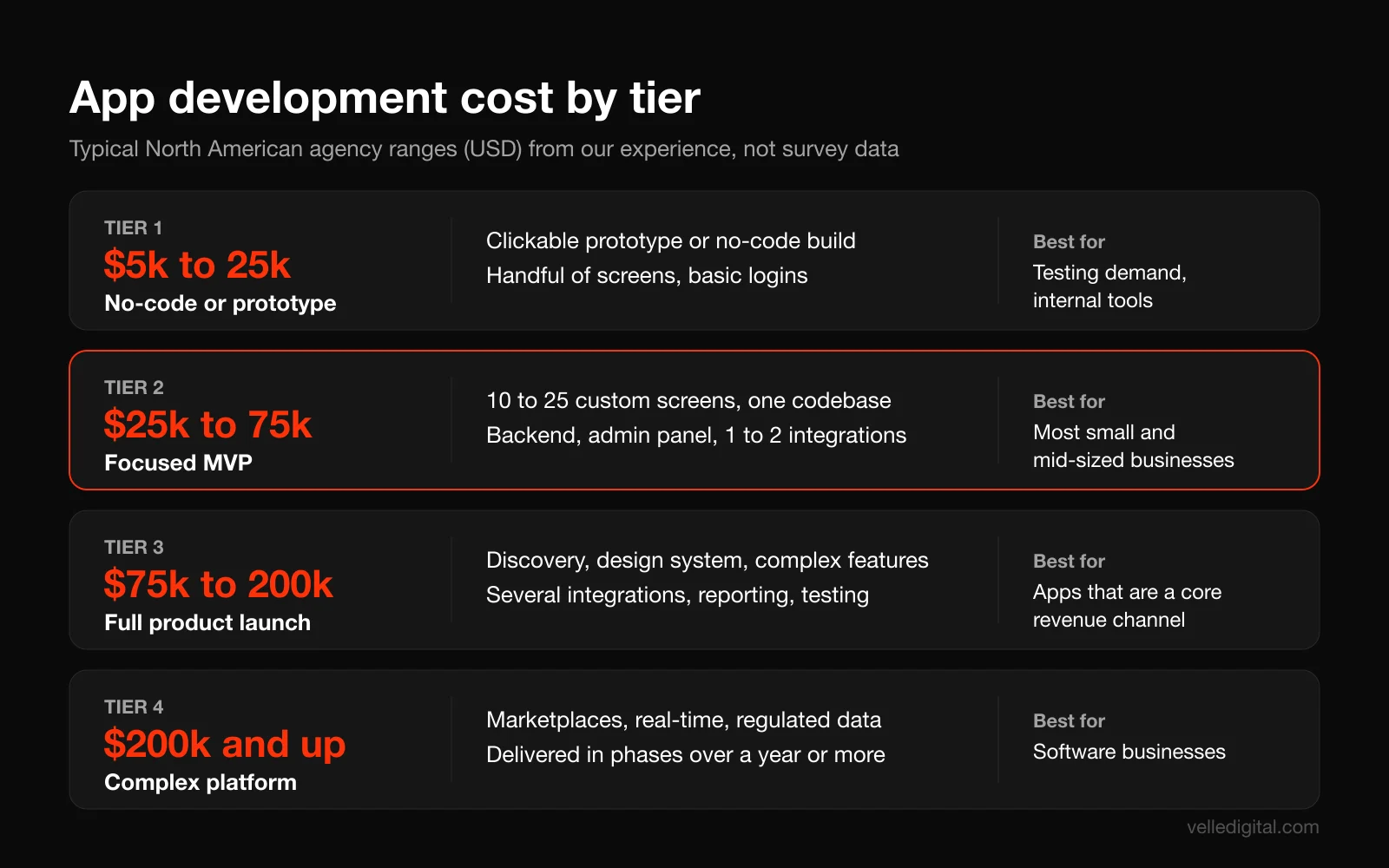
Tier 1: no-code app or clickable prototype, roughly 5,000 to 25,000 dollars
At this level you are either testing an idea or building a simple internal tool. That means a clickable prototype in a design tool, or a working app assembled on a no-code or low-code platform with a template backend. You get a handful of screens, basic forms, simple logins and data stored in the platform's own database.
This is the right choice when you need to prove demand before committing real money, or when the app is for your own staff (a job checklist, an inspection form, a simple inventory lookup). It is the wrong choice when the app is the product you plan to sell. No-code platforms have ceilings on performance, custom logic and data ownership, and rebuilding off them later costs more than starting properly.
Tier 2: focused MVP, roughly 25,000 to 75,000 dollars
A minimum viable product is the smallest version of your app that does one job well enough for real users to rely on it. At this tier you typically get custom design for 10 to 25 screens, one cross-platform codebase that ships to both iOS and Android, user accounts, a real backend with a simple admin panel, one or two integrations (payments, a calendar, your CRM), and store submission.
This is where most small and mid-sized businesses should start. It is enough budget to build something users trust, and small enough that you can afford to learn from real usage before spending more. The key word is focused. An MVP with 40 features is not an MVP; it is a full product with an MVP budget, and that mismatch causes most of the disputes we see.
Tier 3: full product launch, roughly 75,000 to 200,000 dollars
Everything in tier two plus discovery research, a design system rather than one-off screens, more complex features (in-app messaging, subscriptions, offline mode, maps and location), several integrations, a fuller admin dashboard with reporting, analytics wired to business questions, automated testing, and often a companion web app.
This tier makes sense when the app is a primary revenue channel or a core part of your service, for example a customer portal that replaces phone calls, a booking app for a multi-location business, or a subscription product.
Tier 4: complex platform, 200,000 dollars and up
At this level you are building a software business. Two-sided marketplaces, real-time tracking, video, custom algorithms, enterprise integrations, health or financial data with compliance obligations, and apps that need to serve large user bases reliably. Pricing is driven by engineering complexity and risk, not screen count, and most of these projects are delivered in phases over a year or more.
Why app development quotes vary so much
Two agencies can quote 40,000 and 160,000 dollars for what you described as "the same app." Usually neither is lying. They are pricing different assumptions, and the assumptions are hidden inside a single number.
Under the hood, almost every app development quote is the same formula: estimated hours multiplied by a blended hourly rate, plus a buffer for risk. The hours come from the agency's interpretation of your scope. The blended rate depends on who is on the team (designers, developers, QA, a project manager) and where they are.
Worked example (hypothetical): an MVP estimated at 450 hours across design, development, QA and project management, at a blended rate of 140 dollars an hour, is 63,000 dollars. Add a 15 percent contingency and the quote is about 72,000 dollars. Cut 100 hours of scope and the same team quotes about 56,000 dollars.
That math is why scope is the single biggest lever you control. The rate is mostly fixed by the market. The hours are a direct function of what you ask for and how clearly you ask for it. A vague brief gets padded, because the agency is pricing the risk of not knowing what you meant.
It is also why comparing quotes by the total alone is misleading. A low quote with a vague scope often means the agency has assumed a much smaller app than you have in your head. You find out three months in, when every "obvious" feature becomes a change request.
What drives app development cost
These are the variables underneath every quote. When you understand them, you can make trade-offs deliberately instead of discovering them in an invoice.
Platforms: iOS, Android, web, or all three
Every platform you target adds design, development and testing work. Building separately for iOS and Android with two native codebases roughly doubles the front-end development effort, because each screen is built twice and each bug can exist twice.
Decision rules we use with clients:
- If your customers are mostly on one platform, launch there first. A B2B field tool for a team that is issued iPhones does not need an Android version on day one.
- If you sell to the general public in North America, you almost always need both, because your customers are split across the two and you cannot choose them.
- If most usage happens at a desk, consider whether you need a native app at all. A well-built web app may do the job for a fraction of the cost.
- If you need both and budget is tight, use one cross-platform codebase rather than launching on one platform and adding the second later.
Native vs cross-platform vs web app
This is the most consequential technical decision in your quote, and it has a direct effect on app development cost.
Native apps are built with each platform's own tools (Swift for iOS, Kotlin for Android). They give you the best performance and the earliest access to new operating system features. They also cost the most, because you are maintaining two codebases with two sets of specialists.
Cross-platform apps use one codebase to ship to both stores. The two dominant frameworks are Google's Flutter, which builds multiplatform apps from a single codebase, and Meta's React Native, which builds native apps for Android and iOS using React. For the kind of apps most businesses need (accounts, forms, lists, bookings, payments, notifications), cross-platform is usually the right call. In our experience it reduces build cost noticeably compared to two native apps, and it cuts maintenance cost in a similar way, because fixes ship once.
Progressive web apps (PWAs) are websites that can be installed to a phone's home screen and behave much like apps. Google's web.dev guide to progressive web apps covers what it takes to make a site installable. A PWA skips the app stores and their fees entirely, and you build one product that works everywhere. The trade-off is weaker access to some device features and no presence in store search.
Our rule of thumb:
- Choose native when performance or deep device access is the product: heavy graphics, advanced camera work, Bluetooth hardware, augmented reality.
- Choose cross-platform for most customer-facing business apps that need to be in both stores.
- Choose a web app or PWA when users mostly reach you from a link or a desktop, or when you are validating an idea and store presence does not matter yet.
Features: the biggest variable of all
Features are where budgets live or die. Not all features are equal, and the ones that sound simple are often the expensive ones. Here is how we think about relative weight for a typical cross-platform build:
- Light (hours, not weeks): static content screens, a contact form, basic settings, push notifications for simple events, a FAQ.
- Medium (days to a couple of weeks each): email and social login, user profiles, search and filters, payments through a standard provider, a booking calendar, basic analytics, image upload.
- Heavy (weeks each): in-app chat, real-time location tracking, subscriptions with trials and upgrades, offline mode with sync, a recommendation engine, video calls or streaming, role-based permissions for many user types, anything involving AI that must be reliable.
Two features catch owners off guard more than any others. The first is offline mode: making an app work without signal and then sync cleanly is genuinely hard, because you have to resolve conflicts when two people edit the same record. The second is multiple user types. A marketplace with customers, providers and admins is effectively three apps sharing a database.
Backend, admin panel and data
The screens you see are perhaps half the work. Behind them is a backend: the server, database, APIs and business logic that store data, send notifications, process payments and keep users' accounts secure.
You have two broad options. A backend-as-a-service platform such as Firebase provides authentication, a database, file storage and hosting out of the box; Google's Firebase pricing page shows a no-cost Spark plan and a pay-as-you-go Blaze plan for apps at scale. That speeds up MVPs considerably. A custom backend costs more to build but gives you full control over logic, data location and long-term costs.
Do not forget the admin panel. Someone on your team needs to see users, edit content, refund orders and answer support tickets. A basic admin panel is part of a sensible MVP. A polished one with reporting and permissions can be a project in itself. If your app needs to share data with your sales and customer records, it often makes sense to design the backend alongside a custom CRM rather than bolting the two together later.
Integrations
Every connection to another system adds real hours: payments, calendars, accounting, shipping, your CRM, an existing booking system, a point-of-sale system, mapping, SMS. A well-documented modern API might take a few days to integrate. A legacy system with poor documentation can take weeks, and the time goes into discovering how it actually behaves.
When an agency asks for API documentation before quoting, that is a good sign. They are trying to price the real risk instead of guessing.
Design and user experience
Design covers research, user flows, wireframes, visual design and prototypes. Good design reduces development cost, because developers build exactly what was agreed instead of improvising, and fewer screens get rebuilt after testing.
Both platforms publish design rules. Apple's Human Interface Guidelines describe how iOS apps are expected to look and behave, and users notice when an app ignores those conventions. Expect custom app design to be one of the larger line items after development. Our UI and UX design service is often where an app project starts, because a tested prototype is the most accurate thing you can hand a developer for a quote.
Compliance, privacy and accessibility
This category is invisible in most early budgets and very visible at launch.
- Privacy disclosures. Apple requires you to describe your app's privacy practices, including those of third-party partners whose code you integrate, in App Store Connect. Google Play has an equivalent Data safety form. Someone has to audit every analytics and advertising library in the app to fill these in accurately.
- Privacy law. In Canada, PIPEDA sets the ground rules for how private-sector organizations collect, use and disclose personal information in commercial activities, and provinces such as Alberta have their own private-sector laws. US states have their own rules too. Health and financial data bring stricter obligations and more expensive infrastructure.
- Store rules. Apple's App Review Guidelines require that if your app supports account creation, you must also offer account deletion within the app. They also state that an app should elevate itself beyond a repackaged website. Building a thin wrapper around your site is a common path to rejection.
- Accessibility. The W3C's Web Content Accessibility Guidelines (WCAG) can also be applied to native apps. Designing for screen readers, dynamic text sizes and sufficient contrast from the start is cheap. Retrofitting it is not.
Testing, project management and the unglamorous rest
Quality assurance covers testing on real devices and operating system versions, performance checks and regression testing every time something changes. Project management covers planning, standups, demos and keeping the scope honest. Together these typically account for a meaningful share of any quote, and an agency that leaves them out is either including them silently or not doing them.
How to scope an MVP step by step
Scoping is where you have the most control over app development cost. A tight scope does not mean a worse app. It means an app that does one thing well before it tries to do ten things adequately. Follow these steps before you ask anyone for a quote.
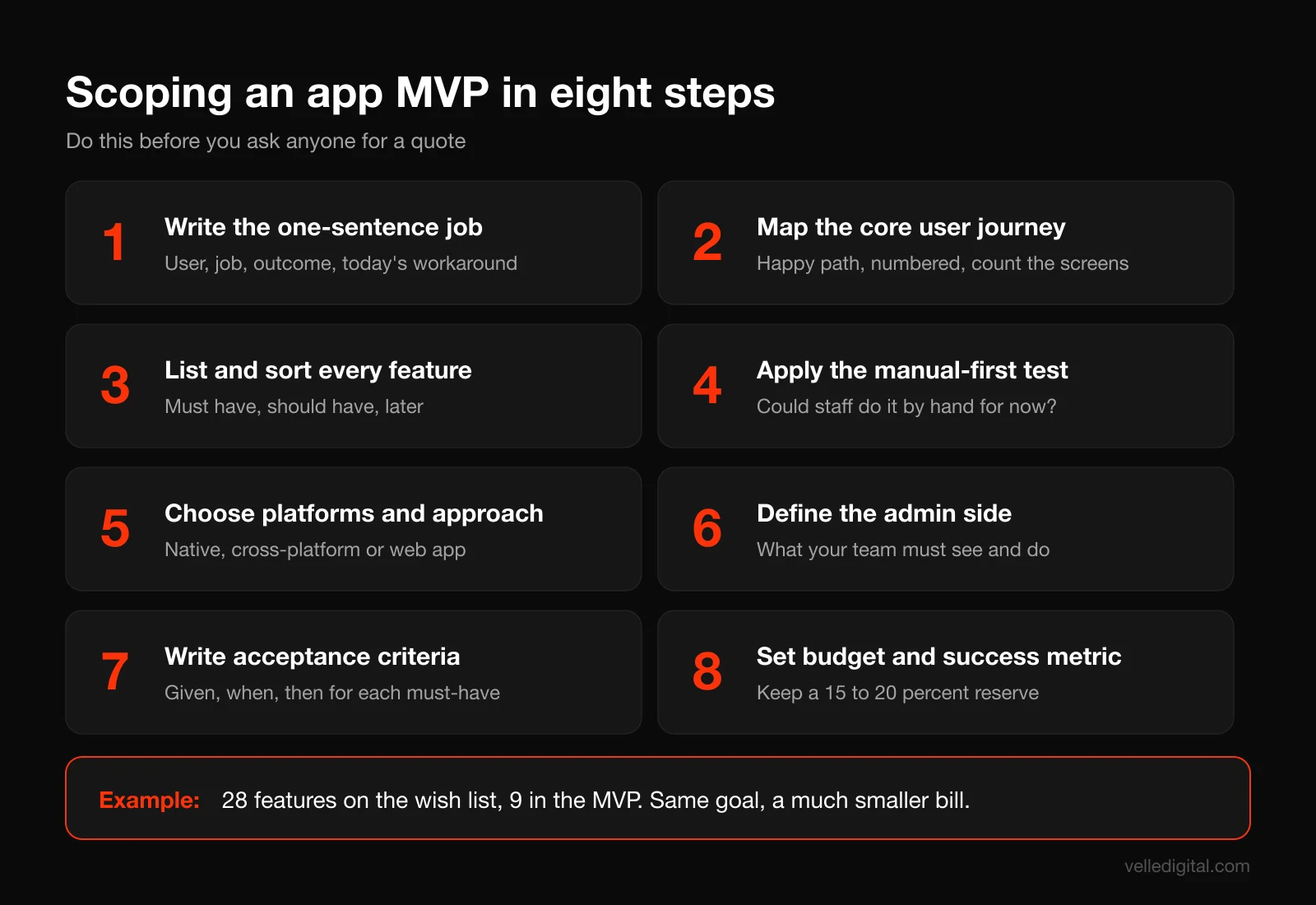
Step 1: Write the one-sentence job
Describe what the app does for one specific user in one sentence. Use this template:
"[Type of user] uses the app to [do one job] so that [measurable outcome], instead of [what they do today]."
For example: "Our residential cleaning customers use the app to book and reschedule cleans so that they stop calling the office, instead of phoning or emailing during business hours." If you cannot write this sentence, you are not ready to build an app. You are ready to do customer research.
Step 2: Map the core user journey
Write out, as a numbered list, every step a user takes to complete that one job, from opening the app to finishing. Keep it to the happy path first. For the cleaning example:
- Download the app and create an account.
- Enter an address and home size.
- Pick a service type and see the price.
- Choose an available date and time.
- Pay or save a card.
- Get a confirmation and a reminder before the visit.
- Reschedule or cancel if needed.
- Rate the clean afterwards.
Each step becomes one or more screens. Count them. This is the backbone of your scope, and anything not on this path is a candidate for later.
Step 3: List every feature, then sort it ruthlessly
Now brainstorm every feature you want, without filtering. Then sort each one into three buckets:
- Must have: the core journey breaks without it.
- Should have: it makes the experience noticeably better, but users can complete the job without it.
- Later: nice ideas, competitor features, anything that starts with "it would be cool if."
A useful test: for each must-have, ask "would a user abandon the app on day one without this?" If the honest answer is no, move it down. Most first lists we see shrink by half or more at this step, and that is the point.
Step 4: Apply the "manual first" test
For every remaining feature, ask whether a person on your team could do it by hand for the first few hundred users. Automated matching, dynamic pricing, refund handling, detailed reporting and complex notifications can often start as a staff member using the admin panel.
Doing things manually at first costs you hours, not development dollars, and it teaches you exactly how the automated version should work. Once volume proves the need, automating a known process is cheaper and more accurate than automating a guess. Our guide to AI and automation for small business covers how to pick which manual tasks to automate first.
Step 5: Choose platforms and approach
Use the decision rules from earlier. Write down your answer to three questions:
- Which platforms do my first users actually use?
- Does any must-have feature require deep native device access?
- Does the app need to be found in the app stores, or will users arrive from a link, an email or my website?
If the answers are "both," "no" and "yes," cross-platform is almost certainly your answer. If the third answer is "no," price a web app or PWA alongside the native option.
Step 6: Define the admin side
List what your staff need to do: view and edit users, manage bookings, update content and prices, issue refunds, export data, respond to messages. Mark each as must, should or later, exactly as you did for user features. An MVP admin panel can be plain and functional. It just has to exist.
Step 7: Write acceptance criteria for every must-have
Acceptance criteria are short, testable statements that define when a feature is done. They are the most effective tool we know for preventing scope disputes, because they turn "booking" into something specific. Use this format:
"Given [situation], when [user action], then [expected result]." Example: "Given a logged-in customer with a saved card, when they pick an open time slot and tap Confirm, then the booking appears in their upcoming list, the office sees it in the admin panel, and the customer receives a confirmation email within one minute."
Write two to five of these per must-have feature. It takes an afternoon. It will save you weeks.
Step 8: Set a budget range and a success metric
Decide two numbers before you request quotes. First, a budget range you can actually spend, keeping 15 to 20 percent in reserve for changes and post-launch fixes. Second, a success metric for the MVP, tied to your one-sentence job: for example, "40 percent of bookings come through the app within three months of launch."
The metric is what tells you whether to invest in version two, change direction or stop. Without it, every app turns into an open-ended project that is never quite finished.
A worked example: cutting a scope to fit a budget
Here is a hypothetical example to make the steps concrete. A cleaning company starts with a wish list of 28 features, including chat with cleaners, live cleaner tracking, loyalty points, referral codes, a tipping system, dynamic pricing and a cleaner-side app.
After sorting and the manual-first test, the MVP keeps nine: accounts, address and home details, instant pricing from a fixed table, booking with available slots, card payments, confirmation and reminder notifications, rescheduling and cancellation, post-clean rating, and a basic admin panel. Dynamic pricing becomes a fixed price table the office updates. The cleaner app becomes a schedule the office shares through tools it already uses. Chat becomes a "call the office" button.
In our experience, a scope like that nine-feature version on a cross-platform stack typically lands in the tier two range. The 28-feature version would be a tier three or tier four project. Same business, same goal, very different bill.
Ongoing app costs after launch
The build is a one-time number. Running an app is not. This is the part of app development cost that most first budgets miss, and it is why we always ask clients to plan the first year, not just the launch.
App store fees
These are the most predictable costs, because the platforms publish them.
- Apple Developer Program: Apple lists a 99 dollar annual membership, and its enrollment page notes the program is 99 USD per membership year, with prices shown in local currency and fee waivers available for eligible nonprofits, educational institutions and government entities. You need this to publish on the App Store.
- Google Play developer account: Google charges a US$25 one-time registration fee to create a Play Console developer account.
- Commissions on digital sales: if you sell digital goods or subscriptions inside the app, the stores take a cut. Apple's App Store Small Business Program offers a reduced commission of 15 percent on paid apps and in-app purchases for qualifying developers earning under 1 million USD in proceeds. Google's Play service fees page says 99 percent of developers subject to a service fee are eligible for a fee of 15 percent or less through its programs, and its fee structure varies by region and has been changing, so check the current page for your markets before you model revenue.
Two clarifications that matter for most service businesses. First, the commission generally applies to digital goods and subscriptions, not to physical services like a cleaning, a repair or a restaurant order paid through a standard payment processor. Second, payment processor fees still apply to those physical-service payments, so budget for them separately.
Hosting, backend and third-party services
Your backend costs money to run, and that cost scales with usage. A small MVP on a backend-as-a-service platform can cost very little each month at first. An app with thousands of daily users, file uploads, video or heavy database activity can cost hundreds or thousands of dollars a month.
Add the services your app depends on: email and SMS sending, maps, push notification services, error monitoring, analytics, search, and any AI APIs. Each is usually modest on its own. Together they add up, and many are priced per use, so a successful launch raises your bill. Ask your agency for a list of every paid service and an estimate at 100, 1,000 and 10,000 active users.
Maintenance and operating system updates
Apps do not stay finished. Apple and Google release major operating system updates every year, devices change screen sizes, and the libraries your app relies on publish security patches. Google Play also sets target API level requirements that apps must meet to keep publishing updates. An app nobody touches for 18 months can stop working properly or become impossible to update without significant rework.
A rule of thumb from our own projects: plan for annual maintenance at roughly 15 to 25 percent of the original build cost. That covers operating system compatibility, dependency updates, bug fixes, monitoring and small improvements. It does not cover major new features. The same principle applies to websites, which is why we offer ongoing website maintenance rather than treating launch as the end.
Feature updates and version two
If the MVP works, you will want to build more. Budget for it as a separate line, informed by what users actually do. The best version two roadmaps come from analytics and support tickets, not from the original wish list.
A first-year budget, worked through
Hypothetical example for a tier two booking app built for 60,000 dollars:
- Build: 60,000 dollars.
- Apple Developer Program: 99 USD for the year. Google Play registration: US$25 once.
- Backend hosting and third-party services: say 150 to 400 dollars a month as usage grows, or roughly 1,800 to 4,800 dollars for the year.
- Maintenance at 15 to 25 percent of build: 9,000 to 15,000 dollars a year.
- Reserve for post-launch fixes and small changes: 15 percent of build, or 9,000 dollars.
In this example, the realistic first-year total is somewhere around 80,000 to 89,000 dollars, not 60,000. Planning for the higher number is what keeps a good app from being abandoned six months after launch.
How to reduce app development cost without hurting quality
Cutting cost is easy. Cutting cost without creating an app you have to rebuild is the skill. These are the levers that work.
- Cut scope, not quality. Removing a feature saves its full cost. Asking a team to build the same features faster or cheaper usually removes testing, and the cost comes back as bugs.
- Go cross-platform unless you have a specific reason not to. One codebase means one set of fixes for the life of the app.
- Use proven services instead of custom builds. Authentication, payments, maps, email and push notifications are solved problems. Paying a developer to rebuild them is rarely worth it.
- Invest in a clickable prototype first. Testing a prototype with five to ten real users finds confusing flows when changing them costs hours of design time, not weeks of code.
- Supply finished content and decisions on time. Delays in copy, images, pricing and approvals are billed as idle time or rushed work.
- Start manual, automate later. Use the admin panel and your team for low-volume processes until the volume justifies automation.
- Launch on one platform when your users allow it. If your users are concentrated on one platform, launching there first and adding the other once the app is proven is a reasonable way to spread cost.
- Consider a web app first. If your users are mostly at desks or arriving from links, a web app may answer the business question for much less.
- Reuse your existing systems. If you already have a booking system or CRM with a good API, building the app as a front end to it can be far cheaper than rebuilding the backend.
- Fix the scope before development starts. Every change during development costs more than the same change during design. Acceptance criteria are your cheapest insurance.
What not to do: do not cut QA, do not skip analytics, do not choose a team on hourly rate alone, and do not let anyone talk you out of owning your code and accounts to save money.
How to read an app development quote
A good app development quote tells you exactly what you are buying. A bad one gives you a big number and a feature list. Here is what each section should contain.
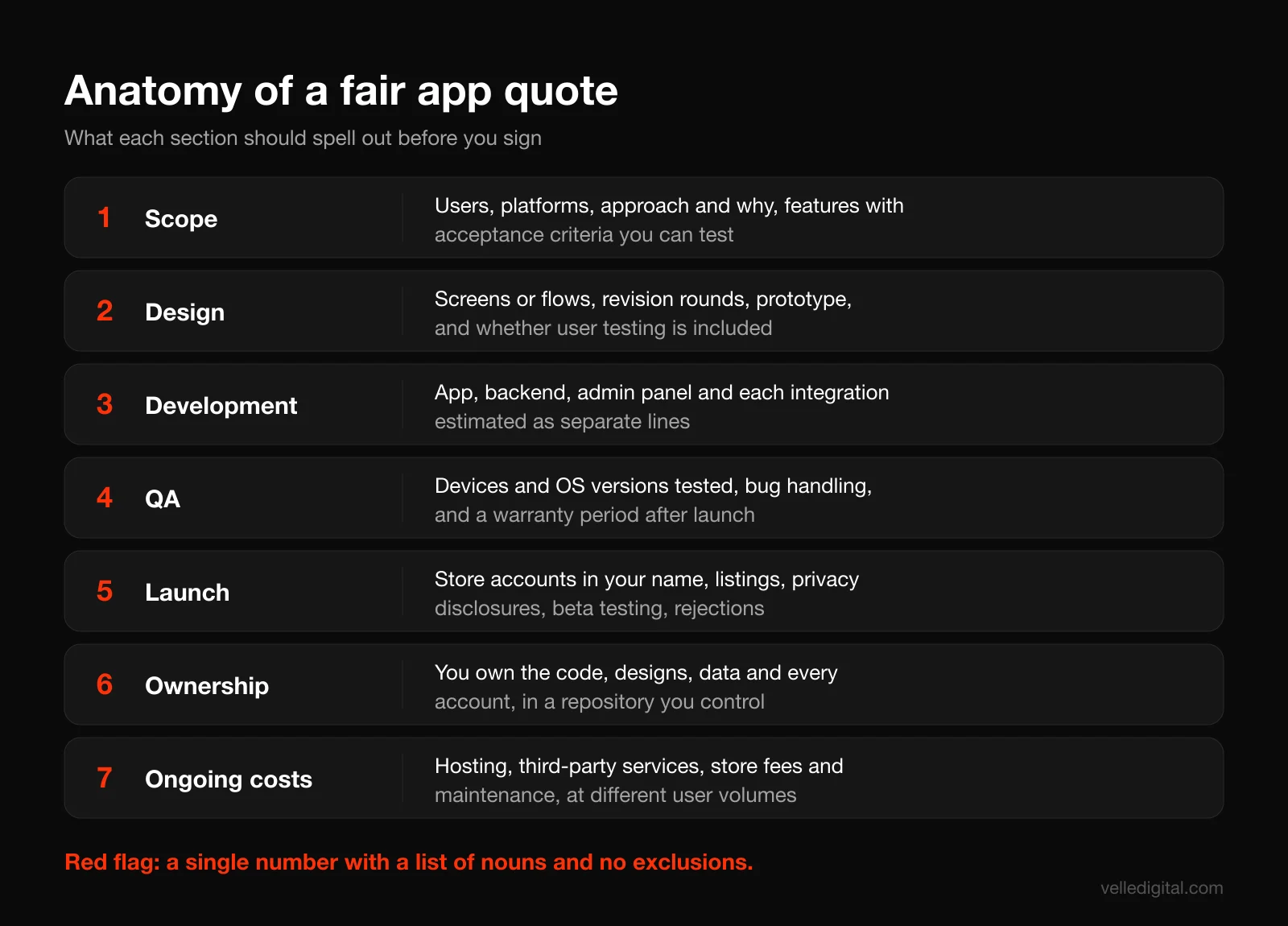
Discovery and scope
A fair quote states the problem, the target users, the platforms, the technical approach (native, cross-platform or web) and why that approach fits. It lists features with enough detail to be testable, ideally with acceptance criteria or user stories. If the scope section is a list of nouns ("login, profile, booking, payments"), you cannot hold anyone to it.
Design
Look for the number of screens or user flows, the number of revision rounds and what counts as a revision, whether a clickable prototype is included, and whether user testing is part of the plan.
Development
This should break down into the app itself, the backend, the admin panel and each integration as separate lines or at least separate estimates. Separate lines let you make informed trade-offs. A single "development" line hides where the money goes.
Quality assurance
Which devices and operating system versions will be tested, whether there is automated testing, and how bugs found after launch are handled. A good quote includes a warranty period, often 30 to 90 days in the projects we see, during which defects in agreed scope are fixed at no charge.
Launch and store submission
Who creates the developer accounts (it should be you, in your company's name), who prepares store listings, screenshots and privacy disclosures, and who handles rejections. Apple's TestFlight lets you invite up to 10,000 external testers before release; a quote that includes a structured beta period is a sign of a careful team.
Ownership and handover
The quote or contract should state that you own the source code, the designs, the data, the developer accounts and the cloud accounts, and that the code lives in a repository you control. Ask for documentation and a handover session as part of the scope.
Pricing model and payment schedule
Fixed price works when scope is tight and well defined; it protects your budget but makes every change a formal change request. Time and materials (hourly or by sprint) works when scope will evolve; it is more flexible but needs a budget cap and regular reporting. A common middle path is a fixed-price discovery and design phase, followed by a fixed or capped development quote based on the approved prototype. Payments should be tied to milestones you can verify, such as an approved prototype or a build you can install.
Red flags in an app quote
- No discovery or questions before a number. They are pricing a guess.
- A dramatically lower quote with the same feature list as everyone else. Find out what they assumed you did not ask for.
- No mention of backend, admin panel, QA or store submission.
- "Unlimited revisions." This sounds generous and usually produces a project with no end date.
- The agency owns the code, the developer accounts or the cloud hosting, or charges a fee to release them.
- A cheap build tied to a mandatory multi-year maintenance contract at a high monthly rate. That is a financing arrangement, not a discount.
- No mention of ongoing costs at all.
Questions to ask before you sign
Bring these to every agency you are considering. The quality of the answers matters as much as the answers themselves.
- What approach are you recommending (native, cross-platform or web), and why does it fit my app specifically?
- Which features in my list are you most worried about, and why?
- What does your estimate assume that I have not stated?
- How many hours have you estimated for design, development, QA and project management?
- What is not included in this price?
- How do you handle change requests, and how are they priced?
- How often will I see working software, and can I install test builds on my own phone?
- Who exactly will work on my project, and are they employees or subcontractors?
- What are the monthly running costs after launch, at 100, 1,000 and 10,000 users?
- What does maintenance cost, and what does it include?
- Do I own the code, designs and all accounts from day one?
- What happens if we part ways halfway through?
- Can I speak to a client whose app you have maintained for more than a year?
That last question tells you the most. Launching an app is one skill. Keeping it healthy through years of operating system updates is another. If you want a broader framework for evaluating partners, our guide on how to choose a marketing agency covers vetting questions that apply to development partners too.
How long it takes to build an app
Timeline and cost move together, because time is mostly people's hours. These are typical timelines from our experience for a cross-platform build with a responsive client:
- No-code prototype or simple internal tool: 2 to 6 weeks.
- Focused MVP: 3 to 5 months, including roughly 3 to 6 weeks of discovery and design, 8 to 14 weeks of development and testing, and 2 to 4 weeks for beta, store submission and fixes.
- Full product launch: 5 to 9 months.
- Complex platform: 9 months and up, usually delivered in phases.
Store review is part of the timeline. Both stores review apps before release, and a first submission can be rejected for issues you did not anticipate (missing account deletion, incomplete privacy disclosures, too little functionality). Build at least two weeks of buffer into your launch date.
The most common causes of delay are the same as for websites: decisions that sit unanswered, content that has not been written, and new features added mid-build. Hold a short weekly review, answer questions within a day or two, and keep a "later" list where new ideas go instead of into the current sprint.
Common app budgeting mistakes
These are the patterns we see most often when an app project goes over budget or stalls.
- Budgeting for the build only. The first-year total is often 30 to 50 percent higher than the build, as the worked example above shows.
- Building the full vision first. Launching with every feature means waiting longer for feedback and spending more before you learn anything.
- Copying a big competitor's feature set. Their app is the result of years of iteration and a large team. Your first version should be their first version, not their current one.
- Choosing native "for quality" without a reason. Native is the right call for some apps, but for most business apps the cost difference buys little a user will notice.
- Forgetting the admin side. An app your team cannot manage creates support work that eats the savings it was supposed to create.
- No success metric. Without a defined outcome, nobody can tell whether the app worked, and the budget conversation becomes emotional.
- Treating the app as separate from marketing. An app nobody downloads is a cost center. Plan how people will find it, through your website, email list, in-person sales and ads, before you launch. Our post on planning a small business marketing budget helps you set that number alongside the build.
When you should not build an app yet
Sometimes the most cost-effective app is no app. Consider waiting, or building something smaller, if any of these are true:
- Your website is not converting. If people who visit your site today do not book or buy, an app will not fix that. Fix the website first.
- The job happens once or twice a year. Few people install an app for an annual service. A mobile-friendly booking page usually wins.
- You cannot write the one-sentence job. Do more customer research before you spend on development.
- You cannot fund maintenance. An app that launches and is then neglected harms your brand more than not having one.
If your real goal is fewer phone calls and faster bookings, a well-built website with online booking and automated follow-up often gets most of the benefit at a fraction of the app development cost. Our comparison of Next.js vs WordPress is a good starting point if a web app might be enough.
App development cost checklist
Use this before you request quotes and again before you sign.
- I can state the app's job in one sentence, for one type of user.
- I have mapped the core user journey and counted the screens.
- My features are sorted into must, should and later, and the must list fits on one page.
- I have applied the manual-first test to every must-have.
- I have decided on platforms and approach, with a reason.
- I have listed what my admin team needs to do.
- Every must-have has two to five acceptance criteria.
- I have a budget range with a 15 to 20 percent reserve.
- I have a success metric for the MVP.
- I have budgeted for store fees, hosting, third-party services and maintenance for year one.
- Each quote I compare states scope, approach, hours by discipline, QA, store submission and exclusions.
- The contract gives me ownership of code, designs, data and all accounts.
- I know how change requests are handled and priced.
- I know who will build the app and how often I will see working builds.
- I have a plan for how people will find and download the app.
Frequently asked questions
How much does it cost to build a simple app?
A simple app with a handful of screens, basic accounts and no complex integrations typically costs 5,000 to 25,000 dollars as a no-code build, or about 25,000 to 50,000 dollars as a custom cross-platform MVP from a North American agency, based on our experience. "Simple" is the risky word here: a feature that sounds simple, like chat or offline mode, can double the estimate. Write your feature list down before you assume your app is simple.
How long does it take to build an app?
A focused MVP typically takes three to five months from discovery to store release, including design, development, testing and store review. A full product launch usually takes five to nine months. The biggest causes of delay are slow decisions and features added mid-build, not the coding itself.
Is it cheaper to build an app for iOS or Android?
The development effort for a single platform is broadly similar on either. The bigger saving comes from building one cross-platform codebase with a framework like Flutter or React Native instead of two native apps. Launch on whichever platform your customers actually use, or on both with a single cross-platform codebase if your audience is split.
Can I build an app for 10,000 dollars?
You can build a no-code app, an internal tool or a clickable prototype for around 10,000 dollars. A custom app with real accounts, a backend and store submission is very hard to deliver at that budget by a North American agency without cutting testing or design. If 10,000 dollars is your ceiling, a prototype to test demand or a web app is usually the smarter spend.
How much does it cost to maintain an app each year?
From our projects, a sensible planning figure is 15 to 25 percent of the original build cost per year, which covers operating system updates, bug fixes, security patches and monitoring. On top of that you pay hosting and third-party services, plus 99 USD a year for the Apple Developer Program. New features are budgeted separately.
Do app stores take a cut of my revenue?
Only on certain sales. Apple and Google charge commissions on digital goods and subscriptions sold inside an app, often 15 percent for smaller developers in their programs. Payments for physical goods and real-world services, such as a home service booking, generally go through a regular payment processor instead, which charges its own fees.
Should I choose a fixed-price or hourly contract?
Fixed price suits a tight, well-defined MVP scope with written acceptance criteria, because it caps your risk. Hourly or sprint-based pricing suits projects where the scope will evolve, as long as there is a budget cap and regular reporting. Many teams combine the two: a fixed discovery and design phase, then a development quote based on the approved prototype.
Talk through your app budget with us
The right app development cost for your business depends on one question: what job should the app do, and what is that job worth to you each year? Answer that, scope tightly, and plan the first year rather than the launch, and almost any of the tiers above can be a good investment. If you want a second opinion on a quote, help shaping an MVP, or a team to design and build it, see our app development service or book a call and we will give you a straight answer about what your app should cost.