Google Local Services Ads: How to Get Verified and Win More Leads
A step-by-step guide to Google Local Services Ads: eligibility in Canada, getting Google Verified, what counts as a charged lead, lead credits, bidding, ranking factors and a setup checklist.
Google Local Services Ads are pay-per-lead ads that sit at the very top of Google results for searches like "plumber near me" or "furnace repair". They show your business name, star rating, hours and a Google Verified badge. You pay when a customer calls, messages or books you through the ad, not when someone clicks. To run them, your business has to be in an eligible category, pass Google's screening (licenses, insurance, background and business checks), and have a verified Google Business Profile.
If you are a home service business in an eligible category, Local Services Ads are, in our experience, among the most cost-effective leads you can buy from Google, and they work best alongside a well-built Search campaign rather than instead of one. This guide walks you through the whole thing: how they differ from Search ads, what is available in Canada right now, how verification works, what counts as a charged lead, how to get credits for bad ones, budget and bidding, what moves your ranking, and a setup checklist you can work through this week.
What Google Local Services Ads are (and how they differ from Search ads)
Local Services Ads (people shorten it to LSA) are a separate ad product from the regular text ads you buy in Google Ads. They live in their own box at the top of the page, usually above the normal sponsored results. Each listing is a small card: business name, star rating and review count, a few details such as hours or service area, and a Google Verified badge if you have earned it.
When a searcher taps a card, they see your profile and can call you, send you a message, or (in some categories and with an integrated booking partner) book a time. According to Google's Getting started with Local Services Ads page for Canada, those leads come in as phone calls and messages, and you manage them from an online lead inbox where you can reply, track bookings and rate leads.
The big differences from Search ads come down to four things.
- You pay per lead, not per click. With Search ads you pay every time someone clicks, even if they bounce off your site in three seconds. With Local Services Ads you pay when a valid lead reaches you: an answered call, a qualifying missed call, a message, a voicemail or a booking.
- There are no keywords. You pick your business category, the specific job types you do (such as "install water heater" or "drain cleaning"), and the areas you serve. Google decides which searches match. You cannot add keywords or negative keywords.
- There is no ad copy and no landing page. Your "ad" is your profile: name, reviews, photos, hours, bio and verification checks. The customer contacts you directly from Google, so your website plays no part in the conversion.
- Trust is built in. The Google Verified badge tells searchers your business passed Google's screening. A Search ad cannot carry that badge.
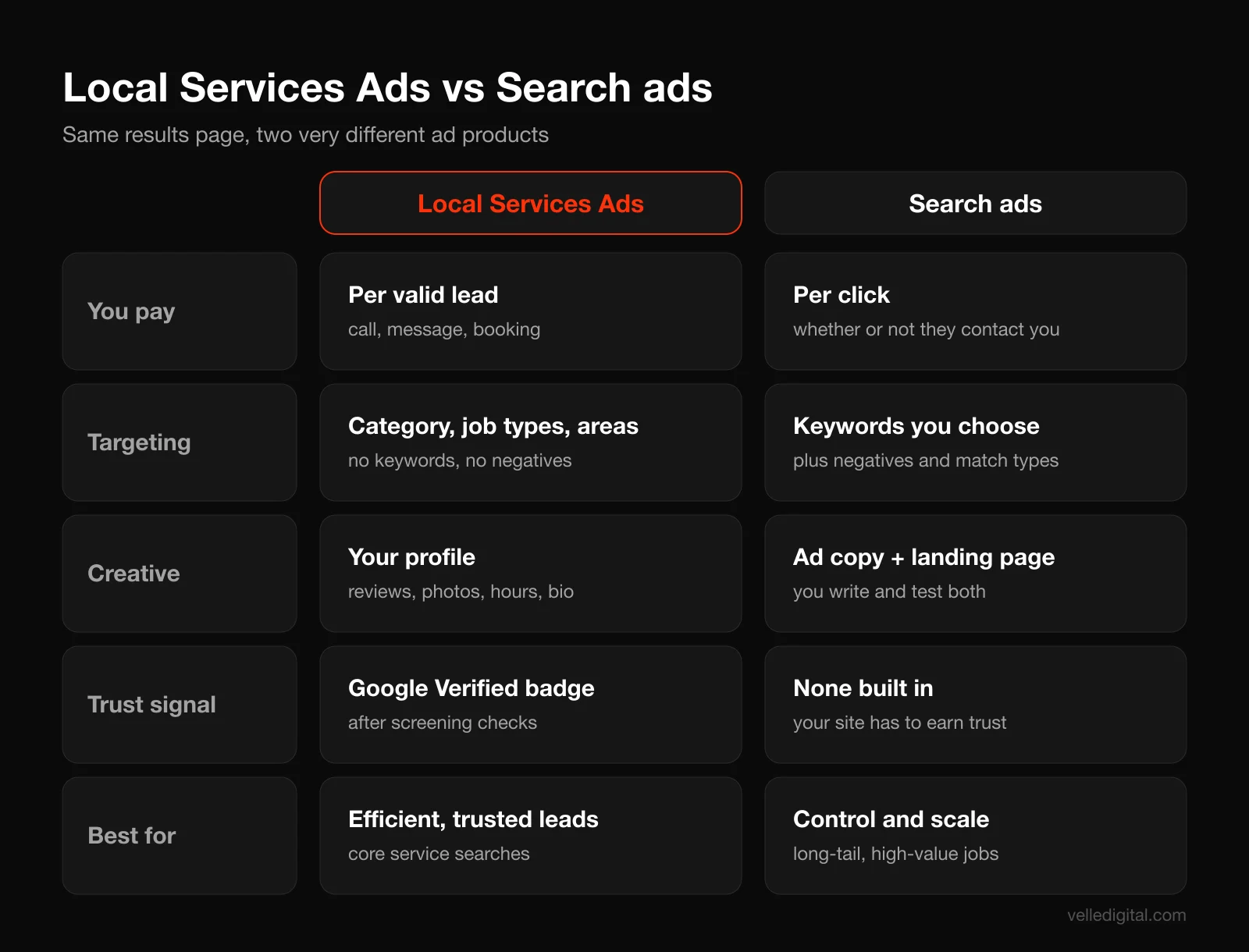
Where the money goes: per lead vs per click
Here is a simple worked example with made-up numbers so you can see why the model matters. These are illustrations, not benchmarks; your real costs depend on your city, trade and competition.
Say a plumber in a mid-sized city runs a Search campaign at 6 dollars a click. Out of 100 clicks, 8 people call or fill in the form. That is 600 dollars for 8 leads, or 75 dollars a lead, and you paid for the 92 people who did not contact you.
Now say the same plumber runs Local Services Ads and the average lead costs 45 dollars. Ten leads cost 450 dollars. Nobody who simply browsed your profile costs you anything. The catch: you have less control over which searches trigger you, and a "lead" can still be a tire-kicker or a price shopper. That is why the lead credit and feedback process (covered below) matters.
Rule of thumb: Search ads give you control and volume. Local Services Ads give you trust and efficiency. Most eligible service businesses should run both.
Do not confuse either with your Google Business Profile, which is your free listing in Maps and the local pack. You never pay for it, but Local Services pulls your reviews, hours and core details from it, so a weak profile drags down your ads. Our Google Business Profile optimization guide covers it step by step.
Important change in 2026: Local Services Ads are moving into Google Ads
Before you set anything up, know that the product is mid-transition. Google's help article on the Local Services Ads transition to Performance Max campaigns with pay-per-lead goals says existing Local Services campaigns are being migrated into a specialized Performance Max campaign type inside the main Google Ads platform.
What stays the same, according to that page: you still pay only for valid leads, your ads still show only on Google Search and Google Maps in the same positions, and targeting stays keywordless.
What changes:
- Budgets, targeting and leads move into Google Ads. The lead inbox becomes a Leads page under Goals, then Conversions.
- Weekly budgets become daily average budgets (weekly divided by 7), with monthly spend capped at the daily average multiplied by 30.4.
- Manual bidding (a maximum cost per lead) is no longer supported, and per-category targets become one campaign-level target. Separate targets for, say, plumbing and HVAC need separate campaigns.
- Old Local Services performance reports do not carry over, so download or screenshot them first. Verification status and the Google Verified badge do carry over.
Google's timeline: the first phase began in August 2026 for select US home and storefront advertisers, a broader US phase follows in late 2026, and non-US accounts (including Canada) and remaining categories move in 2027. Account admins get an email 14 days before their migration date.
So in Canada you are working in the classic Local Services dashboard for now. The fundamentals below apply either way.
Are Local Services Ads available in Canada?
Yes. Local Services Ads run in Canada, and Google's Canadian version of the getting started page (linked above) currently lists these eligible service categories:
- Appliance repair services
- Carpet cleaning services
- Cleaning services
- Electricians
- HVAC (heating or air conditioning)
- Junk removal services
- Lawn care services
- Locksmiths
- Movers
- Pest control services
- Plumbers
- Roofers
- Tree services
- Water damage services
- Window cleaning services
- Window repair services
That is a much shorter list than the US, where the same page lists dozens of categories, including lawyers, real estate, health care, auto services, beauty and even restaurants. If you are a Canadian dentist, lawyer, realtor or auto shop, Local Services Ads are not open to you right now, and your paid search effort should go into regular Search ads instead. Our Google Ads for small business guide walks through that setup.
What about cities?
Google does not publish a list of Canadian cities on its help pages. Availability is checked per business with Google's eligibility tool, where you enter your category and postal code. We are not going to list cities we cannot verify, so run the checker whether you are in a major metro or a smaller town, because availability changes over time.
Decision rule: if the eligibility checker says your category is not available in your area, put that budget into a tight Search campaign and your Google Business Profile. Check again every quarter.
How Google verification and the Google Verified badge work
Every Local Services advertiser has to pass Google's screening and verification. Google's page on understanding the screening and verification process says the checks vary by category and location and may include background, business registration, insurance and license checks, plus minimum review requirements.
The Google Verified badge (and what happened to the Google Guarantee)
You may remember the green "Google Guaranteed" checkmark and its money-back guarantee. Google has replaced that system with a single badge. Its About Google Verified badge page explains that eligible advertisers who completed verification now earn the Google Verified badge, new advertisers earn it by completing screening, and the Money Back Guarantee was discontinued (for services booked before December 7, 2025, consumers could still request reimbursement within 30 days of service completion).
The same page notes the badge change itself did not affect ranking. What does affect ranking is the verification checks you have completed, which feed your profile quality.
What Canadian businesses typically need
Google's Business screening and verification requirements page for Canada lists requirements category by category. For home services, the pattern looks like this:
- Background checks: a business check and an owner check for most categories. Categories Google treats as "urgent" (plumbers, HVAC, electricians and locksmiths) also require service professional checks on the people who go into customers' homes.
- Insurance: general liability and professional liability. Google says the minimum amount depends on category and location, and you upload your certificate of insurance.
- Licenses: a business license and an owner license at the province and/or country level, where your trade requires them. You also confirm you hold any municipal licenses and that your technicians are properly licensed.
- Business registration: in Canada, Google verifies registration through uploaded documents, registration numbers, attestation or other means.
- A verified Google Business Profile: mandatory. The person doing the verification in Local Services must be an owner or manager on the profile.
- Reviews: depending on your category, you may need a minimum number before your ad shows.
Locksmiths face an extra layer called Advanced Verification, which Google describes as a review of your Google Ads account, public data and video interviews. Two things that reassure most owners: Google says businesses are not charged for background checks, and the check does not involve a credit pull.
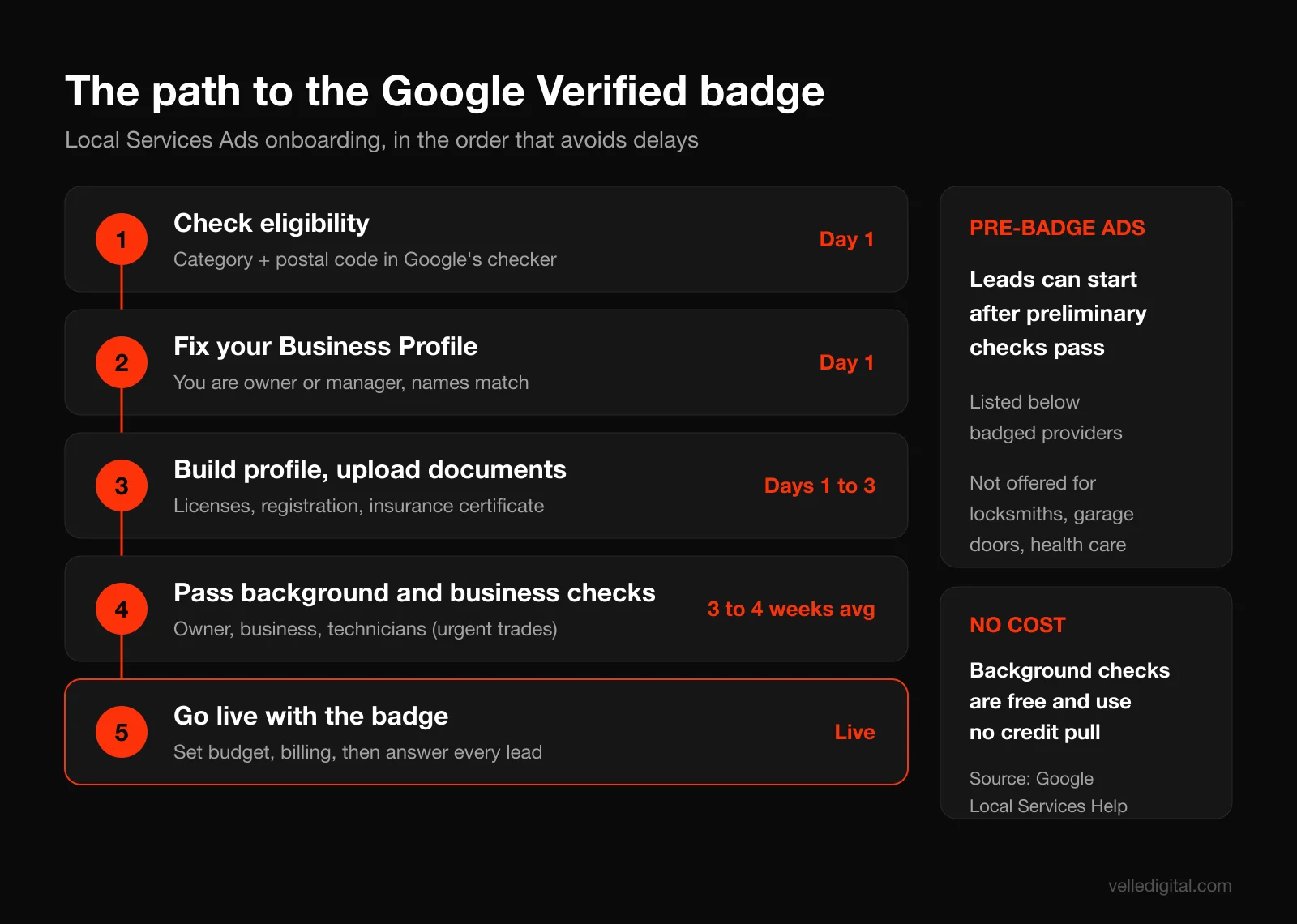
How long verification takes
Google's requirements page says the process takes 3 to 4 weeks on average after you submit your documents, and recommends starting as soon as you create your account. In our experience, delays almost always come from the business side: an expired insurance certificate, a business name that does not match across documents, or a Google Business Profile owned by a former employee or an old web agency.
Pre-badge ads: getting leads before you are fully verified
Google offers "pre-badge" ads so you can start receiving leads after passing the preliminary checks while you finish the rest. Per the getting started page, you need a license (or business registration if no license is required), an acknowledgment that you hold all appropriate licenses, reviews subject to category requirements, and completed billing with a budget.
The trade-off: pre-badge listings show below providers who hold the badge. Pre-badge ads are not available for locksmiths, garage door services or health care.
Step-by-step: how to set up Google Local Services Ads
This is the core of the process. Do these in order. Steps 1 to 3 are prep you can finish in an afternoon, and they are where most applications go wrong.
Step 1: Confirm eligibility and choose your categories
Go to Google's Local Services Ads sign-up page and run the eligibility check with your business category and postal code. Each category you add brings its own verification requirements.
- If a category is a real, meaningful part of your revenue and you hold the required license, add it.
- If you only do the service occasionally or subcontract it, leave it out. Google no longer credits leads for job types you did not want (more below).
- If you are multi-trade, decide now whether you want separate bidding later. After the Google Ads migration, separate targets need separate campaigns.
Step 2: Fix your Google Business Profile first
Your Local Services profile leans on your Business Profile, and after migration your business name, address and hours sync one way from the Business Profile into Google Ads. Get it right now.
- Make sure you, the person signing up, are an owner or manager on the profile. If an old agency or employee owns it, request access before you start.
- Match your legal or trade name exactly as it appears on your license and insurance. "Smith Plumbing" on the profile and "Smith Plumbing and Heating Ltd." on the license will cause back and forth.
- Set accurate business hours. Google uses them to decide when a missed call counts as a charged lead, so do not list hours you are not answering the phone.
- Fill out services, service area, description and photos. Our local SEO guide covers the basics.
Step 3: Gather your documents in one folder
Before you click anything, make a folder with:
- Your provincial trade license numbers and expiry dates for the business and the owner, where your trade is licensed.
- Your business registration documents (provincial or federal registration, or business number).
- Your certificate of insurance showing general and professional liability, with your business name exactly matching your profile.
- A list of every field technician who will enter customer homes, with legal names and emails, if your category requires service professional checks.
- A few real photos of your team, trucks, equipment and finished work.
Tip: call your insurance broker and ask for a certificate of insurance "for Google Local Services verification" naming your business exactly as on your Google Business Profile.
Step 4: Create your account and build your profile
Sign up with the Google account you want to own the ad account long term: a company login, not the personal Gmail of whoever happens to be setting it up. Then fill in:
- Business name, phone number and website.
- Service areas. Google's page on reaching customers with your Local Services Ads explains you can add cities, counties, neighborhoods and postal codes, and exclude postal codes inside a city. When you add a city, your ad can show to people located there and to people elsewhere who search with that city's name.
- Job types. Pick every job type you actually do. Google notes that in some cases your ad only shows for general searches like "plumber" if you offer the common services for your category.
- Business hours and ad schedule.
- Bio. Who you are, what you specialize in, where you work, and what makes you different. Relevance to the search, including your bio, is one of the ranking factors Google names.
- Photos. Real ones. More on that below.
Step 5: Complete verification
Work through the verification checklist on your dashboard: background checks, insurance upload, license entry, business registration and Business Profile confirmation (Google says that last step can take up to 24 hours to show as done). Verification usually stalls because a technician never opened the background check email, the insurance certificate is missing a coverage type, the license sits under a holding company name, or the Business Profile is suspended or owned by someone else. Chase every item personally.
Step 6: Set your budget, bidding and billing
Pick an average weekly budget and a bidding mode (details below). If unsure, start with automated "Maximize leads" and a budget that can buy at least 10 leads a week, which is what Google recommends. Billing runs through Google Ads, and Google's How leads work page notes that a Google Ads account suspension also suspends your Local Services Ads, so keep your payment method current.
Step 7: Turn on message leads, booking and direct business search
Three settings worth reviewing on day one:
- Message leads. Google's guide to improving your Local Services Ads performance says message leads typically cost less than phone leads and let customers reach you at night and on weekends. Your average response time may show on your ad.
- Booking leads. If you use one of Google's integrated booking or CRM partners, customers can book directly through your ad. Booking leads are only available in the US and Canada.
- Direct business search. Google's page about direct business search explains that when someone searches your business name, your ad can appear as the only Local Services ad, and people who say they are returning customers are not charged. It can be switched off in Profile and budget. We usually leave it on, and test turning it off for businesses that already dominate their own brand search organically.
How pay-per-lead works: what counts as a charged lead
This is the part most owners misunderstand, and it is where money leaks. According to Google's How leads work page, a valid (chargeable) lead happens when:
- You answer a call from your ad, or you call the customer back and speak with them.
- You miss a call during your business hours and the customer stays on the line for more than 20 seconds.
- You receive a text message, email or voicemail from the customer.
- You receive a booking request (US and Canada only).
The fine print from Google's FAQ on that page matters a lot:
- Answered calls are not charged on ring time. The 20-second rule only applies to missed calls. If you answer, the lead is evaluated on the conversation.
- Phone menus reset the clock. If callers hang up without pressing a key, you are not charged. Once they press a key, the 20-second timer starts.
- Voicemail during business hours counts. If a call goes to voicemail or a greeting during business hours and the caller stays on more than 20 seconds, it is charged whether or not they leave a message.
- Business hours come from your Google Business Profile. If your ad schedule differs, unanswered calls are only charged during your active ad schedule and within your business hours.
- Repeat contact is free for 15 days. Follow-up calls or messages from the same number or email are not charged again as long as there has been interaction within 15 days.
Lead prices vary by location, job type, lead type and bidding mode. Google says message leads are typically priced lower than phone leads, but not always.
The expensive mistake: voicemail during listed hours
A scenario we see often: a roofer lists hours of 7 a.m. to 7 p.m. but is on roofs all day and lets calls go to voicemail. Every caller who sits through his 25-second greeting is a charged lead, and most hang up and call the next roofer. He pays for leads he never had a chance to win.
The fix, in order of preference:
- Have someone (office staff, an answering service, a family member) answer during listed hours.
- Shorten your Business Profile hours and ad schedule to the times you can actually pick up.
- Lean on message leads and a fast text-back process during hours you cannot answer.
How to dispute bad leads and get lead credits
Google has changed how this works, so ignore older guides that tell you to "dispute" every bad lead with a reason code. Google's page About Automated Local Services Ads lead credits explains the current system:
- Leads judged invalid or low quality (spam, duplicates) when the customer first makes contact are not charged at all.
- Charged leads are reassessed over time and may be credited automatically if they turn out to be low quality.
- Credits are usually applied to your balance within 30 days. The original charge still appears on your invoice.
- Google no longer supports credits for "job type not serviced" and "geo not serviced" leads. If you get leads for work you do not do, the fix is your settings, not a dispute.
- Credits are not available for health care, tax specialists or advertisers in EMEA. Home service businesses in Canada and the US are eligible.
Your leads report shows each lead as Not charged, Charged, In review or Credited. Google also says feedback through the "Rate this lead" survey helps its models, and credits may sometimes be issued as a bonus for leaving feedback.
Step-by-step: your weekly lead quality routine
- Once a week, open your leads list and filter to the last 7 days.
- For every lead, use "Rate this lead" and answer honestly: booked, not booked, spam, wrong service, outside area, existing customer.
- Look for patterns. If 3 or more leads in a month asked for a service you do not offer, remove that job type. If leads come from a town you do not serve, exclude it.
- If clear spam is still charged after 30 days, contact Local Services support through the help center.
- Log every lead in your CRM so you know your real cost per booked job, not just cost per lead.
What we tell clients: rate every lead, every week, even the good ones. It takes 10 minutes and it is your only lever on lead quality besides your settings.
Budget and bidding modes for Google Local Services Ads
Google's page on how bidding works for Local Services Ads describes three bidding modes in the classic dashboard:
- Maximize leads (automated, recommended). Google sets your bids to get the most leads for your budget, and recommends a budget that supports a minimum of 10 leads per week.
- Target cost per lead. Still automated, but you set a target average cost per lead. Some leads cost more and some less, and Google aims to average out near your target.
- Max per lead (manual). You set the most you will pay for a single lead. This goes away after migration to Google Ads.
Google notes it takes about 2 weeks to see accurate results as the model learns.
How the budget actually caps spend
Google's How leads work page says you can spend more than your weekly budget in a given week, but never more than your monthly max (your weekly budget multiplied by the average number of weeks in a month). Hit the max and your ad stops for the rest of the month unless you raise the budget.
Worked example (hypothetical): a 500 dollar weekly budget gives a monthly max of roughly 2,170 dollars (500 x about 4.35). A busy storm week might spend 700 dollars and a quiet week 300, but the month will not go past the max. After migration, the same budget becomes about 71 dollars a day (500 divided by 7), and the cap of daily average x 30.4 lands at roughly the same 2,170 dollars.
How to pick a starting budget
- Estimate your likely cost per lead using the estimates the dashboard shows during setup for your area and category.
- Multiply by 10 to get a weekly budget that supports Google's recommended 10 leads a week.
- Sanity check against your close rate and job value.
Worked example (hypothetical): an HVAC company estimates 60 dollars a lead, so 10 leads a week is 600 dollars a week, about 2,600 dollars a month. If they book 4 of 10 and the average first job is worth 450 dollars, that is 1,800 dollars in weekly revenue on 600 dollars of spend, before repeat service and maintenance plans. Worth testing.
If that is too much, run smaller, but expect slower learning. A budget that buys 2 leads a week will not teach you anything for months.
Which bidding mode to choose
- New account, no data: Maximize leads with no target. Let it run at least 2 to 3 weeks before judging.
- Leads coming in but too expensive: keep Maximize leads and add a target cost per lead a little below your current average. Lower it gradually and watch volume.
- You need a hard cap per lead (classic dashboard only): Max per lead, knowing it often limits volume and disappears after migration.
- Several categories with very different lead values: plan separate campaigns after migration so each gets its own target.
Change budgets in steps of about 15 to 20 percent rather than doubling or halving overnight, so automated bidding has a stable baseline.
What affects your Local Services Ads ranking
Google ranks Local Services listings in an auction that weighs your bid and your profile quality. Google's About ad rankings page lists the factors:
- Your bid. The maximum you are willing to pay, though you may pay less. Google says providers with equal quality and budgets using Maximize leads typically get more leads than those who do not.
- How likely your ad is to result in a lead, including your responsiveness (missed calls can hurt), the context of the search (the job, time, location), how relevant your business is (services and bio), and whether message or booking leads are enabled.
- Profile quality: rating, number of reviews, average response time, high-quality images, completed verification checks and other business information. Google says higher quality profiles may rank higher and may pay lower costs per lead.
That page also notes that if you have multiple locations serving the same area, only your highest ranking ad shows for a given search. Here is how we turn those factors into practical levers.
Reviews
Google's Local Services reviews page says star ratings and review count affect how you rank, and that providers with more and better reviews typically book more jobs. Reviews live in your Google Business Profile, so every review helps both your free listing and your ads. Google recommends 5 or more, and some categories need 5 to show at all.
Ask every happy customer, the same day the job is done, with a direct link. Our guide on how to get more Google reviews has scripts and a follow-up sequence. Never buy reviews or offer incentives for them; reviews are governed by Google Maps content policies and fake ones get removed.
Responsiveness
This is the factor owners control most directly and neglect most often. Google's lead management guidance says a consistently fast response time could improve your ranking, and asks you to respond to as many messages as you can, even ones you decline.
Proximity and service area
Google names the location of the search as part of the context it weighs, and in practice we see listings show more often to searchers near the business and inside its core service area. Google's own advice is to select all the job types you do and set service areas broadly, such as a whole county rather than a few postal codes. Our rule: include every area you will happily drive to and exclude the ones you will not.
Hours and ad schedule
Google's page about ad scheduling explains you can run your ad all day, only during business hours, or on custom hours, and outside your schedule a free version of your listing may still appear. Longer hours give you more eligibility, but only if someone answers.
Decision rule: if you can answer the phone, run the hours. If you cannot, cut the hours and turn on message leads. Never show the ad during hours nobody picks up.
How to optimize your Local Services profile
Once you are live, the profile is your ad. Treat it like a landing page.
Photos
Google's performance page says high-quality photos can help you stand out and get more leads, and suggests photos of your team, work or equipment. Photos are reviewed before they publish, and you should not upload personally identifying photos like a customer's face or house number. Aim for at least 10 real photos: the owner, the team in uniform, branded trucks, before and after shots, and clean equipment. Skip stock photos and logo graphics.
Bio template you can copy
Your bio should answer "why you and not the next card" in under 30 seconds. Fill in this template:
[Business name] is a licensed [trade] serving [main city] and [surrounding areas] since [year]. We specialize in [top 2 or 3 job types] for [homeowners / property managers / commercial clients]. Every technician is background checked and fully insured. We offer [emergency service / same-day appointments / upfront pricing / warranty details]. Call or message us and you will talk to a real person who can book you in, usually within [timeframe].
Keep claims specific and true. "Same-day service" is only worth saying if you deliver it. Then audit job types and service areas every quarter: add services you now offer, remove ones that bring leads you turn down, and make sure the areas where your most profitable jobs come from are fully covered.
How to handle Local Services leads fast
Speed is the biggest controllable factor between a charged lead and a booked job. The customer who taps your card has often tapped two or three others. Whoever answers first, clearly and confidently, usually wins.
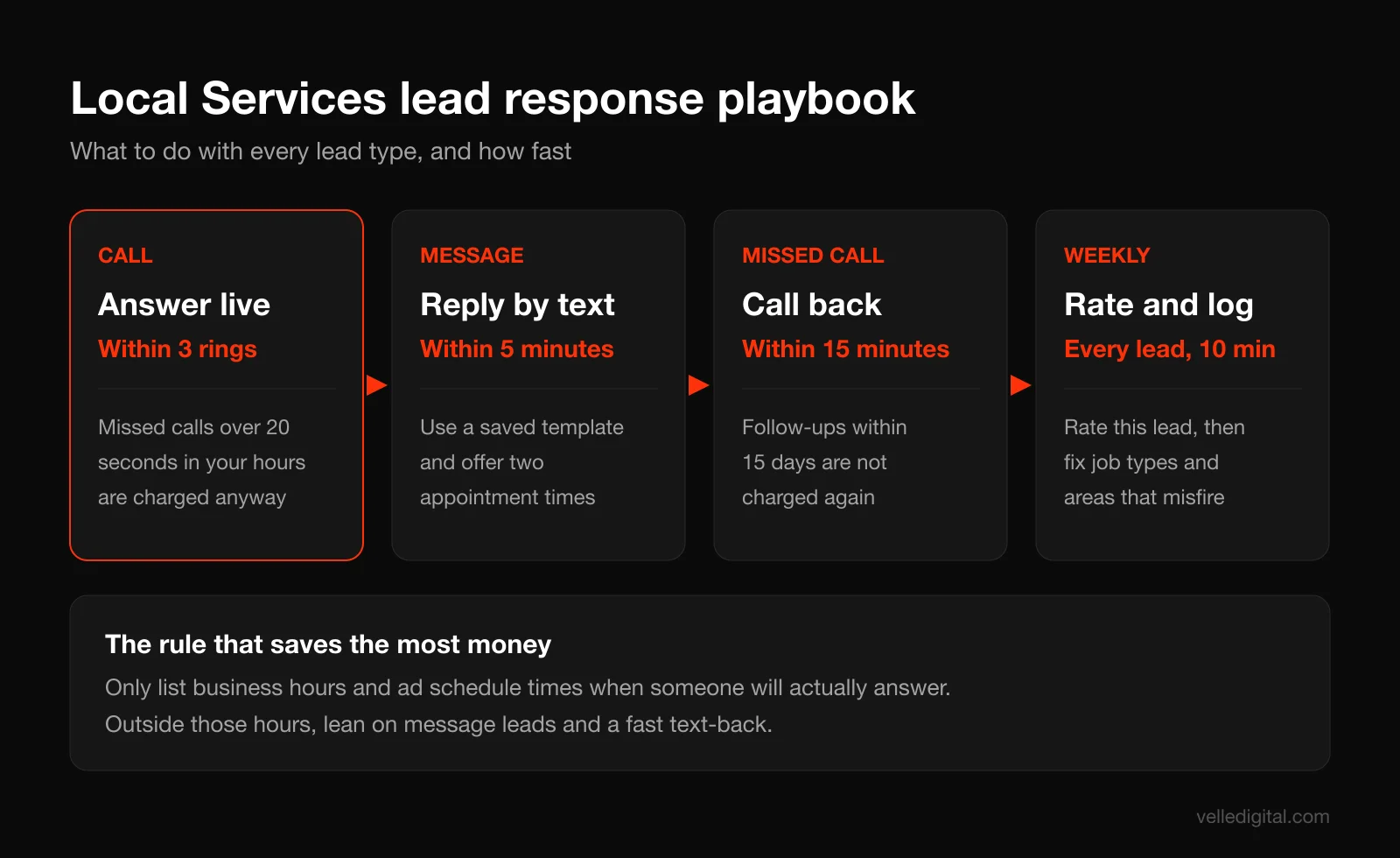
Step-by-step lead handling process
- Route calls to a phone someone answers. The number on your ad is a changing Google forwarding number that rings through to your business line. Google says you will hear "Call from Google" before the call connects (unless certain forwarding or VoIP setups suppress it). Train whoever answers to recognize it.
- Answer within three rings during listed hours. If that is not realistic, use an answering service or shrink your hours.
- Reply to message leads within 5 minutes, from the lead inbox or by replying to the notification email.
- Call back every missed call within 15 minutes. A callback where you speak to the customer is evaluated as an answered call, and follow-ups within 15 days are not charged again.
- Book on the first contact. Offer two specific time slots rather than asking "when works for you?"
- Decline politely when it is not a fit. A short reply keeps your responsiveness strong.
- Log every lead in your CRM with source "Google LSA", outcome and job value.
Our post on speed to lead automation shows how to automate instant text-backs and alerts so nothing sits in an inbox.
Scripts you can copy
Phone greeting when you hear "Call from Google":
"Thanks for calling [Business name], this is [Name]. What can we help you with today?" Get the problem and the address, then offer two times: "I can have a technician there today between 2 and 4, or tomorrow between 8 and 10. Which works better?"
First reply to a message lead:
"Hi [Name], this is [Your name] from [Business name]. Thanks for reaching out about [their request]. We can help with that. Are you free for a quick call now, or would you prefer we text a couple of appointment times? We have openings [today / tomorrow]."
Missed call callback text (if they do not pick up):
"Hi, this is [Your name] at [Business name]. Sorry we missed your call a few minutes ago. Reply here or call us back at this number and we'll get you booked."
A note on privacy and CASL for Canadian businesses
Google says calls through its forwarding number in the US and Canada are recorded by Google for quality, policy and research purposes, and customers hear a notice first. If you also record calls on your own phone system, follow your own privacy obligations and tell callers.
Replying to a customer's inquiry is fine. Marketing to them afterward is different. Innovation, Science and Economic Development Canada's guide on getting consent to send commercial messages says implied consent from an existing relationship may last up to 2 years, or just 6 months in the case of inquiries. So a lead who inquired but never booked can only get promotional texts or emails for a limited window unless they give express consent. Add an opt-in to your booking flow and an unsubscribe option to every marketing message.
Running Local Services Ads alongside Search ads
Local Services Ads and Search ads are not either/or. They appear in different spots on the same page and catch different searchers.
- Coverage. Local Services shows for core category and job type searches. Search ads can target long-tail, higher-value searches such as "commercial boiler replacement" or "basement waterproofing quote".
- Brand protection. Google notes you cannot target competitors' brand searches through Local Services, but you can bid on brand terms with Search and Performance Max.
- Different jobs. Treat LSA as your efficient lead engine and Search as your control and scale engine.
Decision rules for splitting budget
- Just starting, under about 2,000 dollars a month total: start with Local Services Ads if you are eligible, since you pay per lead and the badge does heavy lifting. Add a small Search campaign on your highest-value job types once LSA is stable.
- LSA budget regularly maxes out and leads are profitable: raise the LSA budget before adding Search spend.
- LSA leads plateau even at higher budgets: you have hit your local ceiling. Expand into Search for more volume.
- You want specific high-value jobs more than service calls: use Search, where you control keywords and landing pages.
Avoid double counting
Measure the two channels separately. LSA leads come from Google forwarding numbers and the lead inbox; Search leads come through your website conversion tracking and call assets. Tag each source in your CRM. Our guide to lead tracking for small business shows how to set up source tracking, and our CRM for small business guide helps if you need somewhere to hold it all.
After migration, Local Services results report as "Conversions" (charged leads) and "Cost / conv." (cost per lead) in the same platform as your Search campaigns. Keep an eye on which campaign each conversion belongs to so one campaign's leads do not get read as another's results.
Common Local Services Ads mistakes (and how to avoid them)
These are the issues we see most often when we audit accounts.
- Listing hours you do not answer. Missed calls over 20 seconds during business hours are charged and hurt responsiveness.
- Ticking every job type "just in case". Google no longer credits leads for job types you do not service.
- A service area that is too wide or too narrow. Too wide and you pay for drives you will not make; too narrow and you starve the ad.
- Ignoring reviews. A competitor with 140 reviews at 4.8 stars will beat a profile with 9 reviews most of the time.
- Starving the budget. A few leads a week never gives the bidding model enough to learn.
- Letting the wrong person own the account. If an employee or old agency owns the Google login or Business Profile, you can lose access.
- Judging after 5 days. Google says bidding takes about 2 weeks to settle. Give it at least 3 weeks before major changes.
- Measuring cost per lead instead of cost per booked job. A 40 dollar lead that books 20 percent of the time costs more per job than a 70 dollar lead that books 50 percent of the time.
Measuring results: the numbers that matter
Do this math monthly. Example with hypothetical numbers:
- Spend: 2,400 dollars
- Charged leads: 40 (cost per lead 60 dollars)
- Credited leads: 4 (effective spend drops once credits post)
- Booked jobs: 15 (booking rate 37.5 percent)
- Cost per booked job: 2,400 / 15 = 160 dollars
- Average job value: 520 dollars, total revenue 7,800 dollars
If your cost per booked job is comfortably below the gross profit of an average job, increase budget in steps and watch whether cost per booked job holds. If it is above, fix booking rate first (answering, scripts, speed), then lead quality (job types, areas), then bids.
Google Local Services Ads setup checklist
Work through this top to bottom.
Before you sign up:
- Category and area confirmed with Google's eligibility checker
- Google Business Profile verified, owned by you, same name as your license and insurance
- Profile hours match the hours someone actually answers the phone
- At least 5 genuine Google reviews and a system to get more
- Business and owner licenses ready, with expiry dates
- Business registration documents ready
- Certificate of insurance with general and professional liability, name matching
- Field technician list with legal names and emails (urgent categories)
- 10 or more real photos of team, trucks, equipment and work
During setup:
- Account created under a company-owned Google login
- Only job types you want, with service areas covering your profitable radius
- Bio written with specialties, areas, licensing and response promise
- Every verification step completed, every technician chased until done
- Budget set to support about 10 leads a week, bidding on Maximize leads
- Billing set up with a current payment method
- Message leads on, booking on if you use a supported partner, direct business search reviewed
- Ad schedule set to hours you can answer
After launch:
- Calls answered live during listed hours, missed calls returned within 15 minutes
- Message leads answered within 5 minutes using saved templates
- Every lead rated weekly and logged in your CRM with source and outcome
- Monthly review of cost per booked job, job types and service areas
- Review requests sent after every completed job
- Reports exported before any Google Ads migration date
Frequently asked questions
How much do Google Local Services Ads cost?
You pay per valid lead rather than per click, and prices vary by location, job type, lead type and bidding mode. Google does not publish a price list, and leads in a competitive city trade can cost much more than in a small town. The dashboard shows estimates during setup, and Google recommends a budget that supports at least 10 leads a week.
Are Google Local Services Ads available in Canada?
Yes. Google's Canadian help page currently lists 16 categories, including plumbers, electricians, HVAC, roofers, locksmiths, movers, cleaning, pest control, lawn care, tree services and water damage services. Google does not publish a city list, so use the eligibility checker with your category and postal code.
How long does it take to get Google Verified?
Google says screening and verification take 3 to 4 weeks on average after you submit your documents. Delays usually come from mismatched business names, missing insurance details, technicians who have not completed background checks, or a Business Profile you do not control. Pre-badge ads can let you receive leads earlier in many categories.
Can I dispute a bad lead on Local Services Ads?
The old manual dispute process has been replaced by automated lead credits. Google filters invalid leads before charging, reassesses charged leads, and usually applies credits within 30 days. Rate every lead with the feedback survey, but note that Google no longer credits leads for job types or areas you do not serve, so fix those in your settings.
What is the difference between Local Services Ads and Google Ads?
Local Services Ads charge per lead, use no keywords or ad copy, and show a profile card with a Google Verified badge at the top of results. Regular Search ads charge per click and give you full control over keywords, ads and landing pages. In 2026 Google began moving Local Services Ads into Google Ads as Performance Max campaigns with pay-per-lead goals, with non-US accounts scheduled for 2027.
How do I rank higher in Local Services Ads?
Google ranks listings on your bid and profile quality: reviews and rating, responsiveness, average response time, photos, completed verification checks, and how relevant your services and bio are to the search. The fastest wins are answering every call during listed hours, replying to messages within minutes, and building a steady flow of genuine reviews.
Get Local Services Ads working for your business
Local Services Ads reward businesses that do the basics consistently: verified, well reviewed, quick to answer and honest about what they do. If you want help getting verified, setting budgets and bidding, and running LSA alongside a Search campaign that catches the jobs LSA misses, our Google Ads management team does this every day for service businesses across Canada and the US. For a bigger plan for paid traffic overall, look at our traffic and paid media services or book a strategy call.