How to Create Brand Guidelines Your Team Will Actually Use
Most brand guidelines sit unopened. This step-by-step guide shows you how to build a short, practical guide with logo rules, accessible colors, voice examples and templates your team will reach for.
Brand guidelines are a short, practical rulebook that tells anyone making something for your business how it should look and sound: how to use the logo, which colors and fonts to use, what kind of photos fit, how to write, and where to find ready-made templates. Good brand guidelines make the right choice the easy choice, so a new hire, a printer or a freelancer can produce on-brand work without asking you first.
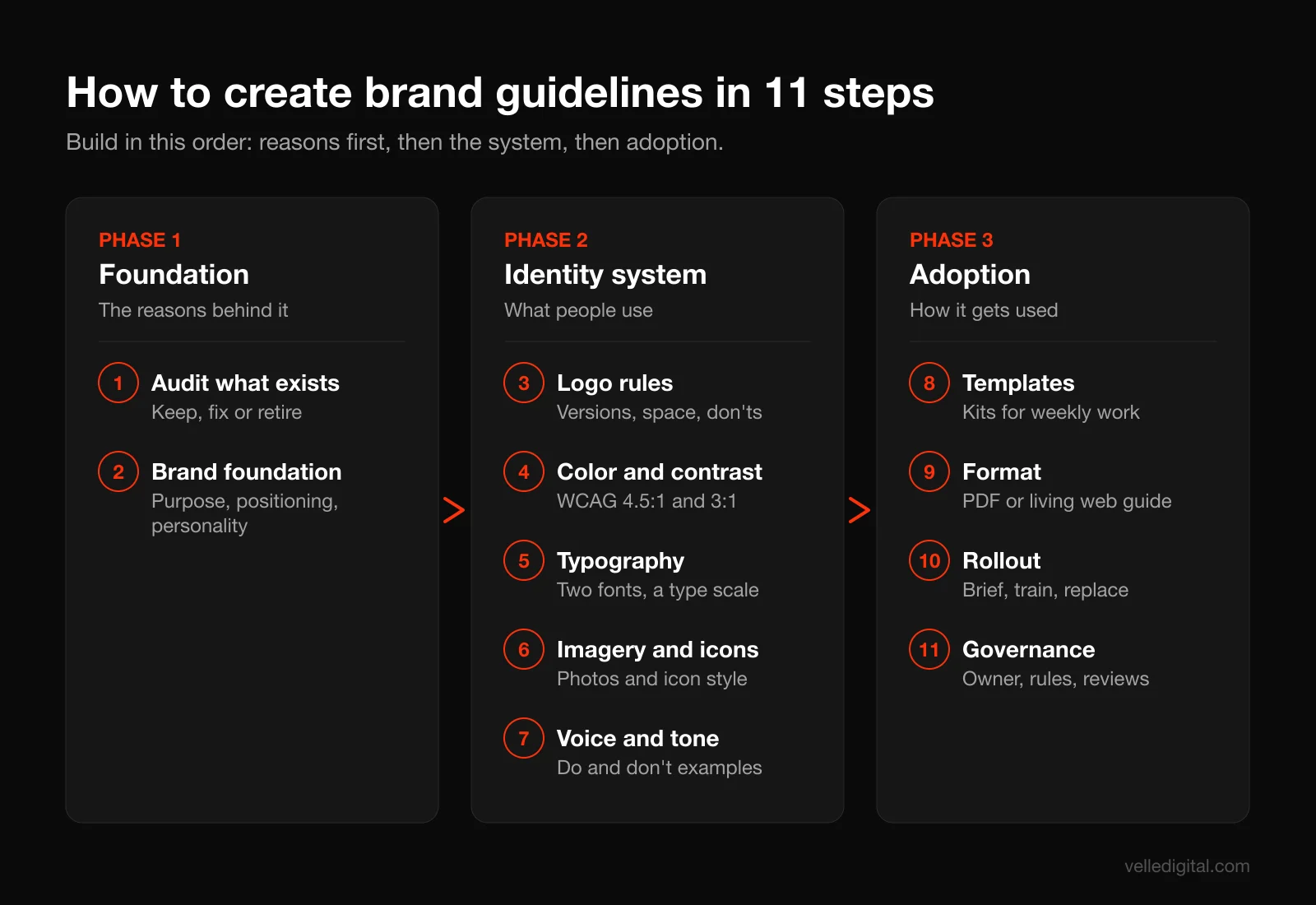
To create brand guidelines your team will actually use, build them in this order: audit what exists, write the brand foundation (purpose, positioning, personality), set logo rules, define an accessible color system, specify typography, describe imagery and icons, write voice and tone with do and don't examples, ship templates for the things people make every week, pick a format people can find, then roll it out and assign an owner. This guide walks through each step with examples you can copy, a table of contents template, a checklist and the mistakes we see most often.
What are brand guidelines?
Brand guidelines (also called a brand style guide, brand book or brand standards) are the documented rules for how your brand shows up. They turn the decisions behind your identity into instructions someone else can follow.
A useful set answers three questions for whoever is holding it:
- What are we? The purpose, positioning and personality that explain why the brand looks and sounds the way it does.
- What do I use? The logo files, color codes, fonts, photo style, icons and templates.
- How do I use it? The rules, sizes, spacing, do and don't examples, and who to ask when something is not covered.
Answer only the second and you have an asset folder. Answer only the first and you have a manifesto.
Brand guidelines vs style guide vs brand book vs design system
These terms get used interchangeably, and that causes confusion when you hire someone. Here is how we use them:
- Brand guidelines or brand book: the full set of rules covering strategy, visual identity and verbal identity. This is what this guide teaches you to build.
- Style guide: often means the visual rules only (logo, color, type), or, in writing circles, an editorial style guide covering grammar, punctuation and word choice. Ask which one someone means.
- Design system: a larger, more technical set of reusable components and code used to build digital products. The Nielsen Norman Group defines a design system as "a complete set of standards intended to manage design at scale using reusable components and patterns", and notes that a style guide is usually one part of it.
Most small and mid-sized businesses need brand guidelines first. A design system becomes worth it when you have a product team building screens every week. If you are still working out the identity itself, start with why brand identity matters and come back here once you have a logo and a direction.
Why most brand guidelines end up unused
We inherit a lot of brand guideline PDFs from clients. Most are beautiful, and most have not been opened in a year. The coordinator pulls the logo from the website footer and the sales team uses a deck from three rebrands ago.
The reasons are almost always the same:
- They were written for designers, not for the people doing the work. Sixty pages of brand philosophy and grid theory do not help someone who needs to make a hiring post by 3 p.m.
- Nobody could find them. The PDF lived in one person's email or a Drive folder with a vague name.
- They described rules but shipped no tools. Telling people to use "generous white space" is less useful than giving them a template with the white space already built in.
- They covered the logo and nothing else. No guidance on writing, photos, social posts or email, which is where most brand drift actually happens.
- They never changed. The brand evolved, the guidelines did not, and people learned the document was out of date and stopped trusting it.
- Nobody owned them. No one was responsible for answering questions, approving exceptions or updating the file.
Every step below fixes one of those failure points. The goal is not a thicker document but one people reach for because it saves them time.
The test for any page in your brand guidelines: would someone making a flyer, an email or an Instagram post on a deadline find it useful? If not, cut it or move it to an appendix.
What to gather before you start
Before writing a word, collect the raw material.
- Every logo file you can find, including old versions, so you know what to retire.
- Recent real work: your website, the last 20 social posts, email newsletters, proposals, invoices, signage, vehicle wraps, uniforms, ads and print pieces.
- Any existing brand documents, even a one-page sheet from the designer who made your logo.
- Font files and licenses, or at least the names of the fonts you are using.
- Your customer insight: who buys from you, why they choose you, and what they say in reviews.
- A list of who creates brand materials: staff, freelancers, agencies, franchisees, print shops, partners.
That last list matters: your guidelines are written for those people and the tools they use. A team that works in Canva needs different deliverables than an in-house designer using Figma.
How to create brand guidelines in 11 steps
The steps run in a deliberate order. Strategy comes before visuals because visual decisions need a reason. Templates come near the end because they apply everything before them. Rollout and governance come last because they decide whether any of it gets used.
Step 1: Audit what you already have
Lay out everything you collected, physically or on a big digital board, and sort it into three piles: keep, fix and retire.
You will usually find several logo versions in circulation, several shades of one brand color, and fonts nobody chose on purpose. Write each down: these are the problems your guidelines must solve.
Then ask the people who make brand materials: "What do you struggle with, and what do you wish you had?" In our experience the answers are almost always the right logo file in the right format, a color list they can paste into their tool, and templates for social posts and presentations.
Decision rule: if the audit shows your identity itself is weak (an illegible logo, no clear color palette, a look that does not fit your market), fix the identity first. Writing rules for a broken identity just documents the problem. That is a job for a brand identity project, and guidelines follow it.
Step 2: Write the brand foundation (purpose, positioning, personality)
The foundation is the "why" behind every visual and verbal rule. Keep it to two pages at most. People skip long strategy sections, and the job here is to give context, not to impress.
Cover four things:
- Purpose: why the business exists beyond making money, in one or two sentences.
- Audience: who you serve, described in plain terms that a new hire would understand.
- Positioning: what you offer, for whom, and why you are the better choice compared with the alternatives.
- Personality: three to five traits that describe how the brand behaves, each with a short explanation of what it means and does not mean.
A positioning statement template you can copy:
For [audience] who [need or problem], [brand] is the [category] that [key benefit], because [reason to believe].
Worked example for a hypothetical Edmonton plumbing company:
For homeowners in the Edmonton area who need a plumbing problem fixed without surprises, Northline Plumbing is the residential plumber that shows up in the booked window and quotes before work starts, because every tech carries a tablet with flat-rate pricing and live dispatch.
Personality traits work best as pairs that define the edges. For example:
- Dependable, not dull. We are calm and organized, but we still sound like people.
- Straightforward, not blunt. We give clear answers and prices, with enough warmth that nobody feels talked down to.
- Local, not small-time. We know the neighborhoods and the weather, and we run a professional operation.
Those pairs do real work later. Is a pun okay in a social post? Does a stock photo of a model in a spotless kitchen fit? Check it against the pairs.
Common mistake: listing traits every business claims, such as "innovative, customer-focused, quality." If a competitor could paste your personality section into their guidelines unchanged, it is not specific enough.
Step 3: Set logo usage rules
The logo section is the one people open most, so make it fast to use. Start with a download link to the logo package at the top of the page, before any rules.
Define your logo versions. Most brands need:
- Primary logo: the full version used whenever space allows.
- Secondary or stacked version: for square or narrow spaces.
- Icon or brand mark: the symbol alone, for favicons, app icons and social profile pictures.
- One-color versions: black, white (reversed) and a single brand color, for embroidery, engraving, stamps and dark backgrounds.
Specify clear space. Clear space is the minimum empty area around the logo. Define it with a unit taken from the logo itself, so it scales. A common approach: "Keep clear space equal to the height of the letter N in the wordmark on all sides." Show it with a diagram.
Specify minimum size. Give a minimum width for print and for screen, for example "Primary logo: no smaller than 25 mm wide in print or 120 px wide on screen. Below that, use the icon." Test this yourself by printing and zooming; the right number depends on your logo's detail.
Specify backgrounds. Show which version goes on light, dark and photographic backgrounds. A simple rule people remember: "Full color on white or cream. White version on navy or dark photos. If the photo is busy, place the logo on a solid panel."
Show the don'ts. Visual examples beat written rules here. Include six to eight "do not" examples, each with a red mark:
- Do not stretch, squash or rotate the logo.
- Do not change the colors or add gradients.
- Do not add shadows, outlines or effects.
- Do not rearrange or resize the parts of the logo.
- Do not place the full-color logo on a busy or low-contrast background.
- Do not recreate the logo by typing the name in a similar font.
- Do not put the logo inside a sentence or headline as a word.
That last rule is common in serious identity programs. The Government of Canada's Federal Identity Program manual is a good public example of how strict logo rules are written: it says symbols must not be altered, asks for generous open space around them, and says the Canada wordmark must not become part of a headline or sentence. You do not need government-level rigor, but reading a real standard is a useful calibration.
Ship the right file formats. Include each logo version as:
- SVG: for websites and anything digital that needs to scale.
- PNG with transparent background: for slides, documents and tools that do not accept SVG.
- PDF or EPS: for printers, sign shops and embroidery vendors.
- JPG: only if a specific platform demands it.
Name files so anyone can pick the right one without opening it, for example "northline-logo-icon-white.png."
If your logo includes a registered or pending trademark, add a line on when to use the symbol and who to ask. The U.S. Patent and Trademark Office puts it simply on its trademark basics page: "Do you have a name or logo you're using to advertise your business? You might have a trademark." Canadian businesses can start with the Canadian Intellectual Property Office trademarks section. Your guidelines are not legal advice, but they should point people to whoever handles it.
Step 4: Build a color system with accessible contrast
A color system is more than a row of swatches. It tells people which colors to use, how much of each, and which combinations are safe for text. This is the section where most brand guidelines fail on accessibility, and where a little math prevents a lot of unreadable buttons.
Define your palette in tiers.
- Primary colors (1 to 2): the colors people associate with you. These carry the brand.
- Secondary or accent colors (2 to 4): for highlights, charts, illustrations and variety.
- Neutrals (3 to 5): text colors, backgrounds, borders and dividers. These end up doing most of the work.
Give every color all the codes people need. For each swatch list:
- HEX (for web and most design tools), for example #12304F
- RGB (for screen and video)
- CMYK (for standard print)
- Pantone or PMS (for spot-color printing, signage and promotional products), if you print enough to need it
Do not convert between these by guessing. Screen and print colors behave differently, so have the designer test CMYK and Pantone values on paper.
Set proportions. A guideline like "60 percent neutrals, 30 percent primary, 10 percent accent" stops the accent color from taking over. It is a rule of thumb, not a law, but it gives non-designers a starting point.
Check contrast against WCAG. The Web Content Accessibility Guidelines, published by the W3C, set the standard most organizations follow. Under WCAG success criterion 1.4.3, normal text needs a contrast ratio of at least 4.5:1 against its background, and large text (at least 18 point, or 14 point bold) needs at least 3:1. A separate criterion, 1.4.11, asks for at least 3:1 for the parts of user interface components and graphics people need to see, such as button outlines, form fields and chart lines.
Two details worth knowing. First, W3C states that text that is part of a logo or brand name has no contrast requirement, so your logo itself is exempt. Your headlines, buttons and body text are not. Second, WCAG criterion 1.4.1 says color should not be the only visual means of conveying information, so your guidelines should tell people to pair color with labels, icons or patterns in charts, forms and status messages.
You can check any pair of colors in a minute with the free WebAIM Contrast Checker, which reports pass or fail for normal text, large text and graphics. Google's web.dev guide to color and contrast also shows how to audit contrast with Lighthouse and Chrome DevTools once things are live.
Worked example. Here is the hypothetical Northline palette, with contrast ratios we calculated using the WCAG formula:
- Navy #12304F on white: 13.45:1. Passes for all text sizes.
- Slate gray #5B6670 on white: 5.87:1. Passes for body text, so it works for captions and secondary copy.
- Brand orange #E8590C on white: 3.58:1. Passes for large text and UI graphics (3:1), fails for body text (4.5:1).
- White text on brand orange: also 3.58:1. Fine for a large bold button label, not for small text.
- Dark ink #1A1A1A on brand orange: 4.86:1. Passes for body-size text, so dark button labels are the safer default.
- Darker orange #B8430A on white: 5.46:1. Passes for body text, so it becomes the approved color for orange text links.
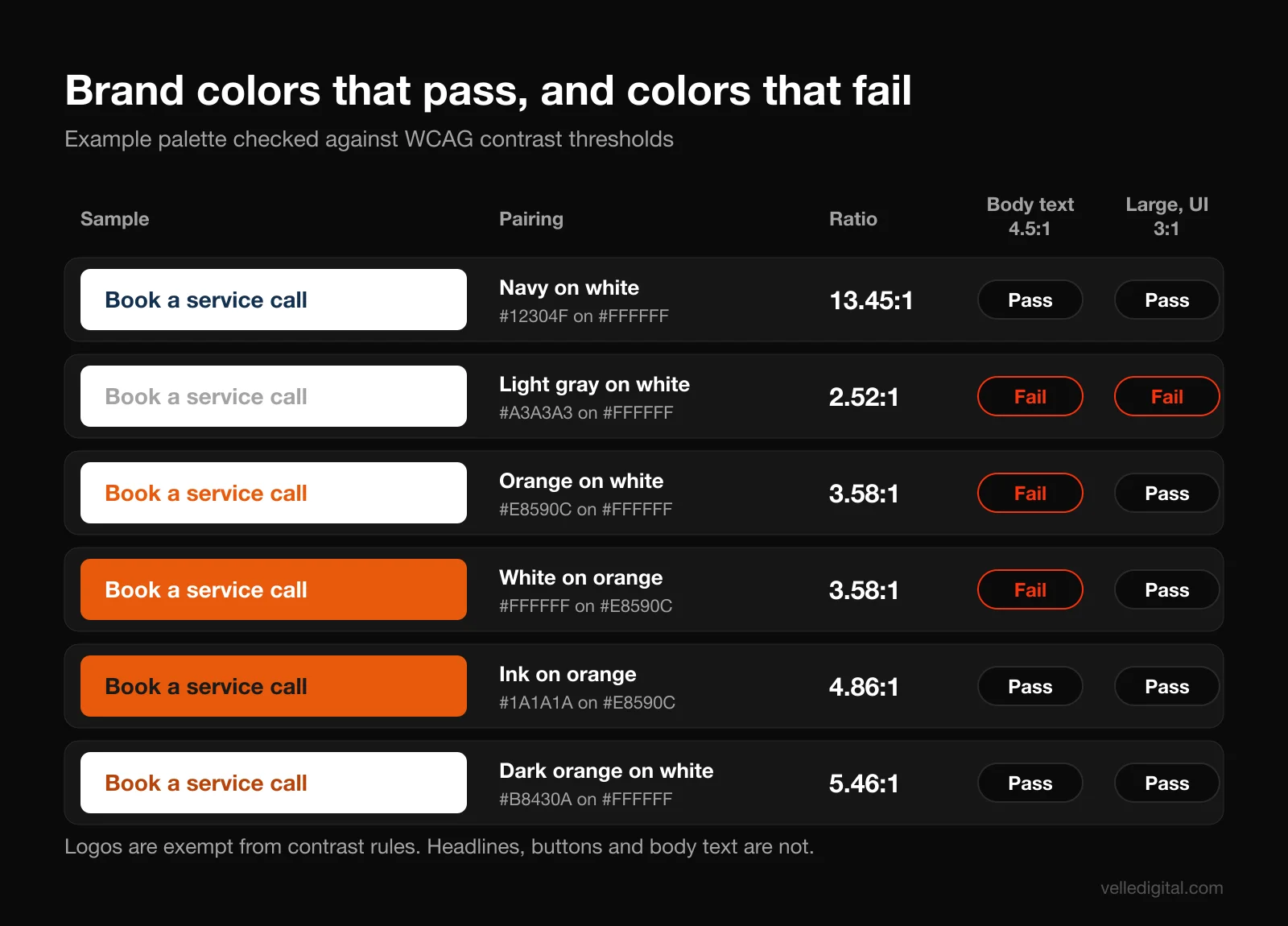
This is the pattern we see constantly: a bright brand color looks great as a swatch and fails as text. Keep the color and add a darker "text-safe" variant.
Publish an approved pairings chart. Instead of making people run contrast checks, give them a short list:
- Body text: navy or ink on white or cream.
- Secondary text: slate on white.
- Buttons: ink text on brand orange, or white text on navy.
- Links on light backgrounds: darker orange or navy, underlined.
- Never: orange text on cream, light gray text on white, white text on light photos without an overlay.
Decision rule: if a color combination is not on the approved list, assume it is not allowed until someone checks it. That keeps the list short and the rule easy to follow.
Step 5: Choose and specify typography
Typography causes a lot of mess. Limit the choices and give exact settings.
Pick no more than two typefaces. Usually one for headings and one for body text, or one versatile family with several weights.
Check licensing before you commit. Fonts are software with licenses, and many paid fonts license desktop, web, app and print use separately. Confirm coverage for every place you will use the font and record the license details in the guidelines.
Define fallbacks. Your team will use tools that do not have your brand font: Gmail, Microsoft Word, some email builders, Google Slides on a borrowed laptop. Name a system font to use when the brand font is not available, for example "If Söhne is not available, use Arial."
Build a type scale. List each text style with size, weight, line height and case. For example:
- H1: heading font, bold, 48 px on web, line height 1.1, sentence case
- H2: heading font, bold, 32 px, line height 1.2, sentence case
- H3: heading font, semibold, 24 px, line height 1.3
- Body: body font, regular, 18 px on web, line height 1.6
- Small or caption: body font, regular, 14 px, line height 1.5, slate gray
- Button: body font, semibold, 16 to 18 px, sentence case
Include print equivalents in points if you do much print work.
Set rules people break most. In our experience these few rules cover most typography drift:
- Use sentence case for headings unless the guidelines say otherwise.
- Do not set long passages in all caps.
- Do not center more than three lines of text.
- Keep body text at a readable size; on the web we rarely go below 16 px.
- Do not use more than two weights on one page or slide.
- Left-align body copy.
For the web, name the exact font files and weights so whoever handles your website development does not load six weights to use two.
Step 6: Define imagery and iconography
Photos and icons fill most of your website and social channels. Most guidelines give one vague line like "use authentic photography." Be specific instead.
Photography: describe the style with rules people can check.
- Subject: real staff, real customers (with written permission) and real job sites are preferred over stock.
- Light: natural light, warm tones, no heavy filters.
- Composition: people doing the work, hands and tools in frame, room for text on one side when used as a banner.
- Setting: recognizable local settings when possible.
- Avoid: posed handshakes, models looking at the camera with forced smiles, cluttered backgrounds, images that show competitor branding.
Show six to twelve example photos that fit and three or four that do not, each with a one-line reason.
Stock photo rules. Set limits, for example: "Use stock only for backgrounds and textures. Never show stock people presented as our staff or customers."
Graphic elements. If your identity includes patterns, shapes or a graphic device, show where, how large and how not to use it.
Iconography. Pick one icon set or style and stick to it. Specify:
- Line or filled style, and stroke width (for example, 2 px line icons on a 24 px grid).
- Corner style (rounded or square) to match your typography and logo.
- Colors allowed for icons.
- Where to get them (a licensed icon library, or a custom set in the asset folder).
Add one rule that matters for usability: pair icons with text labels. The Nielsen Norman Group's research on icon usability concludes that "text labels are necessary to communicate the meaning and reduce ambiguity," and recommends that labels stay visible rather than appearing only on hover. Most icons do not mean the same thing to everyone, especially custom brand icons.
Accessibility for images. Add a short rule that images on the website and in emails need alt text describing what matters in the image, and that text should not be baked into images when real text can be used instead.
Step 7: Write voice and tone with do and don't examples
This is the section that separates guidelines teams use from guidelines that collect dust. Most brand drift is verbal, not visual. One person writes stiff corporate emails, another writes social captions full of exclamation marks, and the website sounds like a third company.
Separate voice from tone. Voice is your consistent personality in writing. Tone is how that voice adjusts to the situation. Mailchimp's public voice and tone guide explains the idea well: its voice "doesn't change much from day to day," while tone adapts to the reader's state of mind, and "it's always more important to be clear than entertaining." It is one of the best examples of a published voice guide and worth reading in full.
Place your voice on four dimensions. The Nielsen Norman Group describes four tone of voice dimensions: formal vs. casual, serious vs. funny, respectful vs. irreverent, and matter-of-fact vs. enthusiastic. Their testing found that changes along these dimensions produce measurable differences in users' impressions. Rate your brand on each scale from 1 to 5 and write a sentence explaining the choice.
Example for Northline:
- Formal to casual: 4 (fairly casual). We write like a helpful tech talking to a homeowner, not like a contract.
- Serious to funny: 2 (mostly serious). Light humor is fine on social media, never when someone has water on the floor.
- Respectful to irreverent: 1 (respectful). We never make fun of customers, competitors or DIY attempts.
- Matter-of-fact to enthusiastic: 2 (matter-of-fact). We lead with facts, prices and times; we save excitement for real news.
Write do and don't examples. This is the most useful part of the section. Pick the situations your team writes in most, and show a bad version next to a good one.
Booking confirmation:
- Don't: "Your service appointment has been successfully scheduled. Please be advised that our technician will arrive within the designated window."
- Do: "You're booked. Sam will be there Tuesday between 1 and 3 p.m. We'll text you when he's on the way."
Price objection reply:
- Don't: "Our prices reflect our commitment to quality and excellence!!"
- Do: "Fair question. Our price includes the part, labor and a one-year warranty, and we quote before any work starts, so the number won't change."
Social post:
- Don't: "HUGE NEWS!!! Don't miss out on our AMAZING furnace deal!!!"
- Do: "Furnace tune-ups are 20 percent off until October 31. It takes about an hour and helps you avoid a no-heat call in January. Book online."
Apology after a missed window:
- Don't: "We apologize for any inconvenience this may have caused."
- Do: "We missed your window today, and that's on us. Your service call is free, and Alex will call you within the hour to rebook."
Map tone to situations. A short list helps people adjust:
- Marketing and social: warm, a little playful, confident.
- Sales and quotes: clear, specific, reassuring.
- Service and support: calm, direct, empathetic.
- Complaints and apologies: plain, accountable, no jargon, no humor.
Add a short word list. Include words you use, words you avoid, and how to write your own name and product names. For example: "We say 'technician' or 'tech,' not 'service professional.' We say 'flat-rate price,' not 'investment.' Northline is one word with a capital N."
Add editorial basics. Pick an approach for the questions that come up every week: numerals vs. words, date and time format, Oxford comma, US or Canadian spelling, capitalization of headings, exclamation marks (we suggest one per piece at most). If you want public guidance to borrow from, the Canada.ca Content Style Guide is free, thorough and grounded in plain language, with practical advice like keeping sentences under 15 to 20 words and putting the most important information first.
If writing is where your brand struggles most, our website copywriting guide goes deeper on messaging, and our copywriting service can write the voice section and the core pages for you.
Step 8: Build templates and real-world applications
In our experience, templates decide whether brand guidelines get used. Rules tell people what to do. Templates do it for them.
Start with what people make every week. Go back to your Step 1 list of who creates materials and what they make. For most local service businesses and growing brands, the priority list looks like this:
- Social media post and story templates (3 to 6 layouts)
- Presentation or pitch deck template
- Email signature
- Email newsletter template in your email platform
- Proposal or quote template
- Letterhead and document template
- Business cards
- Job posting graphics
- Event or promotion flyer
- Ad templates for the sizes you run most
Build templates in the tools your team actually uses. If your coordinator lives in Canva, build Canva templates with locked logo and color elements. If your sales team uses Google Slides, build the deck there, not in a design app they do not have.
Lock what should not change. Most template tools let you lock elements. Lock the logo position, the background shapes and the color palette. Leave headlines, body text and photos editable. This protects the brand without slowing people down.
Show real applications. Include a section of mockups showing the brand applied to real things: the website homepage, a social grid, a truck wrap, a uniform, a storefront sign, a direct mail piece. These pages help people see how the parts work together and help vendors (sign shops, printers, apparel suppliers) understand what you expect.
For each application, add the specifics a vendor will ask for, such as logo version, minimum size, Pantone values, embroidery files and placement.
Build web and email components too. Your site and email platform should use reusable blocks, not one-off designs. Our UI and UX design team turns brand guidelines into page templates so the site and brand stay in sync.
If you do not have the design capacity in-house, this is where outside help pays off fastest. Our collateral design service builds exactly these templates: social kits, decks, print pieces and signage files ready for your team to use.
Step 9: Choose the format: PDF vs living web guide
Format decides whether people find your guidelines, and whether you can keep them current. There are two main options, and many businesses end up using both.
PDF brand guidelines. A designed PDF, usually 15 to 40 pages for a small or mid-sized business.
- Good for: sending to printers, vendors and agencies; a fixed record of the brand at launch; teams that do not create much content.
- Weak at: updates (every change means a new version and the old one keeps circulating), search, linking to files, and copying color codes on a phone.
Living web guide. A private or public web page (or small site) that holds the guidelines, with download links to every asset.
- Good for: teams that create content weekly; brands with many contributors such as franchises, multiple locations or outside agencies; anything that changes often.
- Weak at: it needs an owner and some upkeep, and it can sprawl if nobody edits it.
A living guide can be as simple as a well-organized page in Notion, Google Sites or a password-protected page on your website. Large public examples like the U.S. Web Design System and the GOV.UK Design System show how far a living guide can go, but you need a tiny fraction of that.
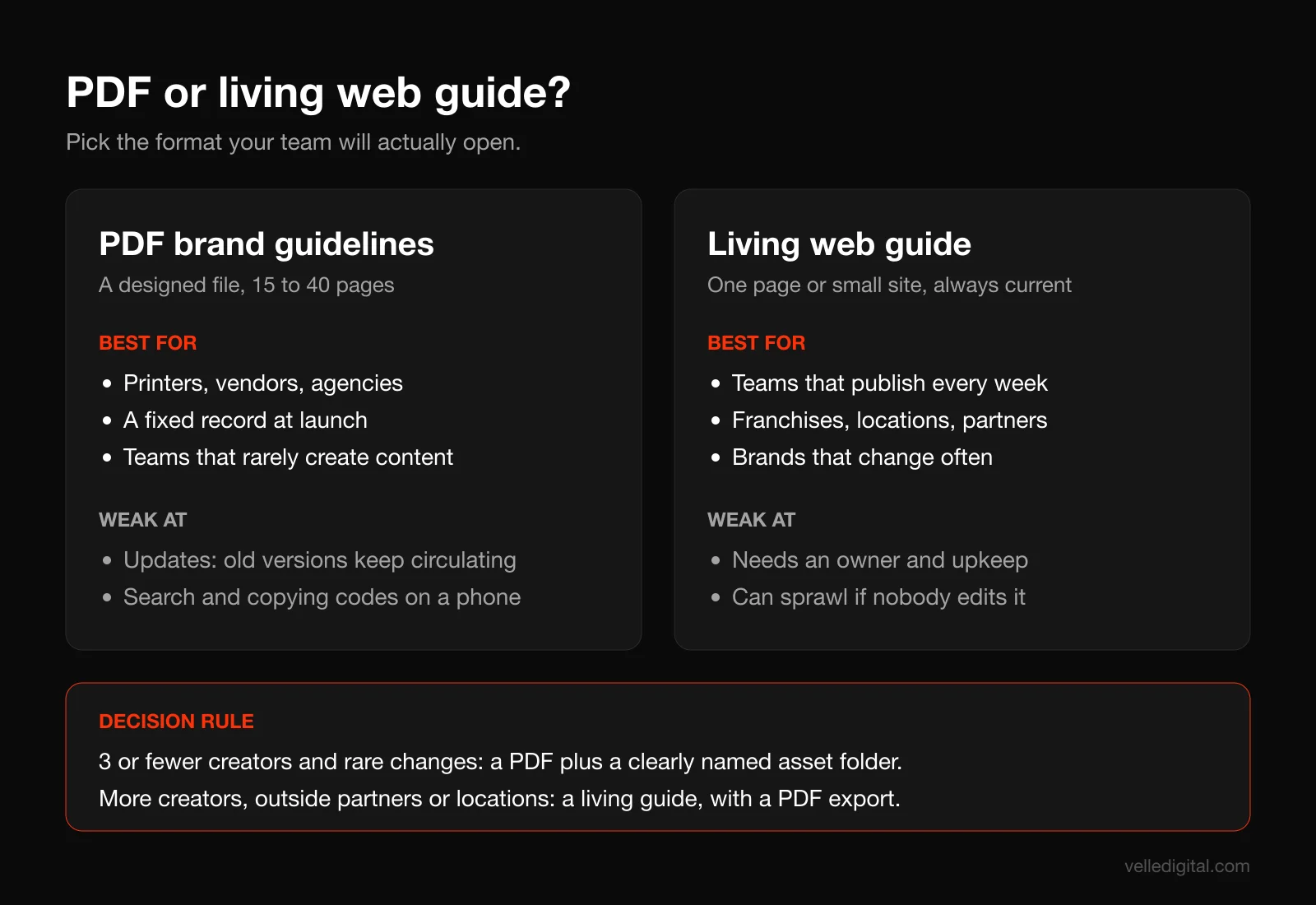
Decision rules:
- If fewer than three people create brand materials and the brand changes rarely, a PDF plus a well-named asset folder is enough.
- If more than three people, or any outside partners, create materials every week, use a living guide as the source of truth and export a PDF from it for vendors.
- If you have multiple locations or franchisees, use a living guide with locked templates. Do not rely on a PDF.
- Whatever you choose, keep one link that always points to the current version. Put it in your email signature, your team chat and your onboarding checklist.
Keep the core short. The core guide should fit in about 10 to 20 screens or pages. Put deep detail (grid systems, full print specs, motion rules) in appendices or separate pages. A short guide that gets read beats a complete one that does not.
Make the assets one click away. Every section should link straight to the files it describes: logos next to logo rules, fonts next to typography, templates next to applications. The number one reason people ignore guidelines is that it is faster to grab a logo from the website than to find the official file.
Step 10: Roll it out
Most brand guidelines are launched with one email, and then nothing changes. A rollout is a short project, not a message.
A simple rollout plan:
- Week 1: Prepare. Finish the templates, upload the asset folder, set the single link, and replace old logo files in shared drives (move old versions to an archive folder labeled "Do not use").
- Week 1: Brief leaders. Walk managers through the guidelines first so they can answer questions and model the change.
- Week 2: Run a 30 to 45 minute team session. Show the foundation in five minutes, then spend most of the time on practical tasks: where to find the logo, how to open a template, how to write a post in the brand voice. Record it for new hires.
- Week 2: Brief outside partners. Send printers, agencies, freelancers and vendors the link, plus the PDF export if they need it, with a short note on what changed.
- Weeks 2 to 6: Replace high-visibility assets. Website, social profile images and banners, email signatures, Google Business Profile photos, proposal template. Then signage, vehicles and print as budget allows.
- Week 6: Check in. Ask the team what is missing or confusing. Fix it. This first update tells people the guidelines are alive.
Make it part of onboarding. Add the link and recorded session to your new-hire checklist, and add "All work must follow our brand guidelines at [link]" to every contractor brief.
Update the systems that publish for you. Your website, email templates, CRM email signatures, social scheduling tool and ad accounts all need the new assets. If you run a social media marketing plan, update the content templates there at the same time so the new look shows up in the feed right away.
Step 11: Set up governance
For most businesses, governance means four simple decisions.
1. Name an owner. One person (marketing lead, operations manager, owner) is responsible for the guidelines. They answer questions, approve exceptions and make updates. Without an owner, guidelines decay within a year.
2. Define what needs approval. Not everything needs review. A workable rule:
- No approval needed: anything made from an approved template without changing locked elements.
- Quick review by the owner: new templates, new ad campaigns, anything printed in quantity, anything on a vehicle or sign.
- Full review: changes to the logo, palette, fonts or brand foundation.
3. Create an exception path. People will hit situations the guidelines do not cover. Give them a clear way to ask (a shared inbox, a chat channel, a form) and a promised response time, such as two business days. Log the answers; repeated questions mean the guidelines need a new section.
4. Schedule reviews. Review the guidelines at least once a year, and after any major change (new service line, new location, new website). Add a changelog at the top of the guide listing the date and what changed, so people know it is current.
Light-touch brand checks. Once a quarter, the owner reviews 20 recent pieces of work against the guidelines. When something drifted, the fix is usually a better template or a clearer rule, not a lecture.
Brand guidelines table of contents template
Here is a table of contents you can copy and adapt. It is sized for a small or mid-sized business. Delete what you do not need; add sections only when someone has asked for them.
- Start here: what this guide is for, who it is for, how to get help, link to the asset library, last updated date.
- Brand foundation: purpose, audience, positioning statement, personality traits.
- Logo: versions, clear space, minimum sizes, backgrounds, don'ts, file formats and downloads.
- Color: palette with HEX, RGB, CMYK and Pantone, proportions, approved contrast pairings, color don'ts.
- Typography: typefaces and licenses, fallback fonts, type scale for web and print, typography rules.
- Imagery: photography style, example images, stock photo rules, graphic elements and patterns.
- Iconography: icon style, sizes, colors, source and labeling rules.
- Voice and tone: voice summary, tone dimensions, tone by situation, do and don't examples, word list.
- Editorial style: spelling, numbers, dates and times, capitalization, punctuation preferences, how to write the brand name.
- Accessibility: contrast rules, alt text, color not as the only signal, readable sizes.
- Templates: links to every template, with one line on when to use each.
- Applications: website, social, email, print, signage, vehicles, uniforms, with vendor specs.
- Governance: owner, approval rules, exception requests, review schedule, changelog.
- Appendix: detailed print specs, grid systems, legal and trademark notes, retired assets.
For a lean first version, ship sections 1, 3, 4, 5, 8 and 11. That covers what most people need on day one. Add the rest over the following month.
Common brand guidelines mistakes (and how to avoid them)
Beyond the failure points covered earlier (too long, no templates, no owner, never updated), these are the problems we fix most often in existing brand guidelines.
- Strategy with no instructions. Pages of mission language and no answer to "which logo do I use on a dark photo?" Fix: every section ends with a rule or a file.
- No accessible color guidance. Brand colors that fail contrast as text, used everywhere as text. Fix: test pairings against WCAG and publish an approved pairings list.
- No voice section. A strong visual identity with copy that sounds like five different companies. Fix: add voice dimensions and do and don't examples for real situations.
- Fonts nobody can use. A premium font licensed for one designer's computer. Fix: confirm licenses and name system fallbacks.
- Too rigid. Rules so strict that people work around them. Fix: give clear options (three approved layouts, not one) and explain the reason behind each rule.
How long it takes to create brand guidelines
Timing depends on whether the identity already exists. These are typical ranges from our own projects, not industry benchmarks:
- Documenting an existing identity: about 2 to 4 weeks for the core guide, assuming the logo, colors and fonts are settled and someone can make decisions quickly.
- Guidelines plus a template kit: about 4 to 6 weeks, since templates take real design and testing time.
- New identity plus guidelines: usually 8 to 12 weeks or more, because strategy and design rounds come first.
Brand guidelines checklist
Use this checklist before you share your brand guidelines with the team.
Foundation
- Foundation fits on two pages; traits written as "this, not that" pairs.
Logo
- All versions included: primary, secondary, icon, one-color.
- Clear space and minimum sizes defined and shown.
- Background rules and at least six "don't" examples.
- Files in SVG, PNG, PDF or EPS, named clearly.
Color
- HEX, RGB, CMYK (and Pantone if needed) for every color.
- Proportions guideline included.
- Every text and background pairing tested against WCAG (4.5:1 body, 3:1 large text and UI).
- Approved pairings list published; color is never the only signal.
Typography
- Two typefaces or fewer, licenses confirmed for every use.
- Fallback fonts named.
- Type scale with sizes, weights and line heights.
Imagery and icons
- Photo style rules with good and bad examples.
- Stock photo rules.
- One icon style, with labeling rules.
Voice
- Voice summary, four tone dimensions and tone by situation.
- At least four do and don't examples from real situations.
- Word list and editorial basics.
Templates and applications
- Templates for the top 5 to 10 things people make, in the tools they use.
- Locked elements set.
- Vendor specs for signage, vehicles and uniforms where relevant.
Format, rollout and governance
- One link to the current version, assets linked from every section, old files archived.
- Team session held and recorded.
- Owner named, approval rules and exception path defined.
- Review date set and changelog started.
Frequently asked questions
What should brand guidelines include?
At minimum, brand guidelines should include a short brand foundation (purpose, positioning, personality), logo usage rules, a color palette with codes and accessible pairings, typography, imagery guidance, voice and tone with examples, and links to templates and asset files. Add governance details (who owns the guide and how to ask questions) so it stays current. Everything else is optional until someone needs it.
How long should brand guidelines be?
For most small and mid-sized businesses, the core guide works best at about 10 to 20 pages or screens. Longer guides tend to go unread. Put detailed specifications like print settings and grid systems in an appendix so the main guide stays quick to use.
What is the difference between brand guidelines and a style guide?
Brand guidelines usually cover the whole brand: strategy, visual identity and voice. A style guide often refers to a narrower set of rules, either visual (logo, color, type) or editorial (grammar, spelling and word choice). In practice the terms overlap, so define what you mean when you brief a designer or writer.
Should brand guidelines be a PDF or a website?
Use a PDF if only a few people create brand materials and the brand rarely changes. Use a living web guide if your team creates content weekly, works with outside partners or has several locations, then export a PDF for vendors. In either case, keep one link that always points to the current version.
Do small businesses really need brand guidelines?
Yes, as soon as more than one person creates anything with your logo on it. Even a five-page guide with logo files, colors, fonts and a few voice examples prevents most inconsistency. It also makes hiring freelancers and agencies faster, because they start with your rules instead of guessing.
How do I make sure my brand colors are accessible?
Test every text and background combination against the WCAG contrast thresholds: at least 4.5:1 for normal text and 3:1 for large text and interface graphics. A free tool like the WebAIM Contrast Checker shows the ratio instantly. If a brand color fails as text, keep it for backgrounds and graphics, and add a darker variant for text.
How often should brand guidelines be updated?
Review them at least once a year and after any significant change, such as a new service line, a new location, a website redesign or repeated questions the guide does not answer. Keep a dated changelog at the top so people trust they are using the current version.
Can I create brand guidelines myself?
Yes, if your identity is already solid. Follow the steps in this guide, start with a lean version (logo, color, type, voice and templates) and expand it as questions come in. Bring in help if the identity itself needs work, if accessibility testing feels out of reach, or if you need a full template kit built.
Get brand guidelines your team will use
Brand guidelines only pay off when people use them every week, which means short rules, real examples, accessible colors, templates in the tools your team already has, and someone who keeps it all current. If you would rather have it built for you, our brand guidelines service delivers the guide, the asset library and the template kit, ready to roll out. If you are still shaping the identity itself, start with our brand identity work, or book a call and we will tell you which one you need.