How to Increase Your Ecommerce Conversion Rate: A Practical Guide
A step-by-step guide to measuring your ecommerce conversion rate, building a GA4 funnel report, finding where shoppers leave, and fixing each stage from product page to checkout.
Your ecommerce conversion rate is the share of store sessions (or visitors) that end in an order. To increase it, you do four things in order: measure it the same way every time, build a funnel report that shows exactly where shoppers leave, fix the biggest leak first (usually speed, product pages or checkout), and then test changes one at a time so you know what actually worked.
That is the whole method. The rest of this guide is the detail: calculating the number honestly, setting up the GA4 ecommerce events and funnel exploration that make diagnosis possible, specific fixes for each stage of the buying journey, and a 90-day testing roadmap you can run without an agency. It works on Shopify, WooCommerce, BigCommerce or a custom build.
What ecommerce conversion rate actually measures
Ecommerce conversion rate is orders divided by sessions (or by users), multiplied by 100. If your store had 20,000 sessions last month and 400 orders, your conversion rate was 2 percent.
That sounds simple, and it is, but the number hides a lot. It blends every traffic source, every device, every product and every customer type into one figure. A store can have a "healthy" overall rate while its mobile checkout is quietly broken, or a "terrible" rate because a viral social post sent 50,000 curious people who were never going to buy.
So treat the headline number as a smoke alarm, not a diagnosis. It tells you something changed. The funnel report tells you where.
Sessions or users: pick one and stick to it
There are two common versions of the formula:
- Session conversion rate: orders divided by sessions. This is what Shopify shows by default and what most people mean.
- User conversion rate: purchasers divided by users. This is closer to "what share of people bought," because one person visiting three times before buying counts once.
User-based rates are always higher than session-based rates for the same store, because many people visit several times before they buy. Neither is wrong. The mistake is comparing a session rate from one tool to a user rate from another and concluding something changed. Write down which definition you use, and use it every month.
Worked example: calculating it properly
Here is an example store (hypothetical numbers) for one month:
- 30,000 sessions, 21,000 users
- 540 orders from 500 unique purchasers
- Session conversion rate: 540 / 30,000 = 1.8 percent
- User conversion rate: 500 / 21,000 = 2.4 percent
Same store, same month, two very different-looking numbers. Now split the session rate by device:
- Desktop: 9,000 sessions, 252 orders, 2.8 percent
- Mobile: 21,000 sessions, 288 orders, 1.4 percent
This is the first real insight. Mobile brings 70 percent of the traffic and converts at half the rate of desktop. If you could lift mobile to just 2 percent, you would gain 132 orders a month without buying a single extra click. That is the kind of finding a blended number will never show you.
How to benchmark your ecommerce conversion rate honestly
Everyone wants to know "what is a good ecommerce conversion rate." Published averages are everywhere, and most land in the low single digits. Use them as a sanity check and nothing more, because they:
- Mix wildly different businesses. A grocery store with weekly repeat orders and a store selling 3,000 dollar sofas do not belong in one average.
- Mix definitions. Sessions, users, consented visitors only.
- Mix traffic quality. A store living on branded search and email will always beat one living on cold social traffic.
The three benchmarks that actually matter
Instead of an industry average, benchmark against these three things:
- Your own trailing 12 months, by month. Seasonality is real. Compare November to last November, not to March.
- Your own segments against each other. Mobile against desktop, new against returning, paid social against email, top 10 products against the rest. The gaps between segments are where the money is.
- Your funnel step rates. Product view to add to cart, cart to checkout, checkout to purchase. These are more stable and more actionable than the overall rate, and they point directly at the problem.
Decision rule: if your overall rate drops but every funnel step rate held steady, your traffic mix changed, not your store. Look at acquisition before you touch the site.
Know your ceiling
One useful reality check comes from Baymard Institute, which has compiled 50 studies on cart abandonment and calculates an average documented cart abandonment rate of 70.22 percent. In plain terms: of everyone who adds something to a cart, roughly seven in ten leave without buying, across the industry.
Baymard is also clear that a large share of that is unavoidable. In the same research, 42 percent of US shoppers said they abandoned a cart because they were "just browsing / not ready to buy." You will never get abandonment to zero, and you should not try. The goal is to remove the abandonment you cause.
Step 1: Set up GA4 ecommerce tracking you can trust
You cannot diagnose a funnel you cannot see. Before changing anything on the site, make sure your analytics records every step of the purchase journey. In Google Analytics 4 this means the recommended ecommerce events.
The events you need
Google's GA4 ecommerce measurement guide lists the recommended events. For a conversion funnel, these eight are the core:
- view_item_list: someone saw a collection, category or search results page.
- select_item: they clicked a product from that list.
- view_item: they viewed a product page.
- add_to_cart: they added a product.
- view_cart: they opened the cart.
- begin_checkout: they started checkout.
- add_shipping_info and add_payment_info: they completed the shipping and payment steps.
- purchase: they placed the order.
Each event should carry an items array (item ID, name, price, quantity, category) and, for purchase, a unique transaction ID, value and currency. The transaction ID matters more than people think: without it, a customer refreshing the thank-you page can record the same order twice.
How to get the events in place
Your path depends on your platform:
- Shopify: connect GA4 with the Google and YouTube app. Confirm that begin_checkout, add_shipping_info and add_payment_info arrive, not just purchase.
- WooCommerce: use Google's official plugin or a well-maintained GA4 ecommerce plugin, and check that it fires add_to_cart on AJAX buttons on collection pages, not only on product pages. This is one of the most common gaps we see.
- Custom and headless builds: push events to the data layer and fire them through Google Tag Manager. Follow Google's event names exactly; renamed events break the built-in ecommerce reports.
Verify before you trust it
Open GA4, go to Admin, then DebugView, and place a real test order (refund it afterwards). Watch every event fire in sequence. Then check:
- Purchase count matches your platform. Compare GA4 purchases to real orders for the last 30 days. Some gap is normal because of ad blockers and consent choices, but if GA4 shows fewer than about 80 percent of your orders, fix tracking before anything else.
- Revenue matches. Big differences usually mean tax and shipping are counted in one system and not the other.
- No payment gateway referrals. If PayPal, Stripe or Shop Pay shows up as a traffic source, add them to unwanted referrals in your GA4 data stream settings, or orders get credited to the payment provider instead of the ad or email that drove them.
- Express wallets are understood. Apple Pay and Shop Pay can jump from product page straight to purchase. Do not read those skipped steps as drop-off.
Step 2: Build the funnel report
With events flowing, build a funnel exploration in GA4. This is the single most useful report for improving ecommerce conversion rate, and it takes about ten minutes.
Setting up the funnel exploration
Google's funnel exploration documentation covers every option. Here is the setup we use with clients:
- In GA4, go to Explore and choose Funnel exploration.
- Add these steps in order: session_start (or page_view), view_item, add_to_cart, begin_checkout, add_shipping_info, add_payment_info, purchase.
- Set the funnel to open. In an open funnel, users can enter at any step, which reflects reality: plenty of shoppers land directly on a product page from an ad.
- Add a breakdown dimension of device category.
- Set the date range to the last 28 or 30 days (long enough for stable numbers, short enough to reflect your current site).
- Duplicate the exploration and change the breakdown to session default channel group, then again to landing page.
GA4 also lets you choose between standard and trended funnels. Start with standard. Switch to trended later when you want to see whether a fix changed a step's completion rate over time.
Tip: Google notes that users are only counted in steps they complete in the order you specify, and a user can only enter the funnel once per date range. That is why your funnel's purchase count will be lower than your total purchases. That is expected.
What a healthy and unhealthy funnel looks like
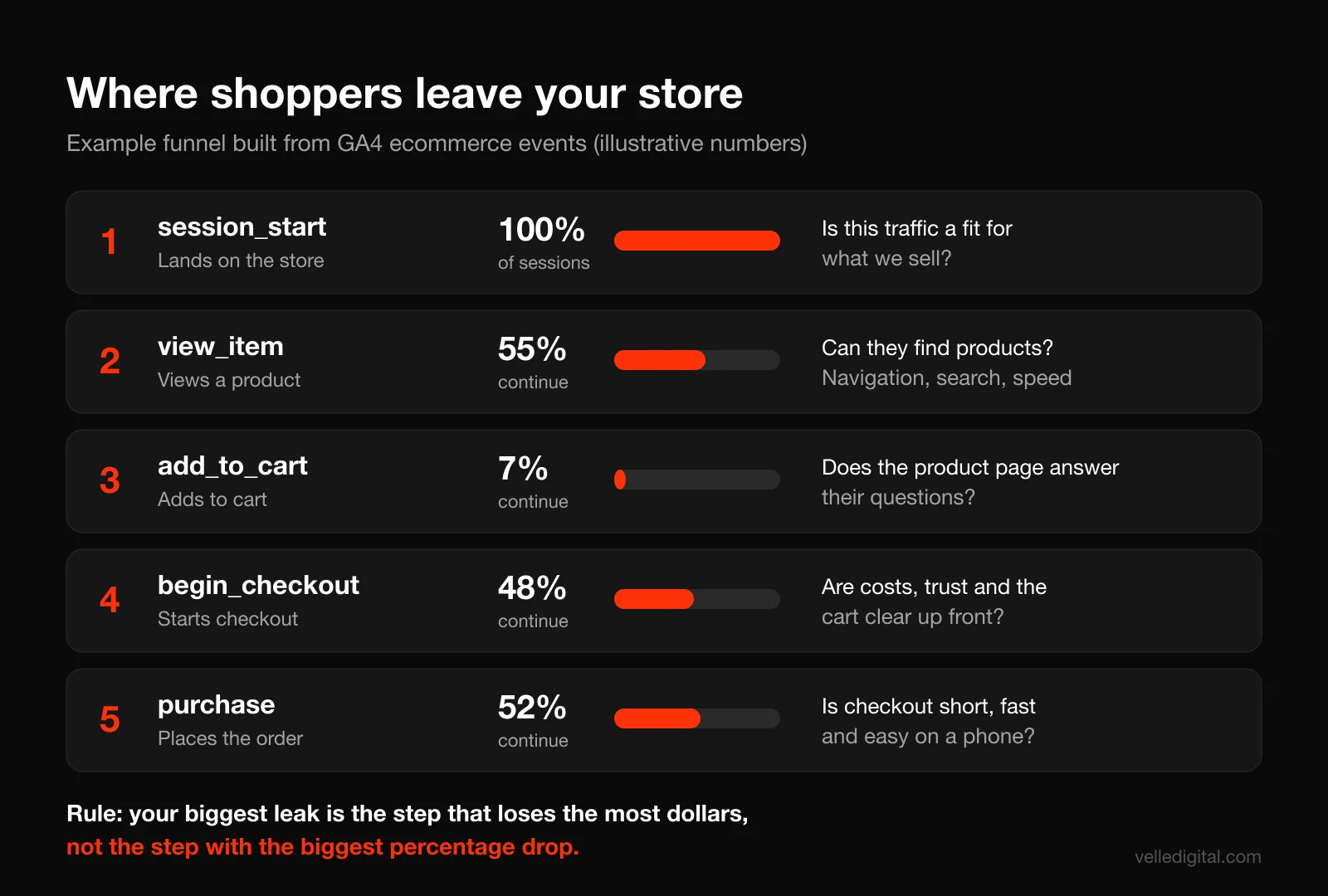
Do not compare your step rates to a universal standard. Compare them to each other and across segments. Here is the example store from earlier, by step:
- Sessions to product view: 55 percent
- Product view to add to cart: 7 percent
- Add to cart to begin checkout: 48 percent
- Begin checkout to purchase: 52 percent
Now look at the same steps by device. If mobile product view to add to cart is 4 percent and desktop is 11 percent, the product page is failing on phones. If mobile and desktop are close on add to cart but mobile checkout completion is 35 percent against desktop at 65 percent, the checkout is the problem, not the product page.
Step 3: Diagnose where people drop off
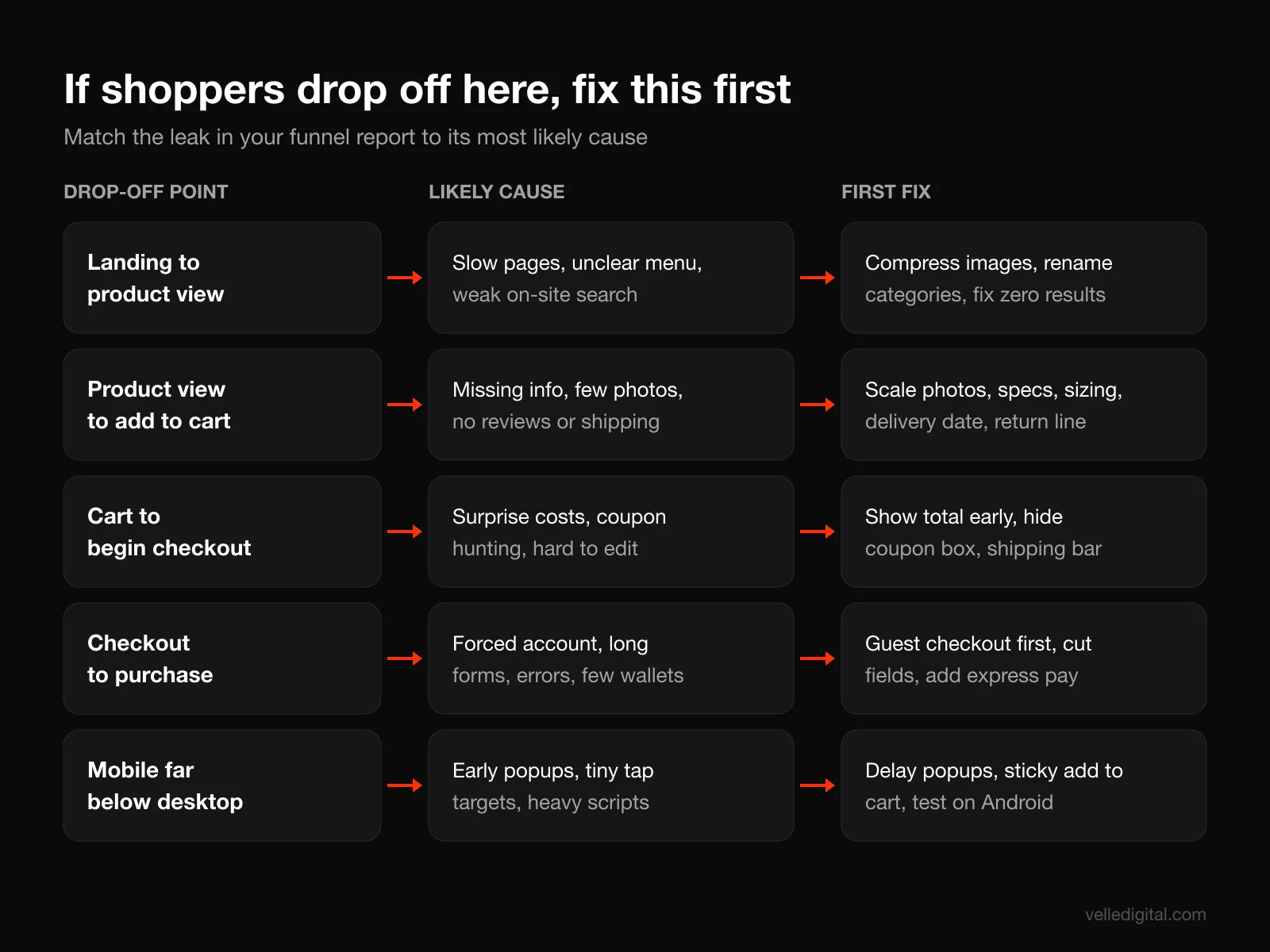
Numbers tell you where. Now you need to find out why. Work through these diagnostic methods in this order, because each one is cheaper and faster than the next.
Find the biggest leak with simple math
Multiply each step's lost users by your average order value and the conversion rate of the next steps. That turns "drop-off" into dollars.
Worked example (hypothetical): the store has 21,000 mobile sessions. If mobile add to cart rate improved from 4 percent to 6 percent, and everything after stayed the same (48 percent to checkout, 40 percent checkout completion on mobile), that is 21,000 x 0.02 x 0.48 x 0.40 = about 80 extra orders. At an average order value of 85 dollars, roughly 6,800 dollars a month.
Do this for each step and each device. The biggest dollar number is your first project. It is usually not the thing the team was arguing about.
Use these diagnostic tools, cheapest first
- Walk the funnel yourself on a real phone, on cellular data, and buy something. Note every moment you hesitate, hunt for information or retype something. This alone finds half the problems we fix.
- Session recordings and heatmaps. Microsoft Clarity is free and good enough. Filter to sessions that reached add_to_cart but not purchase and watch 30 of them. Patterns appear fast: rage clicks on a disabled button, a size chart that will not open, coupons failing.
- On-site search terms. In GA4, check the search terms captured by enhanced measurement. Zero-result searches, and searches for "shipping," "returns" or "size," are customers telling you what is missing.
- Exit surveys. One open question on the cart page: "Anything stopping you from completing your order today?"
- Support logs. Every repeated pre-purchase question is missing content on a product page.
- Five-person usability test. Watch five people who match your customer try to buy while thinking out loud.
Decision rule: if you see a problem in recordings and it also appears in survey answers or support tickets, fix it now without testing. It is a bug, not a hypothesis.
Step 4: Fix site speed and Core Web Vitals
Speed sits under every stage of the funnel, so it comes first. A slow collection page loses people before they see a product. A slow product page loses them before the add to cart button renders. A slow checkout loses them with a credit card in hand.
Know the targets
Google defines three Core Web Vitals, and web.dev publishes the thresholds for a good experience:
- Largest Contentful Paint (LCP): 2.5 seconds or less. This is usually your hero product image.
- Interaction to Next Paint (INP): 200 milliseconds or less. This measures how quickly the page responds when someone taps a size, a color swatch or "Add to cart." Google's INP guidance treats anything over 500 milliseconds as poor.
- Cumulative Layout Shift (CLS): 0.1 or less. This is the page jumping around as things load, the reason people tap the wrong button.
Google assesses these at the 75th percentile of real visits, so a page passes only if three out of four visitors get a good experience. Test your key templates (home, collection, product, cart) in PageSpeed Insights, and look at the field data section at the top, which comes from real Chrome users, before the lab score below it.
Speed has a measurable business effect. Google's collection of Core Web Vitals case studies includes Vodafone Italy, which improved LCP by 31 percent and saw 8 percent more sales.
The ecommerce speed fixes that matter most
In order of how often they help the stores we work on:
- Compress and size product images properly. Serve WebP or AVIF at the size they display. A 4,000 pixel photo shown at 600 pixels is the most common LCP problem in ecommerce.
- Never lazy-load the main product image. Lazy-load below the fold, but give the first image high fetch priority.
- Audit apps and plugins. Every review widget, upsell popup, chat bubble and pixel adds JavaScript. Remove anything you have not looked at in six months, and check the theme for code left behind by uninstalled apps.
- Reserve space for late-loading elements. Set image dimensions and give review widgets and banners fixed heights so the page does not jump.
- Defer third-party scripts like chat, heatmaps and social embeds until after the page is interactive.
- Replace the theme when the theme is the problem. Patching a bloated theme costs more over time than rebuilding. We compare the trade-offs in our Next.js vs WordPress breakdown, and the same logic applies to heavy ecommerce themes.
Decision rule: if your product page LCP on mobile field data is over 4 seconds, fix speed before any design or copy test. Nothing else you test will get a fair hearing.
Step 5: Fix navigation and on-site search
Shoppers who cannot find a product cannot buy it. Navigation and search problems show up as a weak sessions to product view rate, and as high exits from collection pages.
Navigation fixes
- Name categories the way customers do. If your menu says "Apparel Solutions" and customers search "hoodies," change the menu. Your search terms report is the source of truth here.
- Keep the top menu to the categories that sell. Five to seven clear items beats twelve.
- Make collection pages filterable by what matters. Size, color and price for apparel. Compatibility for parts. Room and dimensions for furniture.
- Show price, key variant info and rating on product cards. Shoppers compare on the collection page.
- Default sort to best selling or most relevant, not newest, unless you are a drop-based brand where new is the point.
Search fixes
Search users are often your highest-intent visitors, and they are unforgiving. Nielsen Norman Group found that in ecommerce shopping tests, search success was 51 percent on the first query, 32 percent on the second and 18 percent on the third, and almost half of users whose first search failed gave up immediately. You get one shot.
- Make search a visible box, not an icon, on desktop. On mobile, an icon is acceptable if it opens a full-width field instantly.
- Handle typos, plurals and synonyms. "Tshirt," "t shirt" and "tee" should all return the same results. Most platforms let you add synonyms; do it for your top 20 searches.
- Never show a dead-end zero-results page. Show best sellers, related categories and a way to contact you.
- Add predictive suggestions with product images as people type.
- Review the zero-results report monthly. Each zero-result term is either a synonym to add, a product to stock, or content to create.
Step 6: Fix your product pages
The product page is where the buying decision happens. If your product view to add to cart rate is weak, this is your project. Baymard's product page benchmark found that only 48 percent of leading desktop sites and 38 percent of mobile sites have a "decent" or "good" product page experience, and those are large, well-funded retailers. Most small stores have room to improve.
Nielsen Norman Group's research on ecommerce product pages makes a simple point: users are not looking for marketing fluff, they want a solid description of what the product is, what it looks like and what it does. Every element below serves that job.
Photos and video
Photos do the work a shop floor does: let people see, judge scale and imagine owning it.
- At least five to eight images per product: front, back, side, detail close-up, in use, in context, and a scale reference.
- Show scale explicitly. A model's height and size worn, a hand holding the item, a sofa with a person on it. "Smaller than I expected" is one of the most common return reasons in any store.
- Show every variant. If the product comes in six colors, show photos of all six, not one photo and a swatch.
- Add short video for products where movement or texture matters: fabric drape, how a mechanism works, how a product fits together.
- Let shoppers zoom on mobile with pinch, without the image opening a separate gallery that is hard to close.
Product copy
Write for the questions people actually ask. Pull them from your support inbox, reviews and competitor reviews. A product page template we use:
- Headline: the product name, plain and searchable.
- One-line value statement: who it is for and the main outcome. "A waterproof shell for runners who train in the rain, at 180 grams."
- Three to five benefit bullets: each tied to a concrete feature.
- Specs block: dimensions, weight, materials, compatibility, care instructions. Use a consistent format across every product so people can compare.
- Fit or sizing guidance next to the size selector, not buried in a footer link.
- "What is in the box" for anything with parts or accessories.
- FAQ: the three to five questions support hears most for this product.
If your writing needs help, good product copy is a craft of its own; our website copywriting guide covers the method, and our copywriting service handles it for stores with large catalogs.
Reviews and social proof
Reviews answer the question the brand cannot answer credibly about itself: "Is this actually good?"
- Display star rating and review count near the product name, linking down to the reviews.
- Show reviews with photos from customers, and let shoppers filter reviews by rating or by attributes like size bought.
- Show negative reviews too. A perfect 5.0 from 12 reviews reads as curated. A 4.6 from 300 with honest complaints reads as real.
- Ask for reviews automatically with a post-delivery email, timed to arrive after the customer has had a chance to use the product (usually 7 to 21 days after delivery, depending on the product).
- Never write, buy or selectively suppress reviews. Beyond the ethics, regulators in both the US and Canada treat fake or misleading reviews as deceptive marketing.
Add product structured data so ratings, price and availability can show in Google results. Google's product structured data documentation explains how merchant listing markup can also surface shipping details and return policy in search, which helps the shopper before they even reach your page.
Shipping, returns and delivery info
Remember Baymard's list of abandonment reasons: 40 percent of shoppers (excluding the just-browsing group) left because extra costs like shipping, tax and fees were too high, 20 percent because delivery was too slow, and 12 percent because they could not see or calculate the total order cost up front. All three are problems you can address on the product page, before the cart.
- Show shipping cost or the free shipping threshold on the product page, right below the price.
- Show an estimated delivery date, not "3 to 7 business days." "Order in the next 4 hours, arrives Thursday" is clearer and more persuasive.
- Summarize the return policy in one line near the add to cart button ("Free 30-day returns") with a link to the full policy.
- If you charge duties for cross-border orders, say so clearly. Canadian stores shipping to the US, and the reverse, lose a lot of orders to surprise duties at the door.
The add to cart area
- One primary button, high contrast, visible without scrolling on mobile. A sticky add to cart bar on mobile often helps on long pages.
- Use buttons for size and variant selection, not dropdowns. Baymard found 57 percent of sites in its product page benchmark do not, even though buttons make availability visible at a glance.
- Tell people clearly when a variant is out of stock and offer a back-in-stock notification.
- Confirm the add to cart with a visible cart drawer or message. Silent add to cart buttons cause duplicate adds and confusion.
Step 7: Fix the cart and checkout
This is where the most money is lost, because these shoppers have already decided they want something. Baymard's checkout benchmark found that 65 percent of sites have a "mediocre" or worse checkout, and estimates the average large ecommerce site can gain a 35 percent increase in conversion rate through better checkout design alone.
The cart page
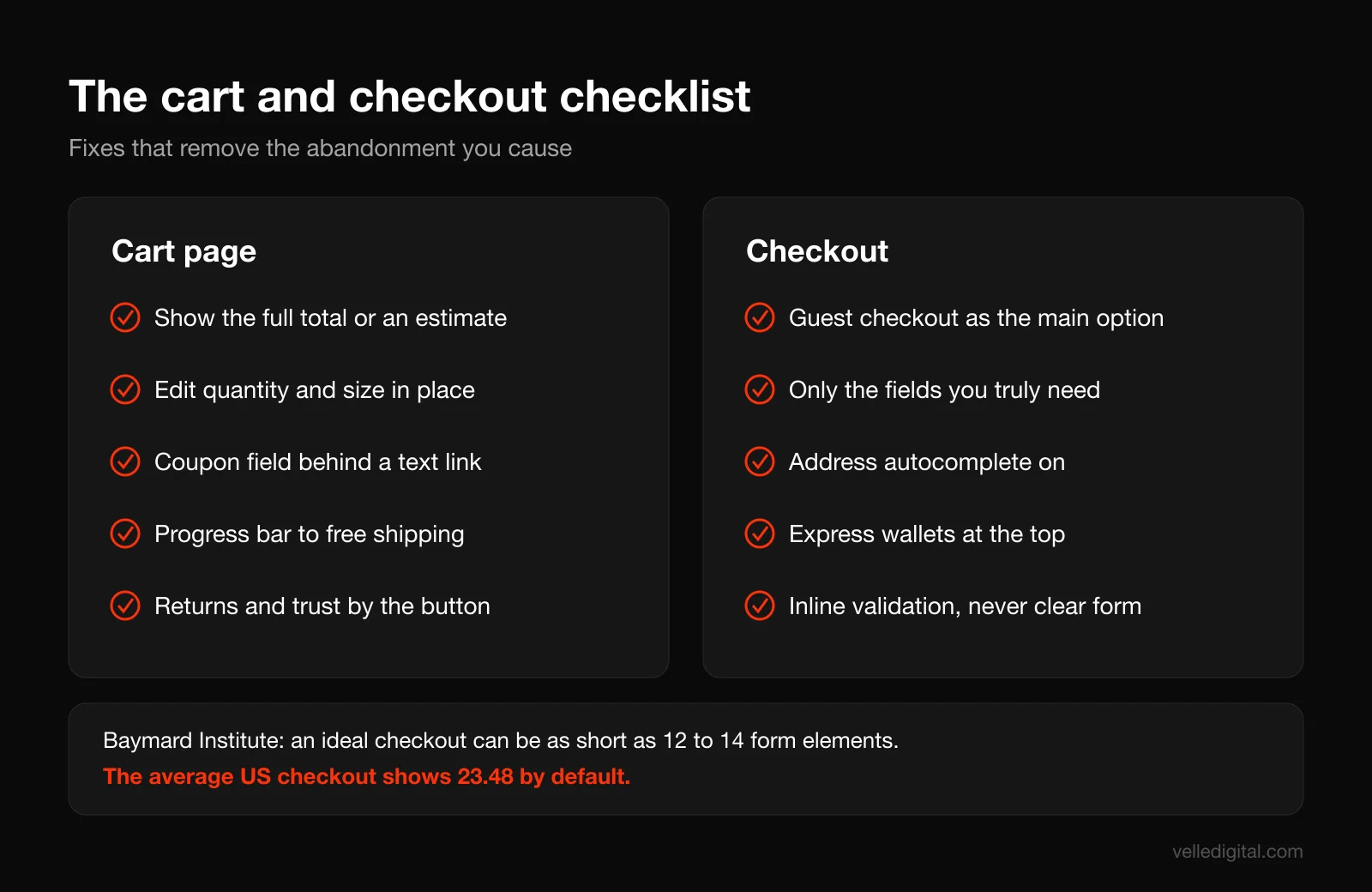
- Show the full total, or a clear estimate, as early as possible. Include shipping and tax estimates. Let people enter a postal code to see exact shipping before checkout.
- Make editing easy: change quantity, change variant, remove, without reloading the page or losing the cart.
- Keep product thumbnails and key options visible so people can confirm they chose the right size.
- Hide the coupon field behind a text link ("Have a promo code?"). A big empty coupon box sends people off to search for codes, and some never return.
- Show your free shipping threshold progress: "You are 12 dollars away from free shipping."
- Put trust and returns info near the checkout button, not in the footer.
The checkout
Baymard's research shows that an ideal checkout can be as short as 12 to 14 form elements, while the average US checkout displays 23.48 by default. It also found 18 percent of shoppers abandoned because the site wanted them to create an account, and 17 percent because the checkout was too long or complicated. These are the fixes:
- Offer guest checkout and make it the most obvious option. Baymard found that 47 percent of sites that allow guest checkout do not make it prominent enough. Offer account creation after the purchase, on the confirmation page, with the details already filled in.
- Cut form fields ruthlessly. One name field or two, not three. Hide "Address line 2" behind a link. Default billing address to the shipping address. Remove "Company" unless you sell B2B.
- Use address autocomplete. It is faster, especially on phones, and it reduces failed deliveries.
- Offer express wallets at the top: Apple Pay, Google Pay, Shop Pay or PayPal, depending on your audience. These skip most of the form entirely.
- Show payment methods you accept before the payment step. Baymard found 9 percent abandoned because there were not enough payment methods.
- Use the right keyboard for each field on mobile: numeric for card and phone, email keyboard for email.
- Validate inline, as people type, and write error messages that say how to fix the problem ("Postal code should look like T5J 0N3"), not just "Invalid."
- Never clear the form on an error. Making someone retype everything because one field failed is the fastest way to lose an order.
- Keep the order summary visible (collapsible on mobile) so people can see what they are paying for.
- Remove navigation and distractions from checkout. The only exits should be "back to cart" and "complete order."
Common mistake: adding a newsletter checkbox, an upsell carousel, a survey and a "how did you hear about us" field to checkout. Each one seems small. Together they make checkout feel like paperwork. Move them to the confirmation page.
Step 8: Build trust at every step
In Baymard's research, 19 percent of shoppers abandoned because they did not trust the site with their credit card information. For a small brand without household-name recognition, trust is the silent tax on every visit.
Trust signals that actually work
- A professional, consistent design. People judge credibility visually and fast. Mismatched fonts, stretched logos and low-quality photos read as risky. This is where strong brand identity pays off in conversion, not just in looks.
- Real contact information: a physical business address, phone number or live chat, and an email address that is not a free webmail account.
- A clear About page with real people and a real story, plus visible policies: shipping, returns, privacy and terms, linked from the footer and summarized near the buy button.
- Recognizable payment logos and a secure checkout (HTTPS everywhere, which every modern platform provides).
- Fresh signals. A stale blog, an old copyright year or a dead Instagram feed suggest the store might not be operating anymore.
Step 9: Optimize for mobile shoppers
For most stores, mobile is the majority of traffic and the minority of revenue. Our example store's 1.4 percent mobile against 2.8 percent desktop is a common shape. Some gap is natural (people browse on phones and buy on laptops), but a gap of two to one or worse usually means friction.
Nielsen Norman Group's mobile UX research explains why phones demand ruthless prioritization: a small screen, short sessions, one window at a time and variable connectivity. Anything not on screen has to be held in short-term memory, so every extra element pushes something important out of view.
A mobile checklist for ecommerce
- Tap targets of roughly 44 to 48 pixels, with space between them, especially size buttons and quantity controls.
- Price, rating and add to cart on the first screen of the product page, with a sticky add to cart bar on long pages.
- No popups in the first few seconds. A full-screen email popup the moment someone lands from an ad is one of the most reliable ways to lose them. Trigger on scroll depth or exit intent, with an obvious close button.
- Express wallets at the top of checkout, since typing a card number on a phone is the most painful part of the journey.
- Test on a mid-range Android phone, not just the newest iPhone. Slow JavaScript hurts most on the devices many of your customers actually own.
Decision rule: if mobile converts at less than half the rate of desktop, make mobile your next project before any desktop changes.
Step 10: Recover abandoned carts with email and SMS
Even with a great checkout, most carts will be abandoned. Cart recovery flows are the cheapest revenue in ecommerce because these people already told you what they want. If you are not running them, set them up this week.
The abandoned cart email flow
This three-message sequence is our default starting point. Adjust timing to your product: a 20 dollar impulse item needs faster follow-up than a 2,000 dollar considered purchase.
- Email 1, about 1 hour after abandonment: a simple reminder. Show the product image, name, price and a button back to the cart. No discount. Subject line idea: "Still thinking it over?"
- Email 2, about 24 hours after: address the likely objection. Add reviews for the product, the return policy and shipping info. Subject line idea: "What other customers say about [product]."
- Email 3, about 48 to 72 hours after: a final reminder, optionally with an incentive such as free shipping. Subject line idea: "Your cart expires soon."
Copy you can adapt for email 1:
Subject: You left something behind. Body: Hi [first name], your [product name] is still in your cart. We have saved it for you, but stock is not guaranteed. [Return to cart]. Questions about sizing or shipping? Reply to this email and a real person will answer.
Discount rules
Discounts in recovery emails work, but they train customers to abandon on purpose. Use these rules:
- Do not discount in email 1. Many people come back on their own with a reminder.
- If you do discount, prefer free shipping over a percentage off, since unexpected costs are the top abandonment reason in Baymard's research anyway.
- Exclude repeat abandoners from discounts. Most email platforms let you filter out people who received a recovery discount in the last 60 to 90 days.
- Make the code single-use and time-limited.
Browse abandonment and SMS
Once cart recovery is running, add a browse abandonment email for known subscribers who viewed a product two or more times without adding to cart ("Still looking at [product]? Here is what people love about it."). If customers have explicitly opted in to SMS, add one SMS cart reminder within an hour or two, short, with opt-out instructions. Never more than one text per cart.
Consent rules
Email and SMS recovery only work on people you are allowed to contact. In Canada, Canada's Anti-Spam Legislation (CASL) requires consent before sending commercial electronic messages, which covers both email and text. In the US, CAN-SPAM governs commercial email and SMS marketing carries its own consent requirements. The practical rule for any store: capture email early in checkout (first field), use an unchecked opt-in box for marketing, always include sender identification and a working unsubscribe, and talk to a lawyer if you are unsure how cart reminders apply to your setup.
For a fuller picture of flows beyond cart recovery (welcome series, post-purchase, win-back), see our email marketing guide for small businesses, or have our email marketing team build and run them.
Step 11: Run a testing roadmap
Once you have fixed the obvious bugs, every further improvement is a hypothesis. Testing is how you find out which ones are true. Done badly, it wastes months. Done well, it compounds.
Fix, test or skip: the decision rules
Not everything needs an A/B test. Use these rules:
- Fix immediately (no test): broken things, bugs, errors, missing information customers keep asking about, slow pages, tracking errors. You do not need a test to prove a broken coupon field is bad.
- Test: changes where reasonable people could disagree and the outcome is uncertain. New product page layouts, pricing presentation, free shipping thresholds, offer framing, checkout design changes.
- Skip: cosmetic changes with no clear hypothesis ("make the button green"), or anything on a page with too little traffic to ever reach a result.
Do you have enough traffic to A/B test?
A/B testing needs volume. As a rough rule from practice, if a page gets fewer than about 1,000 conversions (orders, or add to carts for a product page test) per month, classic A/B tests will take too long to detect anything but large effects. Run your numbers through any sample size calculator before you start.
If you do not have the traffic, you can still improve with evidence:
- Sequential changes with careful before and after comparison, using the same weekday range and similar traffic mix, and watching funnel step rates rather than the overall rate.
- Testing upstream metrics like add to cart rate, which happen far more often than purchases.
- Qualitative validation: five-person usability tests before and after a change.
How to write a test hypothesis
Every test starts with a written hypothesis in this format:
Because we saw [evidence], we believe that [change] for [audience] will cause [effect on metric]. We will know this is true when [metric] moves by [amount] after [sample size or duration].
Example: "Because recordings show mobile shoppers scrolling past the product photos looking for sizing info, and sizing is our top support question, we believe that adding a size guide link next to the size buttons for mobile visitors will increase mobile add to cart rate. We will know it is true when mobile add to cart rate improves at 95 percent confidence after two full weeks."
Prioritize with a simple score
Score each idea from 1 to 5 on three questions, then multiply:
- Impact: how much revenue sits at this funnel step (use the dollar math from Step 3)?
- Confidence: how strong is the evidence (recordings, surveys, support logs, research)?
- Ease: how quickly can you build and launch it?
Run the highest scores first. Re-score the list every month as you learn.
A 90-day roadmap
- Weeks 1 and 2: verify GA4 tracking, build the funnel exploration, walk the funnel on mobile, collect recordings and support questions.
- Weeks 3 and 4: fix bugs and speed issues found in diagnosis. Launch the abandoned cart email flow if you do not have one.
- Weeks 5 to 8: fix the biggest leak by dollar value (usually product page or checkout). Make the no-test fixes, then launch your first one or two A/B tests.
- Weeks 9 to 12: read results, roll out winners, document losers (they are just as valuable), and plan the next quarter's tests from what you learned.
Testing mistakes to avoid
- Stopping tests early because the result looks good after three days. Run at least two full weeks.
- Testing during big sales like Black Friday, when behavior is not normal.
- Measuring only conversion rate. A change that lifts conversion while cutting average order value can lose money. Watch revenue per visitor too.
- Not writing anything down. Keep a test log with hypothesis, dates, result and screenshots, including the losers.
Common ecommerce conversion rate mistakes
These come up again and again when we audit stores:
- Optimizing before measuring. Redesigning a product page because it "feels" weak, when the real leak is a broken checkout on Safari.
- Chasing the overall number. Celebrating a rise caused by pausing a cold traffic campaign, when nothing about the store improved.
- Driving the wrong traffic. Conversion rate is partly a traffic quality metric. Match your ads to the products and pages they send people to; our guide to landing page best practices covers message match in detail.
- Discounting as the default fix. Sitewide discounts raise conversion rate and lower margin. Fix friction first, discount deliberately.
- Hiding costs until the last step. Shipping, duties and fees revealed at payment are the top avoidable abandonment reason in Baymard's data.
- Faking urgency. Fake countdown timers, fake "only 2 left" badges and fake "someone just bought this" popups erode trust once shoppers notice. Use scarcity only when it is true.
Your ecommerce conversion rate checklist
Work through this list in order. Each item takes under an hour to check.
- GA4 ecommerce events verified in DebugView, purchases within about 80 to 100 percent of platform orders, payment gateways excluded as referrals
- Funnel exploration built, broken down by device and channel
- Conversion rate tracked monthly with one definition, compared to the same month last year
- Biggest leak identified in dollars, not just percentages
- Funnel walked on a real phone on cellular data
- Product pages meet LCP 2.5 seconds, INP 200 milliseconds and CLS 0.1 in field data
- Main product image not lazy-loaded, unused apps and scripts removed
- Category names match what customers search, search handles typos and synonyms
- Five or more photos per product, showing scale and every variant
- Specs, sizing and FAQ on every product page
- Star rating near the title, reviews with photos, negative reviews visible
- Shipping cost, delivery estimate and return summary near the price
- Variant buttons, not dropdowns
- Guest checkout as the most prominent option, fields trimmed, address autocomplete on
- Express wallets at the top of checkout, inline validation with helpful errors
- Contact details and policies easy to find, no fake urgency
- Abandoned cart flow live with three emails, consent captured properly
- Test log started, with prioritized hypotheses
If you want a second set of eyes on your store, our website audit covers speed, tracking, UX and checkout against this same list.
Frequently asked questions
What is a good ecommerce conversion rate?
There is no single good number, because conversion rate depends on your price point, product category, traffic sources and how you calculate it. Published averages tend to sit in the low single digits, but the more useful benchmark is your own store over time and the gaps between your segments. If mobile converts at half the rate of desktop, or paid social at a third of email, those gaps tell you more than any industry average.
How do you calculate ecommerce conversion rate?
Divide the number of orders by the number of sessions in the same period and multiply by 100. For example, 300 orders from 15,000 sessions is a 2 percent conversion rate. Some teams use purchasers divided by users instead, which gives a higher number; either is fine as long as you use the same definition every time.
Why is my ecommerce conversion rate so low?
The most common causes are slow mobile pages, product pages that do not answer key questions (sizing, shipping, returns), surprise costs at checkout, forced account creation and low-quality traffic. Build a GA4 funnel exploration broken down by device and channel to see which step is losing people, then watch session recordings of shoppers who dropped out at that step.
Does site speed really affect ecommerce sales?
Yes. Google's published Core Web Vitals case studies include retailers that saw sales increases after improving load times, such as Vodafone Italy's 8 percent sales lift after a 31 percent LCP improvement. Speed matters most on mobile and on product and checkout pages, where every delay sits between a shopper and the buy button.
What is the average cart abandonment rate?
Baymard Institute's compilation of 50 studies puts the average documented cart abandonment rate at about 70 percent. A large part of that is people browsing or comparing, which you cannot prevent. The avoidable part comes from issues like unexpected costs, forced account creation, long checkouts and lack of trust.
Should I offer discounts in abandoned cart emails?
Not in the first email. Many shoppers return with a simple reminder, and routine discounts teach customers to abandon on purpose. If you include an incentive, put it in the last email, prefer free shipping, make the code single-use and exclude people who received a recovery discount recently.
Is A/B testing worth it for a small store?
Only if a page has enough conversions to reach a reliable result in a few weeks. With lower traffic, focus on fixing clear problems found in recordings, surveys and support logs, test upstream metrics like add to cart rate, and use careful before and after comparisons. Evidence-based fixes still move the number without formal tests.
Make your store convert the traffic you already pay for
Improving your ecommerce conversion rate is rarely about one clever trick. It is measurement you trust, a funnel that shows where people leave, and steady fixes at the stage that costs you the most. If you would rather have a team that does this every day handle it, our ecommerce services cover tracking, speed, product pages, checkout and testing, or you can book a call and we will walk through your funnel together.