Email Marketing for Small Business: Build a List That Sells
A practical guide to email marketing for small business: compliant list building, Gmail and Yahoo deliverability rules, five automations with outlines, and a 30 day plan to launch it all.
Email marketing for small business comes down to four things done in order: get permission properly, set up your domain so your mail reaches the inbox, grow a list of people who actually want to hear from you, and build a handful of automated sequences that do the selling while you work. Newsletters and campaigns sit on top of that foundation. They are not the foundation.
If you follow this guide, you will end up with a compliant signup process for Canada and the US, a sending domain that passes Gmail and Yahoo's bulk sender rules, five core automations (welcome, nurture, post-service, review request and win-back) with outlines you can copy, a simple newsletter rhythm, a short list of metrics that still mean something after Apple's privacy changes, and a 30 day plan to launch all of it. No agency required, although we will tell you where one helps.
What email marketing for small business actually involves
Most owners picture email marketing as "sending a newsletter." That is the smallest part. There are three kinds of email, and each does a different job.
- Automations (also called flows or sequences). Emails triggered by something a person does: joining your list, booking a job, buying, going quiet. You write them once and they run forever. This is where most of the revenue comes from in the accounts we manage.
- Campaigns and newsletters. One-off sends to all or part of your list: a seasonal offer, a monthly update, an announcement. They keep you top of mind between purchases.
- Transactional email. Receipts, booking confirmations, password resets. These are usually sent by your booking or ecommerce system, not your marketing platform, but they shape how people feel about every other email you send.
The order matters. A solid welcome series and review request flow will outperform a beautiful newsletter sent to a cold list, so we build automations first.
Why email still earns a place in a small business budget
Email is the one marketing channel you own outright. Social reach changes with the algorithm and ad results stop the day you stop paying. A list of people who opted in is an asset that compounds, and it moves with you if you switch tools.
It also solves the problem most local service businesses have: people are not ready to buy the day they find you. Someone researching a renovation or a new furnace might take months to decide, and email keeps you in the room without paying for every touch. The catch is that it only works when the basics are right, so each step below protects the next one.
Step 1: Choose an email platform that fits how you sell
The right platform depends less on features and more on what kind of business you run and where your customer data already lives. Choose badly and you will copy contacts between systems by hand forever.
The three categories worth considering
- Newsletter-first tools (Mailchimp, MailerLite, Kit and similar). Easy to learn, good templates, reasonable automation. A fit for service businesses with simple needs and creators.
- Ecommerce-first tools (Klaviyo, Omnisend and similar). Deep integration with Shopify, WooCommerce and other stores, so automations can trigger on browsing, carts, orders and products. A fit for anyone selling products online.
- CRM-based tools (HubSpot, ActiveCampaign, and all-in-one platforms that combine CRM, pipeline, booking, SMS and email). Email is one part of a system that also tracks leads, deals and appointments. A fit for service businesses with a sales process, quotes or bookings.
Decision rules
- If you sell products online, choose an ecommerce-first platform. Abandoned cart and post-purchase flows depend on order data, and native integrations beat anything you can stitch together.
- If you sell services with quotes, bookings or a sales pipeline, choose a CRM-based tool or connect your email platform tightly to your CRM. Your best automations trigger on pipeline stages (quote sent, job completed), and that data lives in the CRM. This connection is where most small businesses lose leads, and it is the core of our CRM setup service.
- If you mostly need a monthly newsletter and a welcome series, a newsletter-first tool is enough. Do not pay for complexity you will not use.
- If you already pay for a booking, POS or practice management system with email built in, check whether it can send automations triggered by appointments. If it can, start there.
Must-have features checklist
Whichever category you choose, confirm the platform does all of these before you commit:
- Lets you authenticate your own domain (custom DKIM and a custom return path), not just send "via" the platform's domain
- Adds a one-click unsubscribe header automatically to marketing email
- Records consent details for each contact: date, source, and the form or method used
- Supports automations triggered by tags, form submissions, or events from your other tools
- Lets you segment by tags, custom fields and engagement (clicked in the last 90 days, for example)
- Integrates with your website forms, booking tool, store or CRM without manual exports
- Exports your full contact list and consent records if you ever leave
The consent record point is not a nice-to-have. Under Canadian law, the burden of proving consent is on you, which brings us to the step most guides skim.
Step 2: Get consent right under CASL and CAN-SPAM
Compliance is where email marketing for small business goes wrong most often, usually by accident. Canada and the US take very different approaches, and if you have any Canadian contacts you need to understand the stricter one.
This section is practical guidance, not legal advice. For anything unusual, read the official sources linked below or talk to a lawyer.
CASL (Canada): permission first
Canada's Anti-Spam Legislation is an opt-in law. You need consent before you send a commercial electronic message, not after. The full text of the Act is on the federal Justice Laws site, and the government's plain-language page on getting consent to send email is the clearest summary.
There are two kinds of consent:
- Express consent. The person actively agreed to receive your messages, in writing or verbally. According to the ISED guidance, express consent does not expire unless the person withdraws it.
- Implied consent. Recognized only in specific situations, such as an existing business relationship (a recent purchase or contract) or an inquiry. ISED states that implied consent lasts up to 2 years, or 6 months in the case of inquiries or applications.
Every commercial message you send to Canadians must also include your business name, a current mailing address, and a phone number, email or web address, plus an unsubscribe mechanism. ISED notes that contact information must stay valid for at least 60 days after sending and that unsubscribe requests must be actioned within 10 business days at no cost to the recipient.
What this means in practice:
- No pre-checked boxes. The person has to take an action to opt in.
- Keep records of when, where and how each person consented. Your platform's signup timestamp and form name usually cover this, but anything collected offline (a paper sign-up sheet, a verbal yes at the counter) needs its own record.
- Implied consent has an expiry date. A quote request from eight months ago does not give you permission to send promotions today unless that person has since bought or opted in.
- When in doubt, ask for express consent. It is the only kind that lasts.
CAN-SPAM (United States): opt-out, with rules
The US approach is different. The FTC's CAN-SPAM Act compliance guide for business explains that the law does not require prior consent, but it sets firm rules for every commercial message:
- Accurate "From," "To," "Reply-To" and routing information that identifies who sent it
- Subject lines that are not deceptive about the content
- A clear disclosure that the message is an advertisement (where applicable)
- A valid physical postal address
- A clear way to opt out, honored within 10 business days, and kept working for at least 30 days after you send
- No selling or transferring the addresses of people who opted out
The FTC guide also states that each separate email in violation can cost up to $53,088, and that hiring a vendor to send for you does not transfer your legal responsibility. The underlying rule text is in 16 CFR Part 316 if you want the detail.
If you have contacts in both countries, build to the CASL standard
You cannot reliably know where every subscriber lives. Our rule for every client: collect express consent from everyone, identify yourself fully in every marketing email, and honor unsubscribes immediately. That satisfies both laws and produces a more engaged list.
Consent language you can copy
Use a checkbox (unchecked by default) or a dedicated email signup form with wording like this:
Yes, send me tips, offers and updates from [Business Name] by email. I can unsubscribe at any time. [Business Name], [street address, city, province or state], [phone or website].
For a lead magnet form where the email signup is the point of the form, you can state it next to the button instead:
Enter your email to get the checklist. We'll also send you our monthly tips and occasional offers. Unsubscribe anytime.
Transactional versus marketing email
Booking confirmations, receipts and service reminders are generally treated as transactional or relationship messages, which have lighter requirements. Add a promotion and the message can become commercial; the FTC guide notes these categories are read narrowly. Keep transactional emails clean.
Step 3: Set up deliverability before you send a single campaign
Deliverability is whether your mail reaches the inbox, the spam folder, or nowhere. Since 2024, Gmail and Yahoo have enforced specific sender requirements, and mail that does not meet them gets filtered or rejected. Setting this up takes an afternoon. Fixing a damaged sender reputation takes months.
What Gmail and Yahoo require
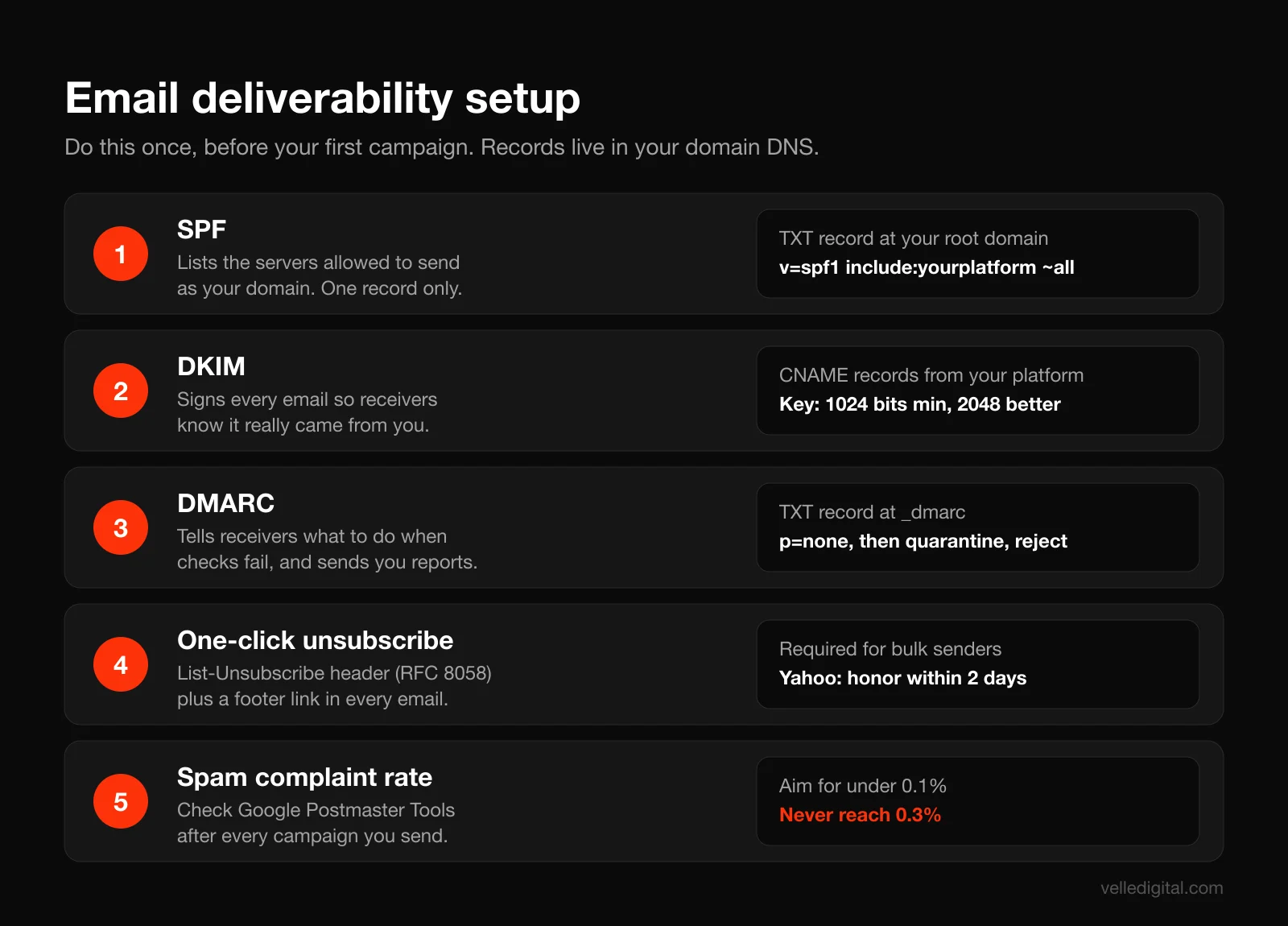
Google's email sender guidelines split requirements into two groups. All senders to personal Gmail accounts must authenticate with SPF or DKIM, have valid reverse DNS, use TLS, and keep spam rates reported in Postmaster Tools below 0.3 percent. Senders of 5,000 or more messages a day to Gmail must also authenticate with both SPF and DKIM, publish a DMARC record (a policy of "none" is acceptable), align the From domain with SPF or DKIM, and support one-click unsubscribe on marketing and subscribed messages. Google recommends keeping your spam rate below 0.10 percent and avoiding ever reaching 0.30 percent.
Yahoo's sender best practices line up closely: SPF or DKIM for everyone, and for bulk senders both SPF and DKIM, a DMARC policy of at least p=none that passes, a working one-click List-Unsubscribe header, unsubscribe requests processed within 2 days, and a complaint rate under 0.3 percent.
You might be nowhere near 5,000 emails a day. Set up everything anyway. It costs nothing, the thresholds are easy to hit on a single campaign once your list grows, and mailbox providers reward authenticated senders regardless of volume.
Step 3a: Send from your own domain
Never send marketing email from a free address like yourbusiness@gmail.com. Gmail's own DMARC policy means mail claiming to be from gmail.com but sent through a marketing platform will fail authentication. Use an address on your domain, such as hello@yourbusiness.com.
Many senders go one step further and use a subdomain for marketing mail, such as news.yourbusiness.com or mail.yourbusiness.com. This keeps a bad campaign from hurting the everyday email your team sends to customers.
Step 3b: Publish SPF
SPF (Sender Policy Framework) is a DNS TXT record listing which servers may send mail for your domain. Your platform gives you the exact value to add. A typical record looks like this:
v=spf1 include:_spf.google.com include:yourplatform.example ~all
Rules that trip people up:
- You get one SPF record per domain. If you already have one for Google Workspace or Microsoft 365, add your email platform's include to the existing record rather than creating a second one.
- Google's SPF setup guide notes that a record can have up to 10 include tags. Every tool you connect (CRM, helpdesk, invoicing) may want one, so audit it once a year.
- Many platforms authenticate SPF through their own return-path domain, in which case you add a CNAME instead. Follow the platform's instructions exactly.
Step 3c: Turn on DKIM
DKIM adds a cryptographic signature to each email that proves it came from you and was not altered. Your platform generates the key; you add one or more CNAME or TXT records it provides. Google's DKIM setup guide covers it for your regular mailbox, and Google's sender guidelines require a key of at least 1024 bits, with 2048 recommended where your provider supports it.
Do this for every system that sends as your domain: your mailbox provider, your marketing platform, your CRM, your booking tool. Each one signs separately.
Step 3d: Publish DMARC, then tighten it
DMARC tells receiving servers what to do with mail that fails SPF and DKIM alignment, and it sends you reports showing who is sending as your domain. You add a TXT record at _dmarc.yourbusiness.com. Start in monitoring mode:
v=DMARC1; p=none; rua=mailto:dmarc-reports@yourbusiness.com
Google's DMARC setup guide recommends starting with p=none, then moving to quarantine and eventually reject as you confirm all your legitimate senders pass, and having SPF and DKIM authenticating for at least 48 hours before you add the record. It also suggests sending reports to a dedicated mailbox, because they arrive in volume.
Our rule of thumb: run p=none for 2 to 4 weeks, read the reports (a free DMARC report reader makes them legible), fix any legitimate service that is failing, then move to p=quarantine. Only move to p=reject when you are confident nothing legitimate is failing.
Step 3e: Confirm one-click unsubscribe
One-click unsubscribe is defined in RFC 8058, which adds a List-Unsubscribe-Post header so mail apps can show their own "Unsubscribe" button. Most reputable platforms add it automatically. Send a test to a Gmail address and check for the unsubscribe link next to the sender name.
Keep a visible unsubscribe link in the footer too. A person who cannot find the unsubscribe link will click "Report spam" instead, and complaints are what damage your reputation.
Step 3f: Monitor with Postmaster Tools
Google's free Postmaster Tools lets you verify your domain and see the spam rate, reputation, authentication results and delivery errors for mail you send to personal Gmail accounts. Set it up now, before you need it. It is the only place you can see the spam rate number Google is judging you on.
Step 3g: Warm up a new domain or platform
On a new domain or platform, do not blast your entire list on day one. Send first to your most engaged contacts, then expand over a few weeks. Mailbox providers trust senders whose recipients open, click and reply.
Step 4: Build your email list the right way
A small list of people who asked to hear from you beats a big list of people who did not. Never buy a list or scrape addresses: it breaks CASL, and purchased lists are full of dead addresses and spam traps that wreck deliverability.
Give people a real reason to subscribe
"Join our newsletter" is not an offer. Nobody wants more email. They want something useful, and the best lead magnets solve a small, specific problem your ideal customer has right before they would hire you.
Lead magnet ideas by business type:
- Home services: a seasonal maintenance checklist, "what a fair quote looks like" guide, or a cost calculator
- Clinics and wellness: a new patient guide, an aftercare plan, a first-visit offer
- Professional services: a tax deadline calendar, a document checklist, a short email course
- Restaurants and retail: a birthday reward, early access to new products or menus, a first-order discount
- Ecommerce: a size or fit guide, a buying guide, a first-order discount or free shipping code
Decision rule: if your average sale is low and frequent (a cafe, a boutique), a discount or reward works well. If your sale is high and considered (a renovation, a legal matter), useful information works better than a discount, because it builds trust and attracts people who are seriously researching.
Put forms where intent is high
- Your homepage and service pages. An inline form near the bottom of key pages, tied to a relevant lead magnet.
- Blog posts. A content upgrade related to the article. Someone reading about furnace maintenance wants the furnace checklist, not a generic newsletter.
- A timed or exit-intent popup. Popups work when they offer something worthwhile and do not fire the instant the page loads. Wait until the visitor has scrolled or spent 20 to 30 seconds, show it once per visitor per few weeks, and make it easy to close on mobile.
- Checkout and booking forms. Add an unchecked consent box at checkout or booking. This is often the single biggest source of subscribers for service businesses.
- Quote and contact forms. Same unchecked box. These leads have implied consent only for a limited time under CASL, so asking for express consent at the point of inquiry is worth it.
Keep forms short: email and first name, plus one segmentation question only if you will use the answer. If your forms or landing pages need work, our guide to landing page best practices covers the layout and copy side.
Capture subscribers offline
Many local businesses meet more customers in person than online. Do not let those relationships go unrecorded.
- At the counter or front desk: a tablet with a signup form, or a QR code on the counter card linking to a mobile form
- On job sites: a QR code on invoices, leave-behind cards and vehicle magnets pointing to a "get our seasonal maintenance reminders" signup
- At events and trade shows: a tablet form with a draw entry, with consent wording that clearly separates the draw from the email signup
- By phone: a short script and a field in your CRM that records verbal consent, the date and who took it
Phone script for verbal consent:
"Would you like us to email you seasonal maintenance reminders and the occasional offer? You can unsubscribe anytime." If yes, record: "Verbal express consent, [date], [staff name], phone call."
Use double opt-in when the source is risky
Double opt-in means a new subscriber confirms by clicking a link. It trades a few signups for a cleaner list. Our rule: use double opt-in for popups, giveaways and any form that attracts bots or typos; single opt-in is fine for checkout and booking forms where you already have a verified relationship.
Tag every subscriber by source
Tag each contact with where they came from (homepage-checklist, booking-form, trade-show-2026) and what they are interested in. Tags power the automations in the next step and make your consent records easy to produce if anyone asks.
Step 5: Build the core automations for email marketing for small business
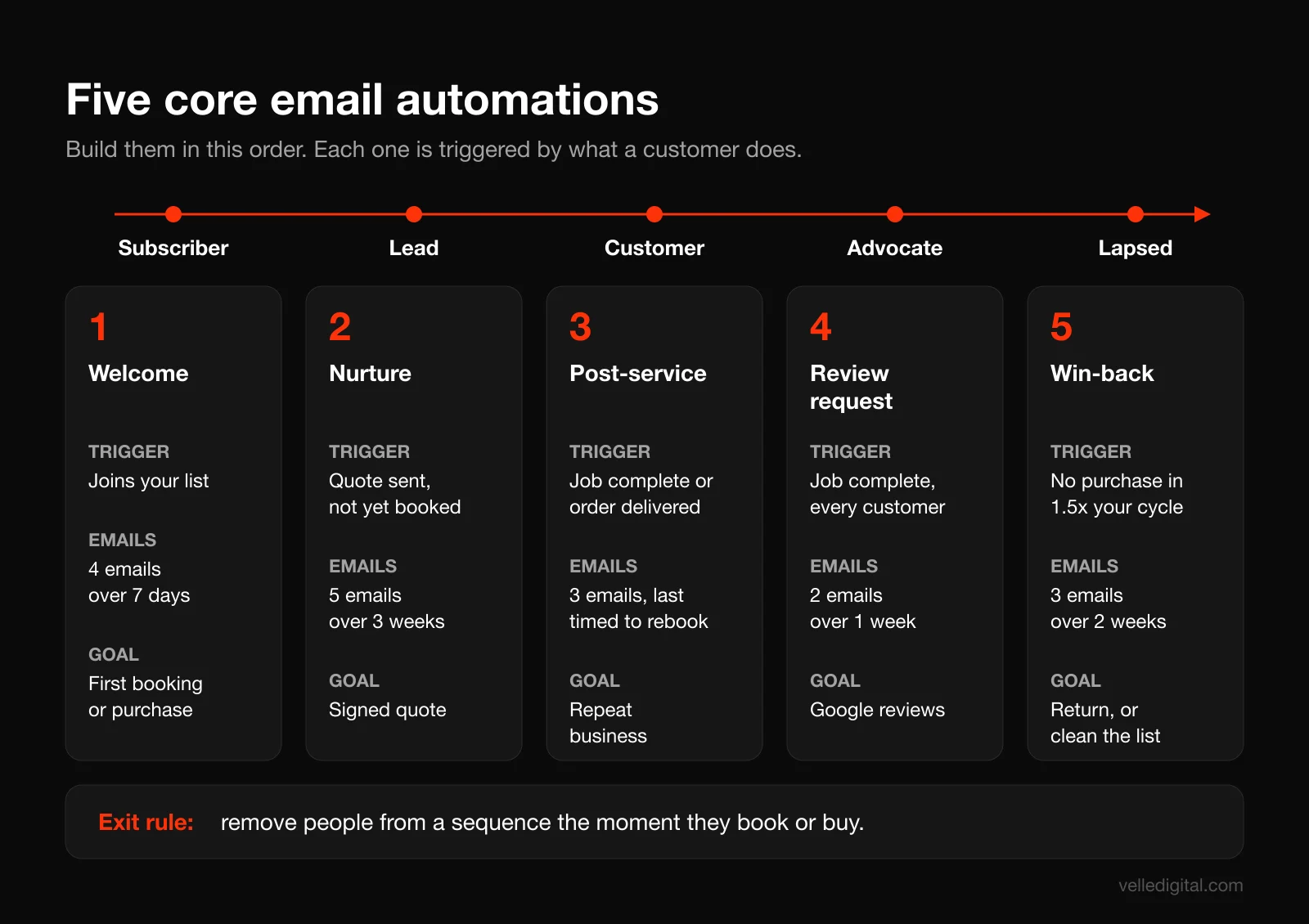
These five automations cover the full customer lifecycle. Build them in this order, because each one depends on the list and tags you set up earlier. Together they handle the moments where a timely email makes the biggest difference: the first impression, the decision, the delivery, the review, and the return.
Automation 1: The welcome series
Trigger: someone joins your list from any form. This is the most read email sequence you will ever send, because people are paying the most attention right after they sign up.
Purpose: deliver what you promised, introduce your business, set expectations, and make one clear offer.
Example outline (home services business, 4 emails):
- Immediately: Delivery. Subject: "Your furnace maintenance checklist is here." Link to the lead magnet, one sentence about who you are, and what they will get from you and how often.
- Day 2: The story and the proof. Subject: "Why we started [Business Name]." Short founder note, what makes you different, two or three customer reviews, photos of real work.
- Day 4: The most common question. Subject: "What should a furnace tune-up actually include?" Answer the question you hear most on sales calls. Educational, not salesy. End with a soft link to book.
- Day 7: The offer. Subject: "Book this month and we'll [specific benefit]." One clear call to action: book, call or request a quote. Mention the deadline.
Decision rule: if your sale is quick (retail, food, ecommerce), compress this to 3 emails over 5 days and lead with the offer. If your sale is slow and considered, stretch it to 5 or 6 emails over two weeks and lean on education.
Automation 2: The lead nurture sequence
Trigger: someone requests a quote, books a consultation, or downloads a high-intent resource but has not bought. This is the sequence that follows up when your team forgets to, which in our experience is most of the time.
Purpose: answer objections, build trust and bring the person back to a decision.
Example outline (renovation contractor after a quote is sent, 5 emails over 3 weeks):
- Day 1: Quote recap. Subject: "Your [project] quote and what happens next." Link to the quote, a clear explanation of next steps, and a direct reply-to from the estimator.
- Day 3: Proof. Subject: "A project a lot like yours." A short case story with photos, a client quote you have permission to use, and the timeline.
- Day 7: Objections. Subject: "The 3 questions people ask before signing." Price, timeline and disruption, answered plainly.
- Day 12: Risk reversal. Subject: "What's covered if something goes wrong." Warranty, insurance, guarantees, licensing.
- Day 21: Check-in. Subject: "Still planning your [project]?" A plain-text email from a real person asking if they have questions or want to adjust the scope.
Exit the sequence the moment the person books or signs. Nothing damages trust faster than an email asking "still thinking about it?" a day after someone paid a deposit. This is why your email platform needs to know what happens in your CRM.
Speed matters here as much as content. The first touch should happen within minutes of an inquiry, not days. Our guide to speed to lead automation covers the instant text and call side of this, and our booked services automation work wires the whole sequence together for service businesses.
Automation 3: Post-purchase or post-service
Trigger: an order is fulfilled or a job is marked complete. Most businesses go silent after they get paid. This is where you turn a single job into a customer relationship.
Purpose: confirm the customer made a good decision, help them get the most from what they bought, and set up the next purchase.
Example outline (service business, 3 emails):
- Day 0 or 1: Thank you. Subject: "Thanks for choosing us, [first name]." Personal thanks, what was done, any warranty information, and who to call with questions.
- Day 5 to 10: Care and value. Subject: "How to keep your [result] looking new." Aftercare tips, maintenance schedule, what to watch for.
- Timed to the next service: Reminder. Subject: "It's time for your [seasonal or annual] service." Triggered by a date field, for example 11 months after an annual service, with a booking link.
For ecommerce, swap in an order confirmation that sets delivery expectations, a "how to use it" email after delivery, and a cross-sell of complementary products 2 to 3 weeks later.
Automation 4: The review request
Trigger: a job is completed or an order is delivered. Reviews drive local search visibility and conversions, and email is the easiest way to ask at scale. Our local SEO guide explains why review volume and recency matter for the map pack.
Purpose: get a public review while the experience is fresh.
Example outline (2 emails):
- 1 to 2 days after completion: The ask. Subject: "Quick favor, [first name]?" Two or three sentences thanking them, one sentence on why reviews matter to a small business, and a single button linking directly to your Google review form.
- 5 days later, only if no click: The reminder. Subject: "Would you share your experience?" Repeat the link and keep it to two sentences. Avoid subjects like "Did we earn 5 stars?", which pressure people toward a rating.
One rule that matters: send the request to every customer, not just the happy ones. Google's prohibited and restricted content policy bans selectively soliciting positive reviews, discouraging negative ones, and offering incentives such as discounts in exchange for reviews. "Review gating" (rating customers first and only sending the happy ones to Google) falls into that category.
Automation 5: The win-back sequence
Trigger: a customer has not bought or booked in longer than your normal cycle (for example, 18 months for an annual service, or 90 days for a monthly consumable), or a subscriber has not opened or clicked in 6 months.
Purpose: bring lapsed customers back, and clean out subscribers who are no longer interested.
Example outline (3 emails over 2 weeks):
- Email 1: We miss you. Subject: "It's been a while, [first name]." A friendly note about what is new, plus a reason to come back.
- Email 2: The incentive. Subject: "A little something to welcome you back." A time-limited offer, if your margins allow it.
- Email 3: The breakup. Subject: "Should we stop emailing you?" Ask them to click a button to stay subscribed. Anyone who does not click within 7 to 14 days gets suppressed from regular sends.
The breakup email is list hygiene. Mailbox providers use engagement to decide whether your mail belongs in the inbox, so removing unengaged subscribers improves delivery to everyone else.
Writing automation emails that get read
- One email, one job. Each email should have one main call to action.
- Write like a person. Plain, short, specific. A plain-text style email from a named person often outperforms a designed one for service businesses. Our copywriting service can help if writing is not your strength.
- Subject lines that describe, not trick. Deceptive subject lines are a CAN-SPAM violation and a fast way to get spam complaints.
- Preview text on purpose. The line after the subject in the inbox. Use it to extend the subject, not to repeat "View this email in your browser."
- Mobile first. Single column, large tap targets, short paragraphs, and a button that is easy to hit with a thumb.
Step 6: Run a newsletter people look forward to
Once your automations are live, a regular newsletter keeps you top of mind between purchases and gives you a channel for seasonal offers. The goal is not to send often. It is to send consistently enough that people recognize you and useful enough that they open.
Pick a cadence you can keep
- Monthly is the right starting point for most service businesses.
- Every two weeks works if you have regular news, new products or a content program.
- Weekly makes sense for ecommerce brands and businesses with frequent offers, and only if you can keep quality up.
Decision rule: pick the cadence you are confident you can hold for 12 months, then go one step less frequent. Consistency beats volume.
A newsletter template that works
Use the same structure every time so writing it takes an hour, not a day:
- One useful tip or short story (100 to 200 words) tied to the season or a common customer question
- One piece of proof: a recent project, a review, or a before and after
- One offer or call to action: book, buy, refer a friend
- One small personal touch: a team member spotlight, a community event, a behind-the-scenes photo
Segment before you send
Use the tags from Step 4 so people get relevant content: someone who bought last week does not need a first-time customer discount. Even two or three segments (prospects, customers, past customers) will lift engagement and cut unsubscribes.
Sending best practices
- Send a test to yourself on desktop and mobile, and click every link before every send.
- Exclude anyone who has not engaged in the last 6 to 12 months from regular campaigns (they belong in the win-back flow).
- Do not change your sending domain or from name often. Recognition drives opens.
If you want email to sit inside a broader plan with ads, social and SEO, our post on full funnel marketing strategy shows where it fits.
Step 7: Measure the metrics that matter after Apple Mail Privacy Protection
According to Apple's Mail Privacy Protection overview, it downloads remote content in the background by default, regardless of whether you engage with the email, and hides the reader's IP address. The tracking pixel that marketing platforms use to count opens is remote content, so for anyone using Apple Mail with this setting on, emails can register as "opened" whether or not a person ever read them.
The result: open rates are inflated and unreliable, especially if many of your subscribers use iPhones. You can still glance at opens as a rough trend line and to spot sudden drops that suggest a deliverability problem, but you should not make decisions based on them.
What to track instead
- Click rate. The percentage of delivered emails where someone clicked a link. This is your main engagement signal for campaigns.
- Conversions and revenue per email. Bookings, quote requests, purchases or calls that came from the email. Use UTM parameters on your links so your analytics can attribute them, and connect your platform to your store or CRM where possible.
- Replies. Especially for service businesses, a reply is the strongest signal of all, and mailbox providers notice when people reply to you.
- Unsubscribe rate. A spike after a specific email tells you the content or frequency missed.
- Spam complaint rate. Watch the number in Google Postmaster Tools and your platform's reports. Stay under 0.1 percent; treat anything approaching 0.3 percent as an emergency.
- Bounce rate. Hard bounces should be suppressed automatically. A high bounce rate usually means a stale or poorly collected list.
- List growth rate. New subscribers minus unsubscribes and bounces, per month. If this is flat or negative, Step 4 needs attention.
Worked example: is this automation worth it?
Hypothetical example: a cleaning company's review request flow goes out to 120 completed jobs in a month. 30 people click through to Google (a 25 percent click rate) and 18 leave a review. Before the automation, the company was averaging 4 reviews a month from customers who left them on their own.
That is 14 extra reviews a month from one flow that took an afternoon to build. Nobody would judge that by open rate. Judge each automation by the action it was built to drive.
Use engagement-based segments, carefully
Because opens are inflated, build engagement segments on clicks, purchases, bookings or replies. If you must use opens, combine them with another signal ("opened or clicked in the last 120 days").
Run a monthly 20 minute review
Once a month, record list size, new subscribers, click rate per campaign, bookings or revenue from email, unsubscribes, spam complaint rate and each automation's results in a simple spreadsheet. Find the one thing underperforming and fix it.
Your 30 day email marketing launch plan
Here is the whole guide as a four week plan. A small business owner putting in 4 to 6 hours a week can launch all of it in a month. Do not skip ahead: deliverability before campaigns, automations before newsletters.
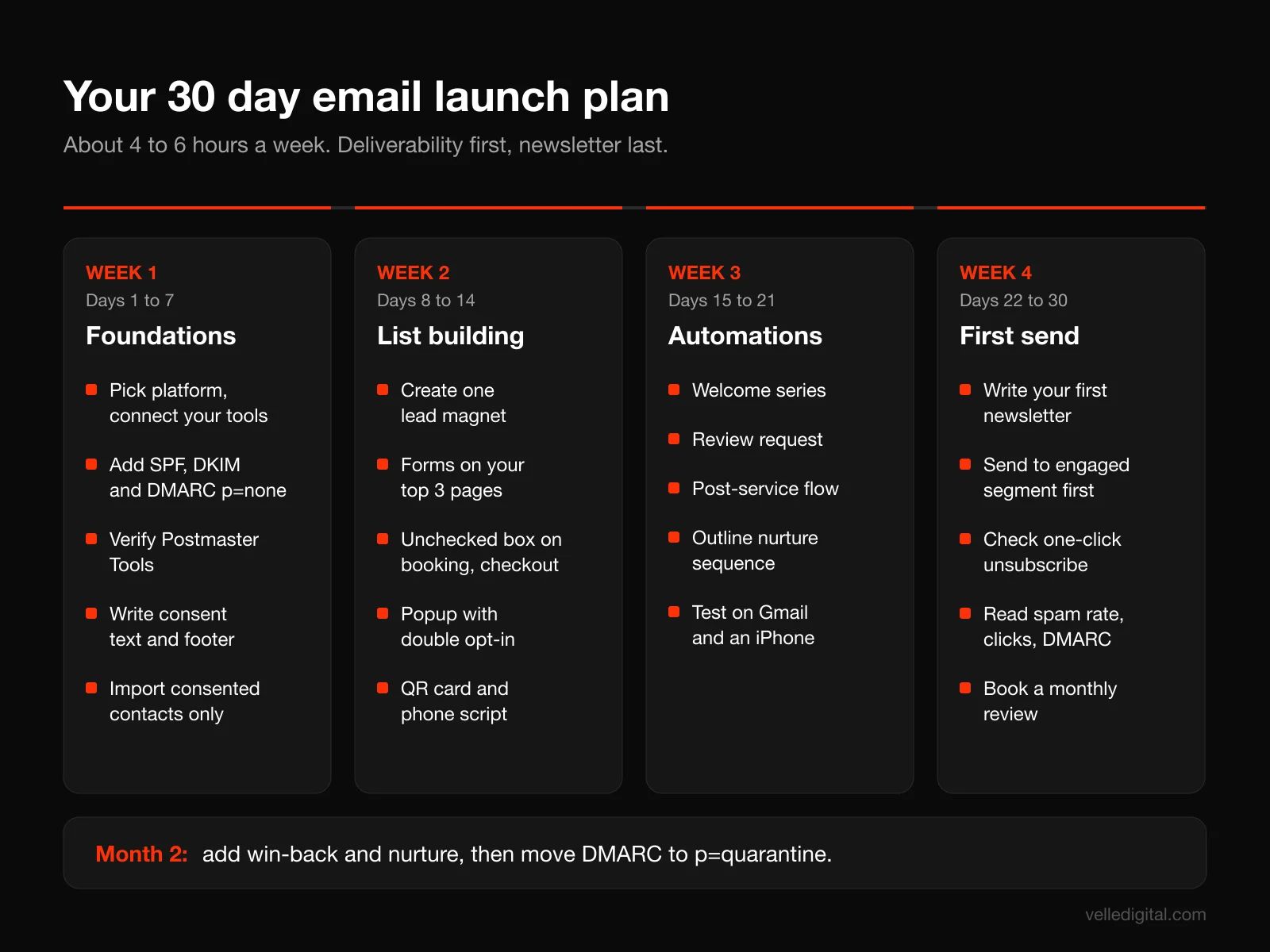
Week 1 (days 1 to 7): Foundations
- Choose your platform using the decision rules in Step 1 and connect it to your website, store, booking tool or CRM.
- Decide on a sending address and, optionally, a sending subdomain.
- Add SPF, DKIM and DMARC (p=none) records. Verify them in the platform.
- Set up Google Postmaster Tools for your sending domain.
- Write your consent language and footer (business name, mailing address, contact details, unsubscribe link).
- Import existing contacts only if you have valid consent for them, and tag each import by source and consent type (express or implied, with the date).
Week 2 (days 8 to 14): List building
- Pick one lead magnet and create it. A one or two page PDF checklist is plenty.
- Add an inline form to your homepage and top two service or product pages.
- Add an unchecked consent box to your checkout, booking, quote and contact forms.
- Set up a popup with sensible timing, and double opt-in for it.
- Print a QR code card for your counter, invoices or job site leave-behinds.
- Train anyone who answers the phone on the verbal consent script and where to record it.
Week 3 (days 15 to 21): Core automations
- Write and build the welcome series (Automation 1). Test every email.
- Build the review request flow (Automation 4) and connect its trigger to job completion or order delivery.
- Build the post-service or post-purchase flow (Automation 3).
- Outline the nurture sequence (Automation 2) and build it if your CRM connection is ready; otherwise schedule it for next month.
- Send yourself through every automation using a test contact on Gmail and on an iPhone.
Week 4 (days 22 to 30): First campaign and measurement
- Write your first newsletter using the four-part template.
- Send it first to your most engaged segment (recent customers and new subscribers), then to the rest two or three days later.
- Confirm the one-click unsubscribe shows up in Gmail.
- Check Postmaster Tools and your platform reports: spam rate, bounces, clicks.
- Read your first DMARC reports and fix any failing legitimate senders.
- Set a recurring calendar reminder for your monthly 20 minute review and your next newsletter.
Month two is for the win-back flow, the nurture sequence if it is not live yet, and moving DMARC to p=quarantine once your reports are clean.
Common email marketing mistakes we see
These are the problems we fix most often when a small business brings its email program to us.
- Importing contacts without consent. Everyone who ever emailed your business is not a subscriber. Under CASL, an old inquiry may have expired implied consent long ago. Ask for express consent with a one-time re-permission campaign, then stop mailing anyone who does not respond.
- Skipping authentication. The platform will often let you send before SPF, DKIM and DMARC are set up. Do not. Unauthenticated mail to Gmail and Yahoo is far more likely to land in spam or be rejected.
- Sending only promotions. If every email is a discount, you train subscribers to ignore you or to only buy on sale. Aim for most emails to be useful and some to sell.
- Judging success by open rate. After Mail Privacy Protection, open rate is mostly noise. Use clicks, conversions and replies.
- No follow-up after the quote. The nurture sequence is the automation most businesses skip and the one that recovers the most lost revenue.
- Review gating or incentivized reviews. Both violate Google's policy and can get reviews removed.
- Never cleaning the list. Mailing people who have not engaged in a year hurts delivery for everyone else.
- Hiding the unsubscribe link. People will mark you as spam instead, and complaints are the metric mailbox providers weigh most heavily.
- Setting it and forgetting it. Automations go stale. Review every flow at least twice a year.
Email marketing checklist
Use this before you call your program launched.
- Platform chosen and connected to your website, store, booking tool or CRM
- Sending address on your own domain (not a free email address)
- SPF record includes your platform, and there is only one SPF record
- DKIM enabled for every system that sends as your domain
- DMARC published with a reporting address, starting at p=none
- Google Postmaster Tools verified for your sending domain
- One-click unsubscribe visible in Gmail, plus a footer unsubscribe link
- Footer includes business name, mailing address and contact details
- Consent checkboxes unchecked by default, with clear wording
- Consent date and source recorded for every contact, including offline signups
- At least one lead magnet live, with forms on key pages
- Welcome series live and tested
- Review request flow sent to every customer, with no gating or incentives
- Post-service or post-purchase flow live
- Nurture sequence planned or live, with an exit when the lead converts
- Win-back flow planned, including a breakup email and suppression rule
- Newsletter cadence chosen and first issue sent
- UTM parameters on email links and conversions tracked
- Monthly review scheduled, with spam rate, clicks and conversions on the scorecard
Frequently asked questions
How much does email marketing cost for a small business?
Most platforms have free or low-cost tiers for small lists and charge more as your contact count grows, so software costs scale with your list. The bigger cost is time: expect 15 to 25 hours to set up the foundations and core automations, then a few hours a month for newsletters and review. If you hire help, setup is usually a one-time project and ongoing management is a monthly fee.
How often should a small business send marketing emails?
Automations send on their own schedule based on what each person does. For newsletters and campaigns, monthly is a good default for service businesses, while ecommerce brands often send weekly. Pick a cadence you can sustain for a year, because consistency matters more than frequency.
Do I need consent to email my existing customers?
In Canada, you may have implied consent from an existing business relationship, but it lasts only up to 2 years from the purchase (or 6 months from an inquiry) under CASL. In the US, CAN-SPAM does not require prior consent but does require a working opt-out and sender identification. The safest approach in both countries is to ask existing customers for express consent and record it.
What is a good open rate for email marketing?
Open rates are no longer a reliable benchmark, because Apple Mail Privacy Protection loads tracking pixels in the background and can count emails as opened even if nobody read them. Compare your own click rate, conversions and replies over time instead. Use open rate only as a rough trend to spot sudden deliverability drops.
Do Gmail's and Yahoo's sender rules apply to small businesses?
The bulk sender rules (SPF and DKIM, DMARC, one-click unsubscribe) formally apply to senders of around 5,000 or more messages a day to those providers. But the baseline rules, including authentication and keeping spam complaints under 0.3 percent, apply to everyone. Set up the full requirements anyway; it is free and improves inbox placement at any size.
What emails should a small business automate first?
Start with a welcome series, because new subscribers are the most engaged people on your list. Next, add a review request flow and a post-service or post-purchase sequence, since they work on customers you already have. Then build lead nurture and win-back sequences as your CRM data allows.
Is email marketing better than social media for a small business?
They do different jobs. Social media helps new people discover you, while email turns people who already know you into customers and repeat buyers, on a channel you own. Most small businesses should use social to grow the email list and email to convert it.
Get help building your email program
Everything here can be done in house. If you would rather have it built properly the first time, with your CRM, booking and email connected so leads never fall through the cracks, our team does exactly this work. See how our email marketing service works, or book a call and we will look at your current setup with you.