Google Ads for Small Business: A Step-by-Step Setup Guide
A complete walkthrough from account setup to your first 90 days: tracking, campaign choice, keywords, ad copy, budgets, bidding and a weekly optimization routine.
Google Ads for small business works when you do four things in order: track the leads that actually matter (form fills and phone calls), start with a tightly focused Search campaign instead of the automated options Google pushes first, control what you pay for with match types and negative keywords, and send every click to a page that matches the search. Get those right and a modest budget can produce predictable leads. Skip any of them and Google will happily spend your money on clicks that never turn into customers.
This guide walks you through the full setup, step by step, and then through the first 90 days: what to change, when, and what to leave alone. It is written for owners and marketing leads who want to run their own account or at least understand exactly what their agency should be doing. Everything here reflects how we set up accounts for local service businesses and growing brands every week.
What you need before you open Google Ads
Most failed accounts fail before the first ad runs. The owner opens Google Ads, follows the setup wizard, picks a budget, and is live in twenty minutes with no tracking, a broad campaign, and the homepage as the landing page. A month later they have spent a few thousand dollars and cannot say what it produced.
Spend an afternoon on these five things first. They make every later step faster.
- A clear offer and a number. Know what you want people to do (call, book, request a quote, buy) and roughly what a new customer is worth to you. You will use that number to set budgets and judge results.
- A landing page that can convert. One page per core service, with the phone number, a short form and proof (reviews, photos, guarantees) above the fold. Your homepage is rarely the right destination.
- Access to your website. You or your developer need to add a tag and possibly a small script. If you cannot edit your own site, sort that out now.
- A Google Analytics 4 property on the site, even if you barely use it yet.
- A way to answer leads quickly. Paid clicks are expensive. If calls go to voicemail and forms sit for a day, no amount of campaign tuning will fix your cost per customer. We cover this in our guide to speed to lead automation.
How to work out what a lead is worth
You do not need a perfect model. You need a ceiling, so you know when a campaign is profitable and when it is not.
Take a hypothetical plumbing company as an example. The average job is 600 dollars with a 50 percent gross margin, so each job earns 300 dollars in gross profit. If the office books 1 in 3 people who call or fill out a form, each lead is worth roughly 100 dollars in gross profit (300 divided by 3). That makes 100 dollars the break-even cost per lead on the first job alone. If customers come back or refer others, you can justify paying more, but 100 dollars is the line to watch at the start.
Write your version of this down. Every budget and bidding decision later in the guide comes back to it.
Step-by-step: setting up Google Ads for small business
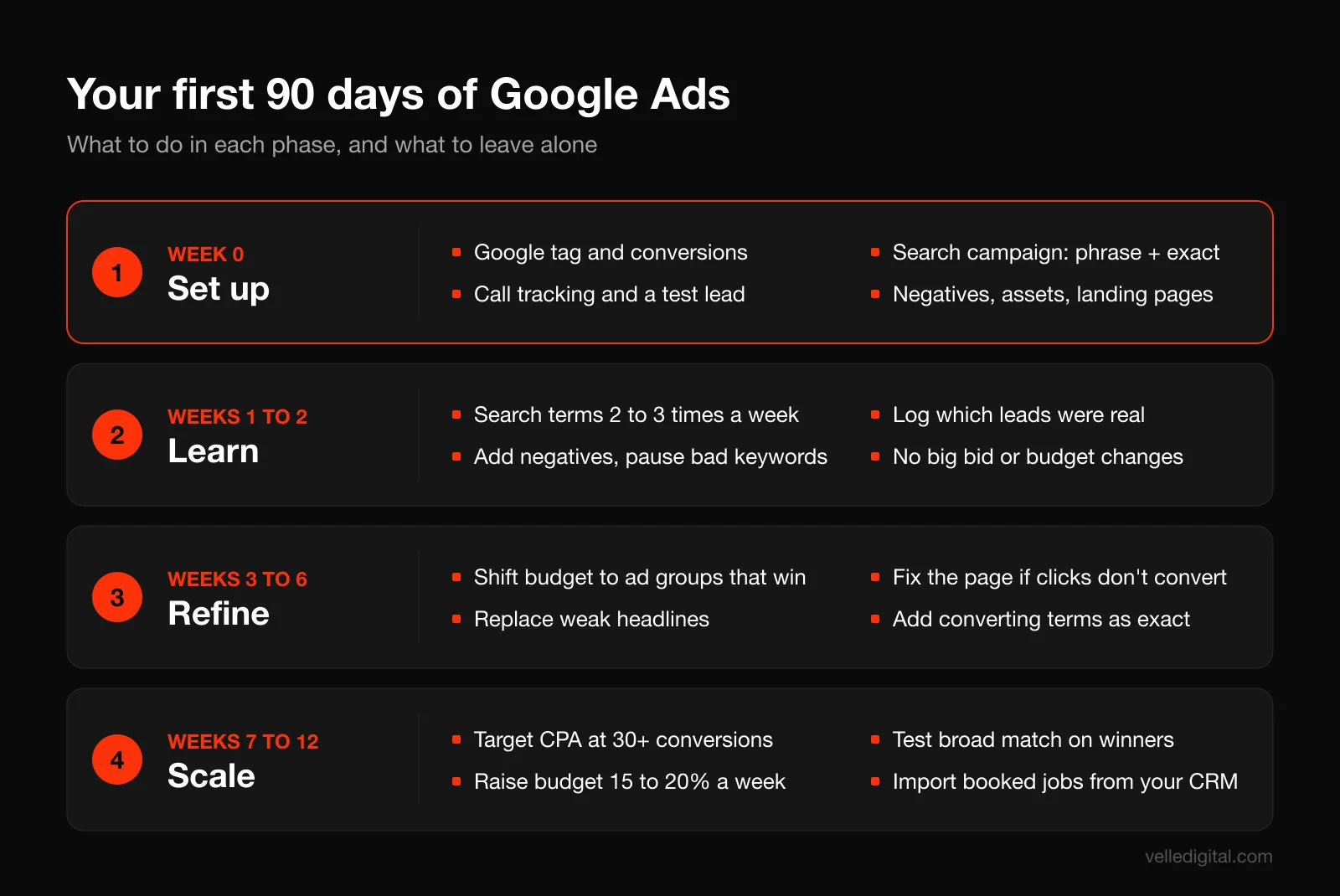
Here is the full setup sequence. Do the steps in order, because each one depends on the one before it. The timeline below shows how the setup fits into your first 90 days.
Step 1: Create the account the right way
Go to ads.google.com and sign in with a Google account your business controls, ideally a shared admin address rather than an employee's personal Gmail. Ownership matters: if an agency or freelancer creates the account under their own login, you can lose your history when you part ways.
The setup wizard will push you toward a simplified campaign with a goal and a budget. If you see an option to switch to Expert mode, take it. If the wizard insists on creating a campaign, create one, leave it paused, and build the real campaign yourself once you are inside the full interface.
Before you leave the account settings, check three things:
- Time zone and currency. Set them to match your business. You cannot change these later without creating a new account.
- Billing. Add a payment method and decide between automatic payments and monthly invoicing if you qualify.
- Access. Add at least one other admin you trust so you are never locked out.
Step 2: Install the Google tag and set up conversion tracking
Conversion tracking is the most important step in this entire guide. Without it, Google has no idea which clicks turned into customers, so it cannot optimize, and neither can you.
Google's own walkthrough on setting up web conversions covers the clicks in detail. Here is the order we use:
- In Google Ads, go to Goals, then Summary, and create a conversion action for conversions on a website. Enter your domain and let Google scan for an existing Google tag or Analytics property.
- If no tag is found, install the Google tag on every page of the site. Most website builders have a field for it; on custom sites, your developer adds it to the site header or through Google Tag Manager.
- Create a conversion action for each real lead type: form submissions (usually the thank-you page load), phone calls, booked appointments and, for ecommerce, purchases.
- Mark only lead and sale actions as primary. Page views, scroll depth and time on site can be secondary at most. If you tell Google a page view is a conversion, it will find you cheap page views.
A note on the setup method. Google explains that tracking a thank-you page load (set up with URL) is the simplest option and needs no code, while tracking button clicks or dynamic values requires code. If your form does not send people to a separate thank-you page, ask your developer to add one. It makes tracking simpler and more reliable.
Step 3: Track phone calls properly
For most local service businesses, the phone is where the money is. If you only track forms, you are flying half blind, and your bidding will undervalue the campaigns that drive calls.
Set up three kinds of call tracking:
- Calls from ads. When you add a call asset (covered in Step 12), Google can count calls placed straight from the ad as conversions. Set a minimum call length so a three-second wrong number does not count. In our experience 60 seconds is a sensible starting point for most service businesses, and longer for high-ticket work.
- Calls from your website after an ad click. Google can swap your website phone number for a forwarding number for visitors who came from an ad. Google's guide to tracking calls to a phone number on your website explains the two parts: the conversion tag and a phone snippet that replaces your number, at no cost to you.
- Clicks on the phone number. On mobile, a tap on the number is a useful secondary signal, but a tap is not a call. Keep it secondary.
If you use a dedicated call tracking platform or a CRM that records calls, you can import qualified calls instead. That is more accurate, but the built-in options are fine to start.
Step 4: Turn on enhanced conversions and check consent
Two settings improve the quality of your tracking and take minutes.
Enhanced conversions sends hashed customer details (such as the email address from your form) along with the conversion, which helps Google match conversions it would otherwise miss. Google's page on enhanced conversions explains that the data is hashed with SHA256 before it is sent. In most setups you turn it on in the conversion settings and confirm which form fields to use.
Consent mode matters if you have visitors in regions with consent rules, or if you run a cookie banner. Consent mode passes the visitor's banner choice to your Google tags so they behave accordingly. Most consent banner platforms support it with a toggle; check yours. If you run a banner without consent mode, you may be losing conversion data you are entitled to model.
Step 5: Link Google Analytics 4
Link your GA4 property to Google Ads (in GA4, go to Admin, then Product links, then Google Ads links). This gives you landing page behavior, lets you build remarketing audiences, and lets you import GA4 key events as conversions if you prefer.
One warning: do not count the same lead twice. If you track a form submission with the Google Ads tag and also import the same event from GA4, set only one of them as primary. Duplicate conversions are one of the most common problems we find when we audit accounts, and they make every campaign look twice as good as it is.
Step 6: Choose your campaign type
Google offers several campaign types. For a small business with a limited budget, the decision is simpler than it looks.
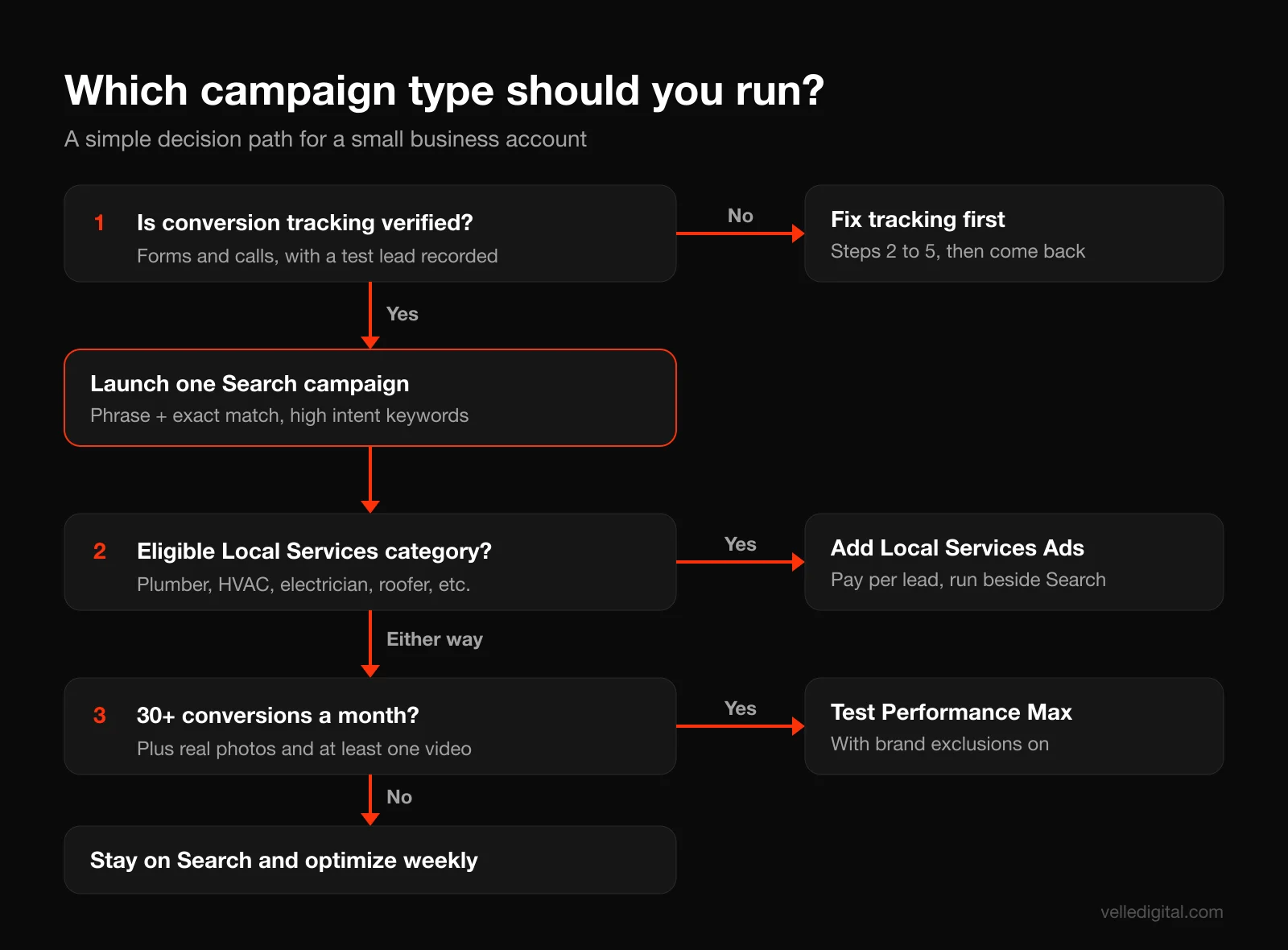
Start with Search. Search campaigns show text ads to people actively searching for what you sell. You choose the keywords, you see the search terms, and you control the landing pages. That transparency is exactly what you need while you learn what works. Almost every account we build starts here.
Consider Local Services Ads if you qualify. Local Services Ads appear at the top of results for certain service categories, and you pay per lead rather than per click. Google's Local Services Ads getting started guide lists categories such as plumbers, electricians, HVAC, roofers, cleaning, pest control, movers and locksmiths, and availability varies by country and city. You need to pass Google's screening, and Google notes that your ranking can suffer if you regularly fail to answer calls or respond to messages. If you are eligible, run them alongside Search. They are managed separately and often produce the cheapest leads in the account.
Wait on Performance Max. Google describes Performance Max as a goal-based campaign that serves across Search, YouTube, Display, Discover, Gmail and Maps from one campaign. It can work well, but it needs strong conversion data and good creative (images, video, copy), and it gives you less visibility into where your money goes. Our rule: add Performance Max only after your Search campaign is producing consistent conversions, roughly 30 or more a month, and you have real photos and at least one video. When you do launch it, use its brand exclusions and negative keywords so it does not simply take credit for people already searching your business name.
Skip Display and Demand Gen at the start. They are useful for remarketing and awareness later. With a small budget, they spread money thin before your core campaign is working.
Decision rule: if you have less than about 3,000 dollars a month to spend, run one Search campaign (plus Local Services Ads if eligible) and nothing else until it is profitable.
Step 7: Do your keyword research
Keyword research for a small business is not about finding the biggest list. It is about finding the searches that signal someone is ready to hire you.
Sort every keyword idea into one of three intent buckets:
- High intent (start here): service plus location, or service plus urgency. "emergency plumber edmonton", "furnace repair near me", "bookkeeper for contractors".
- Medium intent (test later): service without a clear buying signal. "furnace not heating", "how much does a new roof cost".
- Low intent (usually avoid): research, jobs and DIY. "how to fix a leaky faucet", "plumber salary", "plumbing courses".
Here is how to build the list:
- Write down how customers describe the problem. Ask your front desk or sales team what people say on the phone. Customers rarely use your industry's terminology.
- Use Keyword Planner. In Google Ads, go to Tools and open Keyword Planner. Enter your core services and your website, set your location, and review the suggestions and the estimated cost per click ranges.
- Check the search results yourself. Search your top keywords in an incognito window from your service area. If the results are full of DIY videos or national retailers, the intent may not match what you sell.
- Group keywords into tight themes. Each theme becomes an ad group, and each ad group gets its own ad and, ideally, its own landing page.
A typical structure for a hypothetical HVAC company might look like this:
- Campaign: HVAC Search, Edmonton area
- Ad group: Furnace repair (furnace repair, furnace repair near me, furnace not working repair, furnace service edmonton)
- Ad group: Furnace installation (new furnace, furnace replacement, furnace installation cost, high efficiency furnace installed)
- Ad group: AC repair (ac repair, air conditioner repair near me, ac not cooling repair)
- Ad group: Emergency HVAC (emergency furnace repair, 24 hour hvac, no heat emergency)
Five to fifteen keywords per ad group is plenty. If you find yourself writing one ad that has to speak to furnace repair and AC installation at the same time, split the group.
Step 8: Choose match types deliberately
Match types control how loosely Google can interpret your keyword. Google's page on keyword matching options defines three:
- Broad match (typed as plain words): your ad may show on searches related to your keyword, including ones that do not contain your words. It is the default.
- Phrase match (in quotes, "furnace repair"): your ad may show on searches that include the meaning of your keyword.
- Exact match (in brackets, [furnace repair]): your ad may show on searches with the same meaning or intent. It gives you the most control and the least reach.
Google recommends pairing broad match with Smart Bidding, and that advice makes sense in a mature account with plenty of conversion data. In a new small business account, broad match on day one usually means paying for loosely related searches while the bidding system has nothing to learn from.
Our starting rule for a new account:
- Launch with phrase and exact match on your high intent keywords.
- Review search terms twice a week for the first month (Step 14).
- Once a campaign has steady conversions and a clean negative list, test broad match on your best performing themes, ideally in a separate ad group so you can compare.
One more detail: Google says broader match types capture all the searches of narrower ones. You do not need the same keyword in all three match types in the same ad group. Pick the narrowest type that gets you enough volume.
Step 9: Build your negative keyword list before launch
Negative keywords stop your ads from showing on searches you do not want. They are how a small budget avoids being eaten by job seekers, DIYers and people looking for something you do not sell.
Build a starter list before you launch. Here is a template most service businesses can copy and adapt:
- Jobs and careers: jobs, job, careers, hiring, salary, wage, apprentice, apprenticeship, resume, indeed
- Education and DIY: how to, diy, course, courses, training, school, certification, tutorial, youtube, video
- Free and cheap: free, cheapest (keep "cheap" only if you compete on price)
- Wrong intent: used, parts, wholesale, supplier, manual, pdf, definition, meaning
- Competitors and marketplaces you do not want to pay for: names of big box stores, marketplaces or competitors you have decided not to target
- Services you do not offer and areas you do not serve: list them explicitly
Two technical points from Google's guide to negative keywords are worth knowing. First, negative keywords do not match close variants, so you need to add plurals and synonyms yourself ("job" and "jobs"). Second, negatives handle casing and misspellings automatically.
Put the list in a shared negative keyword list (Tools, then Shared library) and apply it to every Search campaign. That way you maintain one list, not five.
Step 10: Set location, schedule and network settings
These settings are quick, but the defaults are not always in your favor.
Locations. Target only the area you actually serve, by city, postal code or radius. Then open the advanced location options. By default Google targets people in or regularly in your area and also people who have shown interest in it. Google's page on advanced location options recommends that broad setting as a best practice, and notes that Presence targeting makes sense when you only want people in specific locations. For a local service business that only serves people at their own address, we usually switch to Presence. Someone in another province reading about your city is rarely going to book a plumber there.
Networks. Uncheck the Display Network on your Search campaign. You can decide about Search partners later; we usually leave them off at launch so the early data is clean.
Ad schedule. If you only answer the phone during business hours and calls are your main conversion, consider limiting ads to those hours plus a buffer. If you have an online booking system or an emergency service, run all day.
Languages. Set the languages your customers use. In bilingual markets, make sure your ads and landing pages exist in each language you target.
Step 11: Write responsive search ads that earn the click
Search campaigns use responsive search ads. You write up to 15 headlines (30 characters each) and 4 descriptions (90 characters each), and Google tests combinations to find what performs. Google also recommends at least two responsive search ads per ad group with Good or Excellent Ad Strength.
The trap is writing 15 headlines that all say the same thing. Write headlines in categories so every combination still makes sense:
- Keyword headlines (3 or 4): repeat the search. "Furnace Repair in Edmonton", "Same Day Furnace Repair".
- Benefit headlines (3 or 4): what the customer gets. "Heat Back On Today", "Upfront Flat Rate Pricing".
- Proof headlines (2 or 3): why trust you. "500+ Five Star Reviews", "Licensed and Insured Techs". Only use numbers that are true.
- Offer and urgency headlines (2 or 3): "Free Estimates on Installs", "Book Online in 60 Seconds".
- Call to action headlines (2): "Call Now for Same Day Service", "Get Your Quote Today".
Here is a description template you can adapt:
Licensed technicians, upfront pricing and same day service across [city]. Call now or book online in under a minute.
Not heating? We fix all furnace brands, 7 days a week. [Offer]. Trusted by [proof point]. Get your quote today.
Pinning. Google lets you pin a headline to a position. Pin only when you must, for example a legal disclaimer or your brand name in position 1 for a brand campaign. Heavy pinning lowers Ad Strength and limits testing.
Display paths. Use the two path fields to reinforce the theme, for example yoursite.com/furnace/repair. They are not real URLs, just a signal to the searcher.
Step 12: Add assets (formerly extensions)
Assets add extra information to your ad and make it larger on the page. They cost nothing extra to add and usually improve click-through rate. Set up these at minimum:
- Sitelinks (4 to 8): links to specific pages such as Furnace Repair, Financing, Reviews, Service Areas, Book Online. Each needs a distinct destination.
- Callouts (4 to 10): short benefit phrases such as "Upfront Pricing", "7 Days a Week", "Licensed and Insured", "Financing Available".
- Structured snippets: a header plus a list, for example Services: Furnace Repair, AC Repair, Duct Cleaning, Heat Pumps.
- Call asset: your phone number, with call reporting on and the schedule matching your answering hours.
- Location asset: link your Google Business Profile so your address and rating can show. Your profile also drives free local traffic, which our local SEO guide covers in depth.
- Image assets: real photos of your team, vehicles or work, if eligible.
- Lead form asset (optional): lets people submit details without visiting your site. Useful for some businesses, but the leads are often lower quality, so test it rather than assume.
Step 13: Match every ad group to a landing page
Quality Score is Google's 1 to 10 diagnostic for how relevant your keywords, ads and landing pages are compared with other advertisers. Google's Quality Score page lists the three components: expected click-through rate, ad relevance and landing page experience. Google is clear that it is a diagnostic, not a KPI. But a low landing page score almost always points to a real problem: people searched for one thing and landed on something else.
The fix is message match. If someone searches "furnace repair edmonton", clicks an ad that says "Same Day Furnace Repair in Edmonton", they should land on a page whose headline says the same thing, not on your homepage with a slider about your company history.
A landing page checklist for paid traffic:
- Headline that repeats the ad's promise and the service
- Phone number in the header, clickable on mobile
- A short form (name, phone, email, a single question) above the fold on desktop and reachable in one thumb scroll on mobile
- Proof right under the headline: star rating, review count, recognizable badges
- The specific service, the area you serve and what happens after someone calls or submits
- Fast loading on a phone. Aim for the main content to appear within a couple of seconds on a mid-range phone over cellular data.
- No main navigation menu, or a stripped down one, so the page has one job
We go much deeper in our landing page best practices guide. If your current site cannot support dedicated pages like this, that is often the best place to invest before raising your ad budget, and it is work our website development team does constantly.
Budgets and bidding strategies for each stage
Budget and bidding are where most small business owners either overspend in a panic or underspend so much that the campaign never learns anything. The answer depends on what stage you are in.
How to set a starting budget
Work backward from the number of conversions you need, not from a round number that feels comfortable.
Here is a worked example with hypothetical numbers:
- Keyword Planner suggests clicks for your core keywords cost around 6 dollars.
- A decent service landing page might convert 8 percent of paid visitors into calls or forms.
- That puts your expected cost per lead around 75 dollars (6 divided by 0.08).
- Google recommends evaluating Smart Bidding over periods with at least 30 conversions. Thirty leads at 75 dollars is 2,250 dollars a month, or about 74 dollars a day.
If that is more than you can spend, do not spread a smaller budget across more keywords. Narrow the campaign instead: fewer services, a tighter area, and only the highest intent searches. A campaign that gets 15 good leads a month from one service is more useful than one that gets 2 leads each across eight services.
Two budget mechanics surprise people. Google's page on overdelivery and your average daily budget explains that a campaign can spend up to twice its average daily budget on a given day, but over a month you will not be charged more than 30.4 times the daily budget. So a 50 dollar daily budget can spend 100 dollars on a busy Tuesday, and that is working as intended.
Choose a bidding strategy by stage
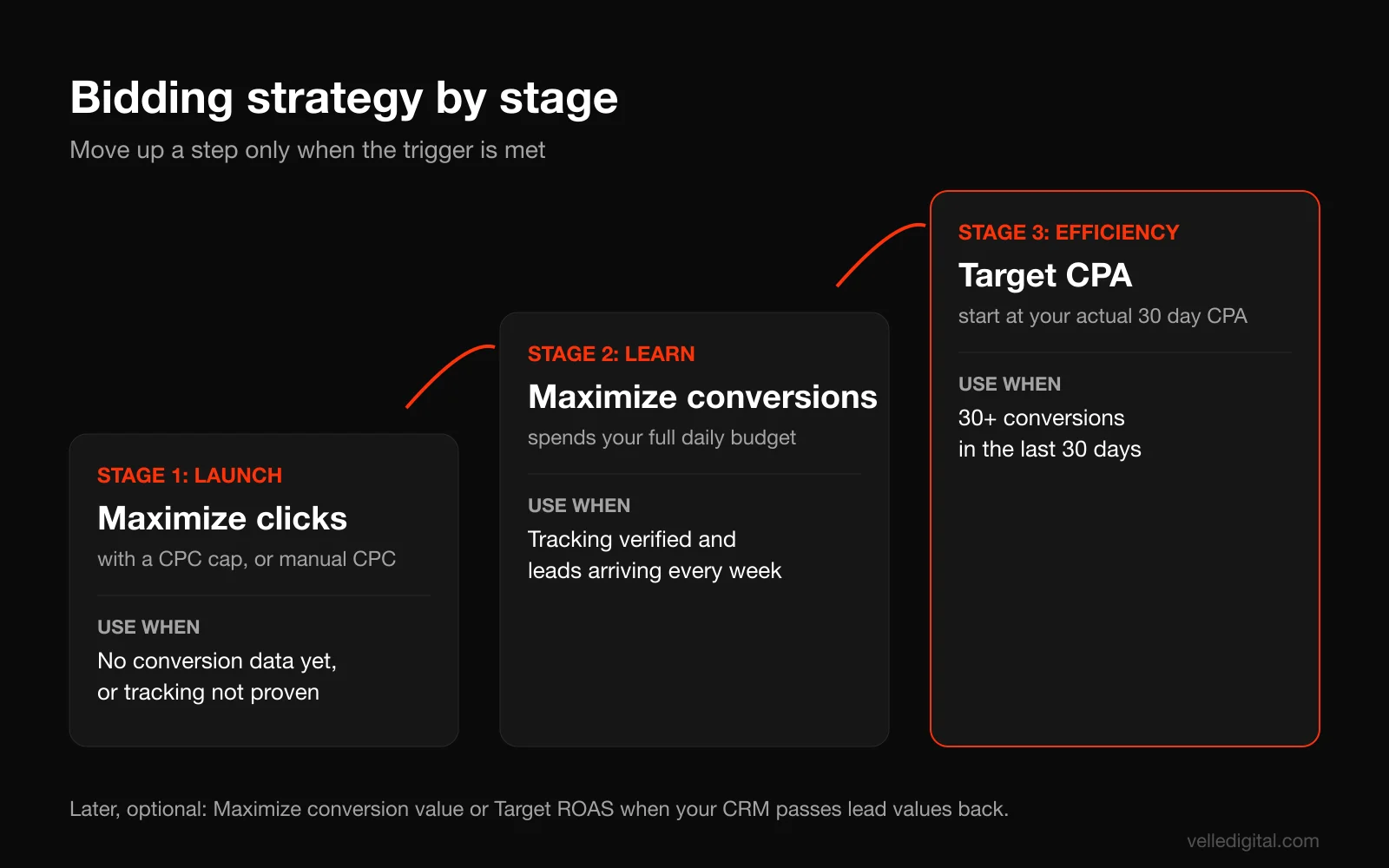
Smart Bidding uses conversion data to set a bid in every auction. It is the right destination for almost every account, but it needs data. Here is the progression we use:
Stage 1: Launch (no conversion history). Start with Maximize conversions if your tracking is verified and your budget can realistically produce a few conversions a week. If your budget is small or your tracking is not trustworthy yet, start with Maximize clicks with a maximum CPC limit, or manual CPC, so a handful of expensive clicks cannot eat the day. Set the cap around your expected cost per click from Keyword Planner.
Stage 2: Learning (conversions arriving). Once conversions are flowing reliably, switch to (or stay on) Maximize conversions. Google notes that this strategy is designed to spend your full daily budget, so set the budget you are actually willing to spend. Expect a week or two of volatility after any bid strategy change.
Stage 3: Efficiency (30 or more conversions in 30 days). Add a cost target with Target CPA. Since June 2026, Google labels the old "Maximize conversions with a target CPA" setting simply as Target CPA, so do not be thrown if the name in your account differs from older tutorials. Set the initial target close to your actual 30 day cost per conversion, not your dream number. If you set it far below reality, the campaign will choke and stop spending.
Stage 4: Value (optional, later). If different leads have very different values and you can pass those values back (for example from your CRM), Maximize conversion value or Target ROAS lets Google chase the valuable leads instead of just more leads. Most small businesses do not need this in the first 90 days.
Decision rule: change one thing at a time, and wait at least one to two weeks before judging a bid strategy change. Reacting to two bad days is the most expensive habit in paid search.
The first 90 days of Google Ads for small business
Launch is the beginning of the work. The first three months decide whether the account becomes a reliable lead source or an expensive experiment.
Days 1 to 3: Verify everything
- Search for your own keywords from your service area (do not click your ads; use the Ad Preview and Diagnosis tool under Tools instead).
- Submit a test form and place a test call from a phone that came from an ad click. Confirm the conversions appear in Google Ads within a day or so. Then exclude or note those test conversions.
- Check that ads are approved and assets are showing.
- Confirm spend is pacing roughly in line with your daily budget.
Weeks 1 and 2: Learn, do not tinker
Expect the numbers to bounce around. Your job in these two weeks is to collect data and remove obvious waste.
- Review search terms two to three times a week and add negatives for anything irrelevant.
- Pause keywords that are clearly wrong for your business, regardless of data.
- Answer every lead quickly and record which ones were real. That quality feedback is more valuable than anything in the dashboard.
- Do not change bid strategies, budgets by more than about 20 percent, or ad copy wholesale.
Weeks 3 to 6: Refine
Now you have enough data to make real decisions.
- Compare ad groups by cost per conversion. Shift budget toward the ones near or below your target, and tighten or pause the ones far above it after they have spent two to three times your target cost per lead without converting.
- Look at Ad Strength and asset performance. Replace the lowest performing headlines with new angles.
- Check the landing page. If you are getting clicks but few conversions, the problem is usually the page or the offer, not the keywords.
- Add exact match versions of search terms that convert well so you control the bid and the ad.
Weeks 7 to 12: Scale what works
- If you are getting 30 or more conversions a month at an acceptable cost, test Target CPA.
- Raise the budget on profitable campaigns in steps of about 15 to 20 percent a week, and watch whether cost per lead holds.
- Test broad match on your best themes, with a solid negative list in place.
- Consider adding a second campaign: another service line, a remarketing campaign, or Performance Max if you meet the criteria from Step 6.
- Start importing offline conversions (booked jobs or closed sales) from your CRM if you can, so Google optimizes for customers, not just leads. Our CRM setup service exists largely to make this connection work.
Your weekly Google Ads optimization routine
Once the account is past launch, a good account manager follows a routine. Set a recurring 45 minute block on your calendar and work through this list in order.
Step 14: Review search terms (every week)
Open the search terms report (Insights and reports, then Search terms) for the last 7 days. For each term, ask one question: would I be happy to pay for this click?
- Yes, and it converted: add it as an exact match keyword in the right ad group.
- Yes, but it did not convert yet: leave it alone and keep watching.
- No: add it as a negative. Use the shortest word that blocks it without blocking good searches. If "plumber salary" shows up, add "salary" to your shared list.
Expect less to show up in this report than you spent. Google hides some low volume terms for privacy. That is normal.
Step 15: Check conversions and lead quality
Compare what Google says with what your phone and inbox say. If Google reports 20 leads and your team only remembers 12, find out why: duplicate tracking, spam forms, or calls that were not real leads. Fixing your data is more valuable than any bid change.
Step 16: Check budget pacing and impression share
- Is the campaign spending its budget? If it is limited by budget and profitable, consider a raise.
- Is it underspending? Your keywords may be too narrow, your bid cap too low, or your target CPA too aggressive.
- On manual or target based bidding, look at search impression share and lost impression share due to rank. If you lose most impressions to rank, the issue is bids or Quality Score, not budget. Note that Google advises against relying on the lost impression share due to budget column when you use Maximize conversions, since that strategy is designed to spend the full budget.
Step 17: Improve one ad or asset
Every week, replace one weak headline or description, or add one new sitelink. Small, steady creative testing compounds. Big rewrites every few months reset what Google has learned.
Step 18: Review recommendations with skepticism
Google's Recommendations tab is useful for spotting issues, such as disapproved ads or missing assets. It also regularly suggests raising budgets, adding broad match keywords and turning on automated features. Evaluate each one against your own data and targets. Apply what helps, dismiss what does not, and turn off auto-apply recommendations in the settings so nothing changes without you knowing.
Step 19: Log what you changed
Keep a simple change log: date, what you changed, why, and what you expect to happen. Google Ads keeps its own change history, but it does not record your reasoning. In a month, the log is what lets you tell whether a change actually worked.
Common Google Ads mistakes small businesses make
We see the same mistakes over and over when we audit accounts. Most are easy to fix once you know to look.
- No conversion tracking, or the wrong conversions. Counting page views or button clicks as conversions trains Google to find people who click, not people who buy.
- Double-counted conversions. The Google Ads tag and a GA4 import both counting the same form as primary. Results look twice as good as they are.
- Sending all traffic to the homepage. The homepage tries to speak to everyone, so it converts no one in particular.
- Broad match with no negatives on day one. You pay to learn what you could have excluded in an hour.
- Running Performance Max first. It needs data and creative a new account does not have, and it hides where the money goes.
- Leaving the Display Network on in a Search campaign. Your text ads end up on websites and apps instead of search results.
- A budget too small to learn anything. Two clicks a day for a month tells you nothing. Narrow the scope until the budget can produce meaningful data.
- Changing everything every few days. Constant changes keep the bidding system in permanent relearning.
- Unanswered calls and slow follow-up. The click was paid for; the lead was lost on your end.
- Ignoring location settings. The default can show ads to people outside your service area who are merely interested in it.
- Accepting every recommendation. Some are great. Some are designed to increase your spend.
- Not owning the account. If an agency built the account under its own login, ask for admin access in writing.
How much Google Ads costs for a small business
There is no single number, because cost per click varies enormously by industry and city. Legal, home services and financial keywords are often far more expensive than retail or hospitality terms. The only reliable way to estimate is to check Keyword Planner for your own keywords and location, then run the math from the budget section above.
What we can say from practice: the businesses that do well with Google Ads are rarely the ones with the biggest budgets. They are the ones with good tracking, a focused campaign, a strong landing page and fast follow-up. A focused campaign with a few thousand dollars a month can outperform a sprawling one with three times the budget.
Remember to budget for more than clicks. Landing pages, call tracking, creative and either your own time or management fees are part of the real cost. If you spend on ads and run Meta ads for your local service business too, plan both together so each channel has a clear job, as we describe in our full funnel marketing strategy guide.
Google Ads setup checklist
Use this before launch and again at the end of your first month.
- Account created under a business-owned login, with a second admin
- Time zone, currency and billing confirmed
- Google tag installed on every page
- Primary conversions set only for real leads and sales (forms, calls, bookings, purchases)
- Call tracking set up for calls from ads and calls from the website, with a minimum call length
- Enhanced conversions on; consent mode configured if you use a cookie banner
- GA4 linked, with no duplicate primary conversions
- Test form and test call recorded successfully
- One Search campaign, with Display Network off and Search partners decided
- Ad groups built around tight keyword themes, 5 to 15 keywords each
- Phrase and exact match on high intent keywords
- Shared negative keyword list applied before launch
- Location targeting set to your real service area, with the Presence or Interest option reviewed
- Ad schedule matching when you can answer leads
- Two responsive search ads per ad group, Good or Excellent Ad Strength
- Sitelinks, callouts, structured snippets, call and location assets added
- Each ad group sending traffic to a matching landing page
- Bid strategy chosen for your stage, with a bid cap if using Maximize clicks
- Auto-apply recommendations turned off
- Weekly 45 minute optimization block on the calendar
- Change log started
When to bring in help
You can run a small Google Ads account yourself if you have three to four hours a week in the first month and about an hour a week after that, plus the patience to follow the routine above. Many owners do.
It makes sense to bring in help when tracking gets complicated (multiple locations, CRM imports, call platforms), when you spend enough that a 20 percent efficiency gain pays for management, or when you would rather spend your time running the business. If you are not sure whether your current account is set up properly, a marketing audit will show where the waste is before you spend more.
Frequently asked questions
Is Google Ads worth it for a small business?
It usually is when people actively search for what you sell, you can track leads, and you can answer them quickly. Google Ads puts you in front of people at the moment they are looking, which is hard to match with any other channel. It is a poor fit if nobody searches for your service or your margins cannot support the cost per click in your market.
How much should a small business spend on Google Ads?
Work backward from cost per lead. Estimate your cost per click in Keyword Planner, assume a realistic conversion rate, and budget for enough leads to learn from, ideally around 30 a month. If that budget is out of reach, narrow your services and area rather than spreading a small budget thin.
How long does it take for Google Ads to work?
You can get clicks and leads within days of launch. Expect the first two weeks to be noisy while the campaign learns, and plan on 60 to 90 days of steady optimization before you judge whether the account is consistently profitable.
Should I use Performance Max or Search campaigns?
Start with Search. It shows you exactly which searches you pay for and gives you control over keywords and landing pages. Add Performance Max once your Search campaign is producing consistent conversions and you have strong images, video and copy to give it.
What are Local Services Ads and are they better than Search ads?
Local Services Ads are a separate ad product for eligible service categories such as plumbers, electricians and HVAC, where you pay per lead instead of per click and can earn a Google Verified badge. They are not better or worse; they are different. If you qualify, run them alongside Search, because they often appear above regular ads.
What is a good conversion rate for Google Ads?
It varies widely by industry, offer and landing page, so compare against your own history rather than an industry average. The more useful question is whether your cost per lead is below what a lead is worth to you. If it is, the conversion rate is good enough to scale.
Can I run Google Ads myself, or do I need an agency?
You can run a small account yourself if you follow a disciplined setup and a weekly routine like the one in this guide. An agency or specialist earns its fee when tracking gets complex, spend grows, or your time is better spent elsewhere.
Get your Google Ads working
Google Ads rewards businesses that measure honestly, start focused and improve a little every week. If you want a second set of eyes on your account, or you would rather have a team build and run it for you, take a look at our Google Ads management service or book a call and we will tell you plainly what we would change first.