How to Get More Google Reviews (Without Breaking Google's Rules)
A step-by-step system for getting more Google reviews inside Google's rules: the review link, the best moments to ask, scripts, automation, reply templates and a 30 day plan.
If you want to know how to get more Google reviews, the short answer is this: ask every customer, at the moment they are happiest, with a direct link that takes them straight to the review box, and then reply to every review you get. That is the whole system. Most businesses with thin review profiles are not doing anything wrong with their service. They simply never ask, or they ask once, vaguely, days after the job, with no link.
The longer answer is about doing it consistently and doing it inside the rules. Google bans incentives, bans asking only your happy customers, and can freeze or wipe your reviews if it catches you. This guide covers the full process we set up for local service businesses: what Google allows, your review link, when to ask, copy-ready scripts, automation, reply templates, fake reviews and a 30 day plan you can start Monday.
Why Google reviews matter for rankings and for sales
Reviews do two separate jobs. They help you show up in the map results, and they help you win the click and the call once you do show up. You need both, and they respond to slightly different things.
Reviews are a local ranking factor (Google says so)
Google is unusually direct about this. In its help article on how to improve your local ranking, Google says local results are mainly based on relevance, distance and prominence, and that prominence is partly based on "how many reviews you have." The same page says, plainly, that "more reviews and positive ratings can help your business's local ranking." It also lists responding to reviews as one of the things you can do to stand out.
You cannot control distance. Prominence is where reviews live, and it is the factor most small businesses leave on the table. Our local SEO guide covers the other levers.
Reviews decide who gets the call
Once a searcher sees three businesses in the map pack, the star rating, review count and latest review text are often all they have to compare. In our experience, a business with 140 reviews at 4.7 stars beats a business with 11 reviews at 5.0 stars almost every time, even if the second business is closer.
The research backs up the general behavior. A Pew Research Center survey found that 82% of U.S. adults say they at least sometimes read online ratings or reviews before buying something for the first time, and 40% say they always or almost always do. The same survey found that 54% of people who read reviews pay more attention to extremely negative reviews than to extremely positive ones, which is why the way you reply to a bad review matters so much.
Northwestern University's Spiegel Research Center studied reviews on e-commerce product pages and found that purchase likelihood for a product with five reviews was 270% greater than for a product with none. It also found that purchase likelihood typically peaks at ratings in the 4.0 to 4.7 range and then drops as ratings approach 5.0. That study was about products, not plumbers, but the lesson carries over: a perfect 5.0 is not the goal. A large, recent, believable set of reviews is.
What this means for you
- If you have fewer than 20 reviews: the gap between you and the competitor with 80 is costing you calls every week. Volume is your first priority.
- If you have plenty of reviews but they are old: recency is your problem. A searcher who sees that the last review was posted eight months ago wonders if you are still open.
- If your rating is below 4.3: fix the service issue that keeps showing up in reviews before you push for volume, then use steady new reviews to move the average back up.
Google's review rules: what you can and cannot do
Before you ask a single customer, learn the rules. Getting this wrong is not a slap on the wrist. Google can remove the reviews, block new ones and put a warning on your profile.
What Google's policy actually says
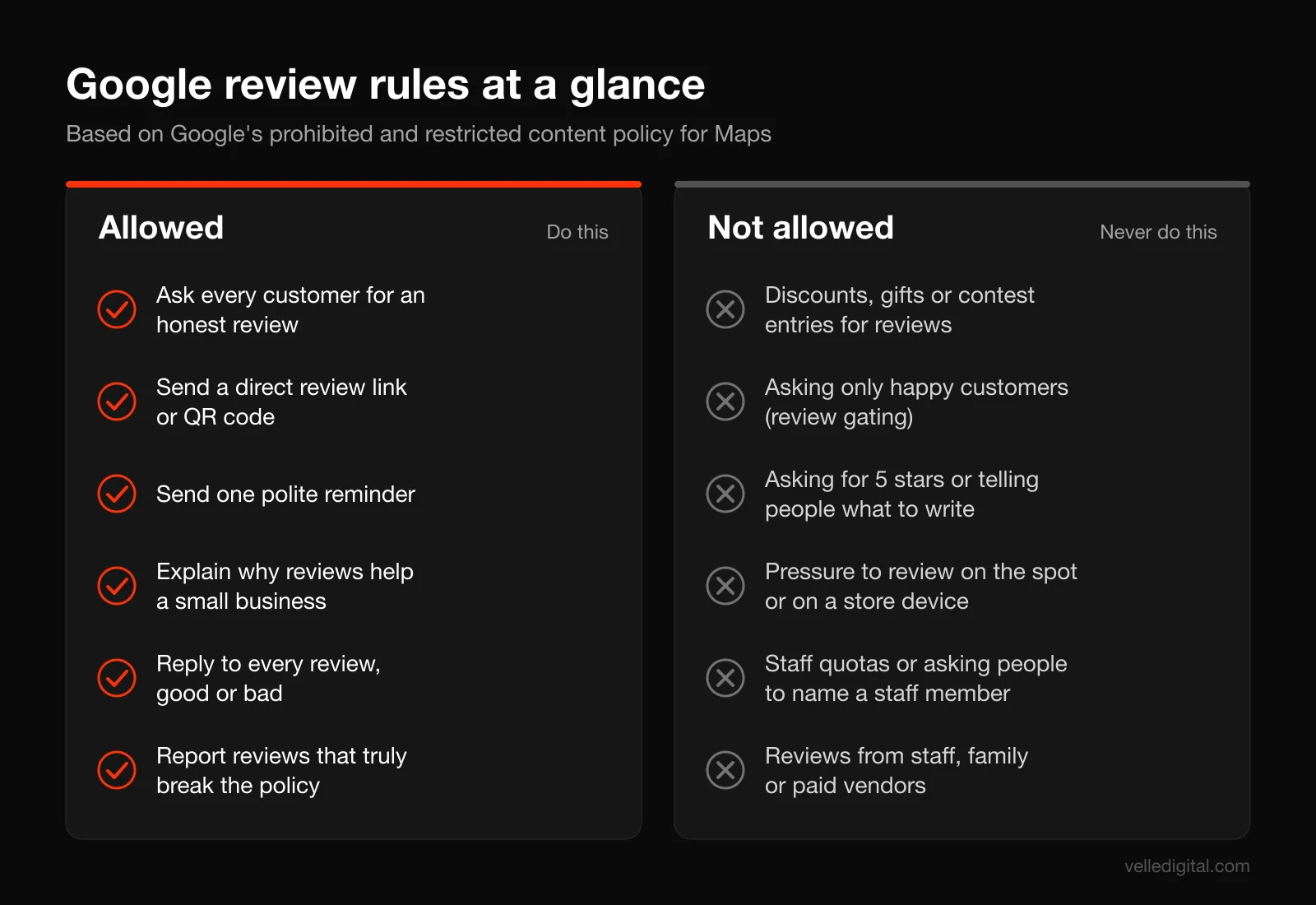
Google's prohibited and restricted content policy for Maps is the document that governs reviews. Under its "Fake engagement" and "Rating manipulation" sections, it says merchants are not allowed to:
- Offer incentives, such as payment, discounts, free goods or services, in exchange for posting a review, or for revising or removing a negative review.
- Discourage or prohibit negative reviews, or selectively solicit positive reviews from customers.
- Require or pressure customers to leave ratings or write reviews while on the premises.
- Request that specific content be included in a review.
- Ask staff to solicit a certain number of reviews, or ask staff to solicit reviews that mention a staff member by name.
- Post reviews based on a conflict of interest, which the policy says includes current or former employees, contractors, competitors and family members.
The policy also says Google removes content "exhibiting unusual volumes or patterns of review contributions" that look like an attempt to manipulate a rating. We will come back to that in the section on review velocity.
What Google does allow is just as clear. Merchants may "solicit or encourage the posting of content that does represent a genuine experience, without offering incentives to do so or attempting to influence the rating or the contents of the review." In plain English: you can ask everyone, as often as is reasonable, as long as you do not pay them, do not filter them and do not script what they say.
What happens if you break the rules
Google's page on Business Profile restrictions for policy violations lists what it can do on top of deleting the offending reviews. Examples include blocking your profile from receiving new reviews for a set period, unpublishing your existing reviews for a set period, and showing a warning to customers that fake reviews were removed. A public notice that you were caught gaming reviews does more damage than any bad review.
Review gating is out
"Review gating" means sending customers a quick "How did we do?" survey first, and only sending the happy ones to Google while routing unhappy ones to a private feedback form. Plenty of software still offers this. It is a direct violation of the "selectively solicit positive reviews" rule above.
You are allowed to collect private feedback. You are not allowed to make the Google link conditional on the answer. If you use a feedback step, every customer must still see a clear, equal option to review you on Google.
The legal side: FTC and Canada
Google's rules are platform rules. There are also laws.
In the U.S., the FTC's rule on consumer reviews and testimonials is now part of federal regulations as 16 CFR Part 465. Section 465.4 makes it unlawful to give compensation or other incentives conditioned on a review expressing a particular sentiment, positive or negative. Section 465.5 covers reviews written by officers and managers without disclosing the relationship. Section 465.7 covers review suppression, including using unfounded legal threats, intimidation or false public accusations to get a review taken down.
The FTC's own questions and answers on the rule addresses gating directly. Asked whether a business can request reviews only from customers it thinks are happy, the FTC says the rule does not specifically prohibit it, "but this practice could violate the FTC Act." It also says courts can impose civil penalties for knowing violations. So even where the federal rule is silent, Google's policy is not, and that is the rule that decides whether your reviews stay up.
In Canada, the Competition Bureau has warned that businesses can be liable for reviews posted by employees. Its release says "anyone who writes or permits writing reviews that give a false or misleading impression to consumers could be liable," and that employees must disclose any connection to the business they are reviewing. The simple rule: your team does not review you. Ever.
Quick test before any review tactic: would you be comfortable if a customer screenshotted it and sent it to Google? If not, do not do it.
One note on the "mention a staff member" rule. Plenty of customers name the technician on their own, and that is fine. What the policy targets is the business asking for it. Do not train staff to say "make sure you mention my name."
How to get more Google reviews: the step-by-step system
Here is the system we set up for clients. It works for trades, clinics, salons, professional services, restaurants and most other businesses with a physical location or service area. Do the steps in order.
Step 1: Make sure your profile is ready to receive reviews
There is no point sending people to a profile that is broken. Before you ask anyone, check these:
- Your profile is verified. Google's help page on managing customer reviews says you must verify your business before you can reply to reviews. Unverified profiles also tend to be incomplete, which hurts trust.
- Your business name is your real name. Keyword stuffing the name ("Smith Plumbing Edmonton Best Emergency Plumber") is a policy problem in its own right and can get the profile suspended right when your reviews start to grow.
- Your primary category is correct. The category affects which searches you appear in, which affects how much value each review gives you.
- Your hours, phone number and website are accurate. A customer who tries to leave a review and sees the wrong phone number loses confidence fast.
If your profile needs real work, our guide to Google Business Profile optimization goes field by field.
Step 2: Get your Google review link and QR code
The biggest reason customers do not leave reviews after saying they will is friction. A direct link drops them right into the review form.
Google's help article on creating a review link or QR code gives the current steps:
- Go to your Business Profile while signed in to the Google account that manages it.
- Select Read reviews, then Get more reviews.
- Select Copy to copy your review link.
- To get the QR code, right-click it and choose Save image as.
Google notes that review QR codes can currently only be generated in a computer browser, not on a phone, so do this step at a desk.
Then do three things with the link:
- Test it on a phone that is not yours. Open it in a private browser window. It should open the star rating box for your business. If it opens the wrong location (common for multi-location businesses), regenerate it from the correct profile.
- Make a short, branded version. Set up a redirect on your own website, such as yourdomain.com/review, that points to the Google link. It is easier to say out loud and print, and you can repoint it later without reprinting anything. It is a five minute job for whoever handles your website development.
- Save it everywhere your team works. Text shortcuts on staff phones, your CRM's snippet library, your email templates and your invoicing tool.
Also note that Google's tips for getting more reviews point out that customers must be signed in to a Google account to leave a review, and that they can create one with a non-Gmail email address. If a customer says they do not have one, do not push.
Step 3: Choose the best moments to ask
Timing matters more than wording. Ask when the customer has just experienced the result they paid for. Too early and they have not seen the value. Too late and your text is just one more notification.
Here are the moments that work best by business type:
- Home services (plumbing, HVAC, electrical, roofing, cleaning): at the final walk-through, right after the customer says something like "that looks great." Follow up by text within one to two hours.
- Clinics, dental, physio, med spa: at checkout after the appointment, then a text the same day. For treatments with delayed results, ask after the follow-up visit when the result is visible.
- Salons, barbers, aesthetics: at the chair while they are looking in the mirror, then a text within the hour.
- Professional services (accounting, law, consulting): after a clear win, such as a filed return, a closed deal or a resolved matter, not at the end of a long engagement.
- Ecommerce and delivery: after the product arrives and has had a few days of use, not at the moment of shipment.
And some decision rules for the edge cases:
- If a customer complains during the job and you fix it well, ask anyway. Recovered customers often write the most convincing reviews. Remember that you are not allowed to pick and choose based on whether you expect a good review, so your default should be asking everyone.
- If a job is still in dispute (unpaid invoice, open warranty claim), resolve it first, then send the request as normal once the job is closed.
- If the customer is a repeat client who already reviewed you, do not ask again for the same business. Google shows one review per account per profile, and asking again can feel careless.
Step 4: Ask in person (scripts)
In our experience, an in-person ask from the person who did the work converts better than anything else. The goal is not the review on the spot, since Google's policy says not to pressure customers to review on the premises. The goal is a clear "yes" followed by the link right away.
Keep it short, honest and free of pressure. Here are three scripts you can adapt.
Home services: "Glad that's all sorted. Quick favor: we're a local business and Google reviews are how most new customers find us. Would you be open to leaving an honest review? I'll text you the link so it takes about a minute."
Clinic or salon front desk: "Thanks for coming in today. If you have a minute later, we'd really appreciate an honest Google review. Can I text you the link?"
After a customer compliments you: "That genuinely means a lot, thank you. Would you mind saying that in a Google review? It helps other people find us. I can send you the link."
Notice what is not in those scripts. No "5 stars." No "mention my name." No "it would really help me with my boss." Just an honest request, a reason and a link.
Training tips for your team:
- Role-play it at a team meeting. Saying it out loud twice removes most of the awkwardness.
- Do not track individual staff "review counts." Track whether the ask happened. Google's policy prohibits review quotas for staff, and quotas also push people toward pressure.
Step 5: Send the request by text message
For most local businesses, SMS gets the best response. People read texts quickly and the link is one tap away. Send it within one to two hours of the job, while the experience is fresh.
Text template 1: "Hi Sarah, thanks for choosing Northside Plumbing today. If you have a minute, we'd appreciate an honest Google review. It really helps a small local team: northsideplumbing.com/review. Thanks, Mike"
Text template 2 (clinic): "Hi James, thanks for visiting Ridgeview Physio today. Would you share your experience in a quick Google review? ridgeviewphysio.com/review. Reply STOP to opt out."
Text template 3 (after an in-person yes): "Hi Priya, here's that review link we talked about: yourdomain.com/review. Thanks again, really appreciate it. Alex"
Rules for review texts:
- Use the customer's first name and your first name. A text from "Mike at Northside" gets read. A text from a short code with no name looks like spam.
- Keep it under 300 characters. One idea, one link.
- Send only one reminder, and only if they have not left a review. Two to three days later is about right. After that, stop.
- Respect consent and opt-outs. In Canada, CASL covers commercial electronic messages, including texts, and requires consent. In the U.S., texting is governed by federal telemarketing rules and carrier requirements. A customer who gave you their number to book a job and just received the service is a very different situation from a cold list, but you should still include opt-out language, honor it immediately and never text people who did not do business with you. If you are unsure, ask your lawyer.
Step 6: Send the request by email
Email is the better channel when you do not have a mobile number, when the customer is a business, or as the one reminder after a text. Response rates are usually lower than SMS, but email lets you add a bit more context.
Subject line options: "Quick favor, Sarah?" / "How did we do on your furnace install?" / "Would you share your experience?"
Email template: "Hi Sarah, thanks again for trusting us with your furnace install last Tuesday. We're a small local team, and honest Google reviews are one of the main ways new customers find us. If you have two minutes, we'd really appreciate hearing how it went: [Leave a Google review]. If anything about the job wasn't right, just reply to this email and I'll make sure we sort it out. Thanks, Mike Chen, Owner, Northside Plumbing"
It names the specific job, gives one link and offers a direct line for problems alongside the review link, not instead of it. That is the difference between good service and review gating: the customer can do either or both.
If you already run email marketing, keep review requests separate from newsletters. Our guide to email marketing for small business covers how to set up transactional and marketing messages so they do not trip over each other.
Step 7: Automate the request after every job
The scripts work. The problem is people. On a busy Friday the technician forgets and the front desk is slammed. Automation fixes consistency, and consistency is what produces steady review velocity.
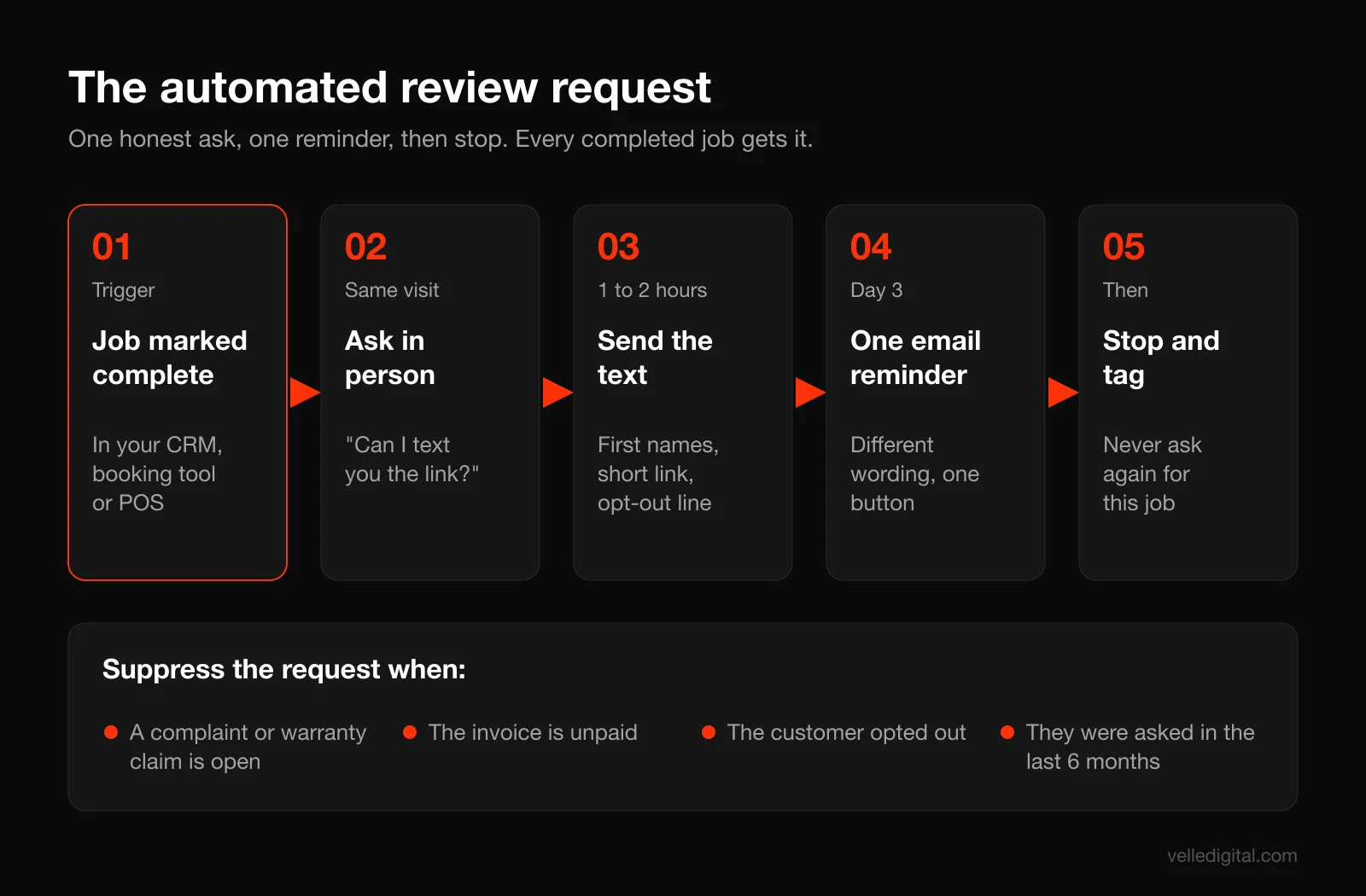
Here is the workflow we build for clients:
- Trigger: the job or appointment is marked complete in your CRM, field service app, booking system or point of sale. It must be a real event, not a button someone has to remember.
- Wait: one to two hours for services, same day for appointments, three to five days after delivery for products.
- Send the text with the customer's name, the technician or provider's first name and your short review link.
- Wait two to three days.
- Send one reminder by email (or text if you have no email), worded differently. Skip it if your tool can tell the customer already reviewed.
- Stop. No third message. Tag the contact as "review requested" so they are never asked again for the same job.
Suppression rules to build in:
- Do not send if the job is flagged as a warranty claim, a complaint in progress or an unpaid invoice. Resolve first, then trigger the request manually.
- Do not send if the customer opted out of texts or emails.
- Do not send more than once per customer in a set window, such as 6 months, even if they book multiple jobs.
- Do send to every other completed job. No survey step that filters people out. That is the rule that keeps you inside Google's policy.
Most CRMs, field service platforms and booking tools can do this natively or with a simple automation layer. If your systems are not connected, this is the kind of build we do in our automation for booked services work. The same plumbing that sends review requests can also respond to new leads in seconds, which we cover in our guide to speed-to-lead automation.
Step 8: Put the review link everywhere else customers already look
Direct asks will do most of the work. Passive placements catch the rest. Google's own review link help page suggests receipts, thank you emails, the end of chat conversations and a printed QR code in your store. Add these:
- Invoices and receipts: a single line and the QR code. "Happy with the work? We'd appreciate an honest Google review."
- Your website: a "Review us on Google" link in the footer and on the thank you page after a booking or purchase.
- Leave-behind cards: technicians leave a small card with the QR code on the counter at the end of a job.
- Counter or front desk: a small framed sign with the QR code. Not a tablet that staff hand to customers.
How to respond to every Google review
Responding is the half of the system most businesses skip. It matters for three reasons. Google lists replying to reviews among its local ranking tips. Every reply is public, so future customers read it. And Google's reply help page notes that the reviewer is notified when you reply and can still change their review afterward. A thoughtful reply to a three-star review can turn it into a five.
Google also checks replies against its content policies before posting them, which usually takes up to 10 minutes but can take up to 30 days.
Rules for every reply
Google's own tips on writing better review replies line up with what we recommend:
- Reply to every review. Positive, negative, star-only, all of them. Aim to reply within 48 hours.
- Keep it short. Two to four sentences. Long replies do not get read.
- Be specific. Mention the service, the neighborhood or the detail they raised. Google specifically suggests avoiding the same generic "thank you" on every review.
- Do not sell. Google advises against using replies to offer deals or promotions.
- Never share private information. No job details, no medical details, no invoice amounts, even if the customer shared them first. This matters even more for clinics and anyone handling health information.
- Sign with a name. "Mike, Owner" reads as a person who cares. A faceless reply reads as a template.
Templates for positive reviews
Use these as starting points, then add one specific detail each time.
Positive, detailed review: "Thanks so much, Sarah. Glad the new water heater is working well and that Dave kept the basement clean. We appreciate you trusting us with it. Mike, Owner"
Star-only review with no text: "Thanks for the five stars, Priya. We appreciate you taking the time. Alex"
Positive review that mentions a small issue: "Thanks, Tom. Glad you're happy with the deck, and you're right that our cleanup on day two wasn't up to our standard. We've already talked to the crew about it. Appreciate the honest feedback. Mike"
That last one is underrated. Owning a small flaw inside a positive review makes every other review on your profile more believable.
A framework for negative reviews
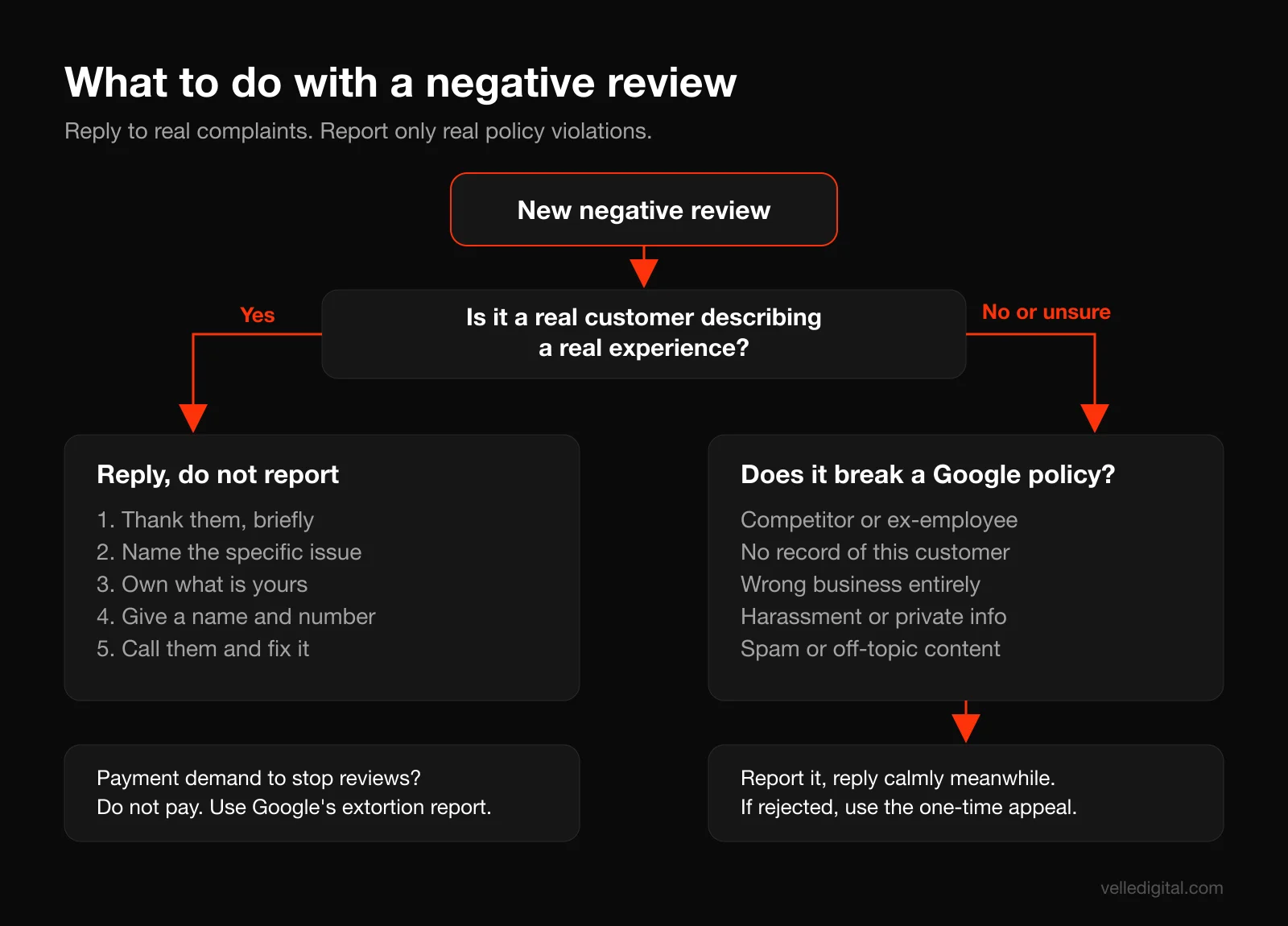
When a bad review lands, the instinct is to defend yourself. Resist it. You are not writing to the reviewer. You are writing to the next hundred people who will read the exchange. Use this five-part structure:
- Thank them for the feedback, sincerely and briefly.
- Acknowledge the specific issue in their words, without arguing.
- Own what is yours. If you made a mistake, say so. Google's tips say to acknowledge mistakes but not to take responsibility for things outside your control.
- Move it offline. Give a name and a direct phone number or email.
- Sign with a real name.
Then actually call them. A reply that says "please contact us" with no follow-up is worse than no reply.
Templates for negative reviews
Legitimate complaint: "Hi Karen, thank you for telling us about this. You're right that our technician arrived well outside the window we gave you, and that's not acceptable. I'd like to make it right. Please call me directly at 780-555-0142. Mike Chen, Owner"
Misunderstanding about price: "Hi Rob, thanks for the feedback. I'm sorry the final invoice was a surprise. That tells us our quote wasn't as clear as it should have been. I'd like to walk through it with you and see what we can do. You can reach me at 780-555-0142. Mike, Owner"
Angry, vague one-star with no details: "Hi Chris, I'm sorry to hear you had a bad experience. I'd really like to understand what happened so we can fix it. Could you call me at 780-555-0142 or email mike@yourdomain.com? Mike, Owner"
What never to do in a reply:
- Argue facts in public, line by line.
- Reveal anything about the customer's job, account or history.
- Suggest the reviewer is lying, even if you think they are.
- Offer a refund or discount in exchange for removing or changing the review. That is an incentive, and Google's policy specifically prohibits it.
- Threaten legal action. Under the FTC rule's review suppression section, unfounded legal threats or intimidation aimed at getting a review removed can be unlawful in the U.S.
Handling fake, unfair or malicious reviews
Every business eventually gets a review that is not real: a competitor, a disgruntled ex-employee, someone who confused you with another company, or an outright scam. Here is how to deal with it calmly.
Step 1: Decide if it actually breaks Google's rules
Google is clear that it does not remove reviews just because a business disagrees with them. Its page on reporting inappropriate reviews says, "Do not report a review just because you disagree with it or dislike it," and that Google does not get involved in conflicts between businesses and customers.
A review is worth reporting when it clearly breaks the prohibited and restricted content policy. Common examples:
- Conflict of interest: a current or former employee, or a competitor.
- Not a real experience: a review from someone you have no record of, especially in a cluster with others.
- Wrong business: they describe a service you do not offer or a location you do not have.
- Harassment, hate speech, profanity or personal information: including posting a staff member's home address or phone number.
- Spam: off-topic content, links or promotions.
A one-star review from a real customer who had a bad experience is not a policy violation, even if it is harsh, exaggerated or unfair. That one gets a reply, not a report.
Step 2: Report it the right way
From Google's reporting help page, the process is:
- Go to your Business Profile and select Read reviews.
- Next to the review, select Report.
- Choose the reason that best fits, such as conflict of interest, off topic or spam.
- Send the report.
Google says evaluation typically takes several days. You can track the status in the Reviews Management Tool, which shows whether the report is pending, reviewed with no violation found, or escalated. If Google decides there is no violation, you can submit a one-time appeal from the same tool. Use that appeal carefully: add specific, factual context about why it breaks a named policy.
Step 3: Reply publicly while you wait
Removal can take days, or may not happen at all. Do not leave a suspicious review sitting there without a response. Reply calmly and factually, without accusing anyone.
Reply to a review you cannot find a record of: "Hi Jordan, we take every review seriously, but we can't find any record of a job under this name or at this address. If we've missed something, please call me at 780-555-0142 so we can look into it. Mike, Owner"
That reply does two things. It tells future customers there may be more to the story, and it invites the reviewer to come forward if they are real.
Step 4: Watch for extortion scams
If a wave of one-star reviews arrives with a demand for payment to stop them, do not pay or engage. Screenshot everything and use Google's extortion reporting process, linked from its reporting help page, as well as flagging each review.
Step 5: Bury it with real, recent reviews
The most reliable fix for an unfair review is not removal. It is twenty new honest reviews on top of it. One bad review among 150 recent good ones barely registers. One bad review among 9 is the first thing people see. This is why the steady system in Steps 1 to 8 matters more than any removal request.
Review velocity and recency: why steady beats sudden
Two businesses can each have 100 reviews and look completely different. One got 80 of them three years ago. The other gets four or five every month. The second looks alive.
Why recency matters to customers
People sort by newest because they want to know what the business is like now. A long gap raises doubts, even if the overall rating is high.
Why bursts are risky
Google's policy says it removes content showing "unusual volumes or patterns of review contributions" that suggest rating manipulation. A business that goes from one review a month to 40 in a weekend after an email blast to its entire five-year customer list may see some of those reviews filtered or delayed, even though they are genuine. Google's page on missing or delayed reviews also notes that reviews are checked against its policies, which can take a few days.
That does not mean you cannot email past customers. It means you should spread it out. Send to recent customers first, in small batches over several weeks, and let the automated system handle everyone going forward.
How long the rating takes to update
Google's help page on review scores says your score is the average of all ratings published on Google for your business, and that it may take up to 2 weeks for a new review to show up in the updated score. Do not panic if a new review does not move the number on the same day.
Worked example: how many reviews you need
Here is a hypothetical to show how the math works.
Say your profile has 40 reviews at an average of 4.2 stars. That is 168 total stars. You want to get to 4.5. If your new reviews average 4.8 stars (realistic once you are asking everyone consistently), how many do you need?
- Target: (168 + 4.8n) / (40 + n) = 4.5
- 168 + 4.8n = 180 + 4.5n
- 0.3n = 12
- n = 40 new reviews
So you would need to double your review count to move from 4.2 to 4.5. That is why one-off review pushes rarely move the rating, and steady systems do.
Worked example: setting a realistic velocity target
Another hypothetical. Say you complete 60 jobs a month.
- With no system, your team remembers to ask maybe a third of customers, and a small share of those follow through. You get two or three reviews a month.
- With automation, every completed job gets a text and one reminder. If even 15% to 20% of customers leave a review (your number will vary by industry and how well the ask is done), that is 9 to 12 reviews a month.
- At that pace, the 40 reviews from the first example take three to five months, not three years.
Your target is not a specific number. It is a review every week or so, every month, without gaps. Track it monthly.
Common mistakes that keep businesses stuck
These are the patterns we see most when we audit a client's review profile.
- Asking only when you remember. The single biggest cause of thin profiles. Automate it.
- No direct link. "Search for us on Google and leave a review" loses most people. Always send the link.
- Asking too late. A request two weeks after the job competes with everything else in their life. Ask within hours.
- Review gating software. Still sold, still against Google's policy. If your current tool filters by a happiness score before showing the Google link, turn that feature off.
- Incentives dressed up as something else. "Leave a review and get entered in our monthly draw" is still an incentive.
- Team reviews. Employees, spouses and friends reviewing the business. Google's policy treats this as a conflict of interest, and Canada's Competition Bureau has warned it can create legal liability.
- Not replying. Unanswered negative reviews tell readers nobody is listening.
- Arguing in public. You might win the argument and lose every reader.
- Ignoring the content of reviews. If three reviews in a row mention late arrivals, the problem is not your review strategy.
How to get more Google reviews in 30 days: the plan
Here is a realistic plan for a business starting from a thin or stale profile. It assumes a few hours a week from an owner or manager.
Week 1: Foundation
- Verify and clean up your Business Profile: name, category, hours, phone, website, photos.
- Get your review link and QR code from a desktop browser.
- Set up a short redirect, such as yourdomain.com/review.
- Reply to every existing review you have not answered, oldest unanswered negatives first.
- Turn off any review gating or incentive features in your current tools.
Week 2: Manual asks
- Write your in-person, text and email scripts using the templates above.
- Save the text template as a shortcut on every customer-facing phone.
- Role-play the in-person ask twice in a 15 minute huddle.
- Ask every customer, every job, by hand.
- Message customers from the past 30 to 60 days in small daily batches.
Week 3: Automation
- Identify the event in your system that means "job complete."
- Build the automation: text after one to two hours, one reminder after two to three days, then stop.
- Add suppression rules for complaints, unpaid invoices, opt-outs and recent requests.
- Add internal alerts so the owner sees any review of three stars or lower the same day.
- Run five test jobs through it using staff phones before turning it on for real customers.
Week 4: Passive placements and review
- Add the QR code and link to invoices, receipts, email signatures and your website.
- Count new reviews this month against last month.
- Check how many completed jobs actually received a request. If it is below 90%, find the gap.
- Share patterns from new reviews with the team.
- Set a monthly 30 minute review check on your calendar going forward.
After 30 days, the system should run mostly on its own. Your ongoing job is to reply to reviews, watch the monthly numbers and fix any service issues the reviews keep pointing at.
What to measure each month
- New reviews this month compared with last month.
- Request rate: completed jobs that received a request, divided by total completed jobs.
- Review rate: new reviews divided by requests sent.
- Average rating of new reviews (more useful than your lifetime average, which moves slowly).
- Reply rate and reply time.
If request rate is low, the problem is process. If review rate is low, the problem is timing, wording or friction. If new-review rating is low, the problem is service.
Google review checklist
Use this before you call the system done.
- Business Profile is verified, accurate and uses your real business name.
- Review link is copied, tested on a phone in a private window and opens the correct location.
- Short redirect (yourdomain.com/review) is live.
- In-person script is written and the team has practiced it.
- Text template includes first names, a short link and opt-out language.
- Email template names the specific job and offers a direct line for problems.
- Automation triggers on job completion, not on a manual button.
- One reminder only, then stop.
- Suppression rules exist for complaints, unpaid invoices, opt-outs and repeat requests.
- No survey step that filters who sees the Google link.
- No incentives, draws, discounts or freebies tied to reviews.
- No reviews from staff, family or vendors.
- Every review gets a reply within 48 hours, signed with a name.
- Fake or policy-violating reviews are reported, with a calm public reply posted meanwhile.
- Monthly numbers are tracked: new reviews, request rate, review rate, new-review rating.
Frequently asked questions
Is it against Google's rules to ask for reviews?
No. Google's policy explicitly allows businesses to solicit reviews that reflect a genuine experience. What it prohibits is offering incentives, asking only happy customers, pressuring people on the premises and telling customers what to write. Ask everyone, honestly, and you are fine.
Can I offer a discount or gift card for a Google review?
No. Google's policy specifically prohibits offering payment, discounts, free goods or services in exchange for a review, and that includes contest entries. Reviews posted because of an incentive can be removed, and Google can restrict your profile. In the U.S., incentives tied to positive sentiment also violate the FTC's rule on consumer reviews.
How do I find my Google review link?
Sign in to the Google account that manages your Business Profile, open the profile, select Read reviews, then Get more reviews, and copy the link. You can also download a QR code from the same screen, but Google says that currently only works in a computer browser. Test the link on another phone before you share it.
Why are my Google reviews not showing up?
New reviews can be delayed while Google checks them, and Google may filter reviews that look unusual, such as a sudden burst from new accounts. The overall rating can take up to two weeks to update. If genuine reviews keep disappearing, avoid big batches of requests, avoid having customers review on a shared store device, and check Google's help page on missing or delayed reviews.
Can I get a bad Google review removed?
Only if it violates Google's content policies, such as a review from a competitor, an ex-employee, someone who was never a customer, or one containing harassment or personal information. You can report it from your Business Profile and track it in the Reviews Management Tool, with one appeal if it is rejected. A genuine negative review from a real customer will not be removed, so reply professionally and focus on earning new reviews.
Should I respond to every Google review?
Yes. Google lists responding to reviews as a way to stand out locally, reviewers are notified when you reply, and future customers read your replies as evidence of how you treat people. Keep replies short, specific and signed with a name. Reply within 48 hours whenever you can.
How many Google reviews do I need?
There is no magic number, but you want more than your top local competitors and a steady flow of recent ones. Research on product reviews shows the biggest jump comes from going from zero to a handful, so get your first 10 to 20 quickly. After that, aim for a new review every week or so rather than a one-time push.
Turn reviews into a system, not a chore
Getting more Google reviews is not about tricks. It is a repeatable process: a ready profile, a direct link, a well-timed honest ask, an automated follow-up and a reply to every review. Build it once, and it compounds every month in both your map rankings and the number of people who pick up the phone. If you want help setting up the automation behind it, our automation for booked services team can wire review requests into the tools you already use, and our local SEO services make sure all those new reviews are working alongside the rest of your local search presence. When you are ready, book a call and we will look at your profile together.