Facebook Ads vs Google Ads: Which Is Right for Your Business?
Google captures demand that already exists and Meta creates new demand. Here is how to choose, how to split a budget, how to run both and how to test it in 60 days.
If you are weighing Facebook ads vs Google ads, the short answer is this: Google Ads captures demand that already exists, and Facebook (Meta) ads create demand that does not exist yet. If people already search for what you sell and need it soon, start with Google. If your offer is visual, impulse-friendly or something people do not know to look for, start with Meta. Most businesses that grow past their first few thousand dollars a month in ad spend end up running both, with each platform doing a different job.
That is the summary. The rest of this guide is the detail you need to make the call for your own business: how each platform targets people, how each one charges you, what creative each demands, which business types fit which platform, a step-by-step decision framework, budget split examples (clearly labelled as hypothetical), how to run both together without double counting, the attribution traps that fool most owners, and a 60 day test plan you can follow from day one.
Facebook ads vs Google ads: the one difference that decides everything
On Google, the customer starts the conversation. On Meta, you do. Everything else flows from that.
When someone types "furnace repair near me" into Google, they have a problem, they know roughly what solves it, and they are looking for a provider right now. Your ad shows up as an answer to a question they asked. That is demand capture. You did not create the need. You are competing to be the business that fills it.
When someone scrolls Instagram or Facebook, they are not looking for you. Your ad interrupts them. If it works, it makes them want something they were not thinking about five seconds earlier. That is demand creation.
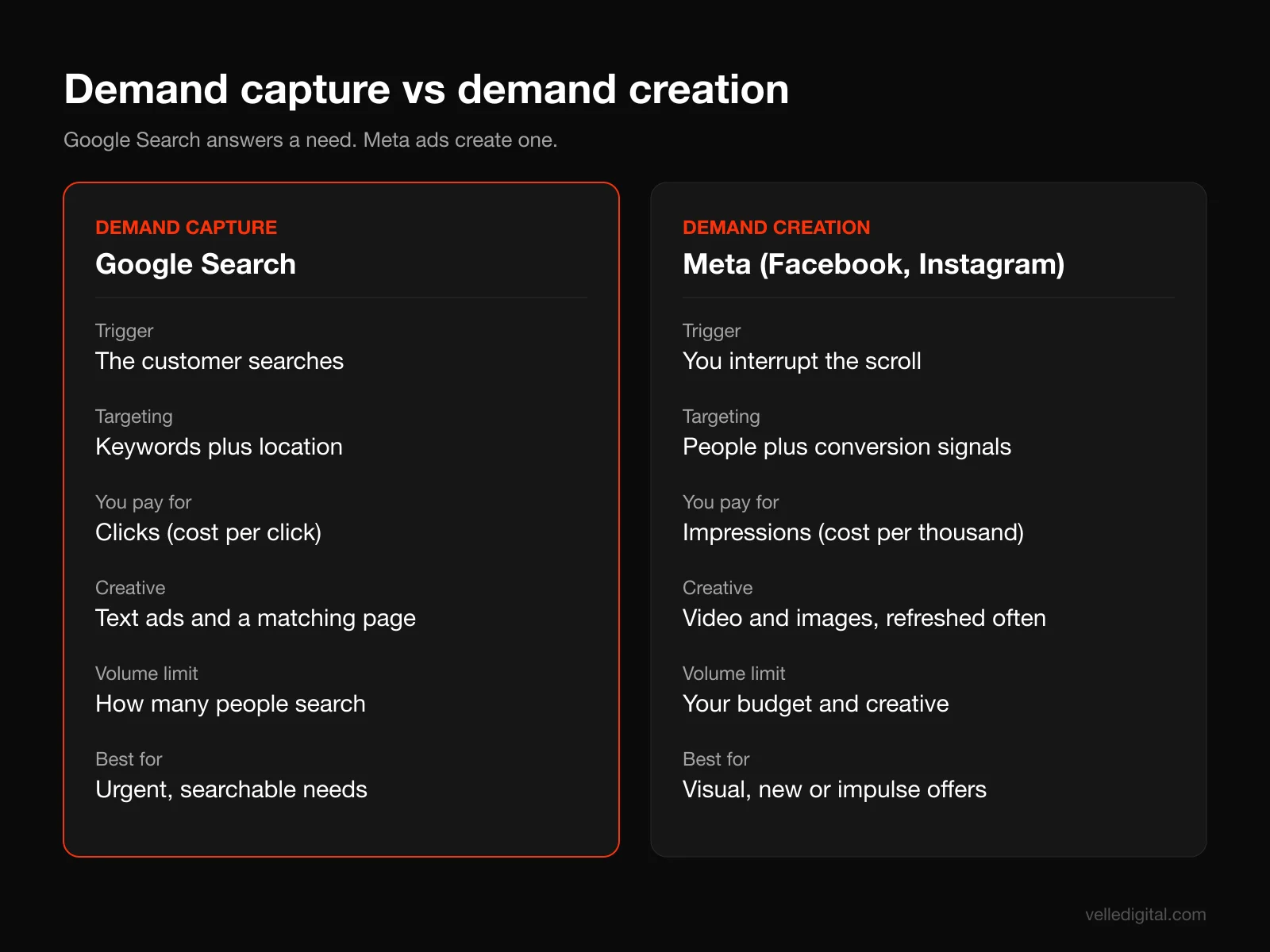
This distinction has practical consequences you should plan around:
- Volume ceiling. Google is capped by how many people search for your service in your area. You cannot buy searches that do not happen. Meta is capped mostly by your budget and your creative, because almost everyone in your market uses its apps.
- Speed to a lead. Search traffic converts faster because the buyer is already in motion. Meta traffic often needs more touches before it acts.
- Lead temperature. A Google lead usually knows what they want and is comparing providers. A Meta lead often needs more education, more follow-up and more trust building.
- What you are really buying. On Google you are buying a position in front of intent. On Meta you are buying attention, and attention only turns into revenue if the message and offer are strong.
Neither is better. The mistake is using one to do the other's job, like running a generic Facebook ad for "emergency drain cleaning" to people who do not have a clogged drain today.
How big is each audience?
According to Pew Research Center's 2025 survey of U.S. adults, 71 percent of Americans report using Facebook, and among 30 to 49 year olds that figure is 80 percent. That age band is the core buyer for a lot of home services, health and wellness, and family-focused businesses.
Google's reach works differently: the audience you can buy is only the slice actively searching your keywords, which for a niche service in a mid-sized city might be a few hundred searches a month.
How each platform targets people
How Google Ads targets: the search term is the targeting
On Google Search, your primary targeting is the keyword. You tell Google which searches you want to appear for, and Google matches those keywords to what people actually type. Location, schedule, device and audience settings narrow or adjust that, but the search itself carries most of the signal.
Google explains in its overview of how the ad auction works that every search triggers a fresh auction: the system finds ads whose keywords match the search closely enough, removes ineligible ones, then orders the rest by Ad Rank. In plain terms, the person's words decide whether you are in the running at all.
What you can layer on top:
- Location. Target a radius, a city, a set of postal codes, or a region. For local service businesses this is the most important setting after keywords.
- Ad schedule. Show ads only when someone can answer the phone, or bid differently on evenings and weekends.
- Audience segments. Observe or target people who visited your site, people on your customer list, or people Google classifies as in-market for a category.
- Customer lists. With Customer Match, you can upload customer emails or phone numbers and use them across Search, the Shopping tab, Gmail, YouTube and Display.
Google also sells YouTube, Display, Demand Gen and Performance Max placements, which behave more like Meta because they reach people who are not searching. When most people compare Facebook ads vs Google ads, though, they mean Facebook and Instagram feed ads vs Google Search ads, and that is the comparison this guide focuses on. We cover campaign types in detail in our Google Ads for small business setup guide.
How Meta targets: the person is the targeting
On Meta, there is no search term. You are targeting people, and increasingly you are telling Meta's system who your customer is and letting it find them.
Your main levers:
- Broad or Advantage+ audience. You give Meta a location, maybe an age floor, and let the algorithm find buyers based on who converts. Meta describes Advantage+ audience as using signals like past conversions, Meta Pixel data and interactions with previous ads to find people likely to act. Meta's own guidance notes it is not recommended for retargeting campaigns.
- Interests and demographics. You can still add interest or behavior targeting, but in our experience these are now better used as suggestions than hard walls. The algorithm tends to beat manual interest stacks once it has conversion data.
- Custom audiences. Meta's custom audiences let you target website visitors tracked by the pixel, people who engaged with your Instagram or Facebook content, people who watched your videos, and people on an uploaded customer list.
- Lookalike audiences. Lookalike audiences use a source audience (your customers, your best leads) to find new people with similar characteristics.
What makes Meta work is not the targeting menu. It is the conversion data you feed it.
Special ad categories: a targeting limit you need to know about
If you advertise housing, employment, or financial products and services, Meta restricts your targeting. Its special ad categories page says that for advertisers based in or reaching the US, and advertisers reaching Canada, options such as age, gender, ZIP or postal code, exclusion targeting, lookalike audiences and saved audiences are limited or unavailable, and city or pin drop locations get an expanded radius.
That affects real estate agents, mortgage brokers, property managers, recruiters, lenders, insurance and some home renovation financing offers. If your business falls in one of these categories, Meta can still work, but your precision drops and creative has to do more of the qualifying. Google Search, where the search term itself qualifies the person, often becomes more attractive by comparison.
Cost structures: what you actually pay for
Owners love to compare cost per click across platforms. It is the least useful number in the account.
How Google charges
Google Search is mostly pay per click. You pay when someone clicks your ad, not when it is shown. Your maximum bid is a ceiling, and Google's Ad Rank documentation notes that what you actually pay is often less than that maximum.
Your position and price depend on Ad Rank, which combines your bid, the quality of your ad and landing page, the context of the search, the competitiveness of the auction and the expected impact of your assets. Google states plainly in its auction explainer that even if competitors bid more, you can win a higher position at a lower price with high-quality ads and landing pages.
Google also reports a Quality Score from 1 to 10 for each keyword, based on expected click-through rate, ad relevance and landing page experience. One detail most people miss: Google says Quality Score is a diagnostic tool, not an input in the auction. Use it to find weak ads and pages, not as a target to chase.
What drives Google costs up:
- Competitive, high-value industries (law, plumbing, HVAC, roofing, dental implants) where one customer is worth a lot and many advertisers bid.
- Broad keywords that attract irrelevant searches you pay for anyway.
- Weak landing pages that hurt your ad quality.
How Meta charges
Meta mostly charges by impressions, quoted as CPM (cost per thousand impressions), even when you optimize for leads or purchases. You are effectively paying for the chance to be seen, and the algorithm tries to show your ad to the people most likely to take your chosen action.
Meta's explanation of its ad auction says the winner is the ad with the highest total value, which combines three factors: your bid, the estimated action rate (the chance this person converts from this ad) and ad quality. It also says an ad that is more relevant to a person can beat ads with higher bids.
What drives Meta costs up:
- Weak or tired creative that people scroll past, which lowers estimated action rates.
- Too narrow an audience, which forces Meta to bid aggressively for a small pool.
- Seasonal competition, especially before the holidays.
- Optimizing for an event that rarely happens, so the algorithm never gets enough data to learn.
Compare cost per qualified customer, not cost per click
Here is a hypothetical example that shows why click costs mislead.
Hypothetical: A renovation company spends 2,000 dollars on each platform in a month. Google clicks cost 6 dollars, Meta clicks cost 1.20 dollars. Google delivers 333 clicks and 33 leads. Meta delivers 1,667 clicks and 50 leads. Meta looks cheaper per lead (40 dollars vs 61 dollars). But only 6 of the Meta leads book a consultation and 2 sign a project, while 14 of the Google leads book and 5 sign. Cost per signed project: Meta 1,000 dollars, Google 400 dollars.
The numbers are invented, but the pattern is one we see constantly: Meta often wins on cost per lead and loses on lead quality for high-intent services. The only fair comparison is cost per qualified outcome: booked appointment, signed job, purchase, or gross profit per dollar spent.
Track all the way to the sale. If your CRM cannot tell you which platform a closed customer came from, fix that before you decide which platform is "working."
Creative requirements: words vs thumb-stopping visuals
What Google Search needs
Google Search ads are text. You write headlines and descriptions, and Google assembles them into combinations. You also add assets like sitelinks, callouts, a phone number and your location.
The work is about matching language to intent:
- Put the service and location in headlines ("Emergency Furnace Repair in Edmonton").
- State a concrete reason to choose you ("Same Day Service, Upfront Pricing").
- Match the landing page to the search. If someone searches "water heater replacement," they should land on a water heater page, not your homepage.
The real creative job on Google is the landing page. Our landing page best practices guide walks through the structure we use for paid traffic.
What Meta needs
Meta is a visual, interruptive medium. Your ad has roughly the time it takes to scroll past a post to stop someone. That means:
- A hook in the first second or two of video, or in the image itself. Show the problem, the result, or a person talking straight to camera.
- Native-looking content. In our experience, phone-shot video of a real owner or technician often beats polished studio work, because it looks like content rather than advertising.
- Volume. Meta creative fatigues. When the same people see the same ad repeatedly, response drops and costs rise. Plan on producing new creative every few weeks.
- Multiple formats. Square or vertical video for Reels and Stories, square images for feeds, carousels for showing several services or before and after shots.
A useful working minimum for a small business on Meta: 3 to 5 distinct creative concepts at launch, each with 2 variations (for example, a video and a static image), and 2 or 3 new concepts every month after that.
If you cannot produce that, Meta will be hard. Google Search is more forgiving for a business with no camera, no designer and no time.
Copy templates you can adapt
Google Search headline set: [Service] in [City] | Same Day [Service] Available | Licensed and Insured Since [Year] | Upfront Pricing, No Surprises | Call Now for a Free Quote
Meta ad primary text: Most [customer type] in [City] wait until [problem] gets expensive. Here is what [result] looks like when you catch it early. [Offer] this month only. Tap below to book a time that works for you.
Meta video hook ideas: "If your [thing] is doing this, stop scrolling." / "Here is what 4,000 dollars of [problem] looks like." / "Three things I check before quoting any [job]."
Which business types and offers fit each platform
Here is our honest read based on what we see across client accounts. These are starting points, not laws.
Usually Google first
- Emergency and urgent services: plumbing, HVAC repair, locksmiths, towing, water damage, garage door repair. The need is immediate and people search.
- High-intent professional services: personal injury and family law, accountants at tax time, immigration consultants. Buyers search for specific solutions.
- Clear-category local services: dentists, chiropractors, physiotherapy, auto repair, movers, pest control.
- B2B services with search volume: commercial cleaning, IT support, industrial equipment repair.
- Specialty ecommerce with clear product names: if people search for the exact product type or brand, Shopping and Search capture it.
Usually Meta first
- Visual, desire-driven offers: med spas, cosmetic treatments, fitness studios, restaurants, home decor, fashion, beauty products.
- New categories or products people do not know to search for: a new gadget, a new type of service, a subscription box.
- Offers that depend on an irresistible deal: limited-time promotions, intro packages, first-visit offers.
- Ecommerce brands with strong product visuals and healthy margins.
Genuinely both from the start
- Home improvement and renovation: Google catches people actively getting quotes. Meta builds desire with before and after content and plants the seed months before the project.
- Real estate: Google for buyers and sellers searching now, Meta (within special ad category limits) for listing promotion and nurture.
If you are a local service business leaning toward Meta, our guide to Meta ads for local service businesses goes deeper on offers and lead forms that work.
A decision framework for choosing between Facebook ads and Google ads
Work through these steps in order. Each one gives you a lean toward one platform. Tally them at the end.
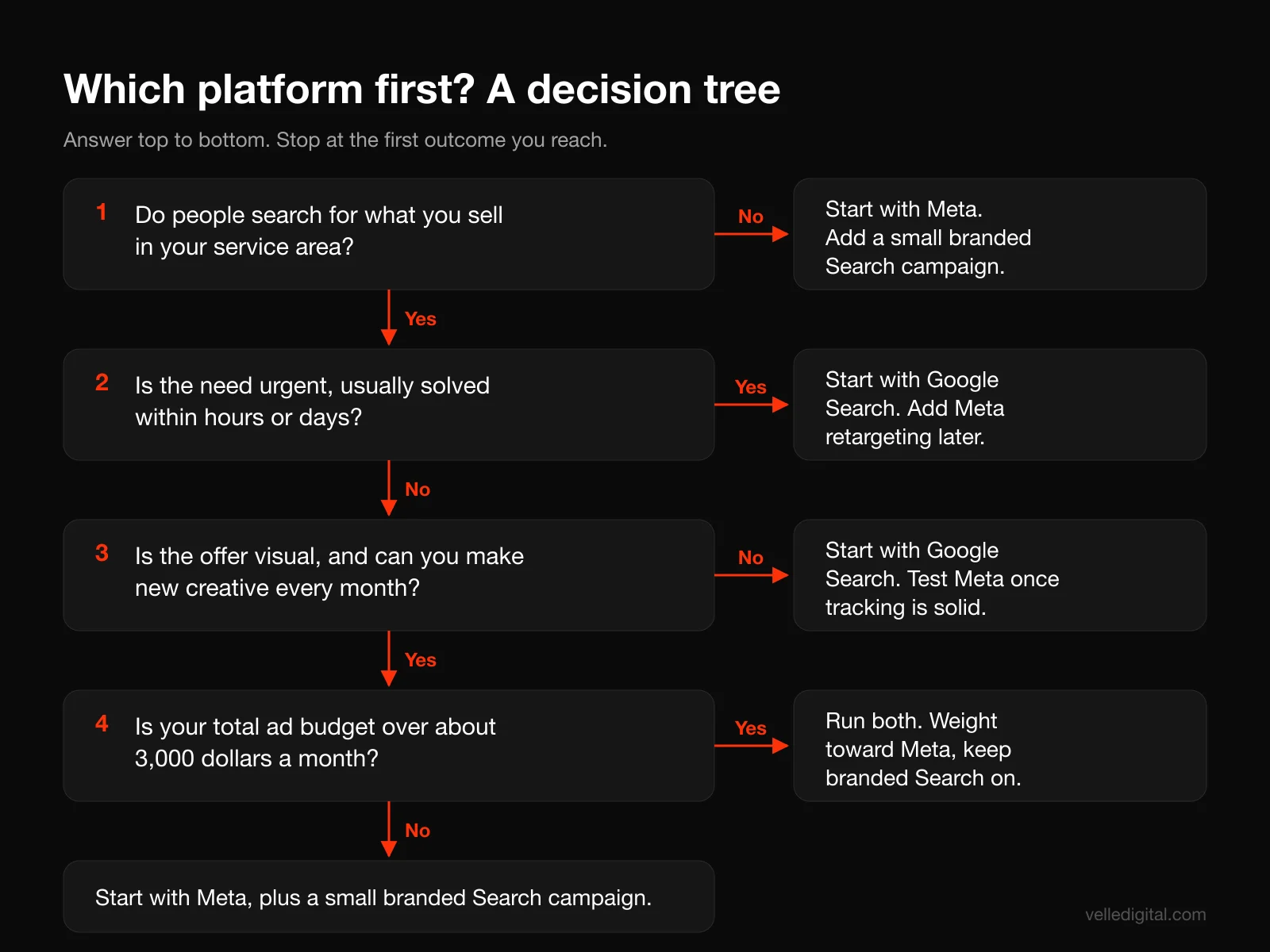
Step 1: Check whether people search for what you sell
Open Google Keyword Planner (free inside a Google Ads account) or simply type your core services into Google and look at what autocompletes and who is advertising.
- If you find solid search volume for your service plus your city, and competitors are advertising, lean Google.
- If searches are tiny or nonexistent, or the only searches are informational ("what is..."), lean Meta.
- Decision rule: if your top 10 keywords together show fewer than roughly 500 monthly searches in your service area, Google Search alone will probably not fill your calendar. Plan Meta as a primary or supporting channel.
Step 2: Measure urgency
Ask: when someone needs this, how fast do they buy?
- Within hours or days (a burst pipe, a broken car, a toothache): lean strongly Google.
- Within weeks (a landscaping project, a new gym membership): either works.
- Months, or "someday" (a kitchen remodel, a cosmetic procedure they have thought about for a year): lean Meta for demand creation and Google for the moment they finally search.
Step 3: Look at price and consideration
- Low price, low risk, easy yes (under about 100 dollars, or a free first visit): Meta can sell this straight from an ad.
- Mid price with some comparison (a few hundred to a few thousand dollars): both, with Google capturing comparison shoppers.
- High price, long consideration (five figures and up): Google for active buyers, Meta for nurture and retargeting, and a strong follow-up system for both.
Step 4: Ask whether your offer is visual
Can you show the result in a photo or 15 second video? Before and after, a finished project, a plated dish, a transformed space, a happy customer using the product?
- Yes, and it looks great: strong lean Meta.
- Somewhat (you can show a technician on site, a clean truck, a friendly owner): neutral.
- No (bookkeeping, legal advice, insurance): lean Google, or plan for talking-head video on Meta.
Step 5: Be honest about creative capacity
- If you can produce several new videos or images every month: Meta is viable.
- If you can produce a handful of assets once and rarely refresh: lean Google.
Step 6: Check tracking readiness
Both platforms need conversion tracking, but Meta suffers more without it because its targeting relies on conversion signals.
- Google: at minimum, track form submissions and calls from ads.
- Meta: install the Meta Pixel and, ideally, the Conversions API, which sends events from your server, website platform or CRM directly to Meta.
- If you cannot track anything yet, start with Google Search while you fix tracking. It degrades more gracefully.
Step 7: Check your budget against each platform's learning needs
Meta's delivery system needs data. Meta's help page on the learning phase says ad sets usually exit learning after about 50 results in the week after the last significant edit.
Use that to sanity check your budget:
Hypothetical: If your realistic Meta cost per lead is 40 dollars, 50 leads a week is 2,000 dollars a week, or about 8,600 dollars a month, for one ad set to fully exit learning on leads.
Most small businesses cannot hit that, and that is fine. It means you should run one ad set and consolidate budget. A 1,000 dollar monthly budget split across several Meta ad sets and a Google campaign is too thin to learn anything.
For Google, a simple floor: your daily budget should cover at least 10 clicks at your expected cost per click. If clicks cost 8 dollars, that is 80 dollars a day, or roughly 2,400 dollars a month, for one well-focused Search campaign.
Tally the result
- Mostly Google leans: start with Google Search. Add Meta retargeting once you have site traffic.
- Mostly Meta leans: start with Meta. Add a small branded and high-intent Google Search campaign to catch people who search your name after seeing your ads.
- Mixed, and a budget over roughly 3,000 dollars a month: run both from the start, with the split weighted toward whichever got more leans.
- Mixed, with a smaller budget: pick the platform that got the lean on Step 1 and Step 2 (demand and urgency). Those are the most predictive.
Budget split examples (hypothetical)
These are illustrations of how we think about splits, not recommendations for your business. Every number below is hypothetical. Your market, margins and competition will change the math. If you are still deciding your overall marketing budget, start with our small business marketing budget guide.
Example A: emergency plumbing company, 3,000 dollars a month
- Google Search (emergency and repair keywords, tight radius): 2,400 dollars (80 percent)
- Meta retargeting (site visitors, past customers for maintenance plans): 300 dollars (10 percent)
- Google branded search: 300 dollars (10 percent)
Why: nearly all revenue comes from urgent searches. Meta keeps the brand visible to site visitors and sells maintenance plans to past customers.
Example B: med spa, 4,000 dollars a month
- Meta prospecting (new client intro offer, before and after creative): 2,600 dollars (65 percent)
- Meta retargeting (video viewers, site visitors, lead form openers): 600 dollars (15 percent)
- Google Search (specific treatment names plus city, branded terms): 800 dollars (20 percent)
Why: the offer is visual and desire-driven, and many clients do not search until they have been thinking about a treatment for months. Google captures people searching specific treatments and people searching the spa by name after seeing Meta ads.
Example C: home renovation company, 5,000 dollars a month
- Google Search (kitchen remodel, bathroom renovation, basement development plus city): 2,750 dollars (55 percent)
- Meta prospecting (project videos, before and after carousels): 1,500 dollars (30 percent)
- Meta and Google retargeting: 750 dollars (15 percent)
Why: high ticket, long consideration. Google catches buyers in quote mode. Meta builds desire and keeps the brand in front of homeowners for the months between "we should redo the kitchen" and "let's get quotes."
How to set your own split
- Estimate monthly search volume for your core services in your area and the expected cost per click.
- Calculate the Google budget that would capture a meaningful share of that volume: searches times expected click share times cost per click. If that number is less than your total budget, Google is capped and the rest can go to Meta.
- Reserve 10 to 15 percent for retargeting once you have traffic.
- Put the remainder into the platform that matched more of your decision framework leans.
- Revisit after 60 days with real cost per qualified lead data, and move budget toward the better performer in steps of about 20 percent, not all at once.
Hypothetical worked example for step 2: 1,200 monthly searches for your core terms, you expect to win clicks on about 8 percent of them (96 clicks), at 7 dollars per click. That is 672 dollars. Google Search is capped around 700 dollars a month in that market, no matter how much you are willing to spend. A 3,000 dollar budget leaves about 2,300 dollars for Meta and retargeting.
Running Facebook ads and Google ads together
Retargeting across platforms
A person clicks your Google ad, looks at your pricing page, and leaves. With Meta in the mix, you can reach that same visitor on Instagram and Facebook.
How to set it up:
- Make sure both the Google tag and the Meta Pixel fire on every page of your site.
- In Meta, create a website custom audience of visitors from the last 30 days, excluding people who already converted.
- Create a second audience of high-intent visitors (pricing, contact or booking page, last 14 days).
- Run a retargeting campaign with creative that answers objections: reviews, guarantees, a short owner video, a reminder of the offer.
- Keep frequency in check. If the same people see your retargeting ads many times a week, refresh the creative or widen the window.
Sequencing: Meta creates, Google captures
Here is the pattern we see most often in accounts running both. Meta puts your brand in front of people who were not looking. Days or weeks later, a need comes up and they search your name, or recognize your business in the results.
What this means in practice:
- Always run a branded Google Search campaign when you run Meta. It is usually cheap and catches people that your Meta ads warmed up. Without it, a competitor bidding on your name can take the customer Meta created.
- Expect branded search volume to rise as Meta spend rises. Watch your branded search impressions in Google Ads. If they climb after you launch or scale Meta, that is a sign Meta is creating demand even if Meta's own reporting looks soft.
- Keep messaging consistent. If your Meta ad promises "free design consultation" and your Google ad says "call for a quote," people notice the mismatch. Use the same offer, the same visual identity, and the same proof points.
Share your customer list with both platforms
Your customer list is the most valuable targeting asset you own. Use it on both platforms:
- Exclude existing customers from prospecting campaigns so you do not pay to acquire people you already have.
- Target past customers with repeat or referral offers (maintenance plans, seasonal services, new product lines).
- Seed lookalikes on Meta from your best customers, not all leads.
- Use Customer Match on Google to bid higher when past customers search, or to exclude them from new customer offers.
Make sure you have consent to use customer data for advertising under the privacy laws that apply to you, and keep the lists current.
Coordinate follow-up across both channels
Whatever platform generates the lead, the follow-up decides whether it turns into revenue. Leads from Meta lead forms in particular go cold fast, because the person submitted a form while scrolling and moved on. Responding in minutes rather than hours makes a large difference. Our speed to lead automation guide covers how to set up instant text and email responses and route leads to the right person.
Measurement and attribution pitfalls
Each platform measures itself, with its own rules, and both are generous to themselves. Take each dashboard at face value and you will make bad decisions.
Pitfall 1: Both platforms claim the same sale
A customer sees your Instagram ad on Monday, searches your name on Google on Thursday, clicks your branded ad and books. Meta counts a conversion. Google counts a conversion. Your CRM shows one customer.
Add up both platforms and you will often get more conversions than you actually received. That is not fraud, just two systems each counting from their own point of view.
What to do: pick one source of truth outside the ad platforms, usually your CRM or booking system, and judge total marketing performance from there.
Pitfall 2: View-through conversions inflate Meta
Meta can attribute a conversion to an ad that someone saw but did not click, if they convert within the attribution window. Meta explains on its page about actions attributed to your ad that off-ad actions like purchases are credited to your ad if they happen within a certain number of days after someone viewed or clicked it, based on the ad set's attribution setting.
View-through credit is not worthless, but for a local service business, a view-through lead from someone who would have called anyway is common.
What to do: in Ads Manager, compare click-through and view-through results using the attribution comparison columns. If most of your conversions are view-through, treat the Meta numbers with caution until your CRM confirms them.
Pitfall 3: Branded search makes Google look better than it is
Branded search campaigns (people typing your business name) almost always look cheap. Many of those people would have found you anyway, and some only searched because a Meta ad or a referral reminded them.
What to do: report branded and non-branded Google campaigns separately. Judge Google's demand capture performance on non-branded search only.
Pitfall 4: Optimizing on leads instead of customers
Both platforms optimize toward whatever event you tell them is a conversion. If that event is "form submitted," the algorithm finds people who submit forms, including people who never answer the phone.
What to do: once you have volume, send qualified lead or closed customer events back to both platforms. On Meta, the Conversions API supports offline and CRM events. On Google, offline conversion imports do the same job. In our experience, this one change does more for lead quality on Meta than any targeting tweak.
Pitfall 5: Broken or partial tracking
Browser privacy changes and ad blockers mean the pixel alone misses some conversions, calls often go untracked, and third-party booking forms may not fire your tags.
What to do:
- Track phone calls from ads and from your website on Google.
- Add the Conversions API on Meta alongside the pixel.
- Test every conversion action yourself: submit a test form, make a test call, and check that each shows up in both platforms.
- Use UTM parameters on every Meta ad URL so your analytics and CRM can tell Meta traffic apart from organic social.
Pitfall 6: Judging Meta on a last-click report
In Google Analytics or any last-click report, Meta usually looks weak, because people rarely buy on their first visit from a social ad. Google, and especially branded search, gets the last click.
What to do: look at assisted conversions and first-touch reports, ask "how did you hear about us?" on every form and every call, and compare with what the platforms report. The self-reported answer is imperfect but is often the best tie-breaker you have.
Pitfall 7: Reading results too early
Meta ad sets in the learning phase are less stable and usually cost more per result, according to Meta's learning phase guidance. Google campaigns with Smart Bidding also take time to settle. Judging either after 5 days leads to constant restarts, which keeps both platforms permanently learning.
What to do: set your evaluation dates before you launch and stick to them, unless something is clearly broken (no impressions, tracking failure, disapproved ads).
A simple holdout test
If you want to know whether Meta is truly driving incremental business, run a simple geographic holdout: pause Meta in one service area or city for 4 weeks while keeping it on in a comparable one, and compare total leads and branded search volume in your CRM. It is not a perfect experiment, but it is far more honest than either platform's dashboard.
The 60 day Facebook ads vs Google ads test plan
If you are still unsure after the decision framework, test. Here is the plan we would follow for a business with at least 2,500 dollars a month that wants a real answer in 60 days.
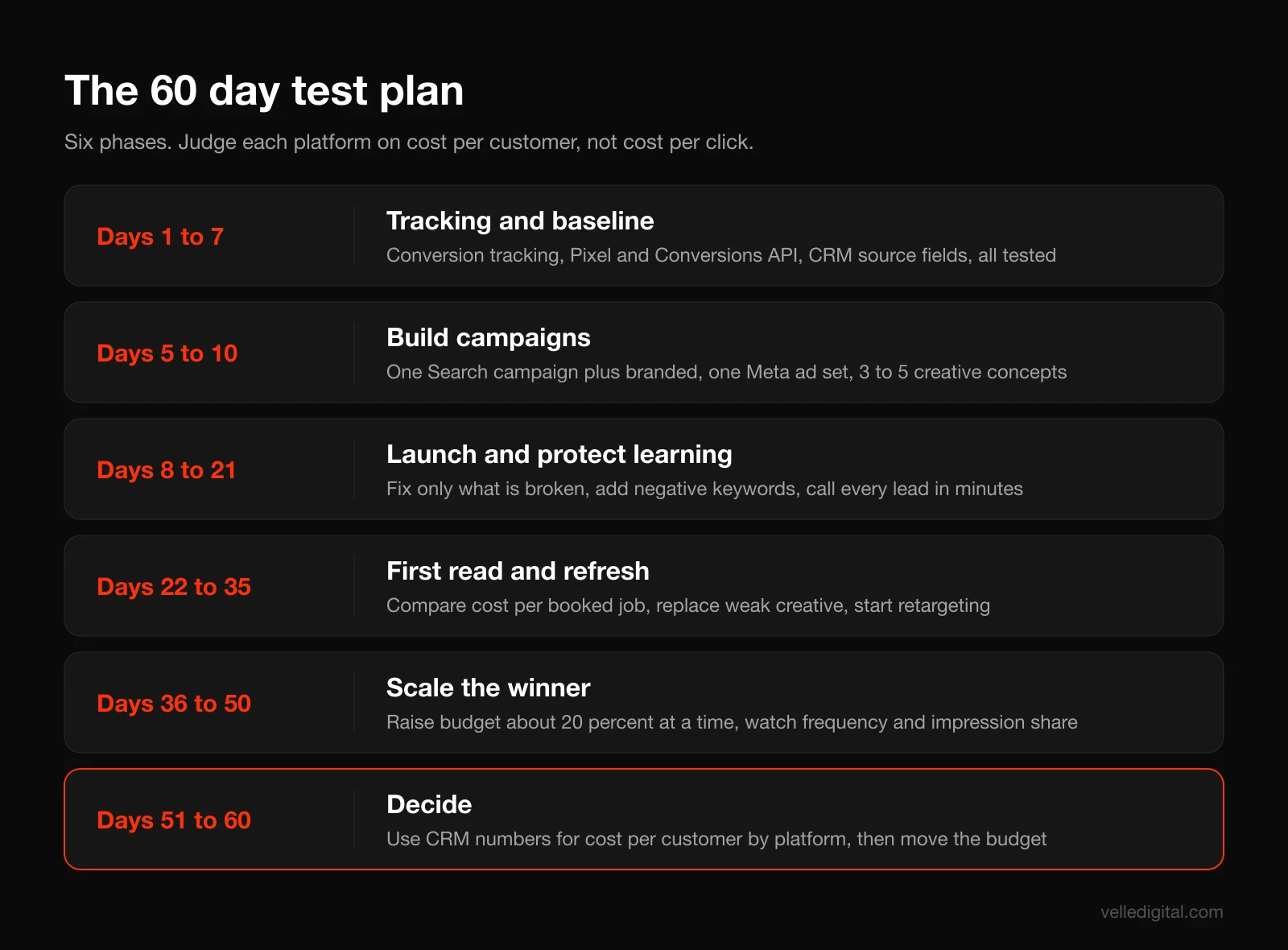
Step 1: Set up tracking and a baseline (days 1 to 7)
- Record your baseline: leads, booked appointments and sales per week for the last 8 weeks, by source if you have it.
- Set up Google Ads conversion tracking for form submissions and calls.
- Install the Meta Pixel with standard events (Lead, Schedule, Purchase, whichever fits) and set up the Conversions API through your website platform or CRM integration.
- Add a required or optional "how did you hear about us?" field to every form.
- Make sure every lead lands in your CRM with source, campaign and UTM data attached.
- Submit test conversions and confirm each one appears in Google Ads, Meta Events Manager and your CRM.
- Write down your target cost per qualified lead and target cost per customer. This is the bar each platform must clear.
Decision rule: do not launch until tracking passes every test. Launching with broken tracking wastes the whole 60 days.
Step 2: Build campaigns (days 5 to 10)
Google Search build:
- One campaign, one or two tightly themed ad groups per core service.
- Phrase and exact match keywords for high-intent terms (service plus city, service plus "near me," "emergency" or "cost" modifiers).
- A starter negative keyword list (jobs, careers, free, DIY, how to, salary, course).
- Two responsive search ads per ad group, with service and location in headlines.
- Location targeting set to people in your service area, not people "interested in" it.
- Call, sitelink and callout assets.
- A separate branded campaign at a small daily budget.
Meta build:
- One campaign using the Leads or Sales objective, optimizing for your real conversion event.
- One ad set with broad targeting or Advantage+ audience, limited to your service area.
- 3 to 5 creative concepts, each in at least two formats.
- An instant form with one or two qualifying questions (or send traffic to a dedicated landing page if lead quality is your main worry).
- Existing customers excluded.
Decision rule: if you have less than about 3,000 dollars a month, run only one Meta ad set and one Google non-branded campaign. Consolidation beats coverage at small budgets.
Step 3: Launch and protect the learning period (days 8 to 21)
- Launch both campaigns on the same day so they face the same season and conditions.
- On Google, review the search terms report twice a week and add negatives for irrelevant searches.
- On Meta, do not edit budgets or targeting in the first 7 days unless something is broken. Significant edits restart learning.
- Call every lead within minutes and record the outcome in your CRM (reached, booked, not qualified, sold).
Step 4: First read and creative refresh (days 22 to 35)
- Pull cost per lead, cost per booked appointment and lead quality notes for each platform.
- On Meta, identify the top two creative concepts by cost per qualified lead (not cost per lead). Pause the bottom performers and add 2 or 3 new concepts that build on what worked.
- On Google, pause keywords that spent meaningfully with no conversions, raise bids or budget on keywords producing booked jobs, and test a new headline or landing page variant.
- Launch retargeting on Meta for site visitors from both platforms, at 10 to 15 percent of total budget.
- Start sending qualified lead events back to both platforms if your CRM integration allows it.
Decision rule: if one platform's cost per booked appointment is more than double the other's at this point, shift about 20 percent of its budget to the stronger platform. Do not shut it off yet.
Step 5: Optimize and scale the winner (days 36 to 50)
- Increase budget on the stronger platform by about 20 percent at a time, waiting several days between increases so performance can stabilize.
- On Meta, keep adding new creative every two weeks. Watch frequency.
- On Google, check impression share. If you are losing impressions to budget on profitable keywords, the campaign can absorb more spend. If you are losing to rank, improve ads and landing pages before raising bids.
Step 6: Decide (days 51 to 60)
Pull the final numbers from your CRM:
- Total spend per platform.
- Leads, qualified leads, booked appointments and sales per platform (using CRM source data and "how did you hear about us?").
- Cost per customer and, if possible, revenue or gross profit per dollar spent.
- Change in branded search volume and total leads versus your baseline.
Then decide using these rules:
- If one platform hits your target cost per customer and the other does not, move most of the budget to the winner and keep the other only for retargeting or branded search.
- If both hit target, keep both and scale the one with more headroom (Google if impression share is low, Meta if creative is still fresh and frequency is reasonable).
- If neither hits target, the problem is probably the offer, the landing page or the follow-up, not the platform. Fix those before spending more.
- If results are close and volume is low, run another 30 days.
Common mistakes when choosing between Facebook ads and Google ads
- Choosing by cost per click. Cheap clicks that never become customers are expensive.
- Boosting posts and calling it Meta advertising. Boosted posts are a simplified option with fewer controls. For lead generation or sales, build proper campaigns in Ads Manager with a conversion objective.
- Running Meta with one creative. It fatigues, costs climb, and you conclude Meta does not work.
- Splitting a small budget five ways. Neither platform can learn on scraps. Concentrate.
- Ignoring special ad category rules. Housing, employment and financial offers that skip the category get rejected, and targeting is limited when you do comply.
- No branded search campaign while running Meta. Competitors happily collect the demand you created.
- Trusting platform dashboards over your CRM. Each platform grades its own homework.
- Slow follow-up on Meta leads. The person who filled your form while scrolling has forgotten you by tomorrow afternoon.
Facebook ads vs Google ads checklist
- I have checked search volume for my core services in my area.
- I know whether my offer falls in a Meta special ad category.
- I can produce the creative volume Meta requires, or I am starting with Google.
- Google Ads conversion tracking records forms and calls, tested.
- The Meta Pixel and Conversions API are installed and tested.
- Every lead lands in my CRM with source and campaign attached.
- Every form asks "how did you hear about us?"
- I have written down my target cost per qualified lead and per customer.
- My budget meets the minimum for each platform I plan to run.
- Google ads point to matching landing pages, not the homepage.
- Existing customers are excluded from prospecting on both platforms.
- A branded Google Search campaign is running if I run Meta.
- Leads get a response within minutes.
- I have set evaluation dates at days 21, 35 and 60.
- I will judge results by cost per customer from my CRM, not platform dashboards.
Frequently asked questions
Is Facebook advertising cheaper than Google Ads?
Facebook (Meta) usually has a lower cost per click and often a lower cost per lead. Google Search leads often convert to customers at a higher rate because the person was actively searching. Compare cost per qualified lead or cost per customer, not cost per click, before deciding which is cheaper for your business.
Which is better for a small business, Facebook ads or Google ads?
It depends on whether people search for what you sell. Businesses with urgent, searchable services (plumbing, legal, dental, auto repair) usually do better starting on Google. Businesses with visual, desire-driven or new offers (med spas, restaurants, fitness, ecommerce) often do better starting on Meta.
How much should I spend to test Facebook ads vs Google ads?
For a meaningful test of both, we generally suggest at least 2,500 to 3,000 dollars a month across platforms for 60 days. With less, pick one platform based on search demand and urgency, and concentrate your budget there. Make sure Google can afford at least 10 clicks a day at your expected cost per click.
Should I run Facebook and Google ads at the same time?
Yes, once your budget supports it. Meta creates demand and Google captures it, so running both with consistent messaging, cross-platform retargeting and a branded search campaign usually works better than either alone. Measure total results in your CRM, because each platform will claim some of the same customers.
Is Instagram included in Facebook ads?
Yes. Facebook ads are run through Meta Ads Manager, which places ads across Facebook, Instagram, Messenger and the Audience Network. Most advertisers let Meta choose placements automatically, then check results by placement.
Why do my Facebook and Google reports show more conversions than I actually got?
Each platform attributes conversions using its own rules and windows, so a customer who saw a Meta ad and later clicked a Google ad is counted by both. Meta also counts some view-through conversions. Use your CRM or booking system as the single source of truth.
How long does it take to see results from Facebook ads vs Google ads?
Google Search can produce leads within days because it reaches people already searching. Meta typically needs a week or more of stable delivery to exit its learning phase, and longer to build momentum with creative testing. Give any fair test at least 60 days before making a final budget decision.
Make the call, then make it work
Picking a platform is the easy part. The results come from tracking that tells the truth, offers people want, creative that earns attention, landing pages that match the click and follow-up that happens in minutes. If you would rather have someone build and run the test with you, our team manages Meta ads and Google Ads as one connected paid traffic program, measured against the customers in your CRM, not the numbers in a dashboard.